# Common
Shared resources that apply to all roles. Start here if you are new, then move on to the book for your specific role.
# Introduction to ATC training in Polaris FIR
Thank you for being an important asset for ATC training in Polaris FIR.
This page will give an introduction to how the training department is structured in our vACC, and different roles and their responsibilities within the organisation.
## VATSIM Scandinavia (VATSCA)
Polaris is one of five Flight Information Regions (FIRs) within VATSIM Scandinavia (VATSCA). The five FIRs are:
- Polaris FIR (Norway)
- Copenhagen FIR (Denmark)
- Sweden FIR
- Reykjavik FIR (Iceland)
- Helsinki FIR (Finland)
VATSIM Scandinavia is part of **VATEUD**, the European Division of VATSIM.
## Training Organisation
The training department within VATSCA is overseen by the Training Director, who is a member of the VATSCA Board and reports directly to the vACC Director.
Each FIR has a Training Lead who reports to the Training Director. Some FIRs also appoint one or more Training Team Members, reporting to the local Training Manager.
## Polaris FIR – Local Training Structure
A summary of how we are structured in Polaris FIR and the different tasks each role has.
### Training Lead
- Overall responsibility for all training activities within Polaris FIR
- Handles policies and coordination with the Training Director, other Training Leads in VATSCA, and VATEUD
- Currently responsible for all S3 and C1+ training
### Training Team Members
- Assists the Training Lead with day-to-day training tasks
- Collaborates with the Training Lead to develop the training in Polaris FIR
- Currently responsible for all S1 and S2 training
- Manages the Buddy system
### Buddies
- Assist students by answering questions and providing practical controlling guidance
- Help students integrate into the FIR community
- Support any student when available (not assigned individually)
- A great entry point into the training organisation and a potential step toward becoming a mentor
### Mentors
- Conduct training sessions with assigned students
- Contribute to the development of training material
- Participate in discussions aimed at improving training quality
- Guide students by providing examples, relevant theory material and demonstrations
- Mentors are not teachers and should not spend excessive time covering basic theory
- May only mentor students up to the same rating they hold themselves
### Examiners
- Conduct exams to assess candidate competency
- Decide whether an exam result is passed, failed, or insufficient (e.g. due to traffic)
- Assist training staff and mentors with assessing students who have received a progression warning
- Jointly decide with the mentor whether training may continue
- Must hold one rating higher than the rating being examined
- C1-rated examiners may examine C1 candidates
## Training Programs
Information about to our training programs can be found in [Local Training Policy](https://wiki.vatsim-scandinavia.org/books/training-curriculum/chapter/local-training-policy). Students should already be familiar with these before applying.
## Training Airports
ATC training may only be conducted at the airports listed below. Airports not listed are not approved for training.
- **ENBR – Bergen/Flesland**
- Main training airport for most ratings
- **ENGM – Oslo/Gardermoen**
- Training airport for T1 endorsements
## New Training Airports
Any new training airports must be approved by VATEUD before being used for ATC training.
# Training policies
A collection of policy documents that our training is built on.
## VATSIM & VATEUD - Training
The below are the central policies we as a FIR build our training around.
You are not required to read the contents of these, but should know about them as they may be referred to at some point. Hence, do not spend any significant amount of time on this section.
The important aspects of these policies are summarised in the next section.
### 1. [Global Controller Administration Policy (GCAP)](https://vatsim.net/docs/policy/global-controller-administration-policy)
This is the central VATSIM policy whcih all divisions must follow. Other policies refer to this.
### 2. [VATEUD Division Training Policy (DTP)](https://core.vateud.net/division/policies)
This is the policy for training in VATEUD, which is the division our vACC is under. It specifies certain requirements in terms of activity, progression, handling of endorsements etc.
---
## VATSIM Scandinavia - Training
Our own policies within the vACC. Some are built on the central documents from VATEUD.
### 1. [Training Policy for Students](https://wiki.vatsim-scandinavia.org/books/training-documents/page/training-policy-for-students)
Responsibilities and expectations from students. It is important to be familiar with these.
Note in particular that the student is responsible for providing you as a mentor with dates to conduct sessions. It is not expected that you as a mentor ask the student.
Mentors are required to know about this policy.
### 2. [Training Policy for Mentors](https://wiki.vatsim-scandinavia.org/books/training-documents/page/training-policy-for-mentors)
Responsibilities and expectations from you as a mentor. Important to be aware of to have a smooth and fair training environment.
Mentors are required to know about and follow this policy.
### 3. [Transfer and Visiting policy in VATSIM Scandinavia](https://wiki.vatsim-scandinavia.org/books/training-documents/page/transfer-and-visiting-policy-in-vatsim-scandinavia)
Simplified version of the [VATSIM Transfer and Visiting Policy (TVCP)](https://vatsim.net/docs/policy/transfer-and-visiting-controller-policy) which makes it much easier for applicants and training resources to know how these requests are handled.
You are not required to know the contents this policy, but should be aware of it.
### 4. [Fast-Track procedure for VATSCA](https://wiki.vatsim-scandinavia.org/books/training-documents/page/transition-real-life-atco-and-ivao)
Clarifying version of the [VATEUD Fasttrack procedure](https://core.vateud.net/division/policies)
You are not required to know the contents this policy, but should be aware of it.
### 5. [Controller Practical Test (CPT) policy for VATSCA](https://wiki.vatsim-scandinavia.org/books/training-documents/page/controller-practical-test-cpt-policy-for-vatsca)
Simplified version of the relevant parts from GCAP. Applied to examiners for the most part, but also useful to understand for mentors.
Examiners are required to know about and follow this policy.
Mentors are not required to know the contents this policy, but should be aware of it.
## VATSIM Scandinavia - Privacy
vACC policy regarding handling of personal information and privacy of members.
### [Privacy Policies](https://wiki.vatsim-scandinavia.org/books/privacy-policies)
These policies are created to protect the privacy of all members in VATSIM Scandinavia and shall be followed at all times.
As a member of the training department you have access to personal information that are protected by these policies, built on GDPR.
You are required to know about and follow these policies.
Always think about these principles when handling training related data.
- Never screen share in discord when you use CC
- Do not share information about trainings with anyone that is not affiliated with the training
- Do not store more personal information than necessary. Always consider the need.
- Never store sensitive information about students.
Contact training staff if you are have questions about privacy in relation to training.
Always contact the Data Protection Officer (DPO) if you notice a (potential) breach of these policies.
## Handling policy breaches
It is expected that you as a mentor is familiar with the following procedures and initiate them when necessary.
### No contact within 7 days after mentor assignment
In case the student has not made contact with the mentor within 7 days after being assigned, notify training staff which will close the training.
### No session scheduled in 14 days
Notify training staff which will issue an Activity Warning.
Student must respond on this and schedule a session within 7 days, otherwise the training will be closed.
### Underperforming student
If there is no clear progression in the training after multiple sessions, notify training staff which will issue a Progression Warning.
This will require that an examiner joins the following sessions to assess, together with mentor, whether or not training should continue. If the conclusion is that the training has stalled, it will be closed.
### Student showing up late to sessions
Note it as an internal comment on the training timeline. Repeating incidents shall be reported to training staff to assess whether training should continue or not.
### Student cancelling or not showing up to sessions
Note it as an internal comment on the training timeline. Repeating incidents shall be reported to training staff to assess whether training should continue or not.
# Control Center
# What is Control Center (CC)?
Control Center (CC) is a web application used in VATSIM Scandinavia for training, mentoring and bookings. This is the core of our operations where people submit applications for ATC training, check the status of their training, read training reports and make bookings for positions online.
As a mentor you are required to keep the trainings you are responsible for up to date with training reports and internal comments when necessary. You can send requests directly to training staff here as well for different actions.
At this point you should already have been given more access as a mentor in CC. If not, talk to the Training Assistant or Training Manager.
Control Center is open source and [available on GitHub](https://github.com/Vatsim-Scandinavia/controlcenter). If you find a bug or have an idea for a good feature, feel free to create an issue there.
# Section: My Students
[](https://wiki.vatsim-scandinavia.org/uploads/images/gallery/2026-01/image-1769530224371.png)
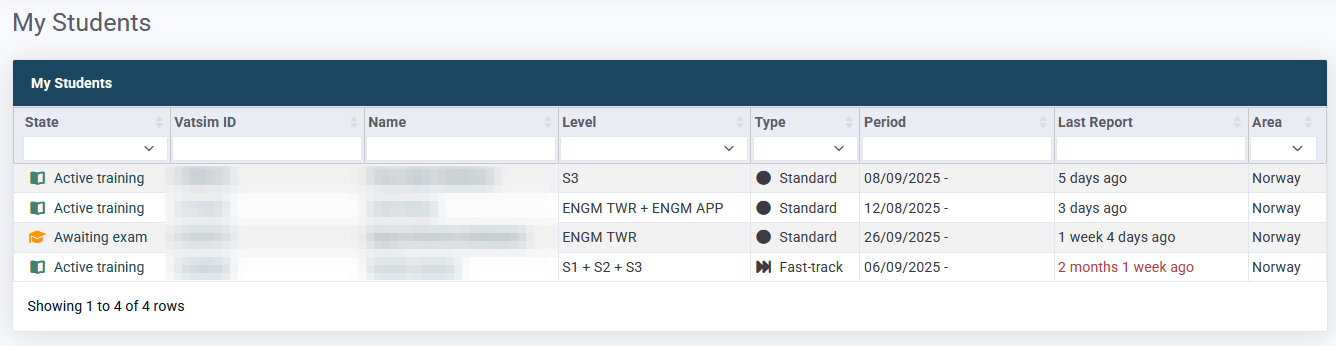
This page has an overview of all students currently assigned to you as a mentor.
Clicking the training state will open the full training page.
Note in particular that the "Last Report" field will turn red if it passes 2 weeks as a reminder for you to either publish a missing report or notify training staff that the student hasn't arranged a session in accordance with Student Training Policy.
The same overview is also embedded on the front page of CC.
# Section: Training
## Student information
[](https://wiki.vatsim-scandinavia.org/uploads/images/gallery/2026-01/image-1769530325101.png)
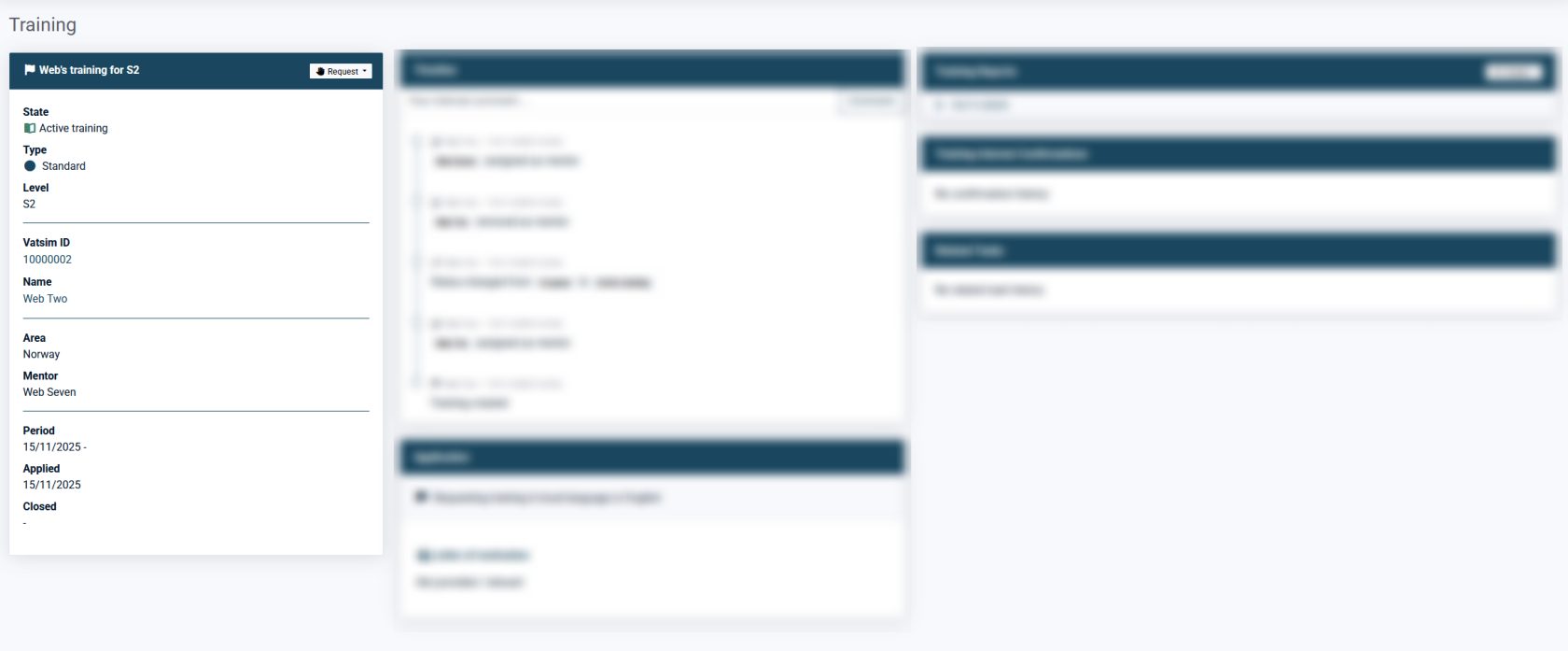
In this module you will have access to relevant information about the student and the training. Additionally there is a button for requests that is covered in the section below.
## Requests
[](https://wiki.vatsim-scandinavia.org/uploads/images/gallery/2026-01/image-1769530360745.png)
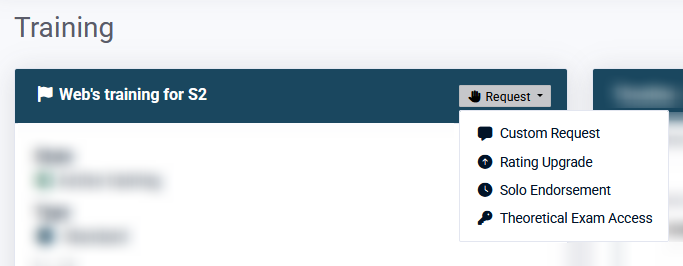
From the same module you as a mentor can send requests to training staff. This will create a task in CC for the person you send the request to and they will be notified by e-mail.
### Custom request
[](https://wiki.vatsim-scandinavia.org/uploads/images/gallery/2026-01/image-1769530456538.png)
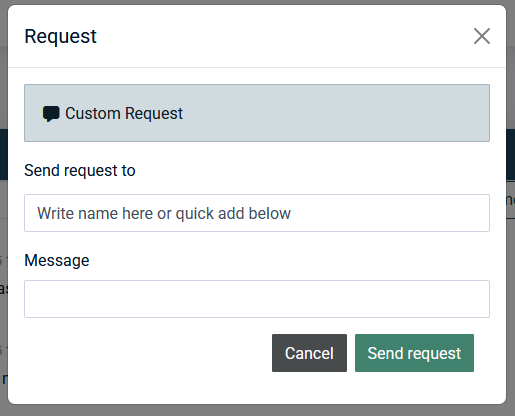
Can be used for almost anything. It is a free text field. Typically used to request solo for T1 trainings, pause trainings etc.
### Solo endorsement
[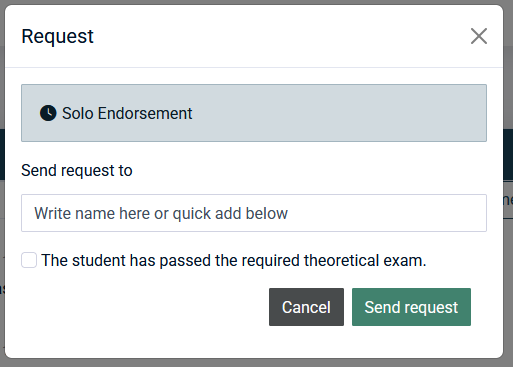](https://wiki.vatsim-scandinavia.org/uploads/images/gallery/2026-01/image-1769530475169.png)
Sends a request to issue a solo endorsement for the student. Note that the relevant theoretical exam must be issued and passed before a solo endorsement can be given.
Solo for T1/T2 trainings are not issued as Endorsements. Talk to training staff or use the custom request.
Note for staff: while Rating Upgrade and Theoretical Exam Access requests are sent automatically to VATEUD when the task is approved, Solo Endorsements must be added manually in CC before approving the task.
### Rating Upgrade
[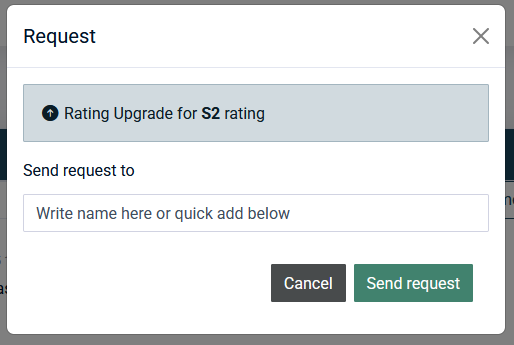](https://wiki.vatsim-scandinavia.org/uploads/images/gallery/2026-01/image-1769530535997.png)
Usually not used by mentors, but can be used to request a formal rating upgrade in case a training is completed and there is no need for an exam. Rating upgrades are mainly requested by examiners.
### Theoretical Exam Access
[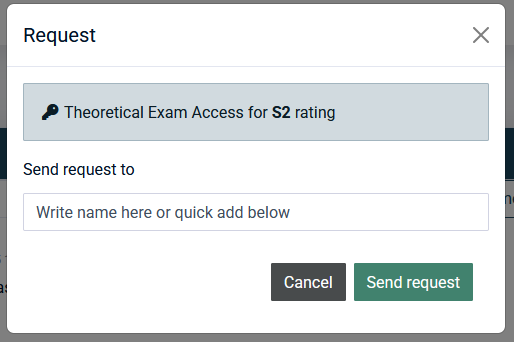](https://wiki.vatsim-scandinavia.org/uploads/images/gallery/2026-01/image-1769530584060.png)
Requests to issue the theoretical exam for the student from VATEUD.
## Timeline
[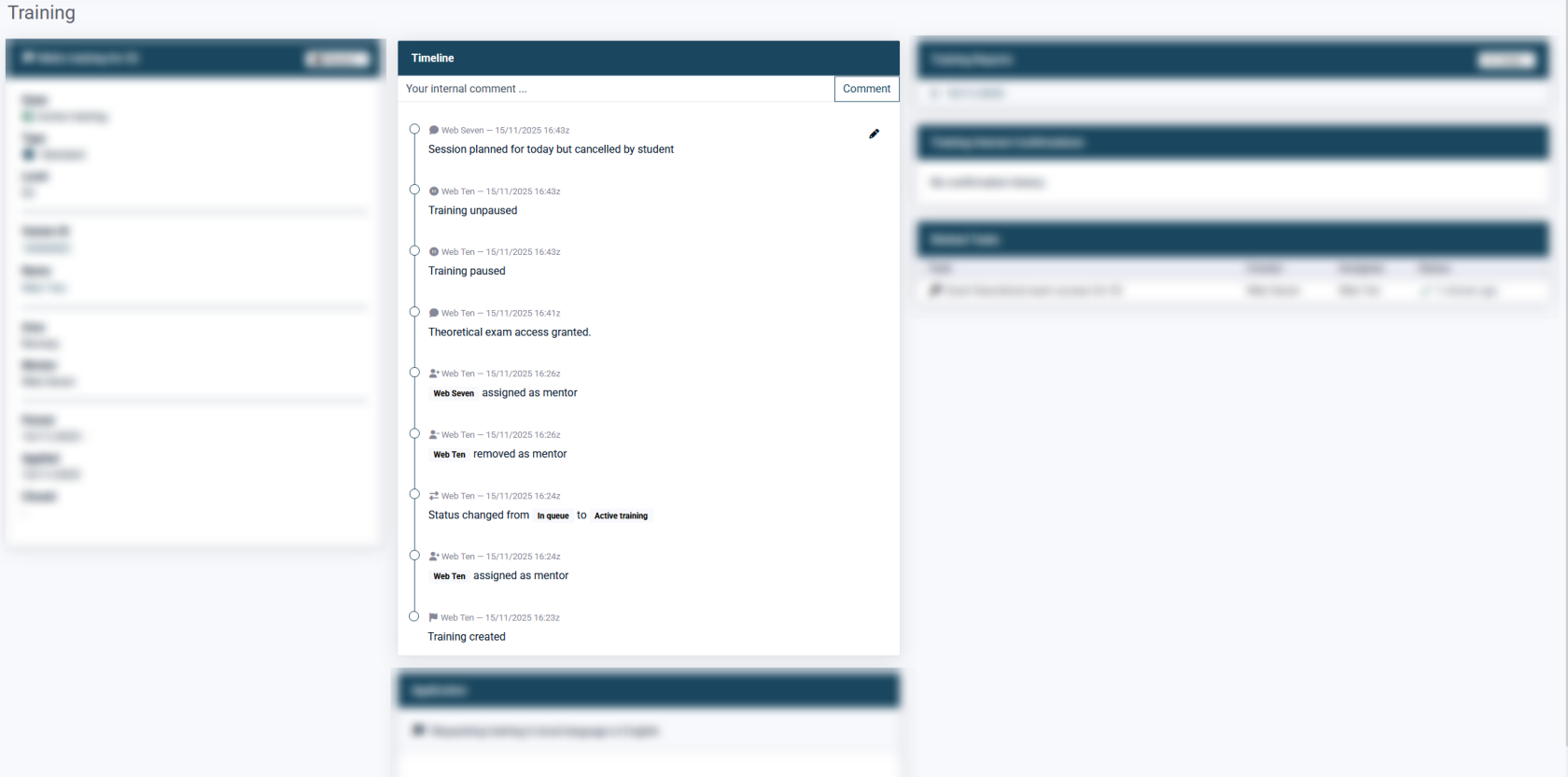](https://wiki.vatsim-scandinavia.org/uploads/images/gallery/2026-01/image-1769530635656.png)
This section is where most events for the training is shown from most recent to old.
### Internal comments
Training staff and mentors can add internal comments to the timeline, as shown above. These are **NOT** visible to the student, but should be limited to relevant information regarding the training.
Personal or sensitive informations shall not be written
Use these comments to keep training staff informed about the training, for example if there will be slightly more than 2 weeks between sessions a short explanation in the timeline is very useful. This way the training staff spends less time following up individual trainings and mentors spends less time on answering these questions.
[](https://wiki.vatsim-scandinavia.org/uploads/images/gallery/2026-01/image-1769530656258.png)
Example of good and informative internal comment.
## Training Reports
[](https://wiki.vatsim-scandinavia.org/uploads/images/gallery/2026-01/image-1769530725722.png)
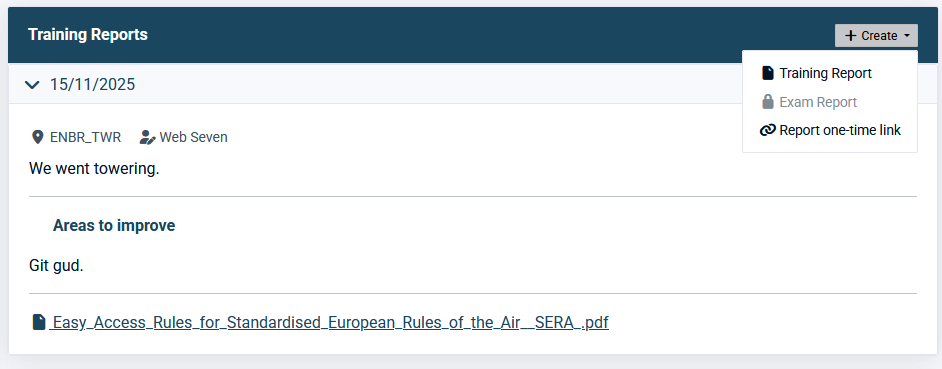
This section shows all historical training reports, which can be expanded by clicking the date. This is also where you create new training reports from the "Create" menu in the top right corner.
If another mentor had a session with your student you can use the "Report one-time link" and send it to the mentor which will allow them to submit a single training report on the training.
The [Training reports](https://wiki.vatsim-scandinavia.org/books/mentors/page/training-reports) page contains guidelines and additional useful information.
## Training Interest Confirmations
[](https://wiki.vatsim-scandinavia.org/uploads/images/gallery/2026-01/image-1769530259577.png)
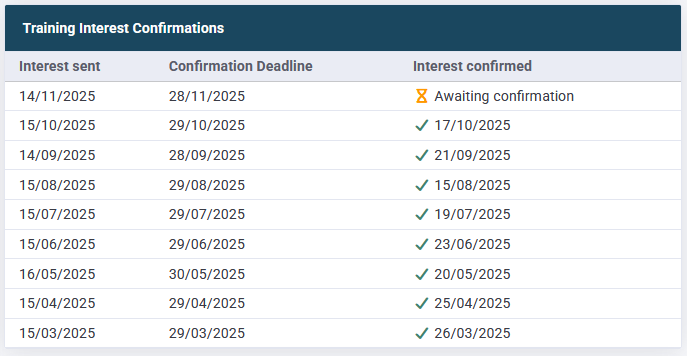
This section shows the history for all training interest e-mails sent out to the student with dates for sent, deadline and when they were confirmed.
As seen above, unconfirmed interest e-mails will be shown as well.
E-mails to confirm training interest is sent out to trainings with state "In queue" and "Pre-training". Hence, trainings that are Active will not receive these.
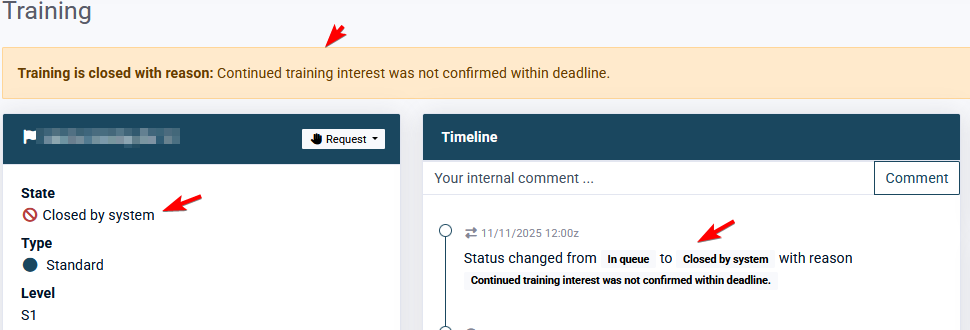
The training will be automatically **closed** if the interest is not confirmed within the deadline.
[](https://wiki.vatsim-scandinavia.org/uploads/images/gallery/2026-01/image-1769530287057.png)
## Related Tasks
[](https://wiki.vatsim-scandinavia.org/uploads/images/gallery/2026-01/image-1769530768176.png)
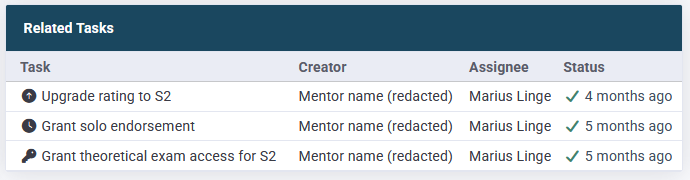
This section shows all tasks (requests) for the training and their status.
# Section: Sweatbox Calendar
The Sweatbox Calendar is a simple way to keep our use of Sweatbox somewhat organised and ensure that sessions don't collide and create issues for each other. It is internal to our vACC and does not propagate to any other systems.
## Existing bookings
[](https://wiki.vatsim-scandinavia.org/uploads/images/gallery/2026-01/image-1769530798013.png)
In the main section each booking is shown with start and end time, position, the corresponding FIR and which mentor booked it. Additionally there is a notes field.
## Creating a Sweatbox booking
[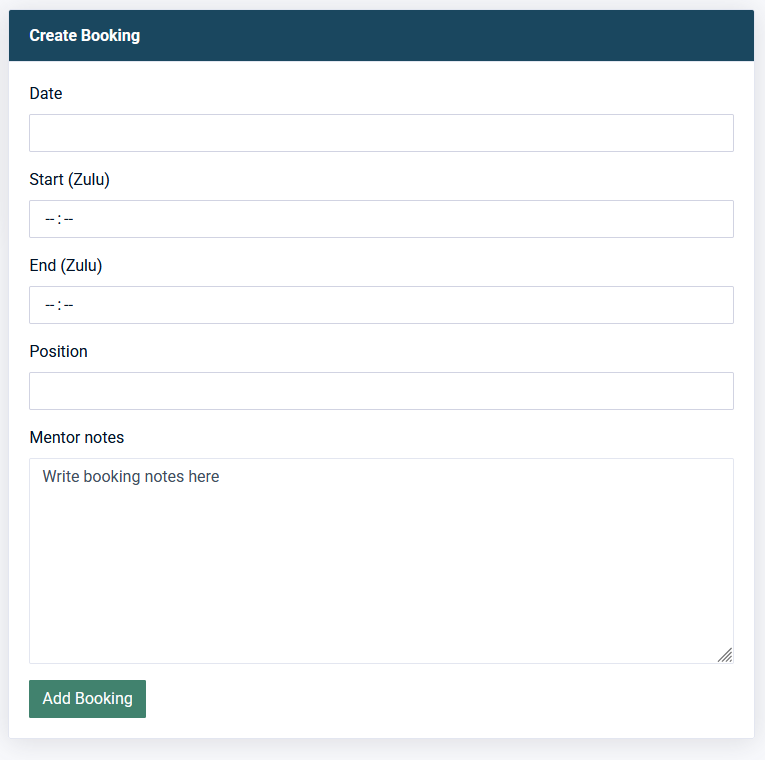](https://wiki.vatsim-scandinavia.org/uploads/images/gallery/2026-01/image-1769530877813.png)
If you have created a regular ATC booking, this is almost identical.
Fill out the form - it is very self explanatory.
Booking notes are visible to everyone that has access to the Sweatbox calendar. Mind your words. Good use is to inform if you are using server 2 for example.
# Using the Wiki
The wiki is our main source of training material. It is important that mentors are familiar with the structure and is comfortable with finding information.
Permissions to edit content in the wiki is primarily restricted to staff members. The reason for this is to ensure integrity and control over changes, to properly create NOTAMs making other members aware of changes.
In case of conflicting information between our wiki and other reliable sources, training staff shall be notified to take corrective measures.
## Training Curriculum
The [Training Curriculum](https://wiki.vatsim-scandinavia.org/books/training-curriculum) is where most of the training material resides, used by students. Most if not all Moodle courses are based on information from these pages.
## Evaluation Criteria
The [Evaluation Criteria](https://wiki.vatsim-scandinavia.org/books/training-curriculum/chapter/evaluation-criteria) is a collection of all competencies the student will be evaluated by during their final exam. These are extracted directly from the exam form used by examiners.
Make sure to read through these and tailor the training around them, ensuring that the student fully meet these criteria.
It is expected that you as a mentor do an assessment on the criteria before releasing the student for a solo and/or exam.
## The work in progress (WIP) book
Selected mentors is granted access to the WIP book in Wiki to contribute with changes and new content. Access is granted on demand to active and engaged mentors.
Everything in the WIP book is considered confidential until it has been moved and published and shall not be shared with others.
# Moodle
Moodle is well known open source e-learning platform used by multiple organisations to create thorough training programs.
It is used by a lot of vACCs on VATSIM to conduct theoretical training both for ATC and pilots.
It allows to create interactive lessions, use voice and video and create quizzes to test and assess the students before conducting practical training.
In Polaris FIR we are working on having one Moodle course per available training in CC. Each course has an entry exam that the student must pass in order to continue the training with a mentor. Students that don't manage to pass these entry exams will have their training closed, as their demonstrated competency isn't good enough to undergo further training.
Moodle courses are also used to check competency on refresh and visiting requests.
The platform can be access from [moodle.vatsim-scandinavia.org](moodle.vatsim-scandinavia.org). These is also a link to it in the left hand navigation in CC.
# Reviewing student results
You as a mentor have access to see how students perform on the moodle courses.
## Accessing courses
As you learned we have multiple courses in Moodle for different types of trainings. You will have access to courses that are relevant for your mentoring.
[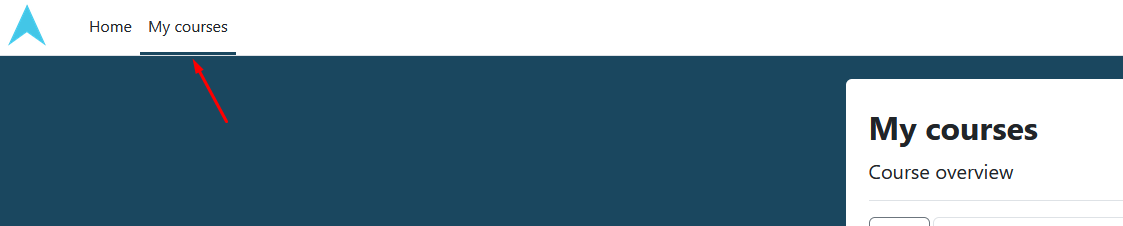](https://wiki.vatsim-scandinavia.org/uploads/images/gallery/2026-01/image-1769531222888.png)
The My courses page will show all Moodle courses you are enrolled to.
If you are looking for a specific course that are not under My courses, go to Home and scoll down until you find "Course categories". From here, click "Norway".
[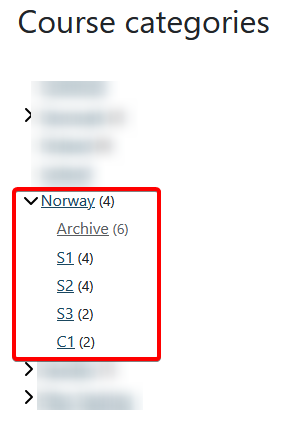](https://wiki.vatsim-scandinavia.org/uploads/images/gallery/2026-01/image-1769531374884.png)
## Show students and grades
Open the course you would like to work with.
[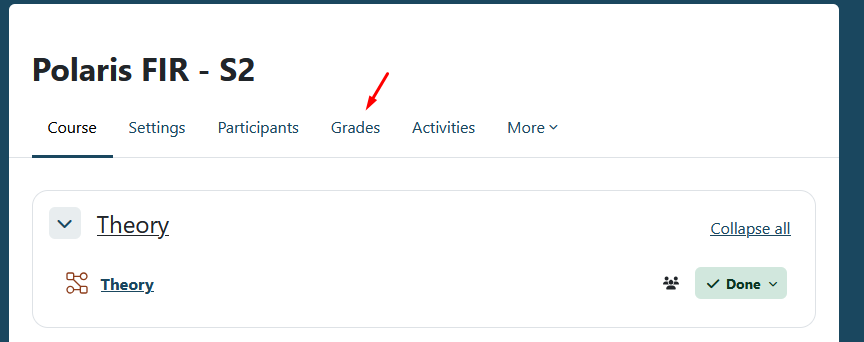](https://wiki.vatsim-scandinavia.org/uploads/images/gallery/2026-01/image-1769531394380.png)
In the course you would like to review results, click Grades.
[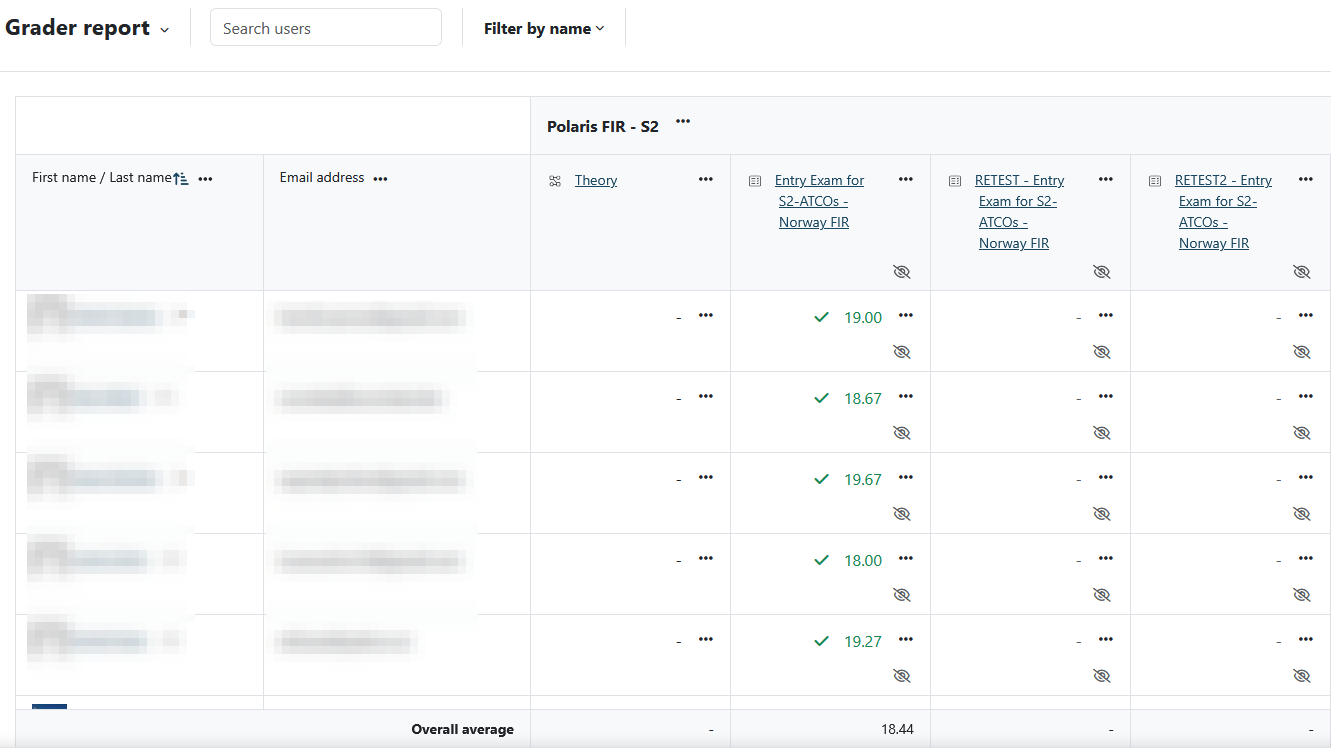](https://wiki.vatsim-scandinavia.org/uploads/images/gallery/2026-01/image-1769531423825.png)
This will open the Grader report with an overview of all enrolled students and the overall result per module with grading.
This view will display personal information!
[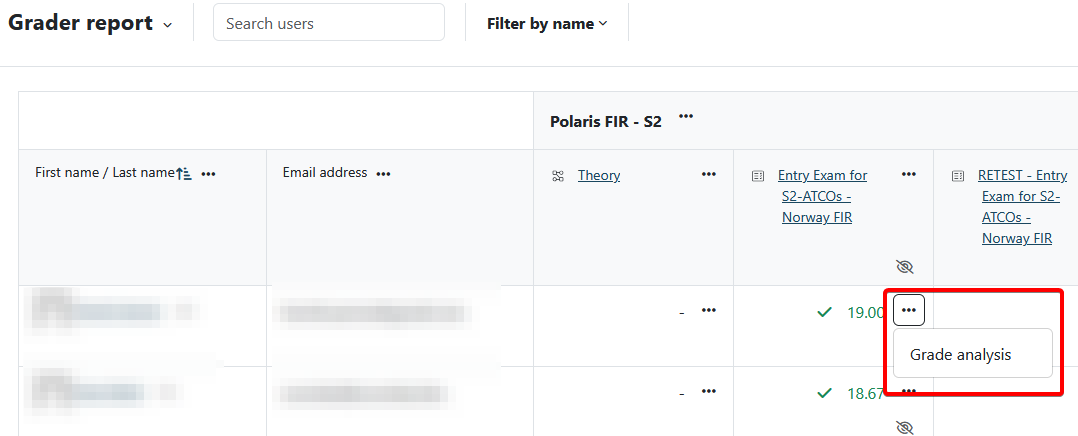](https://wiki.vatsim-scandinavia.org/uploads/images/gallery/2026-01/image-1769531454095.png)
Clicking the three dots next to a result will allow you to see more details through a Grade analysis that will be covered in more detail in the next page.
It is highly recommended to look through the results in Moodle before starting practical training, as it will give you as a mentor insight on what to focus on.
## Grade analysis
[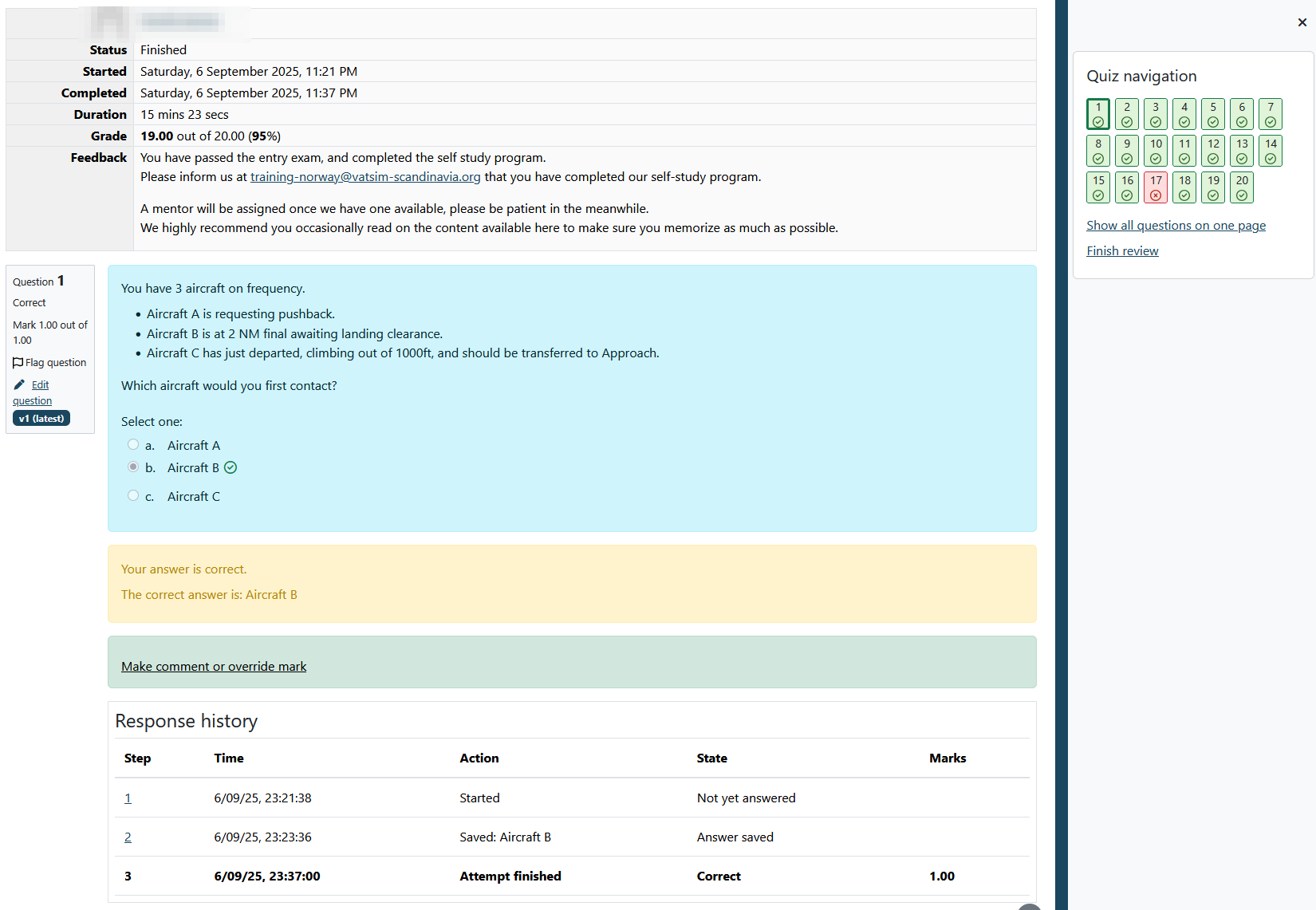](https://wiki.vatsim-scandinavia.org/uploads/images/gallery/2026-01/image-1769531475057.png)
The grade analysis allows you to see details about the attempt, like when it was started and competed, duration, the grade, exactly what the student answered on each question and whether it was correct or wrong.
[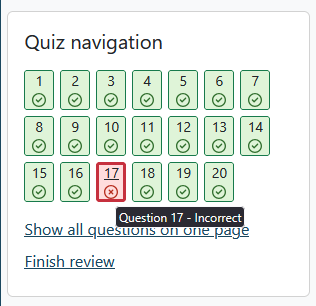](https://wiki.vatsim-scandinavia.org/uploads/images/gallery/2026-01/image-1769531484935.png)
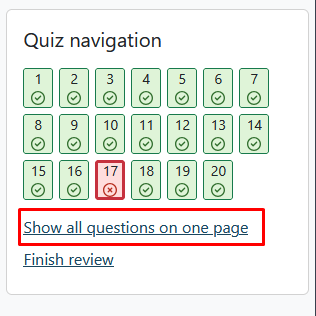
The Quiz navigation shows all questions and the result. Jumping to specific questions is possible by clicking on it.
[](https://wiki.vatsim-scandinavia.org/uploads/images/gallery/2026-01/image-1769531496032.png)
By default questions are shown one by one. Clicking "Show all questions on one page" will allow you to scroll through the entire quiz.
# Communication channels
[Discord](https://discord.vatsim-scandinavia.org/) is currently our primary channel for day to day communication. Students are asked to contact mentors on this platform.
## Text channels
### \#mentors-norway
At this point you should have access to the channel for mentors in Norway. This is the place to have internal discussions about training related matters.
It can be used for things like pitching an idea, asking for clarification, requesting assistance during sessions, discussing scenarios and much more.
It is recommended to create a thread for longer discussions to keep the channel clean.
Engaging and taking initiatives in this channel is highly appreciated.
Training staff will post updates in this channel every now and then.
### \#mentor-chat
This is a shared text channel for all mentors across FIRs. It has no dedicated use, but you may communicate as you see fit here.
### \#norway-notams
This is where important FIR specific announcements are posted by staff. Make sure to keep an eye on this for changes to the wiki that may affect training.
### \#norway-atc-training
This is a channel where S1 (and soon S2) students get access to ask for help from buddies, mentors or training staff. Feel free to contribute in this channel!
It is locked down to the mentioned members in order to create a safe environment for students to ask questions.
## Voice channels
Mentors have permissions on discord to move users between voice channels. This shall only be used when necessary for mentoring purposes, but may also be used if others are breaching the discord server rules.
Continuous misuse of these permissions will have consequences.
### Waiting Room
Used by students waiting for a training session. Should not be used to conduct the actual session - it is strictly a waiting room before being moved somewhere else.
### Training Room #X
Strictly used for training sessions between mentors and students. They are by default limited to two persons per room, but mentors can override this by moving people in.
### Mentor Room
Voice channel restricted to mentors and staff in the vACC Can be used to discuss and collaborate with other mentors.