Flow Management Position
For controllers subject to FMP, please see at the end of this page for abbreviated procedures you can expect.
ALB = Arrival Load Balancer. For tutorial of ALB see here
0. Setup
Before logging on make sure you do following steps in your Euroscope
- Load Profile DK_AIR
- Open a CTR ASR file
- Go to "Other Settings" and "Display Settings" find "Regions" and enable EKDK FMP.
- Make sure ALB is loaded as your plugin. write in ES command line ".alb open" to start the program.
1. Objective and Responsibilities
As Flow Manager (EKDK_FMP) Your objectives and responsibilities in the time period FMP active traffic flow is in sequence of succession:
- Establish Flow rates via ALB consistent with traffic demands.
- Chapter 2
- Manage flow inbound to copenhagen by use of the "BIDE" Acronym
- Balance
- Interrogate
- Distribute
- Equalize
- Modify the ACC sector allocation following traffic peaks
Details of how to achieve all is specified below and is continuously updated.
Please refer to this documentation every time before you log onto EKDK_FMP
2. Flow Rates into TMA
Adjusting the flow rate of aircraft handed over from the 5 ACC sectors (DK_E, DK_D, DK_B, MML, MMK) into TMA. They are managed and communicated via the ALB.
- As FMP you start off with the "Standard Separation"
- At >36 arrivals/hr you start planning the move to "Managed Separation"
- At full holdings everywhere you may choose to expand it with "Selected Separation"
2.1 Standard Flow
This scenario used from the beginning of event until hourly rate becomes more than 36/hr.
Arrival rate 150 flights / hr
2.1.1 Required Rates
All ACCs have standard handovers as pr. LAI/LOA of 10nm with leading aircraft faster, or 5nm with leading aircraft fast if prior coordination has been obtained.
This is valid for all sectors.
2.1.2 Thoughts and considerations
This rate is being used when so little load will be on the TMA (smaller than 36/hr) that the distribution of flights are negligible.
In this scenario, there
2.2 Managed Flow
This scenario used from when ALB advise of an hourly rate of MORE than ~36/hr.
Arrival rate aim: 42-50/hr.
2.1.1 Required Rates
As inbound flow increase beyond 36/hr, it will be time to start planning ahead to assign Arrival rates individually per STAR to assure balanced feeding to the TMA.
Rates should be set to fit with the expected inbound rush for ~30 minutes in the future.
Hourly inbound rate should ONLY be used as a marker for moving from "Standard" to "Managed" flow, NOT as a method of setting Arrival Rate (AR).
T+0min. Setting the sequence.

T+30min. Evaluating the sequence
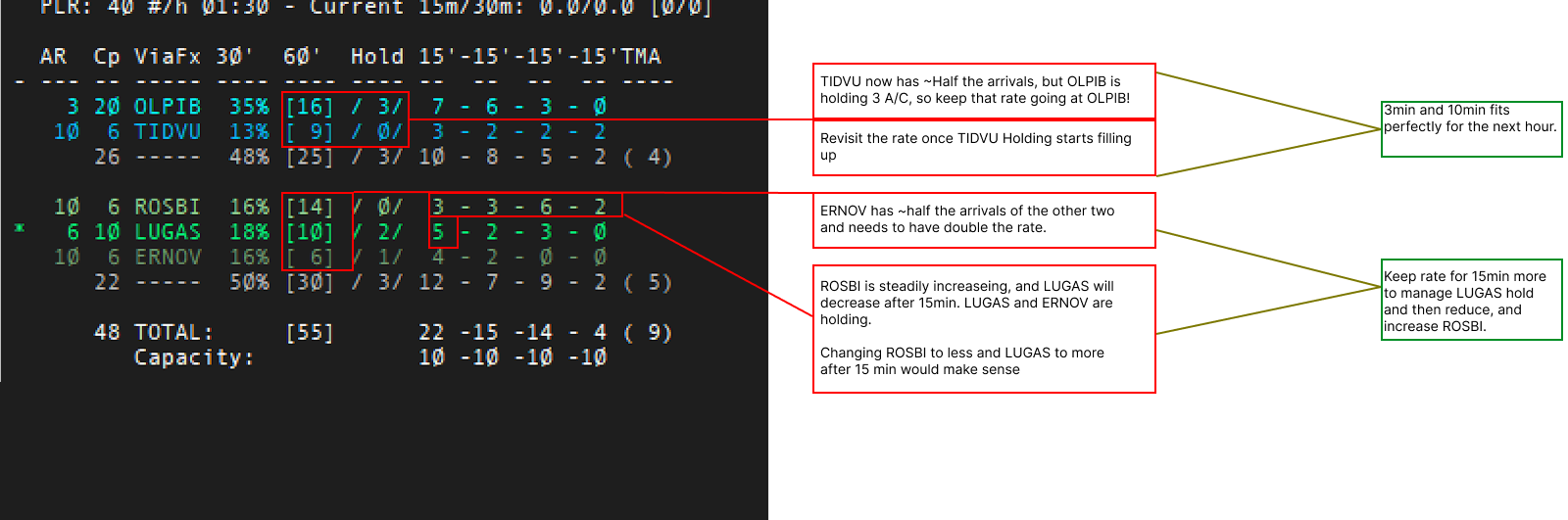
2.1.1 Slow Arrival Rates and Holdings other places
If you have a STAR with very little traffic and others that are employing holdings, you must make sure that the very low traffic STAR just sent people in without holding.
- The AR must be added from when first airplane hits the holding fix, if other STARs have full holds
- SAS123 arriving at TIDVU at 2035z with a 10min AR, shall enter the holding at can be released at 2045z, if OLPIB are holding flights.
2.3 Expanded Flow
This scenario used when two or more STARs on a side is having significant holdings
2.1.1 Required Rates
With full holdings at two STARs on the same side or more, the ALB prediction becomes very complex because it includes people in the holding.
You should do the following as soon as holdings starts to build up.
- Assign the AR based on the hourly expectation (with full holdings, the destribution over 15min doesn't matter anymore)
- Check the holding lists under ETO to identify if there are significant differences in holding time (+/- 5min).
- If there is an imbalance, move the full rate over to the STAR that has longer holds.
- If there is no imbalance, stick to the rate.
2.1.2 Required Rates
Your logic must be to release a certain amount of aircraft from one hold before then releasing a certain amount from another hold.
Aircraft must be released with the rate given in ALB!
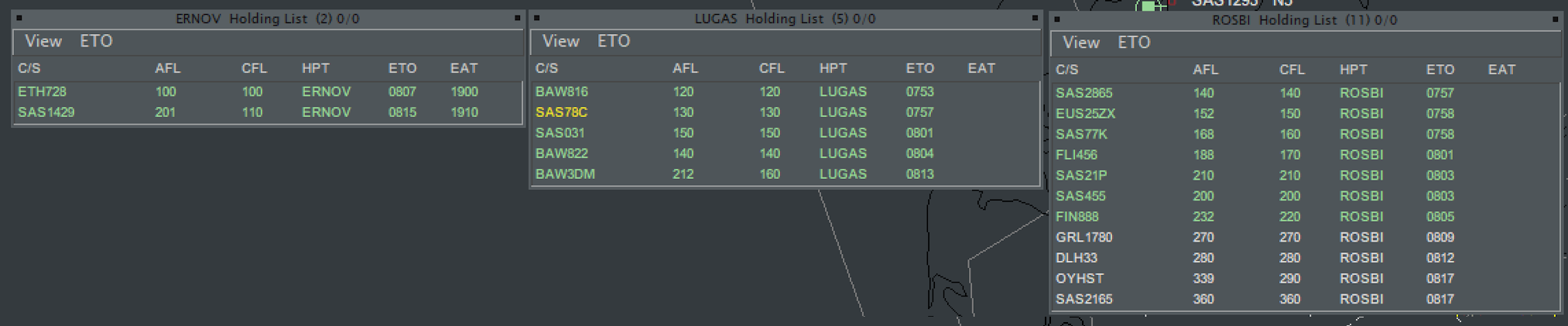
In this example you have the three holdings on WEST STREAM, and you are individually releasing from ETO. Make following observations
- LUGAS has the oldest time at 0753
- ROSBI has a lot of planes in the holding
- ERNOV only has a few ones, and is not worth too much effort
3.5.3 Method
For this scenario we will keep the ERNOV EAT at 15min for simplification, but if a large holding persist at ERNOV it must also be included. oldest ERNOV plane is 0807, which is 15min after oldest LUGAS plane and 12min after oldest TESPI plane, so a 15min EAT is appropriate!.
In this scenario we have an AR of 6 min from TUDLO and TESPI
- combined rate is 3min from TUDLO/TESPI. Shift that to keep 3 min on one of the STARs.
- Identify oldest airplane BAW816
- Release all airplanes up until the first one which is later than the oldest of the next STAR
- In this case SAS78C is 0757 and SAS2856 is 0756, meaning SAS78C is the last to be released
- Tell EKDK_D_CTR to release all airplanes up to and including SAS78C.
4. Tell EKDK_E_CTR to hold all aircraft indefinitely.
5. Tell EKDK_E_CTR that after SAS2856 to release everybody with the rate until SAS445 (0803) to the revert back to D_CTR to release SAS031 and BAW822 respectively
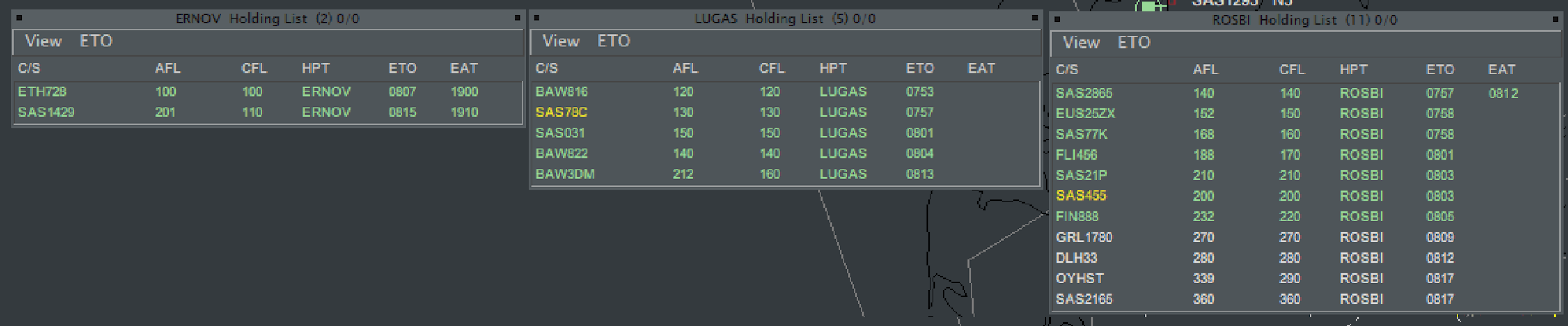
5. EKDK_D will release SAS031 and BAW822 as point 3-5, back to DK_E who will release until DLH33, and then it head back to DK_D-
6. MMK will meanwhile release at EATs you are specifying. The rate takes into consideration an ERNOV every 15 minutes, so delay for an appropriate gap
3. Misc. Management
Use the Acronym BIDE to remember your tasks
3.1 "BIDE"
In addition to managing the flow rate, you need to manage different aspects of the night in regards to traffic. For an attempt to make it easier to remember the acronym BIDE can be used, to remember the four different areas you must manage.
- Balance
- Prioritise a specific stream via the ALB when load is disproportionally heavy
- Inform
- Keep APP-CO in the loop of any balancing of arrival streams that they have to take into consideration.
- Distribute
- Re-Route from East to West and West to East.
- Extend gaps
- Allow an extra 10-15 from a STAR to facilitate a go-around.
All is explained in Detail below
3.2 Balance
3.2.1. Balanced or prioritized flow
From the very beginning of the event you need to identify, via ALB or your screen a potential situation where you need to switch the vast majority of the flow to one STAR or Side, in order to avoid a total collapse on that sector.
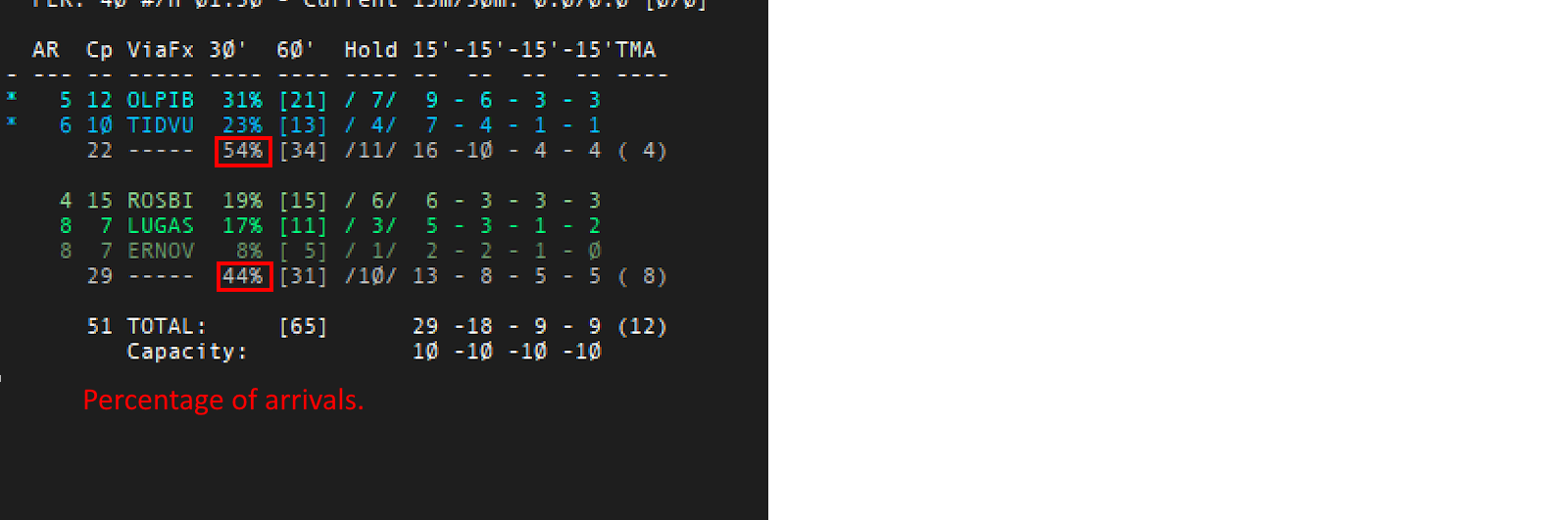
- With a split of ~40/60 or worse, significant steps should be taken to have a higher arrival rate on that side
- OLPIB may sometimes need to be prioritized in order to avoid total collapse.
- 2 min can be assigned at fastest rate.
3.2.2. Priorities
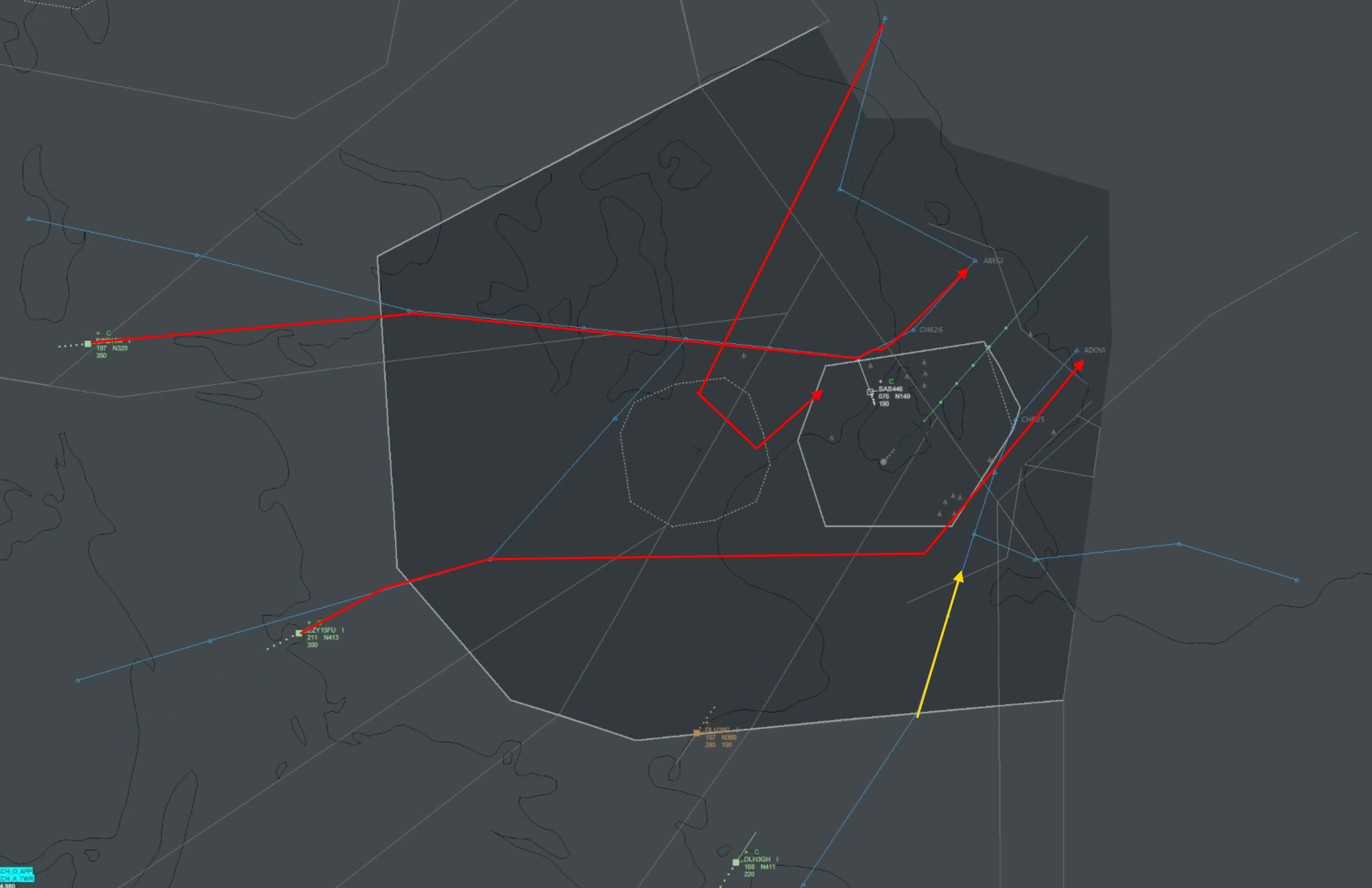
- For EAST priority, OLPIB STARs can be taken at lower separation or OLPIB flights re-routed to EKCH_W_APP
- For WESTpriority, TUDLO STARs can be re-routed to EKCH_O_APP
3.3 Inform
Always keep close contact to APP-CO about your plans. advise him of any imbalance that would result in change of standard separation from O/W to FINAL.
3.4 Distribute
3.4.1 General
This is about distributing flights to which arrivals, or more precise when to REdistribute arrivals to other STARs.
We want to have an ~55/45 split on EAST/WEST. You should consider distributing flights to other STARs when you:
- See an imbalance or empty STARs with other STARs full but no extreme enough to warrant a "Prioritized flow".
- A potential overload situation can happen on a STAR if immediate action is not taken
- Tactical distribution for reasons of your discretion
3.4.2 Techniques
Changing a STAR must ALWAYS adhere to the following.
- Ask the Sector which will get the aircraft to request a tactical direct to their sector
- Ask the sector to change the flightplan route to be only the point of the new STAR.
When coordinating a re-routing please strongly consider using the "point" command to make the controller aware by writing
- ".point [X]" click the aircraft to point out.
- X is the 1-3 letter Idenfier of the station you are coordinating with
- IMPORTANT: Do not use the callsgin (EDWW_M_CTR), use the 1-3 letter identifier (DWM) (found in controller list)

3.4.2 Recommended distribution changes
Following flights are highly effective an recommended
1. EDYY via MONAK - Distribute to TUDLO/TESPI
- Largest threat to the flow is the overload on MONAK. If you see a large amount entering via DWM (Muritz) take immediate action to get some of the GESKA arrivals from EDYY distributing to other STARs.
- Coordinate with DK_A to re-clear via Euroscope to either a vector or another point.
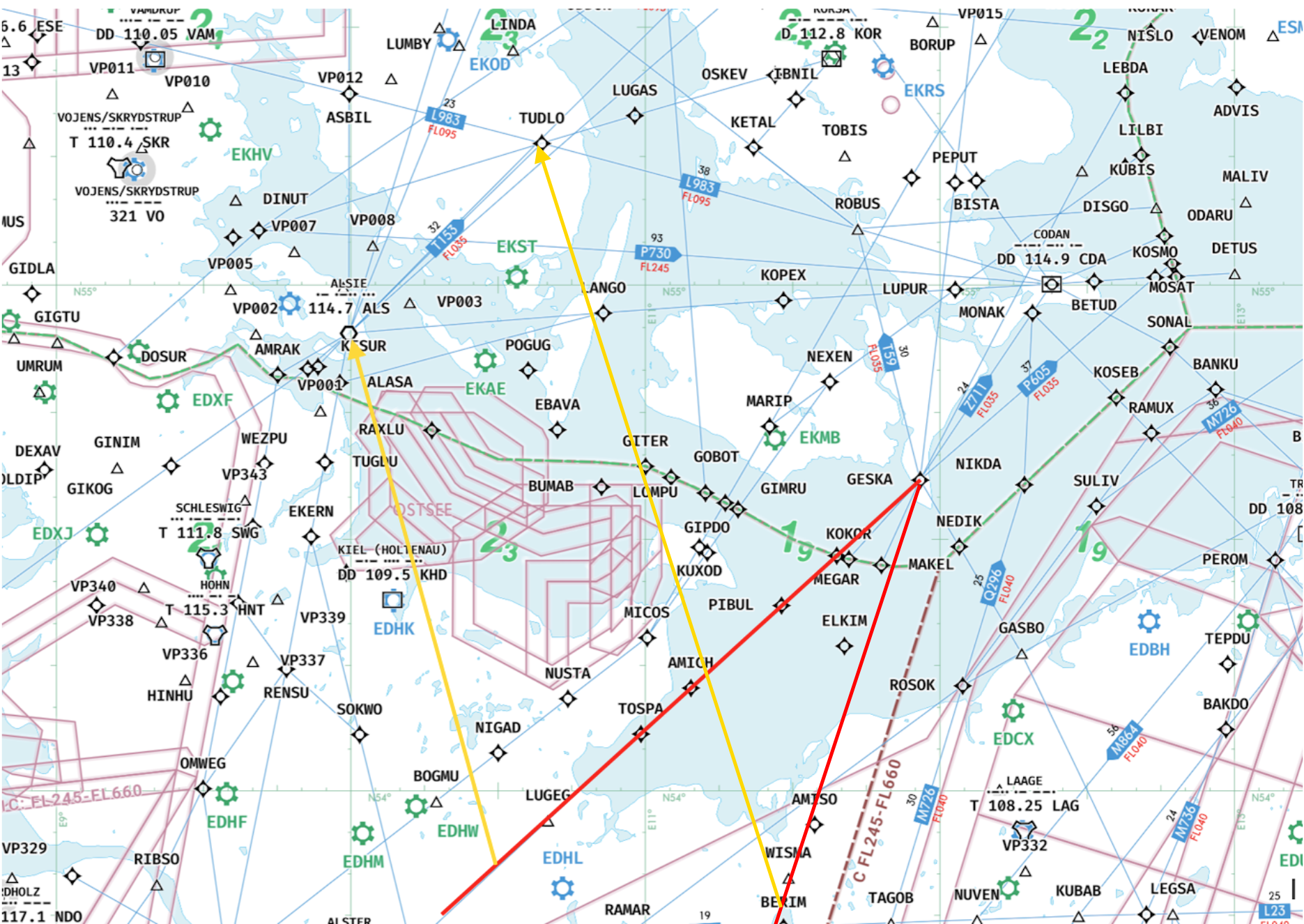
1. EDDH via MONAK - Distribute to TUDLO/TESPI
- EDDH flies at FL230 and hence creates all sorts of issues for DK_B. Consider distributing to TUDLO or TESPI depending on which STAR has the most space (Can be issues as an ECFMP as well)
- Consider whether to keep af FL230 or climb to FL290 to be distributed to DK_A
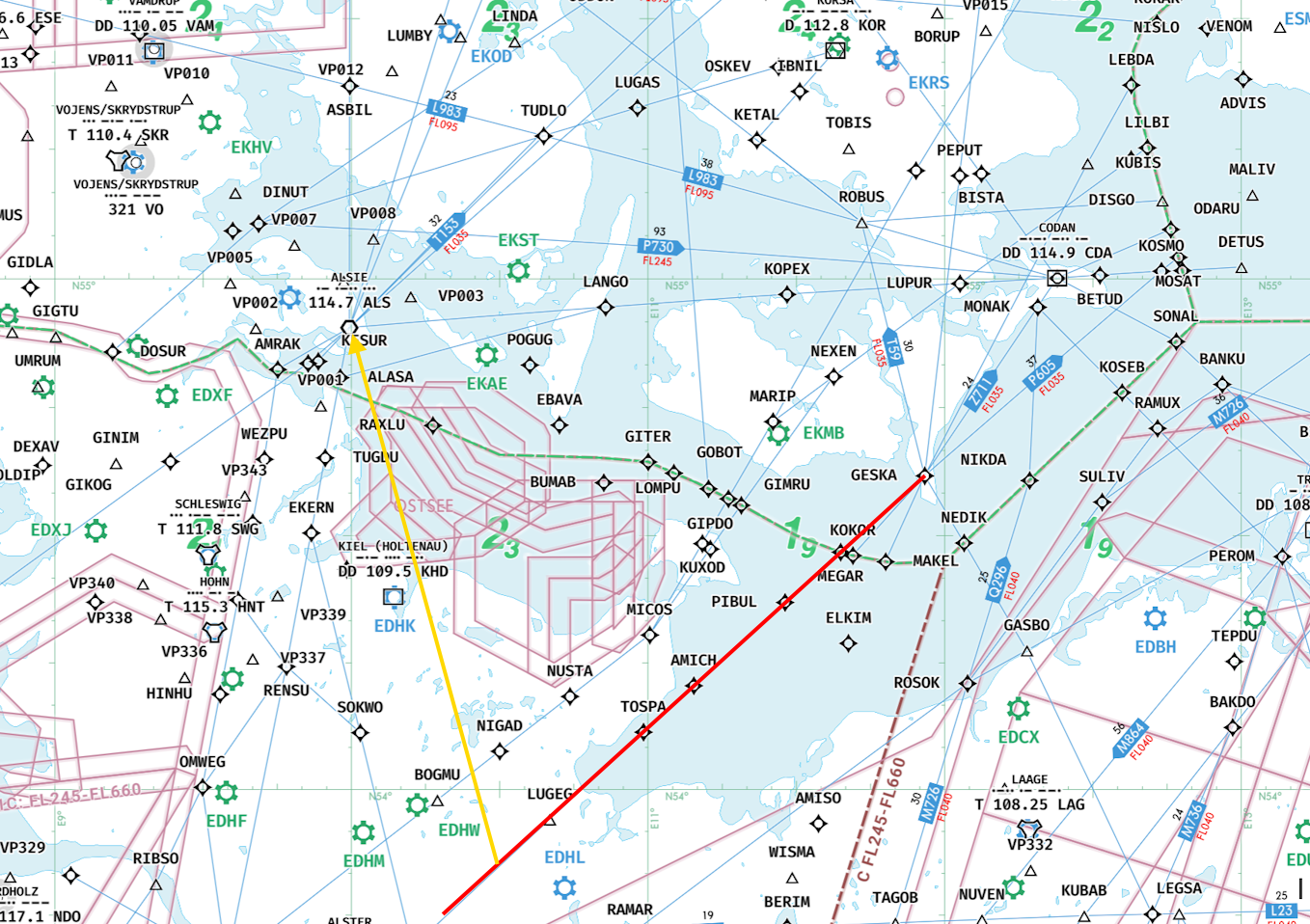
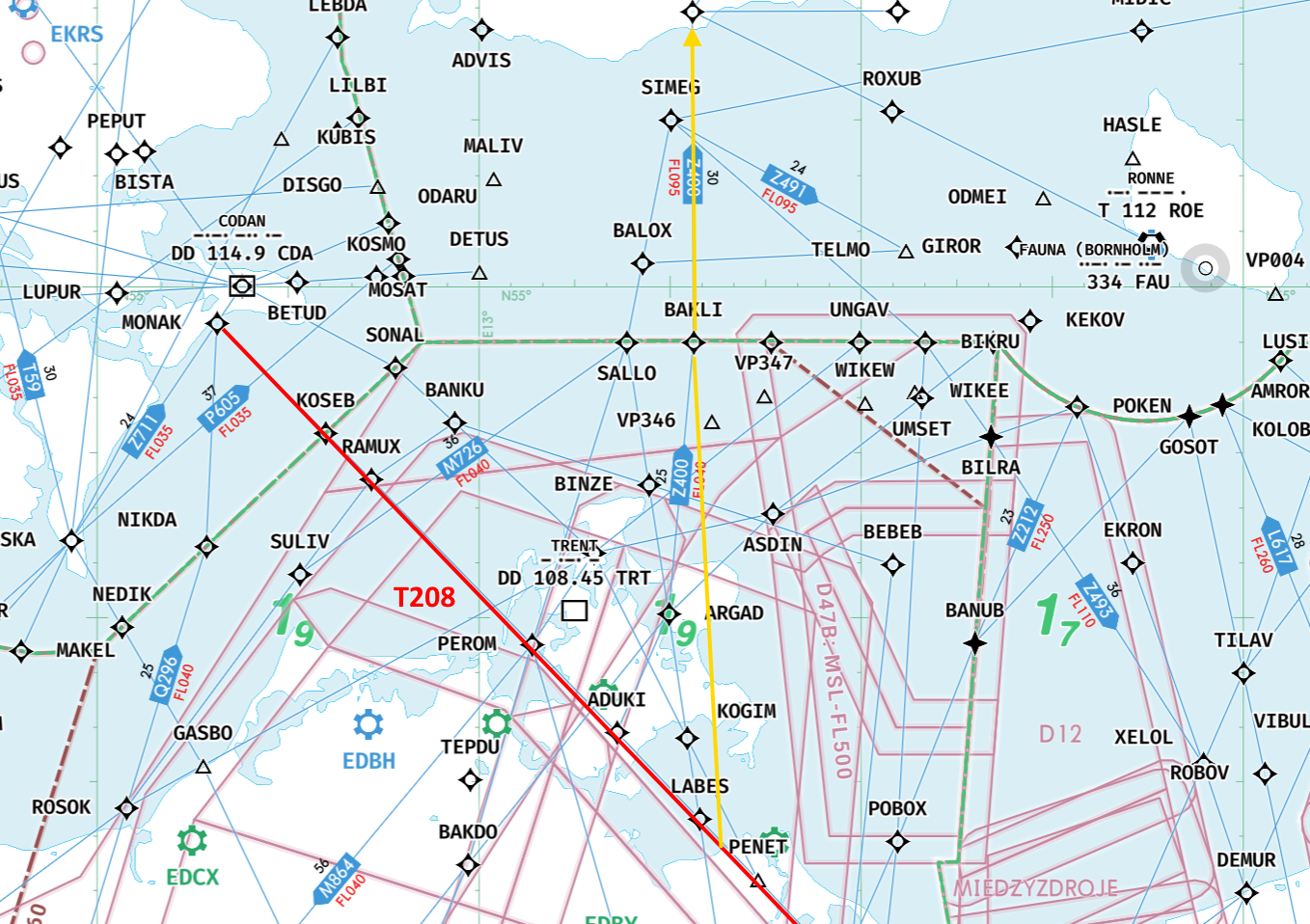
2. EDWW via MONAK from T208
- In a potential MONAK overload situation flights via T208 can be effectively rerouted to TIDVU for holding there. A good direct to propose is "BAKLI" as this is a valid point for the direction
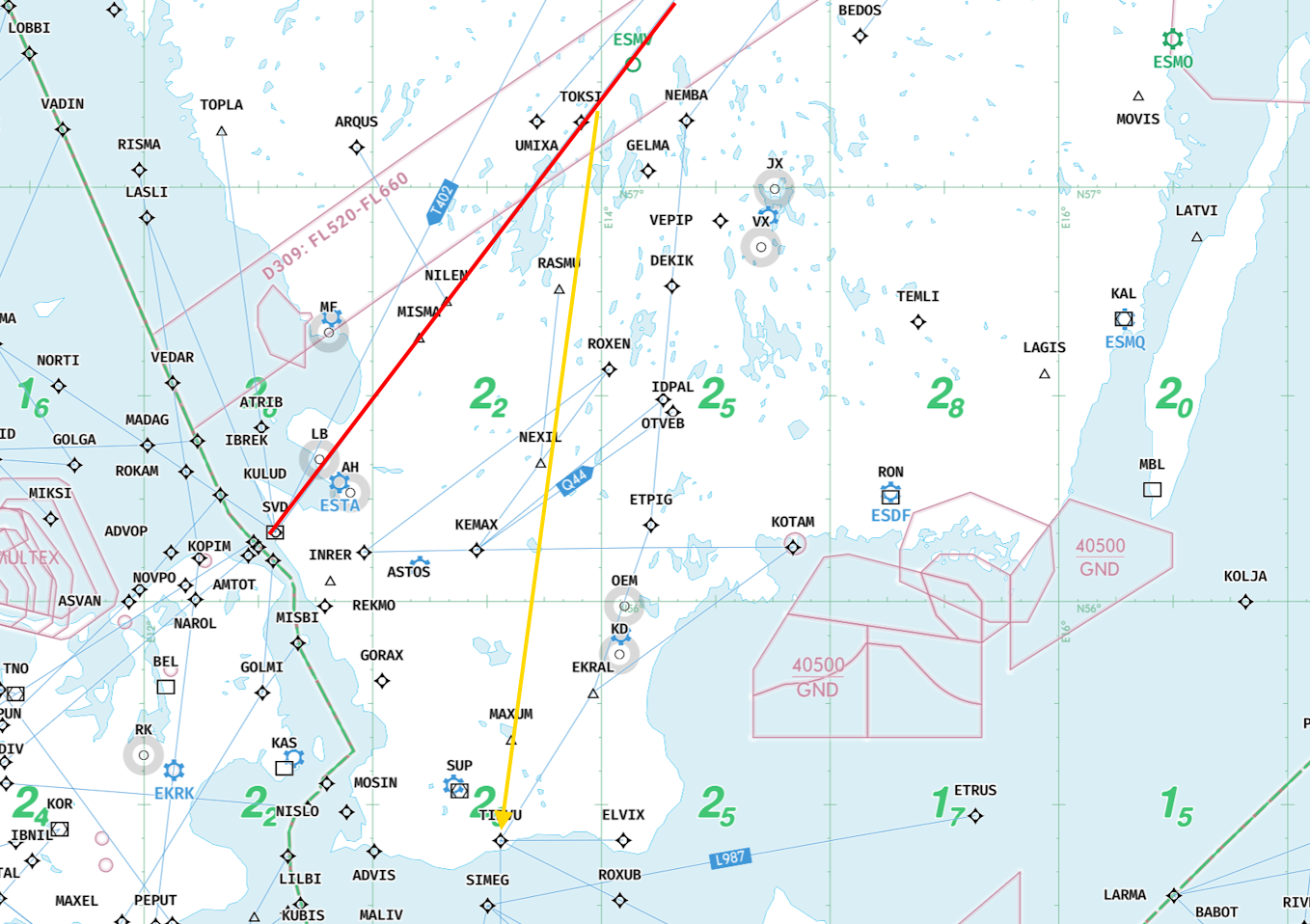
3. ESMM via ERNOV - Distribute to TIDVU
- If high load persist on WEST STREAM and you want to get aircraft to EAST STREAM the most effective way is distributing ERNOV arrivals to TIDVU. This is especially ERNOV arrivals from ESSA and EFHK, as they have a good angle. Coordinate with ESMM
- This is preferable to distributing TUDLO arrivals to MONAK, as long as ESMM or similar is online.
- Avoid distributing ERNOV arrivals from ENGM via L996.
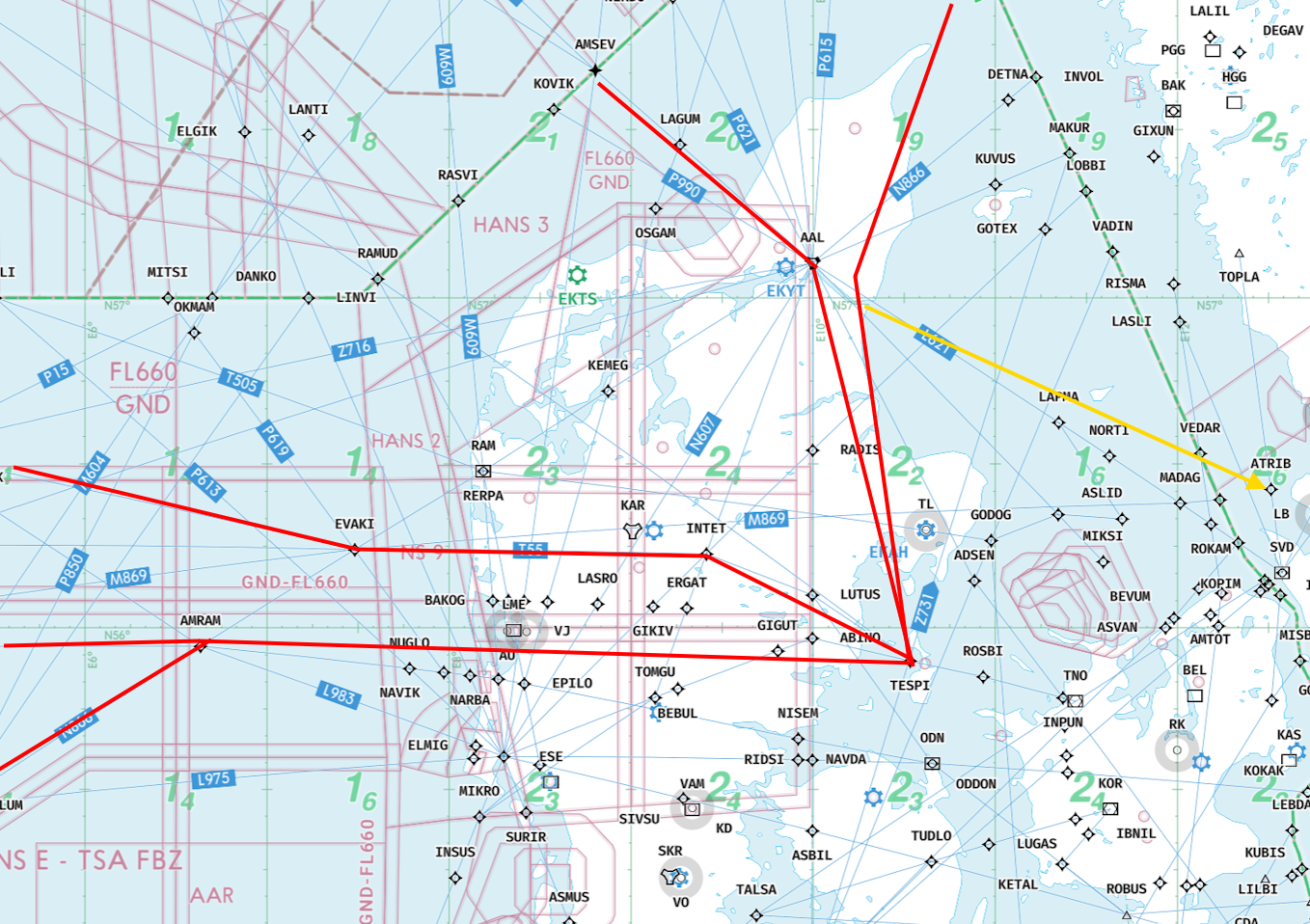
3. EKDK via TESPI - Distribute to ERNOV
- For extreme load on TESPI, consider distributing a few to ERNOV to keep hold managable. This is especially useful if you have high load from ENGM/ENBR combined with several flights crom EGPX
3.5 Evaluate
3.5.1 General
Choose the right sector for the right controller
We have a lot of flexibility depending on where the "Extreme load" is expected. Sectors should be considered as follows
- EKDK_B_CTR is INflexible, and will always stay.
- EKDK_V_CTR (or EKDK_N_CTR) is INflexible and will always stay
- EKDK_E_CTR can be flexible but should be avoided if at all possible, and hence should stay.
- EKDK_D_CTR is flexible
- EKDK_UC is highly flexible
3.5.1 Starting the event.
The four above mentioned are the default starting setup for a VTC event. In that case they are established in ownership as follows.
- EKDK_V_CTR covers all area WEST
- EKDK_E_CTR, EKDK_B_CTR covers their respective sectors
- EKDK_D_CTR covers sectors D and I.
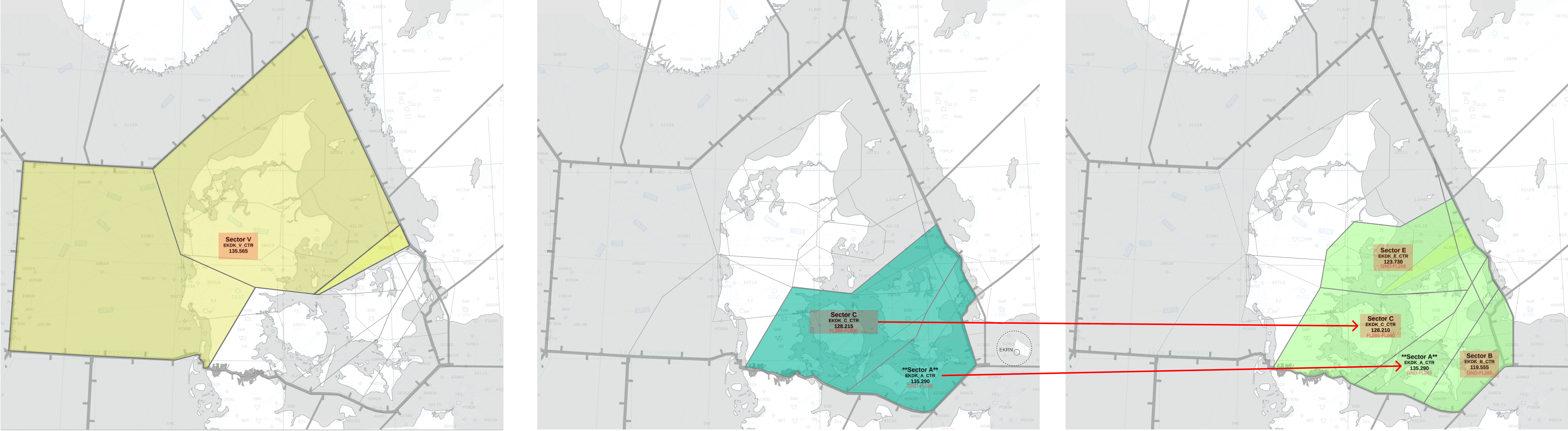
- EKDK_UC_CTR covers Sectors A, C, UA, UC (Note there is NO difference between UC and UA AOR wise)
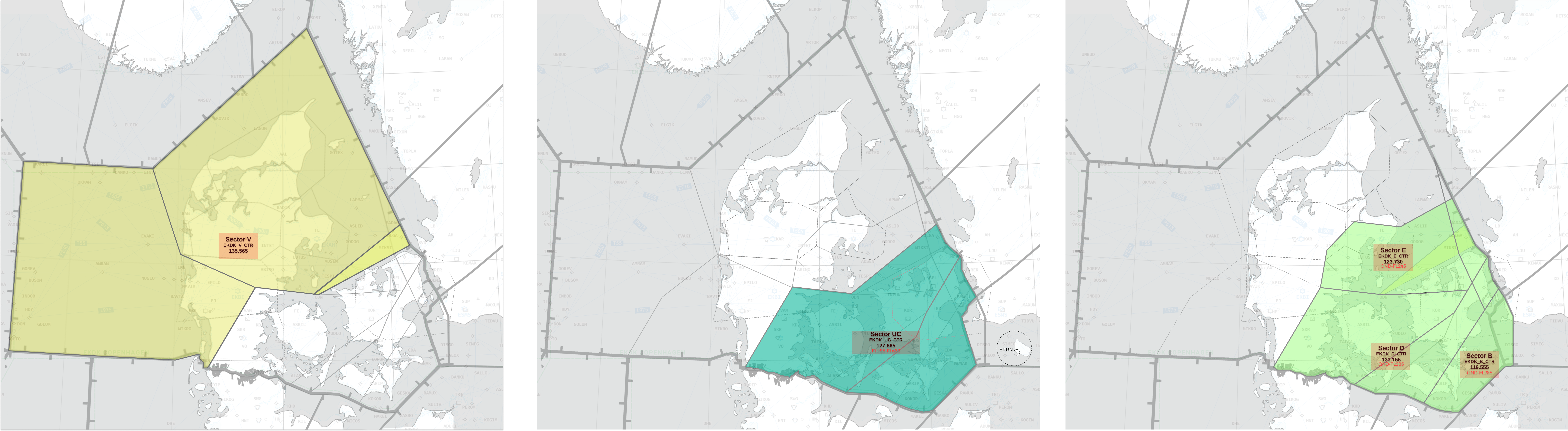
This setup is normally the most efficient and should be used unless one of the cases below demands it
3.5.1 Overload on Sector D
3.5.5.1 Condition
First change is if there is such amounts of traffic to Sector Delta, that we need to relieve EKDK_D_CTR
3.5.5.2 Change
FMP will in this case ask EKDK_UC_CTR to change his position to EKDK_A_CTR. This way
- New EKDK_A_CTR keeps same AOR as EKDK_UC_CTR
- New EKDK_A_CTR takes over control of Sector I.
- This results in EKDK_D_CTR not having to deal with any departures. EKDK_A_CTR now keeps NEXEN, LANGO, KOPEX departures from FL190 to RFL.
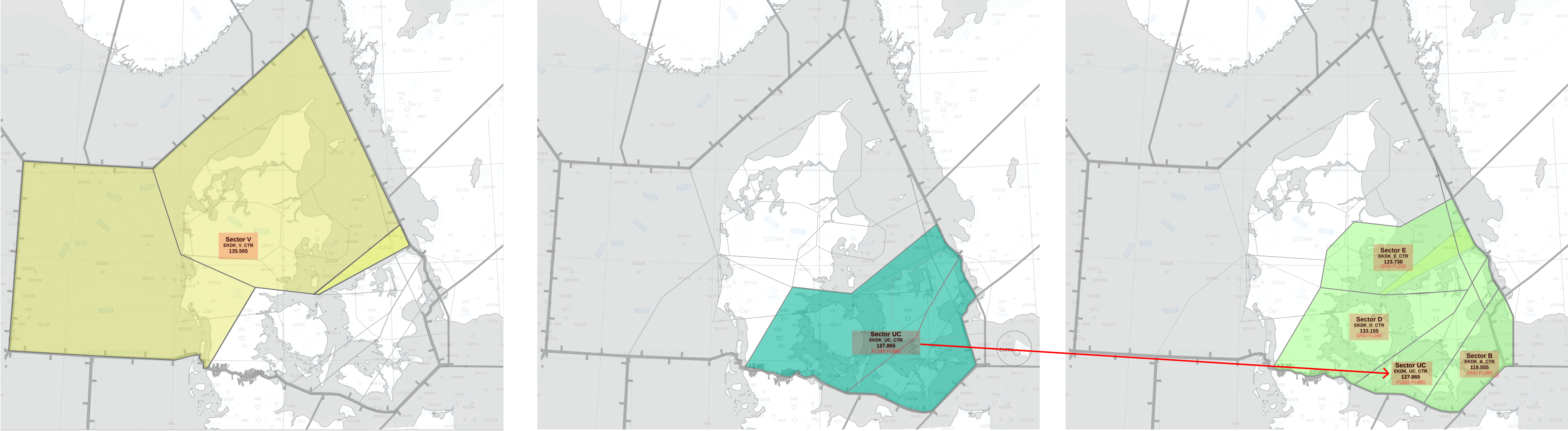
3.5.1 Underload on Sector D and/or Overload on Sector B
3.5.5.1 Condition
If there is such low traffic amounts inbound to TUDLO that controller can be spared to other places.
This may be correlated with an overload on Sector B in order to have a planner, that the EKDK_D_CTR controller can switch to EKDK_A_CTR.
3.5.5.2 Change
FMP will in this case ask EKDK_UC_CTR to change his position to EKDK_C_CTR. This way
- New EKDK_C_CTR keeps same AOR as EKDK_UC_CTR
- New EKDK_C_CTR takes over control of Sector D, when EKDK_D_CTR gets relocated.
- This results in EKDK_C_CTR keeping TUDLO arrivals from RFL to FL120
- EKDK_D_CTR can choose to Relocate