# General
General Operational Information
# Overview
This page highlights how operational information for ATS in Sweden FIR is distributed to controllers.
### Announcing operational Changes
Operational changes are announced in in the ***[\#swedish-bulletins](https://discord.com/channels/182554696559362048/1110667335318130788)*** channel on [our Discord server](http://discord.vatsim-scandinavia.org/). example of changes: GNG Package updated, vATIS profile updated, GOP/LOP/LoA Updated.
Changes are summarised in ***[Revision Highlights](https://wiki.vatsim-scandinavia.org/books/general/page/revision-highlights)***.
Changes to regulations and general and local operating procedures in Sweden FIR that are not included in the official GOP/LOP documentation will be posted in ***[Sweden FIR ATC Operational Bulletins](https://wiki.vatsim-scandinavia.org/books/general/page/sweden-fir-atc-operational-bulletins)***.
## Wiki Pages
The pages listed below can be found under "ATC Sweden"
### General
Contains general information for controllers in Sweden, also containing information about the tools used for/when controlling, such as Euroscope, TopSky, AFV, vATIS.
### GOP - General Operational Procedures
Information relevant to all ATS positions in Sweden FIR, necessary for understanding the LOP.
### LOP - Local Operating Procedures
Information specific to an Airport and/or ATS Position
### LoA - Letters of Agreement
Contains agreements between Sweden FIR and its neighbouring FIR/UIRs regarding airspace, coordination, transfers of aircraft etc.
### Event Procedures
Contains information intended exclusively for use during events.
### Training in Sweden
Contains general information about ATC training in Sweden and training documents.
### Swedish Airports & Charts
Contains information and links mainly intended, but not limited to, pilots.
# Sweden FIR ATC Operational Bulletins
### **Introduction**
Changes to regulations and general and local operating procedures in Sweden FIR that are not included in the official GOP/LOP documentation will be posted here. This can be either temporary changes such as those published in NOTAM or AIP SUP, or permanent changes that have not been included in our manuals yet.
Please check Operational Bulletins regularly before controlling to make sure you are aware of the latest changes.
### **General information: LOP and LoA discrepancies**
Some LOP documents are not up to date which means there can be discrepancies between for example LOP TWR and LOP ACC, or between LOP and AIP information. Generally, our LOP documents are based on AIP information, airport regulations, as well as information from controllers or local documents on how the real ATS units operate. In some cases, where we lack solid information, we have made educated guesses to make sure we as VATSIM controllers have a logical procedure to work with.
Where LOP is not up to date, you may find that LOP may refer to navaids, waypoints or procedures that are no longer available according to AIP. At several airports there are also new RNP approach procedures and associated waypoints which can be used to provide direct routings. In these cases AIP data takes precedence. Note that EuroScope data in general should be up to date. If there is a discrepancy between different LOP documents, refer to the last updated document. Use verbal or system coordination between controllers to ensure you have the same understanding.
Where there is a discrepancy between LOP and LoA, the information in LoA takes precedence as this will be more up to date than the LOP, which is based on LoA.
If you find LOP information that is inconsistent with other sources (e.g. AIP, EuroScope data), please report it so we can rectify it or clarify the correct procedure.
### **OPERATIONAL BULLETINS IN EFFECT 6 OCT 26**
Change to ESSA low speed departures
To mitigate the effect of wind, the initial heading for low speed departures has been replaced by an initial track.
The syntax for a low speed departure clearance will now be: (callsign), CLEARED TO (destination), AFTER DEPARTURE TURN RIGHT (or LEFT) TRACK (3 digits), 3000 FEET, EXPECT VECTORING TO (exit point), SQUAWK (code). The final heading remains a heading.
Changed phraseology effective 1 May 2025
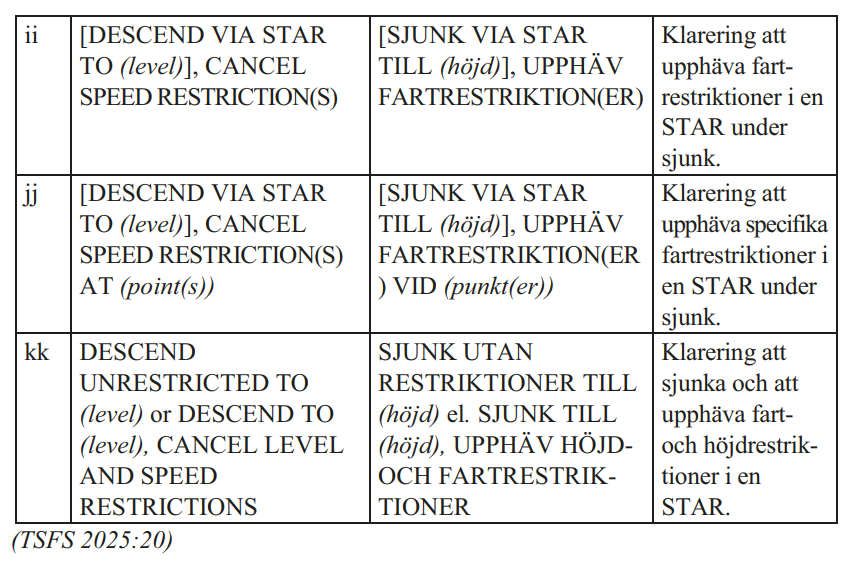
**New phraseology CLIMB VIA SID / DESCEND VIA STAR**
**CLIMB VIA SID / DESCEND VIA STAR** is used when giving climb/descend instructions to aircraft that are *established on a SID/STAR **with level or speed instructions*** ahead along the route.
- An aircraft is considered *established* on a STAR when it has passed the first waypoint of the STAR. An aircraft that is cleared direct to a point on a STAR without passing any waypoint on the STAR is not considered established on the STAR until it has reached a waypoint on the STAR.
- An aircraft is considered *established* on a SID if departing on a SID and following the SID routing, or if cleared direct to a waypoint on the SID. If an aircraft is cleared to a point not on the SID it is no longer established on the SID.
- If a SID/STAR has no level/speed restrictions along the route, "CLIMB VIA SID" / "DESCEND VIA STAR" is **not** used; use "CLIMB/DESCEND TO (level)" instead.
- New phrase "REJOIN SID/STAR" is also introduced. This is used when taking an aircraft off the SID/STAR routing for any reason and then clearing it back to rejoin the procedure. The full phrase is "CLEARED DIRECT (waypoint), CLIMB/DESCEND TO (level)", followed by "REJOIN SID/STAR (SID/STAR designator) AT (waypoint)".
Examples:
- ACC will **not** use "DESCEND VIA STAR" when giving descent clearance *before the first point of the STAR*.
- TWR/APP will use "DESCEND VIA STAR" if there are level/speed restrictions ahead along the STAR. This applies mostly to closed STARs.
- At ESSA, the only open STAR that has a level restriction after the first point of the STAR is ELTOK 7M. So for ELTOK 7M only, "DESCEND VIA STAR to (level)" is used. For other open STARs use "DESCEND TO (level)".
- When descending as part of an approach procedure, "DESCEND VIA STAR" is **not** used. "VIA STAR, CLEARED (type) APPROACH" can still be used.
- "CLIMB VIA SID" is used if there are any level/speed restrictions ahead on the SID. For example, ESSA RWY 08 SIDs have speed restrictions until the first turn is complete (speed restrictions at points SA413/424/557/ARL), so "CLIMB VIA SID" is used for any climb instruction before the last point with a speed restriction.
- Some airports have no restrictions on any SIDs and others have restrictions at the last point in the SID. Check the charts for each airport to know when to use "CLIMB VIA SID"!
**NOTE:** The basic rule is still that level and speed restrictions on a SID/STAR must be followed unless specifically cancelled. So even if you forget to say "via SID/STAR", pilots are still expected to follow the SID/STAR restrictions.
[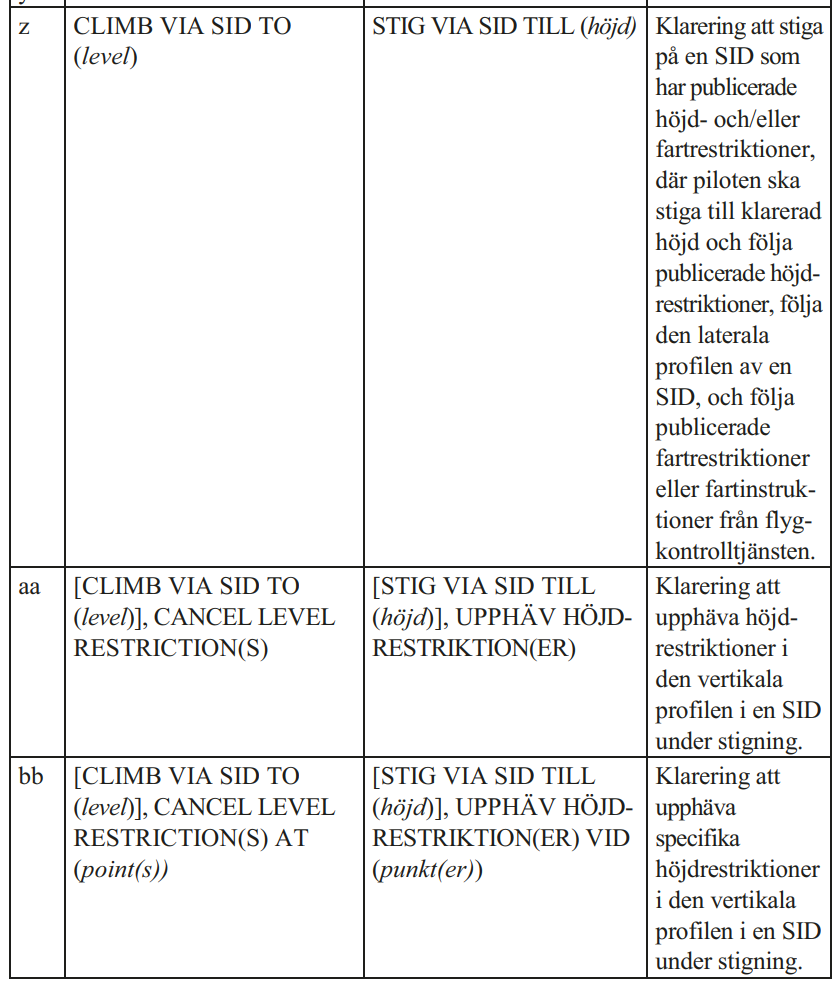](https://wiki.vatsim-scandinavia.org/uploads/images/gallery/2025-12/image-1764695167878.png)
[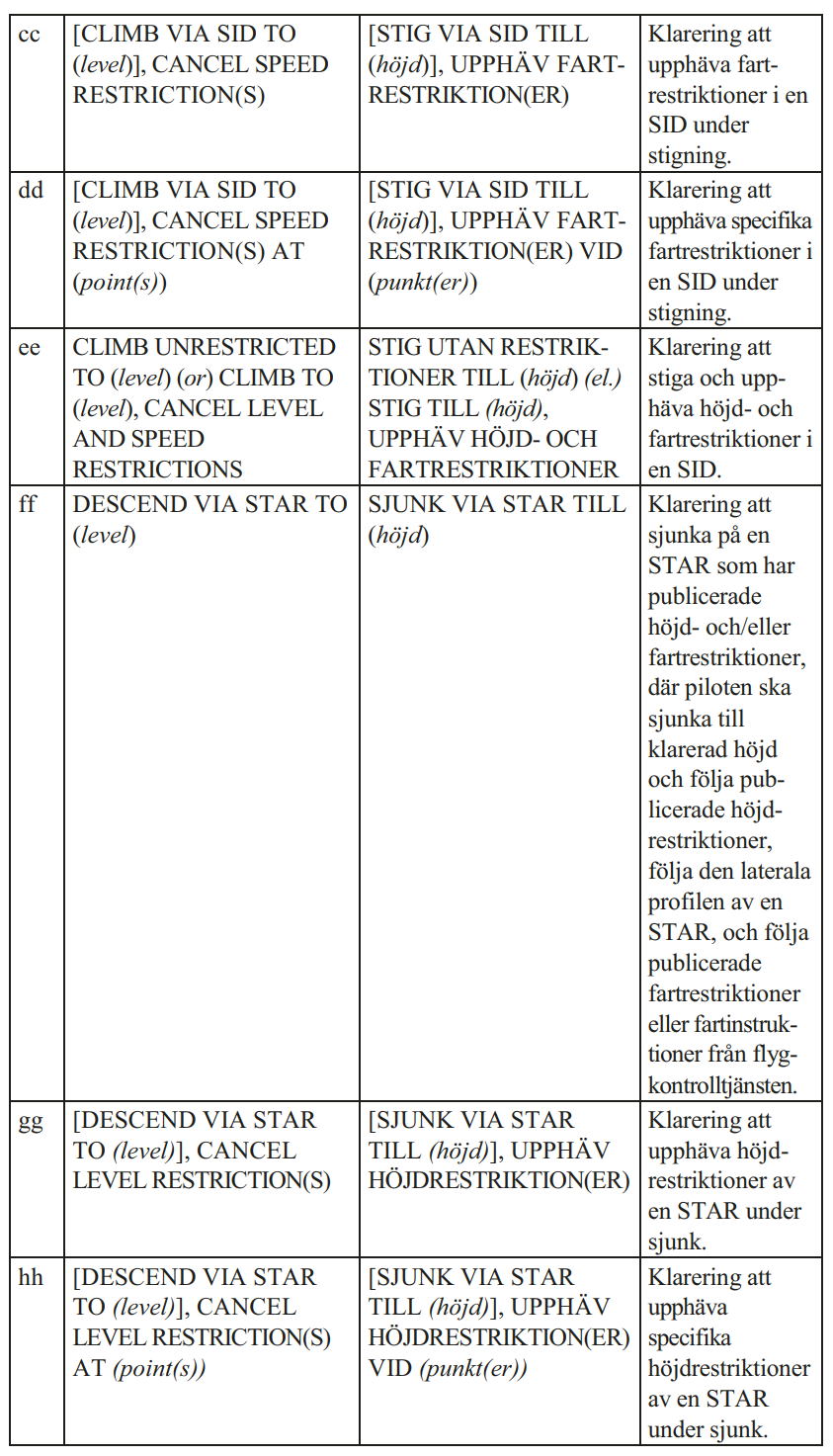](https://wiki.vatsim-scandinavia.org/uploads/images/gallery/2025-12/image-1764695185268.png)
[](https://wiki.vatsim-scandinavia.org/uploads/images/gallery/2025-12/image-1764695209896.png)
The full phraseology regulation can be found [here](https://www.transportstyrelsen.se/TSFS/TSFS%202019_36k.pdf).
ESSA: Established on RNP AR (EoR)
[See LOP ESSA.](https://wiki.vatsim-scandinavia.org/books/lop/page/essa)
ESSA: Updated Appendix A and B with revised low speed departure routes, noise restrictions and runway selection table
Note: LPM Stockholm TMA has not been updated. Where there is a discrepancy between LPM and Appendix A/B the procedure in the Appendix is correct.
Appendix A and B have been updated with the following changes:
- Runway selection simplified as per real life procedures. There is now just one table. Enter the table in the relevant column (Peak, Off-Peak or Night) and select the most appropriate runway combination starting from the top. There are no longer set limits for wind direction/speed, but considerations to wind/WX conditions as well as RWY/TWY closures, WIP etc should be taken as described above the table.
- Noise restrictions added to Appendix B. The Introduction page lists all noise restrictions. Restrictions relevant to specific runway combinations are noted by each runway combination.
- New runway combinations with departures RWY 19L using E SID. These combinations are only used when ESR16 is active above 1600 ft, as departure RWY 19R as well as Q SID RWY 19L are not available in this condition.
- Low speed departure routes updated. Clarified initial *track* and final *heading*, and some tracks/headings changed. Note that in ARR 26/DEP 01L and ARR 26/DEP 26 there is no longer any specified heading/level for transfer from sector W to E. This should be tactically coordinated as needed. Also note that in ARR 26/DEP 19L-E, **some low speed departures are cleared by DEL to 4000 ft.**
- EoR breakout procedures and phraseology added to Appendix A.
ESSA/ESSB: HMR, TRS, COR, LNA replaced by new waypoints, closed STARs withdrawn
The following changes are effective from 22 January 2026:
**Withdrawn NDBs and waypoints in ESSA/ESSB SID/STAR**
NDBs withdrawn:
- COR (replaced by **SOVAX**)
- ERK (replaced by **ERXEC**)
- LNA (replaced by **OBCIV**)
New significant points:
- **INWIQ** (replacing TRS)
- **VACRA** (replacing HMR)
HMR and TRS VORs remain operational but are no longer used in ESSA/ESSB SID/STAR.
**SID/STAR version numbers updated**
Most SID/STAR have been updated with new version numbers to reflect the above changes.
**Closed STARs withdrawn**
The "closed" STARs that were published in AIP but never in operational use have been withdrawn and are no longer available.
Coordination between ESOS ACC and TWR/APP units
As the new GOP ACC is published, the following information regarding LOP ESOS ACC is provided here.
#### Coordination between ESOS ACC and Stockholm APP
##### **Departing Traffic**
- Stockholm APP must ensure a minimum of 5 NM, constant or increasing, surveillance separation before initiating transfer of traffic to ESOS ACC.
- Departing traffic is released to ESOS ACC for further climb if cleared to the LOP/LPM agreed level.
##### **Arriving Traffic**
- ESOS ACC must ensure a minimum of 5 NM, constant or increasing, surveillance separation before initiating transfer of traffic to Stockholm APP.
- Arriving traffic cleared to the LOP/LPM agreed level is released to Stockholm APP for further descent and speed control.
- When a turn release has been effected, traffic via ELTOK and XILAN may be turned more than 45°.
Note that traffic to/from Stockholm APP is not released for turn unless this has been coordinated either verbally or using Trf+Release.
#### Coordination between ESOS ACC and other TWR/APP units
##### **Departing Traffic**
TWR/APP units must ensure a minimum of 5 NM, constant or increasing, surveillance separation before initiating transfer of traffic to ESOS ACC.
Departing traffic is:
- Released to ACC for further climb if cleared to the LOP agreed level (usually FL90).
- Released to ACC for turn (±45°) upon passing 5000 ft.
##### **Arriving Traffic**
ESOS ACC must ensure a minimum of 5 NM, constant or increasing, surveillance separation before initiating transfer of traffic to TWR/APP.
Arriving traffic cleared to the LOP agreed level (usually FL100) is released to TWR/APP for further descent, turn (±45°) and speed control upon passing 20 NM from the TMA border.
Drop-points will only be used for aircraft up to code C, equivalent to B737, A321.
Drop points are named after the taxiway they connect to, excluding the first letter. Where multiple drop points exist on the same taxiway, point 1 is closest to the manoeuvring area and point 2 is further into the apron.
ATS will indicate to the pilot who requests pushback:
> Pushback to drop-point XX approved.
The drop-points can be displayed on the SMR using `ALT`+`D`, they are also included on the pushback map.
Do note that the drop points are not shown in the AIP, only in the pushback procedure manual on \[vats.im/essadrop\](http://vats.im/essadrop) or within VatIRIS.
Because of that, pilots are most probably not aware of the procedures.
`.drop` has been added as a text alias with a suitable message.
# Revision Highlights
This page summarises operationally relevant changes to material/procedures for ATS in Sweden FIR.
For an unfiltered technical changelog, see **[GNG Package Changelog](https://wiki.vatsim-scandinavia.org/books/general/page/gng-package-changelog)** or [**vATIS**](https://wiki.vatsim-scandinavia.org/books/general/page/vatis)
**EuroScope does not allow for plugins to overwrite when updating the GNG package using the automatic download.** After updating, close EuroScope then go to `%appdata%\EuroScope`-> ESAA > Plugins > Updated Plugin" and copy the .dll files in the folder. Thereafter go back in the "Plugins" folder and paste the .dll files there. Overwrite existing files when prompted.
## AIRAC 2610
### Ground lists setup revised with new CDM/vIFF features
Updated documentation to come, workflow is expected to remain roughly the same.
### ESSA pushback drop-points
New drop-points are introduced, in addition to the existing standard pushback procedures.
The practical procedures for this are not yet clear, more information is to come.
Drop-points will only be used for aircraft up to code C, equivalent to B737, A321.
Drop points are named after the taxiway they connect to, excluding the first letter. Where multiple drop points exist on the same taxiway, point 1 is closest to the manoeuvring area and point 2 is further into the apron.
ATS will indicate to the pilot who requests pushback:
> Pushback to drop-point XX approved.
The drop-points can be displayed on the SMR using `ALT`+`D`, they are also included on the pushback map.
Do note that the drop points are not shown in the AIP, only in the pushback procedure manual on [vats.im/essadrop](http://vats.im/essadrop) or within VatIRIS.
Because of that, pilots are most probably not aware of the procedures.
`.drop` has been added as a text alias with a suitable message.
## AIRAC 2609
### ESSA TOVRI/BABAP SID 01L
TOVRI and BABAP SIDs from 01L changed. Commence right turn when passing SA401 or 2500 ft, whichever is later.
### Added new TopSky cursor arrow and additional font (ASM window among others)
Install the new font TopSky.ttf, located in the ESAA folder.
If this is undesired, to revert to the previous setup:
1. Replace the files in ESAA/Plugins with the original cursor files:
- **[TopSkyCursorArrowRight.cur](https://wiki.vatsim-scandinavia.org/attachments/552)**
- **[TopSkyCursorArrowLeft.cur](https://wiki.vatsim-scandinavia.org/attachments/553)**
2. Add the following to **TopSkySettingsLocal.txt** to revert to the previous setup:
3. For font: Uninstall the TopSky font, TopSky will revert automatically
```
System_GUI_Scale_Cursors=0.9
```
### [ESSA APN P/L and new FATO 07/25](https://wiki.vatsim-scandinavia.org/attachments/551?open=true)
APN P is added (used by Polisflyget), located next to APN L (used by Patria)
FATO 07/25 may be used by helicopters with max D-value of 20m (EC35/45,A109,AS65,B429 allowed).
### ESPA Stand layout updated
### [EKDK LoA](https://wiki.vatsim-scandinavia.org/books/loa/page/copenhagen-fir-sweden-fir "Copenhagen FIR - Sweden FIR")
ODMEI replaced by MOQAQ to reflect IRL change. ODMEI did not connect to any IAP.
### AUP data feed back online
Thanks to VatIRIS
### CDM: VDGS link PM button added to lists
Left click button to send PM to pilot with VDGS link ([vats.im/vdgs](https://vats.im/vdgs)).
- PM shows in green when a PM was already sent
- PM shows in red when no PM has been sent
## AIRAC 2605
### Military aerodrome and STRI positions now use 8.33 kHz channels
### TopSky font updated
### Sector split maps added (yellow line)
This is shown when the following sectors are split:
- ESOS 2/7
- ESMM 4/5
- EFIN F/D
### APP track labels updated
Track labels updated to better match IRL setup on ESOS and ESGG APP.
- ATYP and DIAS (Downlinked IAS) is shown in unselected track labels on APP (except MM L).
- DMACH is hidden from track labels on APP (except MM L).
- DSFL and DBPS hidden as this data is not available on VATSIM.
If this is undesired, add the following to **TopSkySettingsLocal.txt** to revert to the previous setup:
```
Label_ATYP_Default=0000
Label_DIAS_Unsel_Default=0000
Label_DMACH_Sel_Default=1111
```
## AIRAC 2604
### ESMM IS (Info South) renamed FIS-S with new radio callsign
ESMM FIS-S (Info South) with radio callsign "Sweden Information".
The position remains "bandboxable" with IN: If one of the two positions open, it covers the other one in its absence.
### TMLs (Traffic Management Lists) now show unconcerned flights
This is to aide in using TMLs for handling traffic flows possibly handled by more than one controller:
The NILUG inbound flow to ESSA is split between ESMM W and Y, this way, both controllers see the same traffic in the TML, despite not controlling all of the traffic in it.
## AIRAC 2603
### Keyboard Shortcuts (Ground Views)
Added shortcuts for useful maps.
### (`ALT`+)
- `G`: Toggles Stand label (**G**ates) maps.
- `H`: Toggles Heavies Restrictions maps.
- `J`: Toggles Pushback map.
- `K`: Toggles Taxiway label maps.
- `P`: Toggles Apron label (**P**latta) maps.
- `W`: Toggles Wingspan/TWY limitation label maps.
## AIRAC 2602
### SAP and APW re-enabled
Functionality of SAP/APW are now fixed since TopSky v2.6b1 -> b2
### EPWW changes
#### Revised sectorisation
EPWW now has three vertical ACC splits instead of the previous two.
- HIGH (FL365+)
- MID (FL335-365)
- LOW (FL335-)
The sector "main" identifiers (B and F) remain the same.
#### Updated LoA
- New XFLs to/from EPWW following the resectorisation.
- New tactical DCTs to EPWW have been added (also shown in TopSky/IRIS).
[ESMM LOP](https://wiki.vatsim-scandinavia.org/books/lop/chapter/esmm-acc) and [LoA EPWW-ESAA](https://wiki.vatsim-scandinavia.org/books/loa/page/warsaw-fir-sweden-fir) updated accordingly.
### TCT (Tactical Controller Tool) and BS (Blind Spot) now available
**TCT** works between the STCA and MTCD functions, providing alerts based on the
aircraft’s tactical trajectory for the next 5 minutes.
- TCT is shown in row 0 of the track label with **TC** if a conflict exists (**TC+** if several conflicts exist).
The **BS** function alerts the controller for level clearances that would create conflicts, by probing
specified levels around the aircraft’s current level for conflicts.
- The BS function is displayed in the right column of the CFL menu.
See ***TopSky plugin for EuroScope - General - B.pdf*** for more information on TCT and BS.
### [CTOT](https://skybrary.aero/articles/calculated-take-time-ctot)s included in all DEP/STUP lists
With the increased traction of [Roger Puig's ETFMS](https://github.com/rpuig2001/CDM/wiki), CTOTs are gaining more importance, hence they are now shown in all three profiles.
**CTOTs shall be adhered to at all airports as far as possible.** Traffic with a CTOT shall depart -5/+10 min within their CTOT window.
Right click on any CTOT to see the reason for it being issued, you can also check **[vats.im/atm](https://vats.im/atm)**
If you think an "incorrect" or excessive CTOT has been issued, contact the NAV team, mentioning the delay reason shown. Ideally with a screenshot.
### ESSA CDM profile revised
The STUP list of the ESSA CDM profile has been revamped for a new CDM workflow.
"RealMode" has been re-enabled in the CDM plugin. This automatically sets the EOBT as TOBT for all traffic. The TOBT can then be updated by:
1. The pilot (via [https://vats.im/vdgs](https://vats.im/vdgs))
2. The controller, via the list
**Updated CDM Wiki page will be published ASAP.**
## AIRAC 2601
### New ESMM sector combos
See [ESMM ACC Appendix A](https://wiki.vatsim-scandinavia.org/books/wip-sweden/page/esmm-acc-jmI "ESMM ACC") for new suitable splits and position restrictions etc.
### TopSky updated to v2.6b1
- **APW is disabled due to issues in this version,** fix expected in b2.
- New "domestic" ACC FREQ map added, displaying adjacent ACC position coverage and frequency within Sweden FIR (previously only available for neighbouring FIRs).
- Sorting of lists are now done from within TopSky (Global Menu->Tools->Flight Plan Lists, then select *sort* for list which you would like to change sorting).
### ESSA/ESSB
New waypoints
- COR replaced by SOVAX
- ERK replaced by ERXEC
- LNA replaced by OBCIV
- TRS replaced by INWIQ (TRS remains operational and is still used for ESKN SID/STAR)
- HMR replaced by VACRA (HMR remains operational)
- COR replaced by SOVAX
New IAP: (straight) RNP z RWY 01R available, with IF UGJAM
The SID/STAR designators have been changed, however;
**Allowing pilots to follow outdated procedures (e.g ARS5C instead of 6C) is allowable without coordination as there are no practical differences between the two versions.**
### ESGG
IAP changes:
- ILS RWY 03/21 becomes ILS **Z** 03/21 (procedure via GG708/404)
- **NEW:** ILS **Y** RWY 03/21 (procedure via LAV)
- NDP APP withdrawn.
### ESGP ATS closed
CTR, VRPs, RNP RWY 19 and ESGP TWR withdrawn.
- SID/RNP 181 remain available for SAR/HOSP and police flights.
## AIRAC 2512
### Automatic selection of primary frequency removed
- Previously, the primary frequency would be automatically selected in EuroScope when connecting as an ATC position with the correct login callsign.
- This feature has been removed in order to make handover/takeover of positions easier.
- When connecting to a position in EuroScope it is now necessary to manually select the *PRIM* check-box for your position in the *Voice communications setup* dialog in EuroScope.
The primary frequency should only be selected when you are actually ready to take over the position. Ensure any preparation and coordination needed is done before activating the primary frequency.
Note that selecting a primary frequency allows EuroScope to identify the ATC position. This is done by matching the prefix (e.g. ESOS), the suffix (e.g. CTR) and the frequency (e.g. 118.405). If logged in as ESOS\_CTR with primary frequency 118.405, this will be recognised as ESOS 1. Any middle character (ESOS\_1\_CTR) or extra underscore (ESOS\_1\_\_CTR) is ignored.
The callsign/frequency match activates the ATC position, which includes applying sector ownership and loading any position specific settings.
## AIRAC 2511
### EKDK Upper Positions
EKDK has introduced new upper positions/sectors UA/UC/UV (FL365+)
## AIRAC 2510
### New data provider
GNG has finally secured a new data provider, Navigraph. There are some new terms and conditions for the use of aeronautical data, requiring the user to hold a free Navigraph account.
As EuroScope has not yet been updated to allow users to sign in with their Navigraph accounts, the built-in automatic update has been disabled. The data is now only available for download from the GNG homepage. A detailed guide on how to update can be found [here](https://wiki.vatsim-scandinavia.org/books/general/page/euroscope-and-gng-package-installation).
### STAR selection
The selectable STARs have been reworked to better assist ATCOs in providing the correct inbound clearances.
Selection philosophy:
- Use EuroScope auto-selection if possible.
- If no auto-selection is available, use the procedure found at the top of the STAR list.
The procedure can either be a "normal" STAR or a direct to a waypoint/navaid.
Many airports have standard inbound clearances via a STAR, but a direct routing to a waypoint/navaid if no suitable STAR is available. In such cases, EuroScope will auto-select the STAR if the traffic is filed via a TMA entry point. For other traffic, a manual selection of the procedure at the top of the STAR list must be made.
Some airports only have a standard inbound clearance directly to a waypoint/navaid. In this case, EuroScope will auto-select that procedure if the traffic is filed via a TMA entry point. Otherwise, manual selection is required. Due to limitations in GNG, an auto-selected procedure may include a sequence number in its name — this number can be ignored. For example, for ESSV arrivals to runway 03, the STAR will show: **VSB·1·RNP**. This indicates that the inbound clearance is direct VSB for the RNP approach. The number “1” can be disregarded.
Overhead procedures for military and AFIS airfields have been added. These procedures are named **OVHD-XX** and are available in the STAR list. (XX= last 2 letters of the Airport ICAO code) They are not linked to any approach procedure, which must be selected separately.
All types of approach procedures can now be selected. This includes ILS (select ILS for LOC), RNP, VOR, and NDB approaches. Military procedures are not available. The list is generally sorted in order of precision — from lowest to highest approach minima. All procedures consist of an approach transition followed by the approach type, e.g. **LB·ILS·Y** or **SLU·VORDME**.
Procedures with a T-shaped approach transition now have indicators showing whether it is a Left-base, Right-base, or Straight-in approach.
For example, for ESPA runway 14:
- **L·PA922·RNP**
- **R·PA921·RNP**
- **S·PA851·RNP**
## AIRAC 2508
The change in AIRAC provider for GNG is in its final stages, GNG is reviewing the new dataset before it becomes available. The files still indicate AIRAC 2413.
### ESGT renamed
ESGT now called Göteborg/Stallbacka. The TWR callsign and CTR name is changed, the TMA sector sector Trollhättan keeps the old name.
### ESSA VRP
ESSA has a new VFR entry/exit point located south of VADA, called VALLENTUNA
## AIRAC 2507
The change in AIRAC provider for GNG is in its final stages, GNG is reviewing the new dataset before it becomes available. The files still indicate AIRAC 2413.
### Custom fonts for TopSky and ESGG SMR
New custom fonts have been made (by Rui Feng) for TopSky and the ESGG SMR (surface movement radar) view. Another font for the ESSA SMR is in the works.
We ask for community feedback **[via Github](https://github.com/Vatsim-Scandinavia/ESAA-Sectorfile/issues/55)** or in DM to @maxlk96 via Discord
**In order to use the fonts they have to be installed manually**. The font files can be located in `%appdata%\EuroScope\ESAA` : `EuroScope.ttf` and `SMR ESGG.ttf` - Right click and install, "Yes" when prompted to replace.
Reverting to old fonts
**To revert to the previous TopSky font**, download, install (and replace with) the following font: **[EuroScope OLD.ttf](https://wiki.vatsim-scandinavia.org/attachments/454)**
**To revert to the previous font and look for the ESGG SMR view**, add this to your **GRpluginSettingsLocal.txt**:
```
[ESGG]
System_GlobalMenu_Font=EuroScope
System_GlobalMenu_FontSize=13
System_Windows_Font=EuroScope
System_Lists_Font=EuroScope
GroundLabel_Font=Lucida Sans Unicode
GroundLabel_FontSize=13
GroundLabel_FontStyle=0,0,0,0
AppLabel_Font=Lucida Sans Unicode
ApwLabel_Font=Lucida Sans Unicode
```
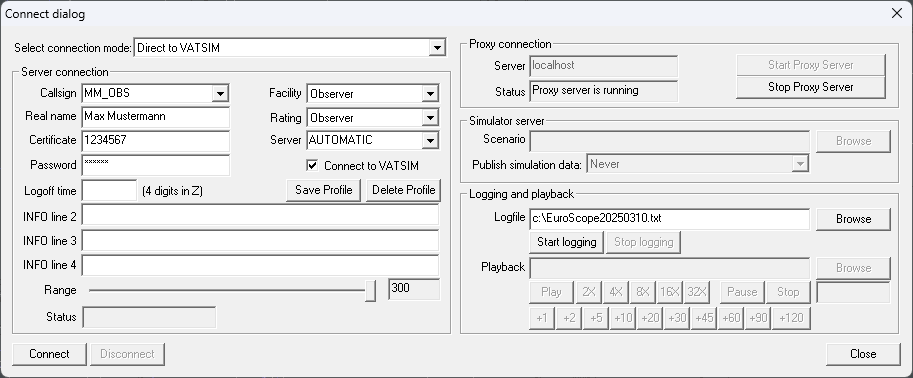
| Field | What to enter |
|---|
| Select connection mode: | Direct to VATSIM |
| Callsign | Your initials, for example, Max Mustermann = MM\_OBS |
| Real Name | Your full name, first name, or your VATSIM ID |
| Certificate | Your VATSIM ID |
| Password | Your VATSIM password |
| Logoff time | Keep empty |
| INFO line 2/3/4 | Keep empty |
| Facility | Observer |
| Rating | Observer |
| Server | AUTOMATIC |
If you get a message saying that the callsign is in use, you can add more letters, such as MMU\_OBS.
[](https://wiki.vatsim-scandinavia.org/uploads/images/gallery/2025-03/h3Timage.png)
The rest of the fields are not relevant at the moment.
Press `Connect` and close the Voice Communication Setup window that appears.
We need to set up visibility centres to see aircraft on the radar.
In the chat window at the bottom left, write `.vis1` and click on a spot on the "map" or add a waypoint/airport etc, `.vis essa esms risem` for example will add vis points at Arlanda, Sturup and at the waypoint RISEM, just south of Kallax.
You will see a circle appear, which is where you can see aircraft.
You can have up to 4 visibility centres at once. The others are `.vis2` `.vis3` `.vis4` if you want to add/change them separately.
To see what visibility centres you have set, type `.showvvis`
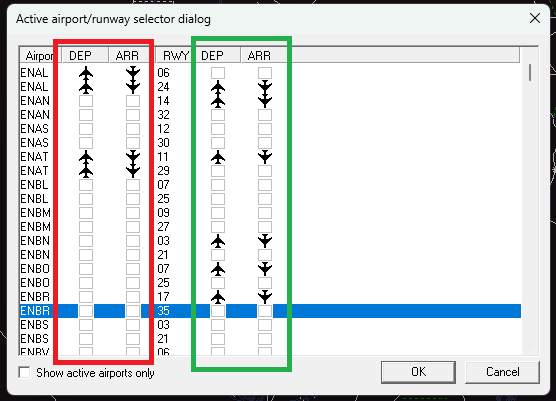
To make flight plans appear in the flight plan lists, click on the runway symbol on the top bar.
This will open the window as shown below.
On the **red side**, you select the airports you want flight plans from/to be displayed. -> **As a controller you should NOT have to change these manually!**
On the **green side**, you select the active departure and arrival runways. This makes sure that the correct SIDs/STARs are displayed.
[](https://wiki.vatsim-scandinavia.org/uploads/images/gallery/2023-05/image-1684074644132.png)
## Audio Client Configuration
If you want to receive voice communications, we must use one of the audio clients mentioned at the top of this page. They are used to receive voice communications on the frequency.
Below is an example of how to set up TrackAudio.
1. Open the TrackAudio client and go into Settings.
2. Fill out your VATSIM ID and password.
3. Configure the correct audio devices.
Both headset and speaker device must be configured, but same device can be selected.
A push-to-talk key must also be configured. A good suggestion is the `right control` key.
4. Settings saves automatically, press Close
Your audio client is now configured and ready to connect to VATSIM.
You must first have a active VATSIM connection via EuroScope to be able to connect in TrackAudio
Press "Connect" in the client.
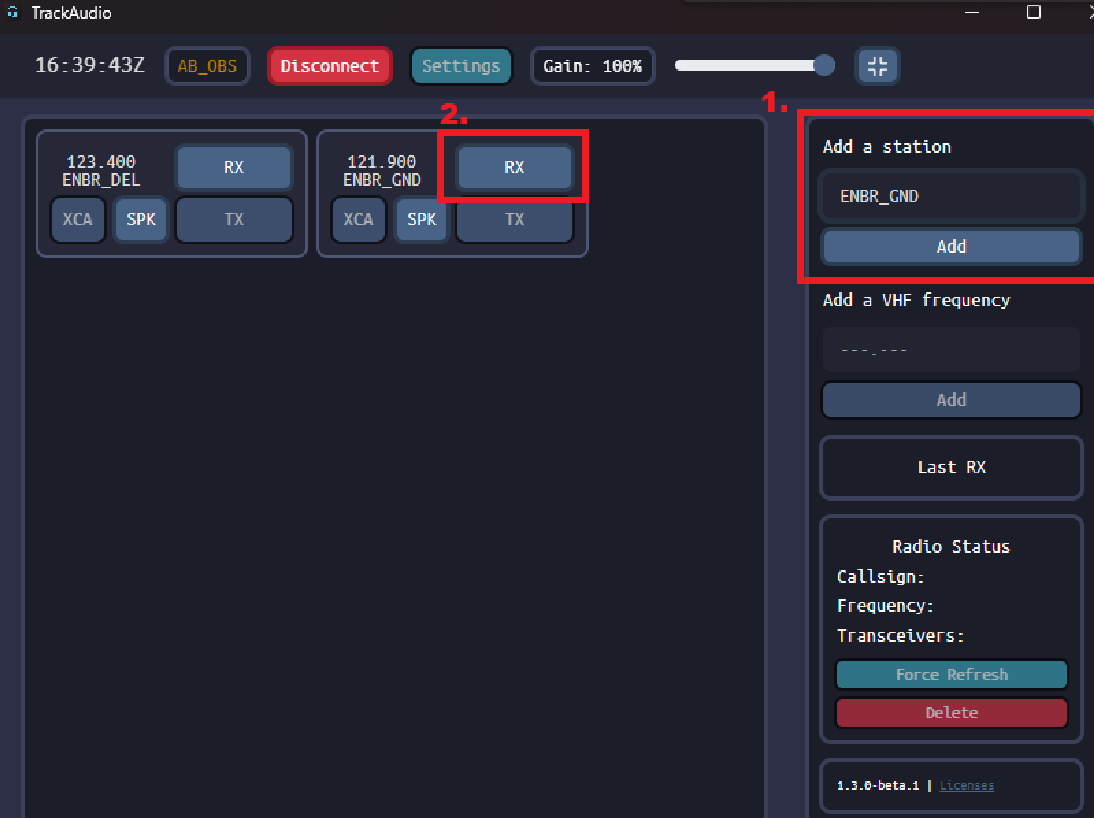
To add a frequency to listen to, we must add a station first.
Under `Add a station` write the callsign of the station you want to listen to - For example, `ESSA_W_TWR`, `ESOS_1_CTR`, or `ESGG_DEL`
Press `Add`.
Enable `RX` for all the frequencies you want to listen to - RX indicates **green** when its active - **orange** when someone is transmitting.
[](https://wiki.vatsim-scandinavia.org/uploads/images/gallery/2024-10/image-1729442477358.png)
You can use [vatglasses](https://vatglasses.uk/) to see what controllers are online in Sweden and which sectors they cover.
# EuroScope and GNG package Installation
This guide will describe how you install and set up EuroScope using the Swedish GNG package, also commonly called sector file package.
EuroScope is the most common controller client used in Europe on the VATSIM network, it is the only supported client used in Sweden. EuroScope is used to observe VATSIM traffic from the ATC's perspective and when becoming an ATC controller, to control traffic yourself.
**EuroScope is only supported by Windows.**
There have been members who has been able to adopt it to MacOS, however not without issues.
No support is provided to MacOS users as Euroscope is officially only supported by Windows.
**There are several steps to the installation, it is important that each step of the instructions are followed to the last detail. There are no shortcuts.**
If you have any issues, primarily contact your mentor, or ask for help in the `#swedish-helpme` Discord channel.
## EuroScope Installation
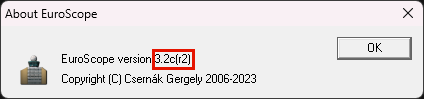
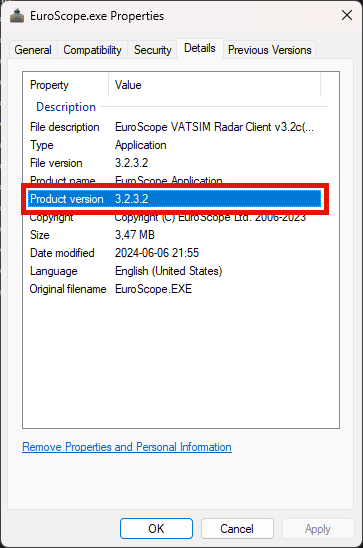
**EuroScope version 3.2.3.2 is the only version of EuroScope supported for use with the Swedish GNG package.**
Newer versions of EuroScope have breaking bugs/issues that are not present in 3.2.3.2.
**There will be no support offered for users who use other EuroScope versions than 3.2.3.2**
**Step 1:** Install the Visual C++ package from the link below, this is needed to run the Swedish GNG package.
- **Microsoft Visual C++ Redistributable** - [https://aka.ms/vs/17/release/vc\_redist.x86.exe](https://aka.ms/vs/17/release/vc_redist.x86.exe)
**Step 2:** Install the EuroScope installer from the link below, this is the only supported EuroScope version for use with the Swedish GNG package.
- **EuroScope installer** - [https://euroscope.hu/install/EuroScopeSetup.3.2.3.2.msi](https://euroscope.hu/install/EuroScopeSetup.3.2.3.2.msi)
There is no need to change any options during the install process of EuroScope, leave the installation folder as the default filled adress.
## GNG Package Installation
Once you have finished installing EuroScope it is time to download the Swedish GNG package, which contains the data needed for EuroScope to display the Airspace and Procedures specific for Sweden.
Automatic download (NOT AVAILABLE UFN)
**Step 1:** Start Euroscope, if asked to open a profile file, click `Cancel`.
Continue to step 2 even if you were not asked to select a profile.
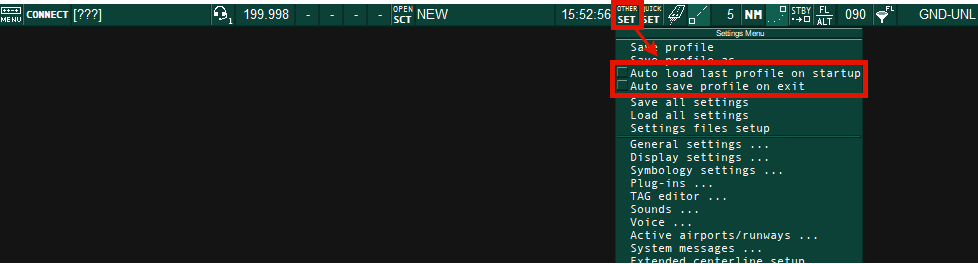
**Step 2:** Make sure the following options are **deselected** under **`OTHER SET`** as shown in the picture below.
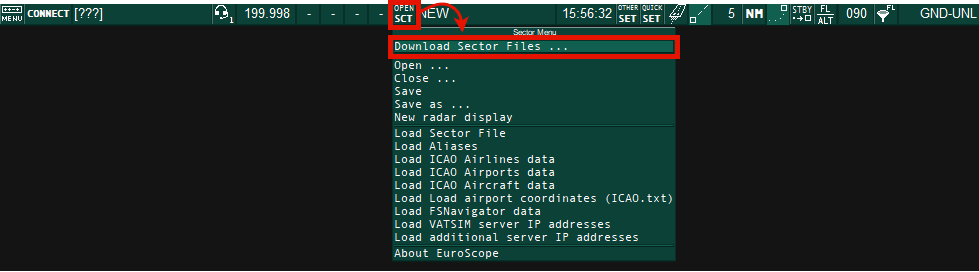
**Step 3:** Open the ES Sector File Downloader by pressing **`Download Sector Files ...`** located under **`OPEN SCT`**
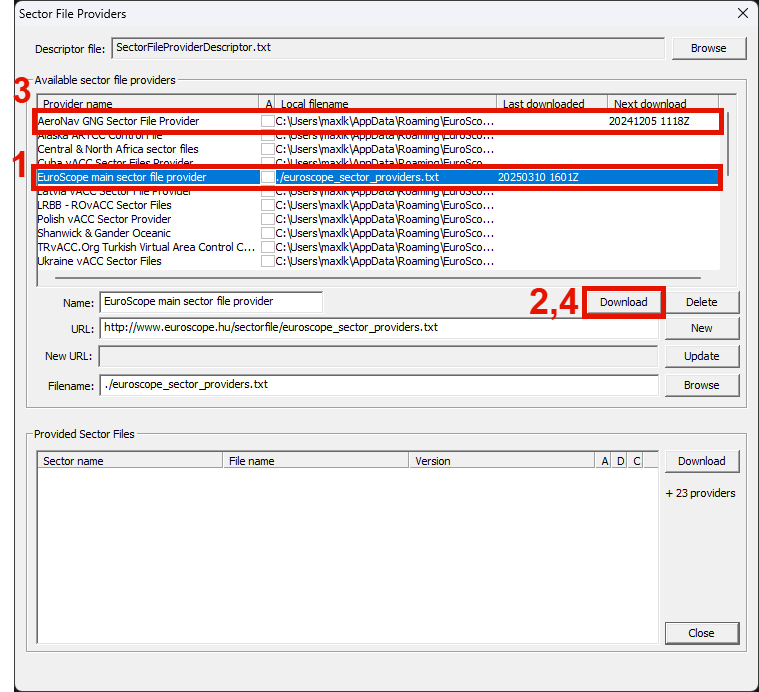
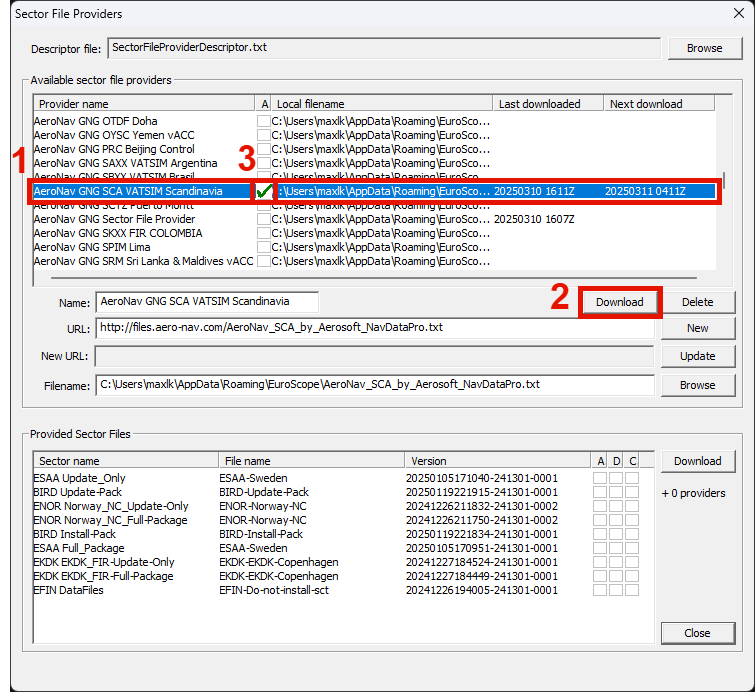
**Step 4:** Select and download the **"EuroScope main sector file provider"**, then the **"AeroNav GNG Sector File Provider"**, following steps 1-4 as shown below.
**Step 5:** Select and download the **"AeroNav GNG SCA VATSIM Scandinavia"** provider, following steps 1-2 below.
**Then:** Select the **"A"** it should show a green checkmark (step 3), this is for ES to automatically look for updated versions of the GNG Package.
Do **not** download `Vatsim-Scandinavia - Sweden` - This one is no longer in use.
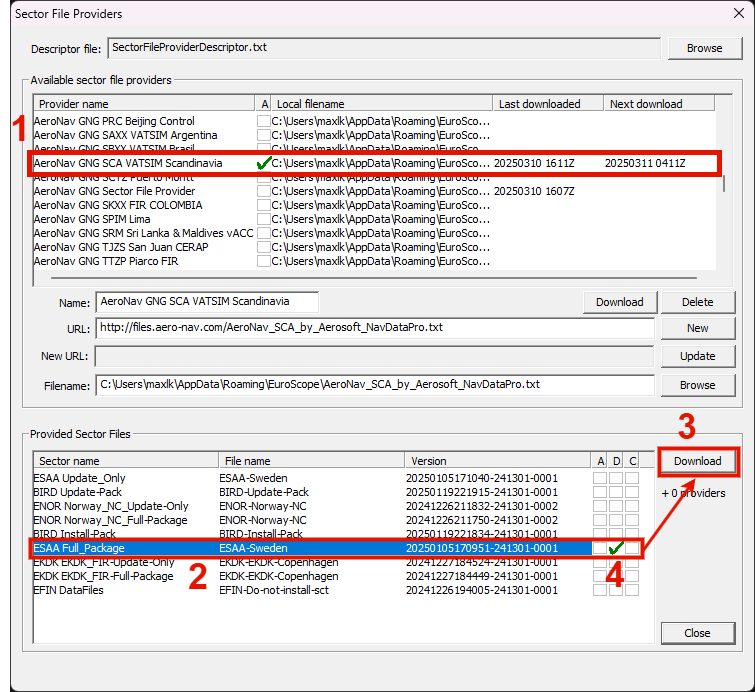
**Step 6:** Select the **"AeroNav GNG SCA VATSIM Scandinavia"** provider, then select and download **"ESAA Full\_Package"** located in in the lower portion of the window, following steps 1-3 as shown below.
**Then:** Verify that a green checkmark appears in the **"D"** column, this indicates that the download has completed successfully (step 4 below).
A successful download can also be confirmed by checking the message handler at the bottom left of the ES main window as shown in the two bottom rows as shown below.
[](https://wiki.vatsim-scandinavia.org/uploads/images/gallery/2025-03/ekZimage.png)
**Step 7:** Select and download "**ESAA Update\_Only"**, following steps 1-2 as shown below.
**Then:** Activate automatic downloading of "ESAA Update\_Only" by selecting the **"A"** column, it should show a green checkmark (step 3). **This will keep your GNG package up to date by automatically downloading new versions as they become available (except for plugin updates, which need some files to be manually replaced, see Q&A below).**
**Step 8:** Close EuroScope, and press **`Cancel All`** when it prompts you to save.
You might be prompted to log in to your Navigraph account.
There is no need to have a Navigraph subscription, but **you must have a (free) Navigraph account to access the GNG package.** Create a new if you do not already have one.
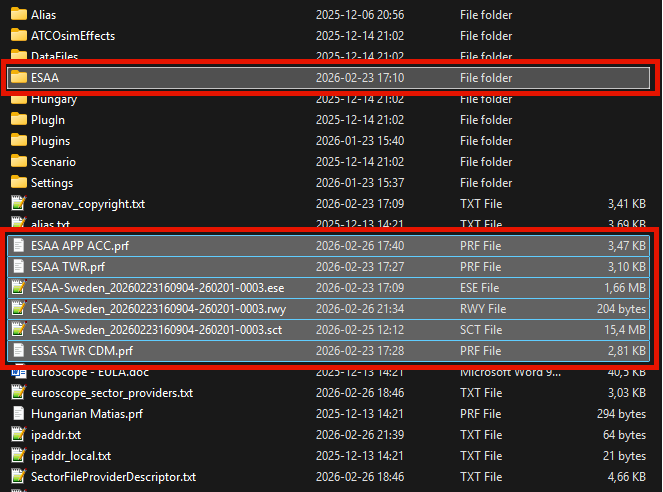
**Step 2:** Unpack the package in `%appdata%\EuroScope` - If everything was done correctly you should have an ESAA folder and several `.prf` files beginning with "ESAA" in the EuroScope folder.
- If prompted, select **"Replace the files in the destination" -** If you have not installed the GNG package before you might not get this prompt.
**Step 3:** Open the ESAA folder (`%appdata%\EuroScope\ESAA`) and **install all font files**, **overwrite when prompted**. Install by selecting all `.ttf` files, right click and select `Install`. Alternatively, open them one by one and press `Install` in the Windows Font Viewer window.
**Step 4:** If you have more than one of each file, remove old versions of the `.ese`, `.sct` and `.rwy` files from `%appdata%\EuroScope` keeping the newest version only (the newest date/file name).
Keeping old files will clutter your EuroScope folder with out-of-date files and you risk using outdated data.
**Then:** Open EuroScope again and select a profile i.e. **"ESAA TWR.prf"** when prompted to select a profile.
If the installation of the GNG package was completed successfully the window should look something like this:
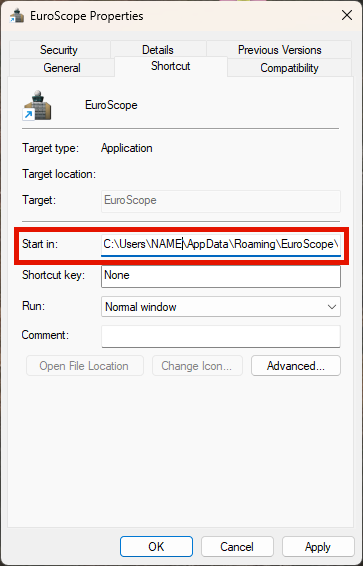
**Always run EuroScope from a shortcut**, there is a shortcut created in the start menu during the installation process. Check the Q&A on the bottom of this page you are having issues.
[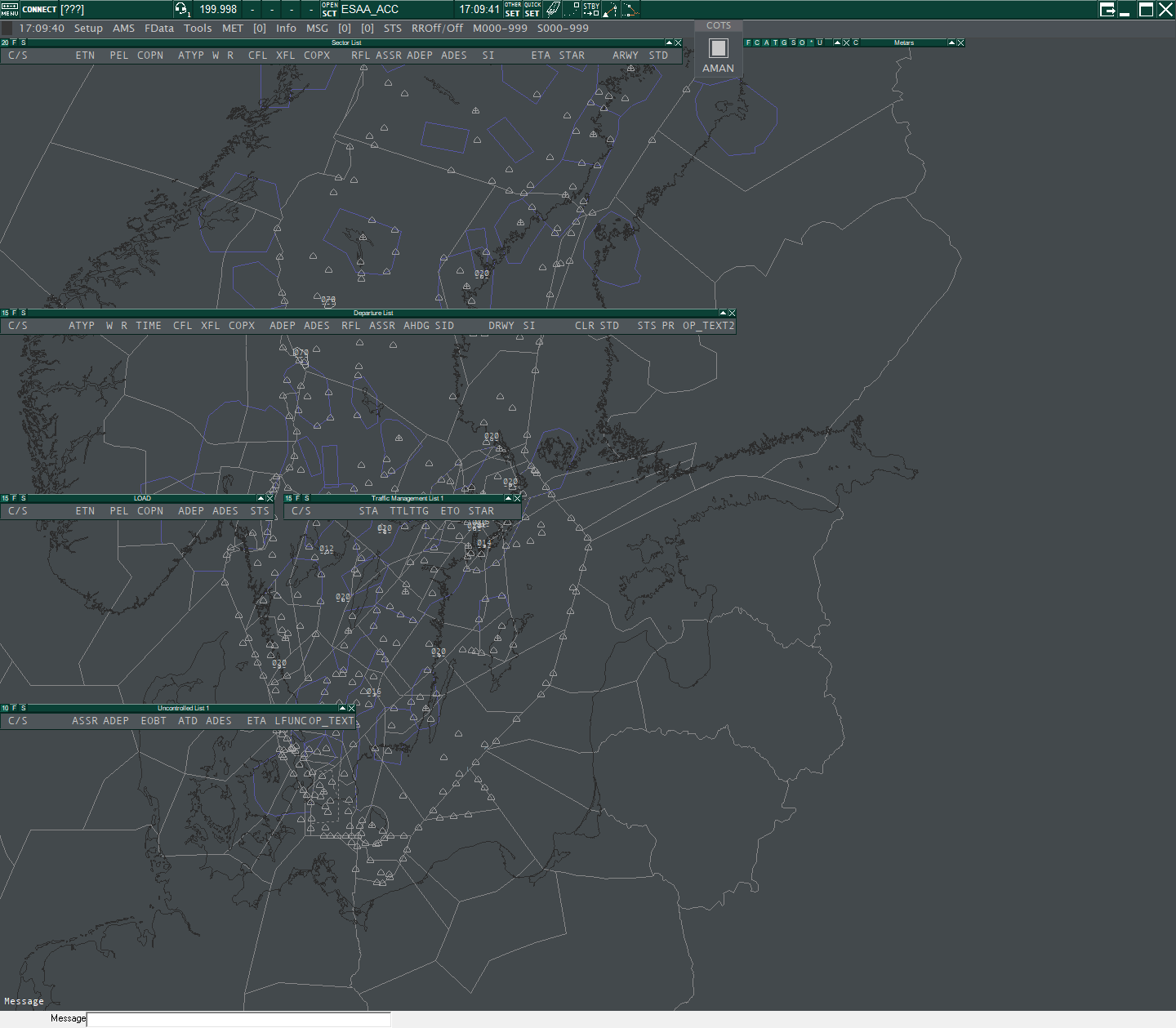](https://wiki.vatsim-scandinavia.org/uploads/images/gallery/2025-03/879image.png)
If your window does not look like the picture above, something went wrong during the installation process. **Try doing a clean install of the GNG Package** as shown in the Q&A on the bottom of this page:
## Keeping the GNG Package updated
Automatic update (NOT AVAILABLE UFN)
If you followed the guide above, ES will automatically notify you and download new files when they become available.
**It is mandatory to always use the latest available GNG package**. You cannot choose to postpone updating to a later time point, since it is necessary that all controllers use the latest and the same files.
**EuroScope does not allow for plugins to overwrite when updating the GNG package using the automatic download.** After updating, close EuroScope then go to `%appdata%\EuroScope`-> ESAA > Plugins > Updated Plugin" and copy the .dll files in the folder. Thereafter go back in the "Plugins" folder and paste the .dll files there. Overwrite existing files when prompted.
If you are notified that there is a new version of a plugin available: **Do NOT update it by manually installing a new version of the plugin, wait for a new GNG package to become available.**
New versions of the GNG package are announced in the `#swedish-bulletins` Discord channel.
EuroScope notifies you when new files are available.
Click `Yes` in all the following prompts when notified:
- "An updated version is downloaded to replace `XXXX.sct` sector file. Do you want to load and change it?"
- "Do you want to use `C:\..XXX.sct` sector file automatically in all ASR?"
- "Shall I delete the old `C:\..XXX.sct` *sector file?*"
New versions of the GNG package are announced in the `#swedish-bulletins` Discord channel.
All updates to the GNG package have to manually downloaded. Follow the instructions in the "GNG Package Installation" guide shown above, but **select the Update-Only GNG package (`ESAA Update Only`).**
**It is mandatory to always use the latest available GNG package**. You cannot choose to postpone updating to a later time point, since it is necessary that all controllers use the latest and the same files.
If you are notified that there is a new version of a plugin available: **Do NOT update it by manually installing a new version of the plugin, wait for a new GNG package to become available.**
## Observer's Guide
If you want to get going, observing online traffic and controllers, check [THIS GUIDE](https://wiki.vatsim-scandinavia.org/books/general/page/observers-guide "Observer's Guide")
## Q&A
Checking your EuroScope version
If you are unsure which ES version you are running, this can be checked under **`OPEN SCT` -> `About EuroScope`**,
The ES version is also shown in the properties of EuroScope.exe (usually located in (`C:\Program Files (x86)\EuroScope`).
How to do a clean install of the GNG Package.
**Step 1:** Remove the following files/folders in located in `%appdata%\EuroScope`.
- The `ESAA` folder.
- All files starting with `ESAA ` and `ESSA `
Do NOT remove any other files as some of them are required for Euroscope to work.
**Step 2:** Restart the installation process from **Step 1** of the **GNG Package Installation.**
Running EuroScope (always from a Shortcut!)
There is a shortcut to ES (EuroScope) created in the start menu during the installation process.
**Always run ES (EuroScope) from a shortcut**, do NOT run by individually opening EuroScope.exe (normally located in (`C:\Program Files (x86)\EuroScope`).
If you are experiencing issues (or creating a new shortcut for ES), make sure the "Start in:" adress is pointing to the ES folder located in `%appdata%`, **this is needed for ES to load the GNG package correctly.**
TopSkySettingsLocal.txt
```
Shortcut_Notepad=0x31
Shortcut_SEP=0x32
Shortcut_QDM=0x33
Shortcut_Quick_Look=0x34
Shortcut_Vector=0x35
Shortcut_Rwy_Line=0x36
Shortcut_FPL_Search=0x37
Shortcut_Find_Track=0x38
Shortcut_Create_APL=0x39
Shortcut_Uncoupled_Label_Combo=0x12
Shortcut_Uncoupled_Label=0x30
Shortcut_QNHTL=0xBB
Shortcut_Track_Control=0xDB
Shortcut_FPL=0x00
```
(CLAM/RAM)|
|---|---|---|
|PSR track (Primary radar)|[](https://wiki.vatsim-scandinavia.org/uploads/images/gallery/2025-07/image-1753283203054.png)|[](https://wiki.vatsim-scandinavia.org/uploads/images/gallery/2025-07/image-1753283239083.png)|
|SSR track (Secondary radar)|[](https://wiki.vatsim-scandinavia.org/uploads/images/gallery/2025-07/image-1753283219181.png) SPI / Transponder ident: [](https://wiki.vatsim-scandinavia.org/uploads/images/gallery/2025-07/image-1753283265122.png)|[](https://wiki.vatsim-scandinavia.org/uploads/images/gallery/2025-07/image-1753283254447.png)|
|SSR uncontrolled track|[](https://wiki.vatsim-scandinavia.org/uploads/images/gallery/2025-07/image-1753283334419.png)||
|Coasted track
(Unreliable position,
no update in over 30 sec)|[](https://wiki.vatsim-scandinavia.org/uploads/images/gallery/2025-07/image-1753283376913.png)||
|Leader line (Connecting the RPS and track label)|[](https://wiki.vatsim-scandinavia.org/uploads/images/gallery/2025-07/image-1753283486379.png)||
|History dot|[](https://wiki.vatsim-scandinavia.org/uploads/images/gallery/2025-07/image-1753283385131.png)||
### Flight Plan tracks
FPASD (Flight Plan Air Situation Display) tracks show positions not based on surveillance data but calculated by EuroScope.
Disabled by default but can be selected in the global menu under `Setup`->`FPASD`
|Description|Symbol|
|---|---|
|FPASD controlled track|[](https://wiki.vatsim-scandinavia.org/uploads/images/gallery/2025-07/image-1753283360279.png)|
|FPASD uncontrolled track|[](https://wiki.vatsim-scandinavia.org/uploads/images/gallery/2025-07/image-1753283369362.png)|
## Navigation symbols
|Description|Symbol|
|---|---|
|Significant point / NDB|[](https://wiki.vatsim-scandinavia.org/uploads/images/gallery/2025-07/image-1753283433277.png)|
|VOR|[](https://wiki.vatsim-scandinavia.org/uploads/images/gallery/2025-07/image-1753283448627.png)|
|Aerodrome|[](https://wiki.vatsim-scandinavia.org/uploads/images/gallery/2025-07/image-1753283457509.png)|
|Military significant point|[](https://wiki.vatsim-scandinavia.org/uploads/images/gallery/2025-07/image-1753283466772.png)|
|VFR Entry/exit point/Holding|[](https://wiki.vatsim-scandinavia.org/uploads/images/gallery/2025-07/image-1753284971586.png)|
# Track Labels
Data fields in "Normal Text", can be selected globally on/off via the Track Control Window, or for some of them, for individual tracks via the selected or Extended track label.
Data fields in **Bold Text**, is always shown.
Data fields in (Parentheses), are blank (instead of displaying the field name) when there is no data.
In case of the CFL/PEL field, only the PEL display can be selected off. For the COPN/COPX field, only the COPX display can be selected off.
The Selected Label is shown when the cursor is hovering over a label, otherwise the Unselected Label is shown.
The unselected Standard and Reduced labels can be minimi
**FLTID/TSSR**
**AFL (a)** GS
(DSFL) (DHDG) (DIAS) (DMACH) (DRC) (DBPS)
### Selected track
**(TCT DUPE EMRG AIW)**
**FLTID/TSSR**
**AFL (a) GS**
**(DSFL) (DHDG) (DIAS) (DMACH) (DRC) (DBPS)**
## Reduced label
Track label correlated with a flight plan. The Reduced label is shown for uncontrolled, unconcerned and notified tracks.
### Unselected track
**(V ALRT W S EMRG)**
**CALLSIGN (SI)** (NRAC) ATYP WTC TSSR
**AFL (a)** FCOPX GS NPT ADES
(DSFL) (DHDG) (DIAS) (DMACH) (DRC)
### Selected track
**(COM * V ALRT W Y A + C TEL I S EMRG COORD CPDLC_E CPDLC_W TEXT2)**
**CALLSIGN SI (NRAC) ATYP WTC TSSR**
**AFL (a) FCOPX GS NPT ADES**
**CFL**
**(OP_TEXT)** [max 2 lines of text]
(DSFL) (DHDG) (DIAS) (DMACH) (DRC)
## Standard label
Track label correlated with a flight plan. The Standard label is shown for Coordinated, Assumed, Redundant and Informed tracks.
### Unselected track
**(COM * V ALRT W Y R P M • • A + C TEL I F S EMRG COORD NSSR CPDLC_E CPDLC_W TEXT2 TTLTTG)**
**(MTDC) CALLSIGN (SI)** (NRAC) ATYP WTC TSSR
**AFL (a)** COPN/COPX GS NPT RFL ADES
**CFL**/PEL XFL AHDG ASP ARC
(DSFL) (DHDG) (DIAS) (DMACH) (DRC)
### Selected track
**(COM * V ALRT W Y R P M • • A + C TEL I F S EMRG COORD NSSR CPDLC_E CPDLC_W TEXT2 TTLTTG)**
**(MTDC) CALLSIGN (SI) (NRAC) ATYP WTC TSSR**
**AFL (a) COPN/COPX GS NPT RFL ADES**
**CFL/PEL XFL AHDG ASP ARC**
**(OP_TEXT)** [max 2 lines of text]
(DSFL) (DHDG) (DIAS) (DMACH) (DRC)
## Extended label
Extended track label correlated with a flight plan. The Extended label can be toggled by right click on Callsign for any track label except Uncorrelated tracks.
**(COM * V ALRT W Y R P M • • A + C TEL I F S EMRG COORD NSSR CPDLC_E CPDLC_W TEXT2 TTLTTG SQ FF STAFF)**
**(MTDC) CALLSIGN (SI) (NRAC) ATYP WTC TSSR ASSR PSSR FLTID FLTADD CODE**
**AFL (a) COPN/COPX GS NPT RFL ADES ADEP EOBT/ATD**
**CFL/PEL XFL AHDG ASP ARC EET**
**SECTOR STATE LFUNC ALT1 ALT2**
**(DSFL) (DHDG) (DIAS) (DMACH) (DRC)**
**COMP_CS**
**FIELD15** [max 9 lines of text]
**(FIELD18)** [max 6 lines of text]
**(FMF)**
**(MALRT)**
**OP_TEXT**
**OP_TEXT2**
## Mouse functions in track labels
|Data Fields|Description|Left-click action|Right-click action|
|---|---|---|---|
|•|Frequency
Set from Callsign menu| | |
|•|Mark
Set from Callsign menu| | |
|+|Field 18 / FMF indicator| |Open extended label|
|*|Unit|Toggle Units| |
|A|Manual alerts| |Open extended label|
|a|Vertical Trend Indication|Invoke SEP tool with VSEP| |
|ADEP|Departure aerodrome| |For debugging only: Toggle route prediction points draw|
|ADES|Destination aerodrome|Open FPL Window|Toggle ADES display|
|AFL|Actual Flight Level|Toggle AFL highlight|Toggle Level Band Highlight (AFL)|
|AHDG|Assigned heading |Open AHDG menu|Clear AHDG value / ACK, RJC or FAIL coord|
|ALRT|Alert message in priority order:
“MSAW”
“APW”
“AIW”
“L”(CLAM)
“D” (DUPE)
| |Acknowledge AIW alert|
|ALT1/2| |Open FPL Window| |
|ARC|Assigned vertical rate|Open ARC menu|Clear ARC value / ACK, RJC or FAIL coord|
|ASP|Assigned speed |Open ASP menu|Clear ASP value / ACK, RJC or FAIL coord|
|ASSR|Assigned mode A code|Open ASSR menu|Send CPDLC Squawk SSR|
|ATYP|Aircraft type|Toggle ATYP highlight|Toggle ATYP display|
|C|Inbound clearance|Toggle Inbound clearance flag| |
|CALLSIGN|Callsign|Open Callsign menu|Open Extended label|
|CFL / PEL|Cleared Flight Level or
Planned Entry Level|Open CFL/PEL menu|Open Vertical Aid Window|
|CODE|FPL mode S hex code| | |
|COM|Communication type|Open communication type popup| |
|COMP_CS|ICAO RTF callsign| | |
|COORD|Coordination message
ROF message sent / received:
“ROF”
Transfer with release:
“F” fully released
“C” released for climb
“D” released for descent
“T” released for turns|Open Tactical transfer menu|Open Tactical Info Window|
|COPN / COPX|Entry point or Exit point|Open Waypoint menu|Toggle Route draw with MTCD|
|CPDLC_E|CPDLC Emergency messages:
“SQ7500”
“MAYDAY”
“PAN”|Open CPDLC Emergency Acknowledgment menu| |
|CPDLC_W|CPDLC Warning|CPDLC Warning functions|Open CPDLC Current Message Window|
|DGS|Downloaded ground speed| |Toggle DGS display|
|DHDG|Downloaded heading | |Toggle DHDG display|
|DIAS|Downloaded indicated airspeed
Only estimated value if upper wind/temp data available.| |Toggle DIAS display|
|DMACH|Downloaded Mach number
Only estimated value if upper wind/temp data available.| |Toggle DIAS display|
|DRC|Downloaded rate of climb/descent| |Toggle DRC display|
|DSFL|Downloaded Selected Flight Level
Not available| |Toggle DSFL display|
|EET|Estimated Elapsed Time|Open FPL Window| |
|EMRG|Emergency:
“HI” for squawk 7500
“CF” for squawk 7600
“EM” for squawk 7700| | |
|EOBT / ATD|Estimated Off Block Time / Actual Time of Departure|Open FPL Window| |
|F|No fix warning
If IFR flight is not routing via one of specified fixes to its destination|Toggle No Fix flag| |
|FCOPX|FIR COPX point| | |
|FF|Feeder fix
(provided by AMAN)| | |
|FIELD15|TAS, RFL and Route | | |
|FIELD18|Other information | | |
|FLTADD|Mode S transponder address| | |
|FLTID|Aircraft identification| | |
|FMF|Flight Message Field
No information shown| | |
|GS|Ground Speed|Invoke SEP tool|Toggle GS display|
|I|Flight information
If OP_TEXT has data| |Open extended label|
|LFUNC| | | |
|M|Military coordination |Toggle Military Coordination flag|Toggle Route draw with SAP|
|MALRT|Manual alerts
Entered via Callsign menu:
"MAPP"
"IRREG"
"WEATHER"| | |
|MTCD|MTCD indicator
“•” if aircraft has an MTCD conflict|Invoke SEP tool|Toggle Route draw with MTCD|
|NPT|Next route point|Open Waypoint menu|Open CPDLC Current Message Window|
|NRAC|Number of aircraft
Number can be set by prefixing the aircraft type in the FPL by “X/” where X is the number.| | |
|NSSR|SSR warning
Displays ASSR if different from TSSR|Open ASSR menu|Send CPDLC Squawk SSR|
|OP_TEXT|Flight information message|Edit OP_TEXT| |
|OP_TEXT2|OP-TEXT2 message|Edit OP_TEXT2| |
|P|No P-RNAV/RNAV1 capability| | |
|PSSR|Previous mode A code| | |
|R|No B-RNAV/RNAV5 capability| | |
|RFL|Requested Flight Level |Open RFL menu|Open CPDLC Current Message Window|
|S|Mode S mismatch indicator| | |
|SI|Sector Indicator|Assume / Transfer|Toggle SI frequency|
|SQ|Arrival sequence number
(provided by AMAN)| | |
|STAFF|Scheduled Time of Arrival at feeder fix
(provided by AMAN)| | |
|SECTOR STATE|Current system state
Notified: NOTI
Coordinated: COOR
On-going coordination: ONGC
Assumed: ASSU
Transfer initiated: TRAN
Redundant: REDU
Terminated: TERM
Free: FREE
On-contact: ONCT| | |
|TEXT2|OP-TEXT2 message|Edit OP_TEXT2|Open extended label|
|TSSR|Aircraft transmitted mode A code| | |
|TTL_TTG |Time To Lose/Gain at feeder fix
(provided by AMAN)| | |
|V/Y/Z|Flight rules
“V” if VFR
“Y” if first IFR and later VFR
“Z” if first VFR and later IFR| | |
|W|No RVSM capability | | |
|WTC|Wake turbulence category|Toggle WTC highlight| |
|XFL|Exit Flight Level|Open XFL menu|Toggle Level Band Highlight (XFL)|
|Y|No 8.33kHz capability | | |
# Flight Lists
List fields in bold text e.g. "**C/S**", are shown by default.
List fields in normal text e.g. "EVT", is not shown by default but can be selected in the list top bar by pressing "F".
List fields in parentheses e.g. "**(ETN)**", indicate the default sorting for that list.
## Sector List
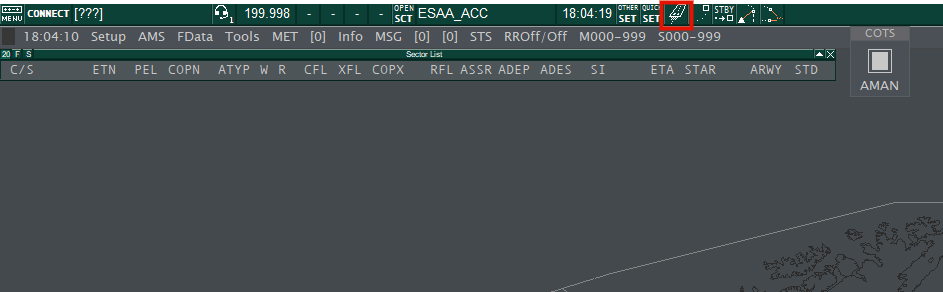
The Sector List contains all **Departed controlled flights** (all IFR, VFR only if assumed) in the *Coordinated* (from -15 min to ETO) and *Assumed* state.
Selected and configured from TopSky Tools menu.
|Data Fields|Description|Left-click action|Right-click action|
|---|---|---|---|
|EVT|Event indicator| | |
|**C/S**|CALLSIGN|Open Callsign menu| |
|**ETN**|Estimated Time Over sector entry| | |
|**PEL**|Planned Entry Level|Open PEL menu|Open Vertical Aid Window|
|**COPN**|Entry Coordination point|Open Waypoint menu|Toggle Route draw with MTCD|
|No|Number of aircraft.
Number can be set by prefixing the
aircraft type in the FPL by “X/” where X is the number.| | |
|**ATYP**|Aircraft type|Toggle ATYP highlight| |
|**W**|Wake turbulence category|Toggle WTC highlight| |
|**R**|Flight rules
“V” if VFR
“Y” if first IFR and later VFR
“Z” if first VFR and later IFR| | |
|**CFL**|Cleared Flight Level|Open CFL menu|Open Vertical Aid Window|
|ASP|Assigned speed |Open ASP menu|Clear ASP value / ACK, RJC or FAIL coord|
|**XFL**|Exit Flight Level|Open XFL menu|Open Vertical Aid Window|
|**COPX**|Exit coordination point|Open Waypoint menu|Toggle Route draw with MTCD|
|**RFL**|Requested Flight Level |Open RFL menu|Open CPDLC Current Message Window|
|PSSR|Previous mode A code| |Find PSSR|
|**ASSR**|Assigned mode A code|Open ASSR menu|Send CPDLC Squawk SSR|
|**ADEP**|Departure aerodrome| | |
|SID|Assigned SID|Open SID menu|Acknowledge SID Allocation|
|DRWY|Departure Runway| | |
|**ADES**|Destination aerodrome|Open FPL Window|Open ES flight plan dialog|
|FF|Feeder fix
(provided by AMAN)| | |
|STA|Scheduled Time of Arrival at feeder fix
(provided by AMAN)| | |
|TTLTTG|Time To Lose/Gain at feeder fix
(provided by AMAN)| | |
|**SI**|Sector Indicator|Open next controller popup list|Simulation popup|
|**Not shown**|Manual Coordination flag|Accept Manual coordination| |
|**ETA**|Estimated Time of Arrival| | |
|**STAR**|Assigned STAR|Open STAR menu|Acknowledge STAR Allocation|
|**ARWY**|Arrival Runway|Open RWY menu| |
|**Not shown**|Cleared to land Flag
Shown within 12 NM from ADES.
Red until toggled green.|Toggle CTL flag| |
|**STD**|Arrival Stand|Open Stand menu| |
|OP_TEXT|Flight information message|Edit OP_TEXT| |
|C|Check Indicator|Toggle Check Indicator| |
## Departure List
The Departure List contains all **Non-departed flight** (IFR and VFR) from active airports.
Selected from EuroScope Quick SET.
|Data Fields|Description|Left-click action|Right-click action|
|---|---|---|---|
|EVT|Event indicator| | |
|**C/S**|CALLSIGN|Open Callsign menu| |
|No|Number of aircraft.
Number can be set by prefixing the
aircraft type in the FPL by “X/” where X is the number.| | |
|**ATYP**|Aircraft type|Toggle ATYP highlight| |
|**W**|Wake turbulence category|Toggle WTC highlight| |
|**R**|Flight rules
“V” if VFR
“Y” if first IFR and later VFR
“Z” if first VFR and later IFR| | |
|**TIME**|EOBT (Estimated Off Block Time)|Open Time menu (EOBT)| |
|ECTOT|Event CTOT| | |
|**CTOT**|CTOT|CTOT Options|Network Status Options|
|NET|Network Status|Network Status Options|Get Flow Message as text|
|**CFL**|Cleared Flight Level|Open CFL menu|Open Vertical Aid Window|
|**XFL**|Exit Flight Level|Open XFL menu|Open Vertical Aid Window|
|**COPX**|Exit coordination point|Open Waypoint menu|Toggle Route draw with MTCD|
|**ADEP**|Departure aerodrome| | |
|**ADES**|Destination aerodrome|Open FPL Window|Open ES flight plan dialog|
|**RFL**|Requested Flight Level |Open RFL menu| |
|**ASSR**|Assigned mode A code|Open ASSR menu| |
|AHDG|Assigned heading |Open AHDG menu|Clear AHDG value / ACK, RJC or FAIL coord|
|**SID**|Assigned SID|Open SID menu|Acknowledge SID Allocation|
|**DRWY**|Departure Runway|Open RWY menu| |
|**SI**|Sector Indicator|Open next controller popup list|Simulation popup|
|**Not shown**|Manual Coordination flag|Accept Manual coordination| |
|DEP|Departure Coordination.|Toggle between:
Estimate (EST)
Depart (DEP)
Abort (ABT)| |
|**CLR**|Combined clearance received flag,
DCL dialogue status and CMT (Comment) indicator|Open PDC/DCL Window|Open CMT Pop-up|
|**STD**|Departure Stand|Open Stand menu| |
|**STS**|Ground Status|Open Ground State menu| |
|**PR**|Pending Request|Open Request Menu|
|**OP_TEXT2**|OP-TEXT2 message|Edit OP_TEXT2| |
## Load List
The Load List contains all **Departed controlled flight** (all IFR, VFR only if assumed) in the *Notified* state (from -60 to -16 min from ETO) and all **Non-departed controlled flights** in the *Notified* state (from -15 min to ETO).
Selected from TopSky Tools menu.
|Data Fields|Description|Left-click action|Right-click action|
|---|---|---|---|
|**C/S**|CALLSIGN|Open Callsign menu| |
|No|Number of aircraft
Number can be set by prefixing the
aircraft type in the FPL by “X/” where X is the number.| | |
|R|Flight rules
“V” if VFR
“Y” if first IFR and later VFR
“Z” if first VFR and later IFR| | |
|**ETN**|Estimated Time Over sector entry| | |
|**PEL**|Planned Entry Level|Open PEL menu|Open Vertical Aid Window|
|**COPN**|Entry coordination point|Open Waypoint menu|Toggle Route draw with MTCD|
|**ADEP**|Departure aerodrome| | |
|**ADES**|Destination aerodrome|Open FPL Window|Open ES flight plan dialog|
|PSSR|Previous mode A code| |Find PSSR|
|ASSR|Assigned mode A code|Open ASSR menu| |
|**STS**|Ground Status| | |
|C|Check Indicator|Toggle Check Indicator| |
## Uncontrolled List 1 & 2
The Uncontrolled List contains all **Uncontrolled flights** (VFR not in assumed state) within or close to Sweden.
Selected and configured from TopSky Tools menu.
|Data Fields|Description|Left-click action|Right-click action|
|---|---|---|---|
|**C/S**|CALLSIGN|Open Callsign menu| |
|**ASSR**|Assigned mode A code|Open ASSR menu| |
|No|Number of aircraft
Number can be set by prefixing the
aircraft type in the FPL by “X/” where X is the number.| | |
|ATYP|Aircraft type|Toggle ATYP highlight| |
|**ADEP**|Departure aerodrome| | |
|**EOBT**|EOBT (Estimated Off Block Time)|Open Time menu (EOBT)| |
|**ATD**|ATD (Actual Time of Departure)|Open Time menu (ATD)|Reset ATD to EOBT|
|**ADES**|Destination aerodrome|Open FPL Window|Open ES flight plan dialog|
|**ETA**|Estimated Time of Arrival| | |
|FCOPN|FIR Entry coordination point| |Toggle Route draw with MTCD|
|PEL|Planned Entry Level|Open PEL menu|Open Vertical Aid Window|
|FETN|Estimated Time Over FIR Entry| | |
|FCOPX|FIR Exit coordination point| |Toggle Route draw with MTCD|
|**LFUNC**|Logical Function (SI)|Open next controller popup list|Simulation popup|
|**OP_TEXT**|Flight information message|Edit OP_TEXT| |
|C|Check Indicator|Toggle Check Indicator| |
## Traffic Management List 1 & 2
The Traffic Management List (TML) contains all **Departed flights** in the *Notified, Coordinated, Assumed* and *Redundant* state with a specific destination and/or routing via specified points. The ETO over the point (or ETA if no point specified) must be within the next 45 minutes. The destination must be specified to include uncontrolled flights in the list.
Selected and configured from TopSky Tools menu.
|Data Fields|Description|Left-click action|Right-click action|
|---|---|---|---|
|EVT|Event indicator| | |
|COPN|Entry Coordination point|Open Waypoint menu|Toggle Route draw with MTCD|
|SI|Sector Indicator|Open next controller popup list|Simulation popup|
|**C/S**|CALLSIGN|Open Callsign menu| |
|ASSR|Assigned mode A code|Open ASSR menu|Send CPDLC Squawk SSR|
|AFL|Actual Flight Level|Open AFL menu| |
|CFL|Cleared Flight Level|Open CFL menu|Open Vertical Aid Window|
|ATYP|Aircraft type|Toggle ATYP highlight| |
|RFL|Requested Flight Level |Open RFL menu| |
|COPX|Exit coordination point|Open Waypoint menu|Toggle Route draw with MTCD|
|FF|Feeder fix
(provided by AMAN)| | |
|**STA**|Scheduled Time of Arrival at feeder fix
(provided by AMAN)| | |
|**TTLTTG**|Time To Lose/Gain at feeder fix
(provided by AMAN)| | |
|**ETO**|Estimated Time Over TML waypoint if selected or ETA| | |
|**STAR**|Assigned STAR|Open STAR menu|Acknowledge STAR Allocation|
|ETA|Estimated Time of Arrival| | |
|FText|Free Text|Edit FText| |
|C|Check Indicator|Toggle Check Indicator| |
|HOLD|Hold indicator|Toggle TML HOLD/XHOLD| |
## Sector Inbound List
The Sector Inbound List (SIL) contains all **Departed controlled flight** (all IFR, VFR only if assumed) in the *Notified* (no time limit) and *Coordinated* state. Intended to be used on additional EuroScope instance to show inbound traffic, only shows 4 rows by default.
Selected from EuroScope Quick SET.
|Data Fields|Description|Left-click action|Right-click action|
|---|---|---|---|
|**C/S**|CALLSIGN|Open Callsign menu| |
|PSSR|Previous mode A code| |Find PSSR|
|ASSR|Assigned mode A code|Open ASSR menu| |
|**ETN**|Estimated Time Over sector entry| | |
|**PEL**|Planned Entry Level|Open PEL menu|Open Vertical Aid Window|
|**COPN**|Entry Coordination point|Open Waypoint menu|Toggle Route draw with MTCD|
|R|Flight rules
“V” if VFR
“Y” if first IFR and later VFR
“Z” if first VFR and later IFR| | |
|XFL|Exit Flight Level|Open XFL menu|Open Vertical Aid Window|
|COPX|Exit coordination point|Open Waypoint menu|Toggle Route draw with MTCD|
|RFL|Requested Flight Level |Open RFL menu| |
|ADEP|Departure aerodrome| | |
|ADES|Destination aerodrome|Open FPL Window|Open ES flight plan dialog|
|SI|Sector Indicator|Open next controller popup list|Simulation popup|
|Not shown|Manual Coordination flag|Accept Manual coordination| |
|**C**|Check Indicator|Toggle Check Indicator| |
## ETWR List
The ETWR List (Departure SIL) contains all **Controlled flight** (all IFR, VFR only if assumed) in the *Notified* and *Coordinated* state departing from a specific airport.
Selected and configured from TopSky Tools menu.
|Data Fields|Description|Left-click action|Right-click action|
|---|---|---|---|
|**C/S**|CALLSIGN|Open Callsign menu| |
|PSSR|Previous mode A code| |Find PSSR|
|ASSR|Assigned mode A code|Open ASSR menu| |
|**ETN**|Estimated Time Over sector entry| | |
|**PEL**|Planned Entry Level|Open PEL menu|Open Vertical Aid Window|
|**COPN**|Entry Coordination point|Open Waypoint menu|Toggle Route draw with MTCD|
|R|Flight rules
“V” if VFR
“Y” if first IFR and later VFR
“Z” if first VFR and later IFR| | |
|XFL|Exit Flight Level|Open XFL menu|Open Vertical Aid Window|
|COPX|Exit coordination point|Open Waypoint menu|Toggle Route draw with MTCD|
|RFL|Requested Flight Level |Open RFL menu| |
|ADEP|Departure aerodrome| | |
|**SID**|Assigned SID|Open SID menu|Acknowledge SID Allocation|
|**DRWY**|Departure Runway|Open RWY menu| |
|ADES|Destination aerodrome|Open FPL Window|Open ES flight plan dialog|
|SI|Sector Indicator|Open next controller popup list|Simulation popup|
|Not shown|Manual Coordination flag|Accept Manual coordination| |
|STS|Ground Status| | |
|**C**|Check Indicator|Toggle Check Indicator| |
## Flight Plan List
The Flight Plan List contains all **Flight plans** on the network. By default the list is filtered to show only flight plans in the *Notified, Coordinated* and *Assumed* state. To show all flight plans, click "N" in the top bar.
Selected from EuroScope Quick SET.
|Data Fields|Description|Left-click action|Right-click action|
|---|---|---|---|
|**(C/S)**|CALLSIGN|Open Callsign menu| |
|**ADEP**|Departure aerodrome| | |
|**ADES**|Destination aerodrome|Open FPL Window|Open ES flight plan dialog|
|ASSR|Assigned mode A code|Open ASSR menu| |
|SI|Sector Indicator|Open next controller popup list|Simulation popup|
|STS|Ground Status| | |
|**STATE**|Flight Plan State
NOTST (Not Started)
SIMUL (Simulated)
TERM (Terminated)|Open Flight Plan State menu| |
## Resectorisation List
The Resectorisation List contains all flights **Assumed** and **On-Contact** with a specific FLUNC (controller ID). Can be used at controller shift change to show all flights under the control of the other controller.
|Data Fields|Description|Left-click action|Right-click action|
|---|---|---|---|
|**(C/S)**|CALLSIGN|Open Callsign menu| |
|**SI**|Sector Indicator|Assume|Simulation popup|
|**CFL**|Cleared Flight Level| |Open Vertical Aid Window|
|**COPX**|Exit coordination point| |Toggle Route draw with MTCD|
|**ASSR**|Assigned mode A code| | |
|**CLR**|Combined clearance received flag,
DCL dialogue status and CMT (Comment) indicator| | |
|**STS**|Ground Status| | |
|**C**|Check Indicator|Toggle Check Indicator| |
# TWR / TWR CDM Profile
# The Setup
## ASR fast keys
### (`F1`+)
- `1`: ESAA TWR APP
- `2`:
- **TWR profile**: ESGG GND
- **TWR CDM profile**: ESSA GND TWR-W
- `3`: ESSB GND
- `4`: ESMS GND
- `5`: ESPA GND
- `6`: ESKN GND
## Keyboard Shortcuts (Ground Views)
### (`ALT`+)
- `D`: Toggles Pushback **D**rop-point map (ESSA only).
- `F`: Toggles Pushback map.
- `G`: Toggles Stand label (**G**ates) maps.
- `H`: Toggles Heavies Restrictions maps.
- `J`: Toggles Pushback map.
- `K`: Toggles Taxiway label maps.
- `P`: Toggles Apron label (**P**latta) maps.
- `W`: Toggles Wingspan/TWY limitation label maps.
## General
The Swedish TWR profile makes use of advanced ground states and flight lists, this requires Euroscope v.3.2.1.27 or later.
Since TopSky is designed to be used in an Area/Approach setting the functionality of that setup is not suited for the tower environment. The tower setup is intended to be used only by DEL, GND or TWR positions (with or without an associated TMA). APP and CTR positions shall use the TopSky setup.
There are two versions of the tower setup, one for use at airports with A-CDM (Airport Collaborative Decision Making) and one for airports without. The tower setup uses EuroScope lists in a way similar to a FPB (Flight Progress Board A.k.a. Strips) where the progress of a flight can be managed.
# Flight Progress Board
## Layout
The FPB (Flight Progress Board) consists of default EuroScope lists arranged in a way that lets you monitor and manage the progress of a flight. Two TopSky lists, Sector and Uncontrolled, are also part of the setup and they will be used to handle airborne traffic. All lists in the FPB have columns and functions specific to that phase of flight.
[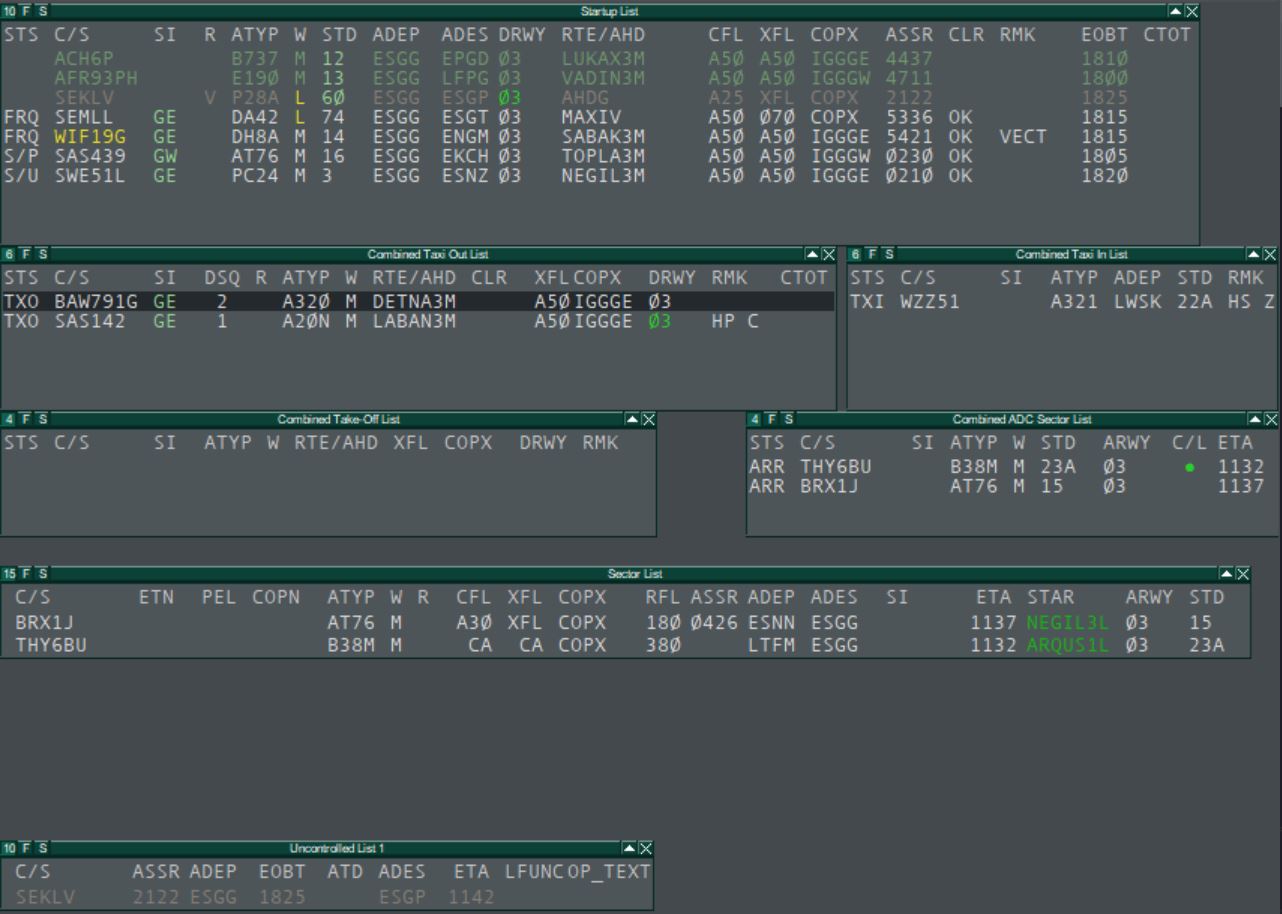](https://wiki.vatsim-scandinavia.org/uploads/images/gallery/2024-05/full-fpb.JPG)
A departing flight will appear in the Start-up list and will successively move to the Taxi Out list, Take-Off list and then to the Sector list. In the Start-up list you can manage any action necessary from receiving the flight plan to start-up and push-back. Once the aircraft calls for taxi the flight can be toggled to the Taxi Out list. When the aircraft receives the take-off clearance it will be toggled to the Take-Off list and once airborne it will show in the Sector list.
An arriving aircraft will initially appear in the Sector list and with less than 40 track miles to destination will also show in the ADC Sector list. The ADC Sector list will show the arrival sequence. Once the aircraft has landed it can be toggled to the Taxi In list.
Additionally, the setup contains the Uncontrolled list, showing all VFR flights, the Controller list and the METAR list. These lists are not forming part of the FPB.
The A-CDM version of the FPB have a few additional columns in the Start-Up list related to the A-CDM / Departure sequencing. By default, the A-CDM version have more rows in the Start-Up and Taxi Out/In lists to allow for more traffic. The two versions of the FPB are otherwise identical.
Depending on what position you are working, you are encourage to remove lists that are unnecessary for your task. This will free up screen space and let you focus on the responsibilities specific to your working position. Below is a table suggesting which lists to have open for which position.
| | TWR | GND | DEL |
|------------|-----|-----|-----|
| Startup | X* | X | X |
| Taxi out | X | X | |
| Take-off | X | | |
| ADC Sector | X | X | |
| Taxi in | X* | X | |
| Sector | X | | |
**Not needed if GND is open*
It is recommended to have the TWR setup in the same Euroscope instance as the primary situation display (radar display). This way the integration between the FPB, TopSky lists and situation display will be maintained and functions like the Flight Leg will work.
[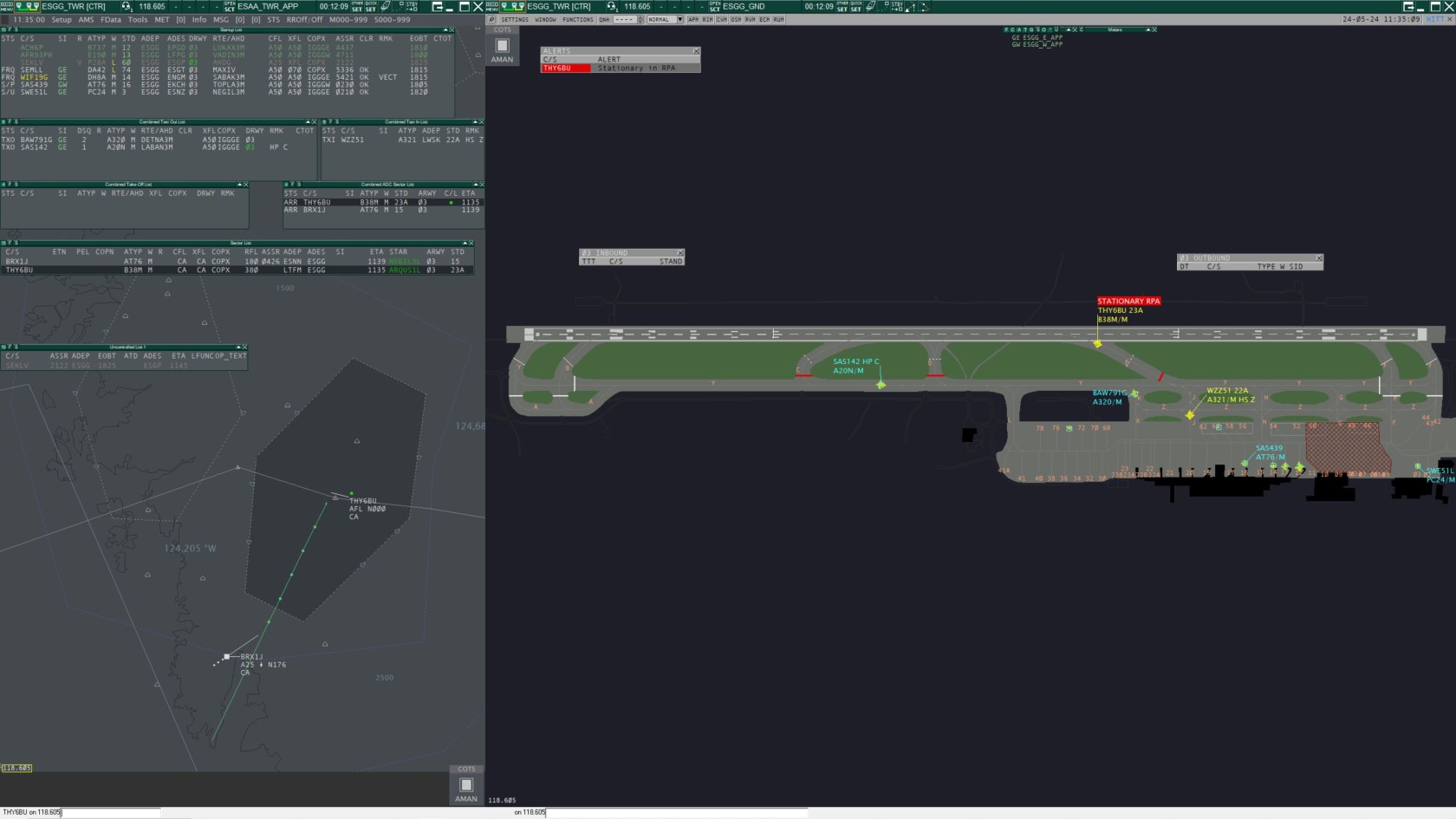](https://wiki.vatsim-scandinavia.org/uploads/images/gallery/2024-05/full-setup-gnd.JPG)
[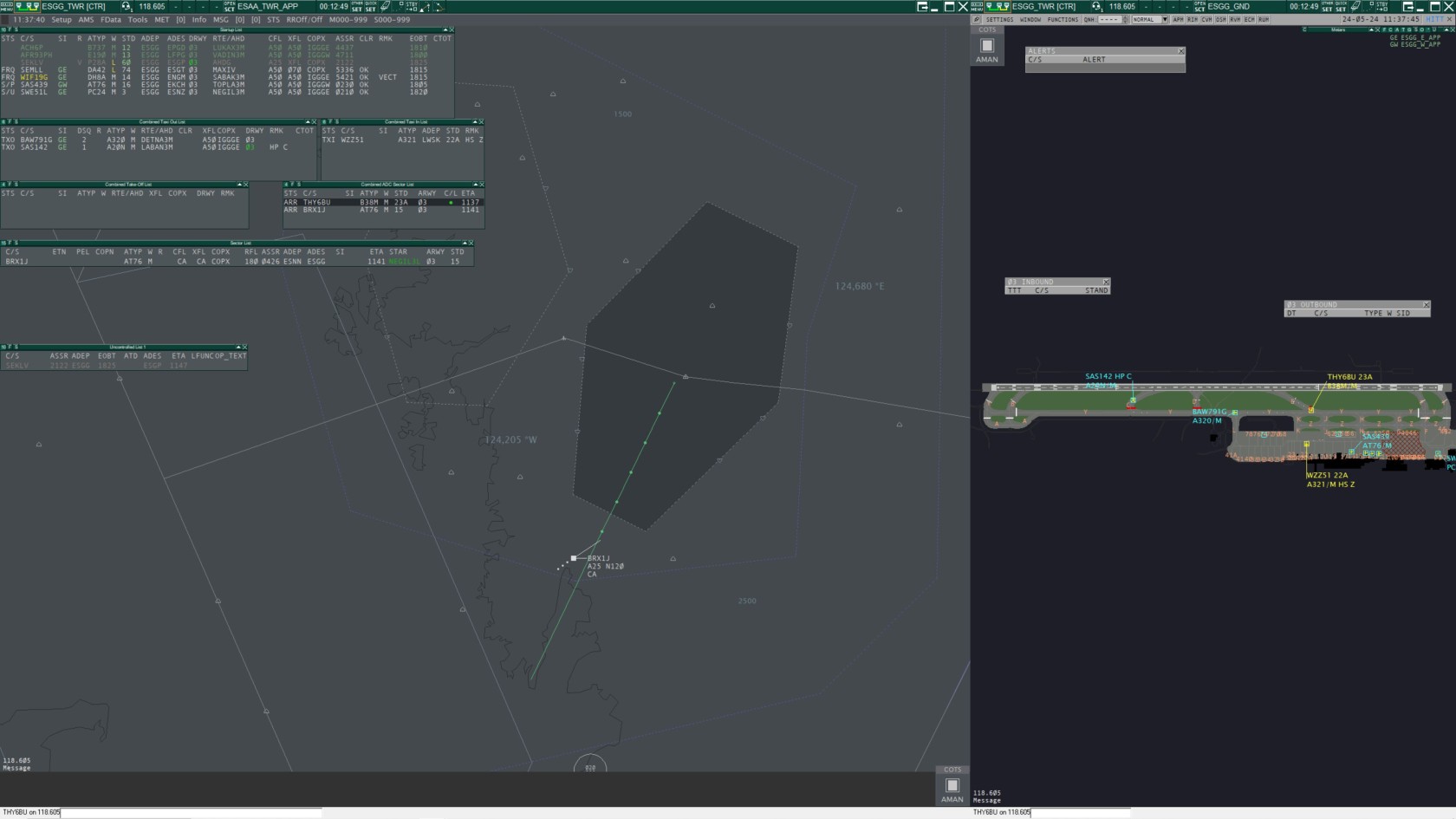](https://wiki.vatsim-scandinavia.org/uploads/images/gallery/2024-05/full-setup-twr.JPG)
## Flight Progress
### General Use
A complete description of all functions and click actions in the list are described in section Flight Lists.
All lists in the FPB, TopSky lists excluded, have a common left side from where you can manage the progress of the flight:
**Ground Status (STS)**
- Left Click: Set ground status
- Right Click: Assume/Transfer
**Call Sign (C/S)**
- Left Click: Open handoff menu
- Right Click: Call Sign Highlight
**Sector Indicator (SI)**
- Left Click: Open next controller menu
- Right Click: Assume/Transfer
Setting the ground status moves the flight across the FPB. The SI can be pre-set to the
correct sector sequence. Right clicking on the STS or SI assumes or transfers the flight. In
the handoff menu you can assume an uncontrolled flight, make a manual transfer or release
a flight.
### Start-Up List
Shows traffic from receiving the flight plan until ground state S/U (Start-Up) or S/P (Start-Up
& Push-Back).
[](https://wiki.vatsim-scandinavia.org/uploads/images/gallery/2024-08/start-up-list.jpg)
Start-Up list is sorted by ground state.
Column RTE/AHD (Route/Assigned Heading) will only work correctly if logged on as DEL, GND or TWR. By default, RTE/AHD will show SID if available otherwise the first waypoint in the route or the assigned heading if set. Left click opens the SID menu where you can assign a different SID and right click opens the AHDG menu. To set a DCT left click on COPX to open the waypoint menu.
Column PR (Pending Request) is used to set reminders of pilot request that cannot handled directly. Left click and select the request in the menu. The letter indicates the type of request and the number in what order it was made. C = Clearance, S = Start Up, P = Push Back and T = Taxi. Once the request has been handled the PR-indicator will reset with either the CLR OK or updating the STS.
**Work flow:**
1. Check flight plan by left click on ADES to open FPL window, FLEG can be toggled by right click on COPX.
3. If necessary, update RTE/AHD, left click to change SID and right click to set a heading.
4. Left click CLR, this opens the DEP Clearance menu. CFL and ASSR will be set automatically. Click **Cancel**.
5. Enter any special conditions (SLOW etc.) in the RMK column.
6. When aircraft calls, left click C/S and then assume and also left click STS and then FRQ (On Frequency).
7. Open DEP Clearance menu and give the departure clearance, click **OK** after the readback. PDC is available as well.
8. If necessary, update SI with correct sector sequence by left click on SI and selecting the next sector.
9. To transfer the flight to the next controller, right click on either STS or SI.
10. When approving start-up or push-back, set correct ground state.
11. With the taxi clearance, set ground state TXO. This will move the flight to the Taxi Out list.
### Taxi Out List
Shows traffic with ground state TXO (Taxi Out) or xLU (Line Up).
[](https://wiki.vatsim-scandinavia.org/uploads/images/gallery/2024-08/taxi-out-list.jpg)
Taxi Out list is sorted by DSQ (Departure Sequence). To assign a departure sequence, left click on the blank space in the DSQ column, this will assign the next available sequence number. To edit or remove a sequence number left click on a number in the DSQ column, this will open the DSQ menu. To advance an aircraft in the sequence, right click on the number.
**Work flow:**
1. When the flight appears in the list, update the SI with correct sector sequence if necessary and assign a departure sequence number.
2. Hold Short instructions can be entered in the HS column.
3. To transfer the flight to the next controller, right click on either STS or SI.
4. When aircraft is instructed to Line Up, set ground state xLU.
5. When the aircraft is cleared for Take-Off, set ground state xTO. This will move the flight to the Take-Off list.
### Take-Off List
Shows traffic with ground state xTO until the aircraft is airborne. Once the aircraft is airborne the flight will be moved to the Sector list.
[](https://wiki.vatsim-scandinavia.org/uploads/images/gallery/2024-08/take-off-list.jpg)
### ADC Sector List (Arrival Sequence)
Shows arriving traffic within 40 track miles with ground state ARR (Arrival).
[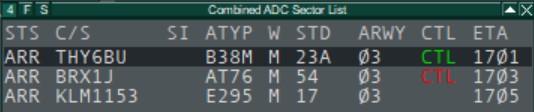](https://wiki.vatsim-scandinavia.org/uploads/images/gallery/2024-08/adc-sector-list.jpg)
This list is sorted by ETA.
**Work flow**
1. Assume traffic by right click on either STS or SI.
2. If necessary, update SI with correct sector sequence by left click on SI and selecting the next sector.
3. Once cleared to land toggle the CTL (Cleared to Land) indication with a left click. The CTL flag will show up at 12 NM from the airport in red to indicate that landing clearance has not been given. Once toggled the CTL flag will turn green and after landing the flag will disappear.
4. To transfer the flight to the next controller, right click on either STS or SI.
5. With the taxi clearance, set ground state TAXI IN. This will move the flight to the Taxi In list.
### Taxi In List
Shows arriving traffic with ground state TAXI IN.
[](https://wiki.vatsim-scandinavia.org/uploads/images/gallery/2024-05/taxi-in-list.JPG)
This list is sorted by call sign.
**Work flow:**
1. Hold Short instructions can be entered in the HS column.
2. If necessary, update SI with correct sector sequence.
3. Once the aircraft is on stand, left click call sign and select release.
4. After traffic is released, left click STS and select PARKED, this removes the traffic from the list.
### Sector List
This is a TopSky list with the same functionality as in the TopSky setup and is needed since we are using TopSky as the primary situation display. The Sector list is not part of the FPB but rather a complement to the situation display. For airborne traffic the majority of inputs are done in the label and not through the list.
[](https://wiki.vatsim-scandinavia.org/uploads/images/gallery/2024-05/sector-list.JPG)
The list shows airborne traffic that is assumed by you or that will enter your sector in the coordinated state. If needed, traffic in the notified state can be displayed through selection in the TopSky menu TOOLS. Sector list is sorted by ETN for inbound traffic and by call sign when assumed.
The main difference is the call sign menu accessed by left clicking on the call sign. From this menu some additional functionality can be found e.g. setting the Missed Approach manual alert. Additionally, this list is using the TopSky flight plan window.
### Uncontrolled List
This is a TopSky list with the same functionality as in the TopSky setup. Uncontrolled list is not part of the FPB.
[](https://wiki.vatsim-scandinavia.org/uploads/images/gallery/2024-05/uncontrolled-list.JPG)
This list shows only uncontrolled VFR, either in Free or On Contact state. Controlled VFR in the Assumed state is shown in the Sector list. The Uncontrolled list is not exclusive to a specific position and will show all uncontrolled VFR in Sweden.
### Known issues
There are some limitations and known issues with the setup. Flights on the FPB cannot easily be moved from the normal departure and arrival flow and this can create some difficulties.
Traffic with the same departure and arrival airport will disappear from the Taxi In list when Euroscope terminating the flight plan.
An arrival with a flight plan to the airport wants to depart again without filing a new flight plan:
1. Set ground status TAXI IN so the flight appear in the Taxi In list.
2. Then change status to TAXI OUT. The flight will now disappear from Taxi In list and will not show in the Taxi Out list since the flight plan contains the wrong departure airport.
3. In the ground radar display, open the call sign menu and select FPL (Flight Plan). Alternatively open the Euroscope Flight Plan list from the “Quick SET” dropdown menu from where the flight plan dialog can be opened.
4. Edit the flight plan and set “Origin” to the current airport. Now the flight should appear in the Taxi Out list.
As a general rule, if a flight is not showing properly in the Start-Up or Taxi Out list. Open the Flight Plan list and set Flight Plan status to “Terminate”. This will usually reset any issues and the flight will appear in the correct list after a few seconds.
When signed in as Delivery there is usually an issue with the Start-Up list. Delivery can technically not have an separate sector in Euroscope when other positions are online and this will make all flights in the list appear in unconcerned state (greyed out). In this state the RTE/AHD column will not show the correct value until you assume the flight.
This can be fixed with the use of sector ownership:
1. Open “Other SET” menu and select “Sector ownership setup”.
2. Click on “Select All” and wait until the list gets a grey background.
3. In the dropdown list at the bottom, select “DEL” and click “OK”. Euroscope can freeze for a few seconds.
Now, the Start-Up list will show correct colours and values. The drawback is that the sector sequence will skip any ground position and those has to be selected manually.
# Ground Track Labels
This chapter describes the track labels as shown on ASRs using the Ground Radar plugin.
For a description of TopSky track labels (such as shown on `ESAA_TWR_APP.asr`), see [**TopSky**](https://wiki.vatsim-scandinavia.org/books/general/page/topsky).
The track symbols and labels are colored according to the flight’s status (arrival, departure or overflight/unknown).
- Arrivals are yellow
- Departures are light blue
- Overflight/unknown are light grey.
Data fields in normal text e.g. "SID", can be selected globally on/off via `SETTINGS`->`Labels`.
Data fields in bold text e.g. "**CALLSIGN**", is always shown
Data fields in parentheses e.g. "(ALRT)", are blank when there is no data.
Right-clicking on the any track symbol toggles the heading lines.
## ESGG Departures
Track label for outbound flights.
### Unselected track
(ALRT ASSR_E COMM)
**CALLSIGN (RMK)**
**ATYP/WTC** DEP
### Selected track
(ALRT ASSR_E COMM)
**CALLSIGN RMK**
**ATYP/WTC DEP**
## ESGG Arrivals
Track label for inbound flights.
### Unselected track
(ALRT COMM)
**CALLSIGN (STAND)**
**ATYP/WTC** RMK
### Selected track
(ALRT COMM)
**CALLSIGN STAND**
**ATYP/WTC RMK**
## ESGG Overflight
Track label for flights that are neither outbound nor inbound.
### Unselected track
(ALRT COMM)
**CALLSIGN**
**ATYP/WTC** RMK
### Selected track
(ALRT COMM)
**CALLSIGN**
**ATYP/WTC RMK**
## ESSA Departures
Track label for outbound flights.
### Unselected track
(ALRT ASSR_E COMM)
**CALLSIGN**
ATYP WTC DEP
REG **(RMK)**
### Selected track
(ALRT ASSR_E COMM)
**CALLSIGN**
**ATYP WTC DEP**
**REG RMK**
## ESSA Arrivals
Track label for inbound flights.
### Unselected track
(ALRT COMM)
**CALLSIGN** STAND
ATYP WTC DEP
REG **(RMK)**
### Selected track
(ALRT COMM)
**CALLSIGN STAND**
**ATYP WTC DEP**
**REG RMK**
## ESSA Overflight
Track label for flights that are neither outbound nor inbound.
### Unselected track
(ALRT COMM)
**CALLSIGN**
ATYP WTC
REG **(RMK)**
### Selected track
(ALRT COMM)
**CALLSIGN**
**ATYP WTC**
**REG RMK**
## Mouse functions in track labels
|Data Fields|Description|Left-click action|Right-click action|
|---|---|---|---|
|ALRT|Safety net alert indicator (yellow or red)| | |
|ASSR_E|SSR code error indicator (red)| | |
|ATYP|Aircraft type (ICAO)| ||
|CALLSIGN|Callsign|Open Callsign menu| |
|COMM|Communication type indicator (yellow)
“r” for voice receive only
“t” for text only| ||
|REG|Aircraft registration code
(Read from FPL remarks)|| |
|RMK|Remarks
(scratchpad/OP-TEXT2 text)|||
|DEP|Displays AHDG if set
Displays SID if no AHDG set.|Open SID setup popup list|Open assigned heading popup list|
|STAND|Assigned arrival stand name.
Yellow if reassigned and not acknowledged|Open Stand assignment menu.
If yellow: Acknowledge new assignment||
|WTC|Wake turbulence category|||
## Other
For a description of track labels shown at other airports than ESGG and ESSA, refer to **Ground Radar plugin for EuroScope - General.pdf (4. Track presentation)** included in the GNG package.
# Flight Lists
List fields in bold text e.g. "**C/S**", are shown by default.
List fields in normal text e.g. "EVT", is not shown by default but can be selected in the list top bar by pressing "F".
List fields in parentheses e.g. "**(ETN)**", indicate the default sorting for that list.
## Start-Up List
Shows traffic from receiving the flight plan until ground state S/U (Start-Up) or S/P (Start-Up & Push-Back).
|Data Fields|Description|Left-click action|Right-click action|
|---|---|---|---|
|EVT|VATCAN Event indicatior| | |
|**PR**|Pending Request|Open Request Menu|
|**(STS)**|Ground Status|Open Ground State menu|Assume / Transfer||
|**C/S**|Callsign|Open Callsign menu|Toggle callsign highlight|
|**SI**|Sector Indicator|Open next controller popup list|Assume / Transfer|
|**R**|Flight rules
“V” if VFR
“Y” if first IFR and later VFR
“Z” if first VFR and later IFR| | |
|**ATYP**|Aircraft type|Toggle ATYP highlight| |
|**W**|Wake turbulence category|Toggle WTC highlight| |
|**STD**|Departure Stand|| |
|**ADEP**|Departure aerodrome| | |
|**ADES**|Destination aerodrome|Open ES flight plan dialog||
|**DRWY**|Departure Runway|Open RWY menu| |
|**RTE/AHD**|Displays AHDG if set
Displays SID if no AHDG set.|Open SID menu|Open AHDG menu|
|**CFL**|Cleared Flight Level|Open CFL menu||
|**XFL**|Exit Flight Level|Open XFL menu||
|**COPX**|Exit coordination point|Open Waypoint menu|Toggle Route draw with MTCD|
|**ASSR**|Assigned mode A code|Open ASSR menu| |
|**CLR**|Combined clearance received flag,
DCL dialogue status and CMT (Comment) indicator|Open PDC/DCL Window|Open CMT Pop-up|
|**RMK**|Remarks
(scratchpad text/OP-TEXT2)|Edit scratch pad string(OP_TEXT2)| |
|**EOBT**|EOBT (Estimated Off Block Time)|Open Time menu (EOBT)| |
|ECTOT|VATCAN Event CTOT
(Calculated Take Off Time)|||
|**CTOT**|CTOT (Calculated Take Off Time)|CTOT Options|Network Status Options|
The fields listed below are shown when using the CDM profile, for more information see [**CDM Procedures ESSA**](https://wiki.vatsim-scandinavia.org/books/event-procedures/page/cdm-procedures-essa).
|Data Fields|Description|Left-click action|Right-click action|
|---|---|---|---|
|**EOBT**|EOBT (Estimated Off Block Time)|Open EOBT Options|Open CDM Options|
|ECTOT|VATCAN Event CTOT
(Calculated Take Off Time)|||
|**CTOT**|CTOT (Calculated Take Off Time)|CTOT Options|Network Status Options|
|**E**|CDM Timing
"P" if EOBT > 35 min in the future
"C" if EOBT < 35 min in the future
"I" if TSAT has expired| |Open CDM Options|
|**TOBT**|EOBT (Estimated Off Block Time)|Open TOBT Options|Open CDM Options|
|**TSAT**|CTOT (Calculated Take Off Time)|Open TSAT Delay
Add custom delay to all future TSATs|Open CDM Options|
|**Not shown**|Target Start-Up Approval Communicated.
Yellow if TSAT changes more than 5 minutes|Add TSAT to TSAC|Open CDM Options|
## Taxi Out List
Shows traffic with ground state TXO (Taxi Out) or xLU (Line Up).
|Data Fields|Description|Left-click action|Right-click action|
|---|---|---|---|
|**STS**|Ground Status|Open Ground State menu|Assume / Transfer|
|**C/S**|Callsign|Open Callsign menu|Toggle callsign highlight|
|**SI**|Sector Indicator|Open next controller popup list|Assume / Transfer|
|**(DSQ)**|Departure sequence number|Open DSQ menu
If no number set: Assigns next available sequence number|Advance (decrease) aircraft sequence number by one|
|**R**|Flight rules
“V” if VFR
“Y” if first IFR and later VFR
“Z” if first VFR and later IFR| | |
|**ATYP**|Aircraft type|Toggle ATYP highlight| |
|**W**|Wake turbulence category|Toggle WTC highlight| |
|**RTE/AHD**|Displays AHDG if set
Displays SID if no AHDG set.|Open SID menu|Open AHDG menu|
|**CLR**|Combined clearance received flag,
DCL dialogue status and CMT (Comment) indicator|Open PDC/DCL Window|Open CMT Pop-up|
|**XFL**|Exit Flight Level|Open XFL menu||
|**COPX**|Exit coordination point|Open Waypoint menu|Toggle Route draw with MTCD|
|**DRWY**|Departure Runway|Open RWY menu| |
|**HS**|Hold Short Of|Open Hold Short of Menu| |
|**RMK**|Remarks
(scratchpad text/OP-TEXT2)|Edit scratch pad string(OP_TEXT2)| |
|**CTOT**|CTOT (Calculated Take Off Time)|CTOT Options|Network Status Options|
## Take-Off List
Shows traffic with ground state T/O until the aircraft is airborne. Once the aircraft is airborne the flight will be moved to the Sector list.
|Data Fields|Description|Left-click action|Right-click action|
|---|---|---|---|
|**STS**|Ground Status|Open Ground State menu|Assume / Transfer|
|**(C/S)**|Callsign|Open Callsign menu|Toggle callsign highlight|
|**SI**|Sector Indicator|Open next controller popup list|Assume / Transfer|| |
|**ATYP**|Aircraft type|Toggle ATYP highlight| |
|**W**|Wake turbulence category|Toggle WTC highlight| |
|**RTE/AHD**|Displays AHDG if set
Displays SID if no AHDG set.|Open SID menu|Open AHDG menu|
|**XFL**|Exit Flight Level|Open XFL menu||
|**COPX**|Exit coordination point|Open Waypoint menu|Toggle Route draw with MTCD|
|**DRWY**|Departure Runway|Open RWY menu| |
|**RMK**|Remarks
(scratchpad text/OP-TEXT2)|Edit scratch pad string(OP_TEXT2)| |
## ADC Sector List (Arrival Sequence)
Shows arriving traffic within 40 track miles with ground state ARR (Arrival).
|Data Fields|Description|Left-click action|Right-click action|
|---|---|---|---|
|**STS**|Ground Status|Open Ground State menu|Assume / Transfer|
|**C/S**|Callsign|Open Callsign menu|Toggle callsign highlight|
|**SI**|Sector Indicator|Open next controller popup list|Assume / Transfer|
|**ATYP**|Aircraft type|Toggle ATYP highlight| |
|**W**|Wake turbulence category|Toggle WTC highlight| |
|**STD**|Arrival Stand|Open Stand menu| |
|**ARWY**|Arrival Runway|Open RWY menu| |
|**CTL**|Cleared to land Flag
Shown within 12 NM from ADES.
Red until toggled green.|Toggle CTL flag| |
|**(ETA)**|Estimated Time of Arrival| | |
## Taxi In List
Shows arriving traffic with ground state TAXI IN.
|Data Fields|Description|Left-click action|Right-click action|
|---|---|---|---|
|**STS**|Ground Status|Open Ground State menu|Assume / Transfer|
|**(C/S)**|Callsign|Open Callsign menu|Toggle callsign highlight|
|**SI**|Sector Indicator|Open next controller popup list|Assume / Transfer|
|**ATYP**|Aircraft type|Toggle ATYP highlight| |
|**ADEP**|Departure aerodrome| | |
|**STD**|Arrival Stand|Open Stand menu| |
|**HS**|Hold Short Of|Open Hold Short of Menu| |
## Sector List and Uncontrolled List 1 & 2
For a description of the Sector List and Uncontrolled List 1 & 2, see [**TopSky**](https://wiki.vatsim-scandinavia.org/books/general/page/topsky).
# Software and Tools
Information about Software and Tools used by Controllers
# vATIS
Since ES v3.2.2 it is possible to have up to 4 simultaneous ATIS-connections, however in Sweden we use vATIS. vATIS offers the same number of ATIS connections, but also easier addition of RWYCC (Runway condition codes) and NOTAMs as free text.
To use vATIS you need to download the software itself, and import a profile, both of which are linked below.
---
#### [**vATIS**](https://vatis.app/)
#### [**vATIS Sweden Profile**](https://wiki.vatsim-scandinavia.org/attachments/101)
The profile is updated automatically when a new version is found.
---
#### Documentation and more information available on [the vATIS website](https://vatis.app/docs/).
---
#### [**https://wx.awos.se/**](https://wx.awos.se/) and [**VatIRIS**](https://vatiris.se/) shows real life AWOS/ATIS for many airports in Sweden.
---
#### **ATIS formatting**
We use vATIS to simulate as closely as possible both voice ATIS and D-ATIS (datalink ATIS in text format). Therefore it is important to use the correct text format to ensure that both the ATIS text looks reasonable, using plain language or common abbrevations (*contractions* in vATIS terminology), and that audio output is sensible.
Always check that the ATIS output is reasonable, especially when using free text in the AIRPORT CONDITIONS or NOTAMS fields. vATIS may not recognise certain abbreviations. If this is the case use plain language instead. ATIS output can be checked by selecting "Get ATIS" for the relevant ATIS in the ES controller list. Audio output can be checked by using the sandbox feature in vATIS or by adding the relevant ATIS and listening to its frequency in AFV.
#### LVP:
When LVP is in force it can be added to the *AIRPORT CONDITIONS* window with `LVP` as free text, or activated by clicking on the AIRPORT CONDITIONS text above the text field, and selecting LVP in the list.
#### Adding free text in AIRPORT CONDITIONS and NOTAMS windows:
**AIRPORT CONDITIONS** window:
- The *AIRPORT CONDITIONS* window is used to add runway conditions (SCCs - see below) and other conditions such as Low Visibility Procedures.
- SCCs (surface condition codes) can be added as free text to the *AIRPORT CONDITIONS* window. In the real life AWOS, the text is manually entered as free text, which means there are some variations to the formatting and abbrevations used.
**NOTAMS** window:
- NOTAMs can be added as free text to the *NOTAMS* window:
- e.g. `TWY Y3 CLSD` or `GLIDE PATH RWY 17 OUT OF SERVICE`
- The NOTAMs window is also used to add information such as:
- Conditions on the movement area: `TWY AND APRON POOR`
- `SINGLE RWY OPERATIONS`, `CDM IN USE` and similar information.
**Text formatting:**
- vATIS interprets certain phrases and abbrevations differently depending on context.
- `Y3` will be read out as "why three" whereas `TWY Y3` will be read out as "taxiway Yankee three".
- Runway designators will only be interpreted correctly if preceded by `RWY`, i.e. write `RWY 01L` instead of just `01L`.
- For runway conditions copied from real life AWOS or SNOWTAM, you may need to edit certain phrases or formatting. Examples:
- Generic format, as used by most ATIS where a single runway is in use: `SURFACE CONDITION CODE 3 3 3. DOWNGRADED. ISSUED AT 1944 RWY 100 PCT 3 MM WET SNOW. TWY AND APRON POOR`
- The format used by ESSA AWOS (see below): `RWY 01L SCC 5 5 5. ISSUED AT 1800. RWY 100 PCT WET. CHEMICALLY TREATED.` Note that the contraction `SCC` is recognised by vATIS only at ESSA. For other ATIS stations, use plain text.
- SNOWTAM format: `ESNN 02291436 16 5/5/5 100/100/100 NR/NR/NR WET/WET/WET`.
- The "raw" SNOWTAM text in the example above would have to be formatted as free text to be properly interpreted by vATIS, like this: `SURFACE CONDITION CODE 5 5 5 RWY 100 PCT WET`
- To indicate coverage of 25/50/75/100%, the formats `25PCT`/`50PCT`/`75PCT`/`100PCT` are accepted. Note that for example `50 PCT` will **not** work as vATIS interprets two numbers after the word RWY/runway as a runway number.
- When a contamination depth is included, make sure there is a space before `MM` (i.e. make sure it says `1 MM`, not `1MM`). Note that for the most common reported contamination depth of 3 mm, the phrase `3MM` (without space before MM) has been added for convenience. For other depths, make sure to add a space before MM as described above.
- Use punctuation as needed where a pause is desired in the spoken output. When adding AIRPORT CONDITIONS or NOTAMS free text, always end the phrase with a period (.). This ensures that the spoken ATIS makes a brief pause before reading the next item.
When adding or pasting free text to the AIRPORT CONDITIONS or NOTAMS fields, take care to remove colon symbols ( : ) or double spaces ( ) where included, as the remaining text after will be ignored if the symbol/double space is not removed.
Note: Text added in the AIRPORT CONDITIONS and NOTAMS fields will remain in place for that preset until it is edited or deleted (including after closing and re-opening vATIS). Pre-defined airport conditions (such as LVP) will also remain in place until deselected. When setting up an ATIS, make sure that no old/irrelevant ATIS text is present.
#### ESSA ATIS set up and formatting:
- AWOS for ESSA which shows real life runways in use as well as runway surface conditions is available at [**https://wx.awos.se/?siteId=ESSA**](https://wx.awos.se/?siteId=ESSA).
- In vATIS, there are one or more *presets* for each runway combination. Some runway combinations have separate presets for IMC and VMC conditions (the phrase "additional spacing on final due to runways in use" is added to the IMC preset). **Take care to select the relevant preset!**
- Runway surface conditions can be added by pasting the info from AWOS. For the text to be displayed and read out correctly by vATIS, it needs to be in the correct format:
- The "raw" text from AWOS might look like: `01R: SCC 5 5 5. ISSUED AT 18:57. RWY 100 PCT DRY SNOW 2MM. TWY P APN P.`
- This needs to be edited to the correct format for vATIS. Include `RWY` before the runway designator, remove any colons and make sure there are spaces and punctuation where needed. Some abbreviatons may need to be changed into plain language. The above example when edited to suit vATIS should look like this: `RWY 01R SCC 5 5 5. ISSUED AT 1857. RWY 100PCT DRY SNOW 2 MM.` and be added in the *AIRPORT CONDITIONS* window. Taxiway and apron conditions should be edited as needed and added in the *NOTAMS* window: `TAXIWAYS POOR. APRONS POOR.`
- For DEP ATIS, include surface conditions for the departure runway only, as well as taxiway and apron conditions.
- For ARR ATIS, include surface conditions for the arrival runway only, as well as taxiway and apron conditions.
- AWOS lists the runway conditions based on the lowest runway designator, e.g. the conditions for RWY 01L/19R, 01R/19L and 08/26 will always be listed for RWY 01L, 01R and 08. In the ATIS, this needs to be adjusted to reflect the runway direction in use so you may need to manually change it to RWY 19R, 19L and 26.
- When independent parallel approaches are in use using the EoR concept, the following phrase should be added to *AIRPORT CONDITIONS* in the ARR ATIS, depending on runway in use. This is also selectable as a pre-defined phrase via the AIRPORT CONDITIONS window.
- ARR 01R/DEP 01L: `INDEPENDENT PARALLEL APCH IN OPERATION. SECONDARY APCH RNP Y RWY 01L`
- ARR 19L/DEP 19R `INDEPENDENT PARALLEL APCH IN OPERATION. SECONDARY APCH RNP Y OR RWY 19R`
- When CDM is in use, the phrase `CDM IN USE.` should be added to *NOTAMS* in the DEP ATIS. The phrase is selectable as a pre-defined phrase in the NOTAMS window.
In real life, the ATIS designator letter for DEP ATIS and ARR ATIS are usually different. This might be inconvenient on VATSIM as there is no practical way to display both ATIS letters in ES. Therefore it may be preferable to use the same letter for both DEP and ARR ATIS.
# vacs
## VATSIM ATC Communication System (vacs)
is an open-source, cross-platform Ground-To-Ground Voice Communication System for VATSIM.
In some situations Discord may still be the desirable coordination tool as it most closely resembles face-to-face coordination, as it is done where controllers IRL sit next to each other.
Handover coordinations are preferably done in Discord.
---
#### [**Download vacs**](https://github.com/MorpheusXAUT/vacs/releases/latest)
vacs v2 automatically loads the appropriate profile for your position.
No local profiles are needed, the dataset (including profiles) is kept "in the cloud".
### See [vacs User Manual](https://docs.vacs.network/) for more information
### Verbal Coordination Etiquette
- Before initiating a call, select the appropriate call source for that specific call (see VACS User Manual above!).
Pressing the button corresponding to the source station makes the button light up in light orange (when the source is temporary, i.e. to be used for for the next call only). Pressing the button twice makes the call source fixed, i.e. the same source will be used for all outgoing calls (the button lights up in dark orange).
It is highly recommended to configure a fixed call source representing the station you most frequently call from. This ensures that outgoing calls use the correct caller by default and avoids the need to manually select a call source for every call.
If a call source is not selected, the incoming call will show up with the VATSIM login callsign, i.e. ESOS 1 CTR instead of OS 1.
- When initiating a call, select the station/sector you want to reach; the call will automatically be routed to the correct controller.
- The controller picking up should respond with the name of the position shown in bright green. This is the station the initiating caller selected and is expecting to talk to.
Example:
ESSA_E_APP and ESOS_1_CTR are online. ESSA_E_APP covers the whole TMA, i.e. positions ARR-E, ARR-W, APP-S and DEP positions. ESOS_1_CTR covers ESOS sectors 12346789.
How do you make a call concerning a flight to ESSA around ELTOK?
1. The traffic would be in ESOS sector 8.
2. The traffic will enter the TMA in sector W, i.e. covered by ARR-W.
This means that if ACC wants to call APP concerning this traffic, the call source should be selected as ESOS 8 (OS 8) and ARR-W should be the selected destination station. This way both controllers know even before starting the call that the coordination concerns sectors ARR-W and ESOS sector 8 and should identify themselves accordingly, i.e. as "Arr West" and "[Sector] 8" (not "Arr East" or "Stockholm sector 1" as could be implied from the login callsigns ESSA_E_APP/ESOS_1_CTR).
- When responding, the unit name (Stockholm/Malmö/Göteborg etc.) may be omitted when there is no risk for confusion.
- **Identify the traffic** you are talking about, with as much detail as needed e.g. ***"inbound ELTOK, SAS123"*** or ***"east of your TMA, transponder 7000, indicating 2000 ft"*** with response ***"identified/radar contact"***, as we are unable to physically point out traffic on the screen of the other controller.
- **Be clear and concise**, keep coordination brief and use standard ICAO/TSFS phraseology.
### "Sharing" positions
When more than one controller is active on the same position simultaneously, all will receive the same inbound calls, the first controller to respond will be connected to the call, in that moment the incoming call is ended for all other controllers on the same position.
This functionality allows both mentors and students to be connected to vacs during training, or to use it in a E/P (Executive/Planner) configuration if desired.
Group calls are not available, but is planned to be added in a future version.
### Phone Directory / Direct Calls
If you want to call a controller not shown to you on any tab, they can be found in the phone directory: `☎️`->`Dir.`
Calls can also be initiated using the Dial Pad, entering a controllers CID.
### Reporting bugs and getting support
#### [**vacs Discord Server**](https://discord.gg/yu2nyCKU3R)
#### [**vacs GitHub Issues**](https://github.com/MorpheusXAUT/vacs/issues)
# AFV (Audio for VATSIM)
Since 2018 VATSIM is using a new voice codec, reducing latency and increasing voice quality.
Euroscope has not yet been updated to natively integrate and support the audio client, therefore requiring one of the following standalone audio clients to be able to communicate via radio:
- [TrackAudio client](https://github.com/pierr3/TrackAudio/releases) (scroll down to assets and download the latest .exe file)
- ([Audio for VATSIM standalone client](https://audio.vatsim.net/downloads/standalone)) - No longer officially supported as it is abandonware.
### Crosscoupling
When manning positions covering large areas with the use of several tranviecers (e.g. ESOS_3_CTR) controllers are urged to cross-couple (XC, XCA in TrackAudio) their frequency, even if using a single frequency, this helps pilots hear each other even when outside of their local radar range.
### Relieving positions
When relieving positions, make sure to manually add and select the correct position callsign in the audio client, as this is the only way to ensure the correct trancievers are being loaded. (See picture below)
[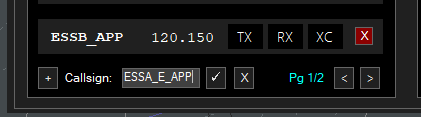](https://wiki.vatsim-scandinavia.org/uploads/images/gallery/2023-12/image-1703695625017.png)
# VatIRIS
## Overview
**[VatIRIS](https://vatiris.se/)** is an interpretation of its real-world counterpart:
**[IRIS](https://www.awos.se/sv-se/products/iris.aspx)** - **I**ntegrated **R**eal-time **I**nformation **S**ystem,
adapted and extended for use by VATSIM controllers in Sweden.
IRIS is designed to provide real-time information to various aviation facilities. It integrates and displays critical information such as air traffic data, weather conditions, and navigational aids into one flexible, role-based presentation.
### Purpose of VatIRIS
VatIRIS can be used to:
- **Provide situational awareness** for air traffic controllers by combining previously separate data into one interface.
- **Improve safety and operational efficiency** for airports by allowing seamless communication between controllers and other operational systems.
### User Interface
The different modules in VatIRIS are contained in a GUI similar to Windows or MacOS with resizable windows for each module.
Window snapping is enabled by default but can be disabled under **SYSTEM** -> **SETTINGS** if desired.
#### Modules
Below are some examples of the different types of information that the different modules can show:
1. **Dynamic Information**
- Real time weather data (METAR, TAF, Weather sensor values, Weather map).
- ECFMP Flow measures.
- Airspace Occupancy data.
- PLS data.
2. **Static Information**
- AIP (Aeronautical Information Publications).
- Pushback procedure maps.
- Manuals and regulations (LOP, GOP etc. from Wiki)
- Tactical directs (DCT)
### Data timestamps
Most modules show a timestamp in the top right corner of each window.
The timestamp is not shown at all if not relevant (e.g. for data from Wiki and AIP).
Sometimes the timestamp only shows (in red) when the data is outdated (METREPORT and METSENSOR).
**Logging in using VATSIM Connect is required to access most features**, saved presets etc are also stored connected to your account, this manual assumes you are logged in to IRIS.
### Saving/"Installing" VatIRIS an app
Using IRIS as a standalone "app" (PWA - progressive web application) instead of within a browser is recommended. Below you can find guides on how to for the most common web browsers.
- **[Chrome](https://support.google.com/chrome_webstore/answer/3060053?hl=en)**
- **[Edge](https://learn.microsoft.com/en-us/microsoft-edge/progressive-web-apps/ux)**
- **[Firefox](https://developer.mozilla.org/en-US/docs/Web/Progressive_web_apps/Guides/Installing#installing_and_uninstalling_pwas)**
## The Menu Row
All modules/windows can be opened using the menu row,
A short description of the first level of buttons are shown below, modules that can be opened using a button are described in their entirety under ***Module Descriptions***.
#### System Menu
To the left in the menu bar you'll find the following buttons, affecting the general behaviour of IRIS system-wide.
- **`Reload arrows`** Reload Button - Reloads the data in all open windows.
- **`SYSTEM`**
- **`SETTINGS`** - Open personal options view.
- **`PRESET`** - Create/manage window presets, default presets are also available here.
- **`RESET`** - Reset settings.
- **`ABOUT`** - Opens the about view, this is also where the privacy policy can be found.
- **`LOGIN`/`LOGOUT`** - VATSIM Connect: log in/out.
- `Search icon` To use the global search function, see below.
#### Main Toolbar
The buttons to the right of **`SYSTEM`** are connected to their specific modules, each button opens their own window or a submenu, see ***Module Descriptions*** for a full description of each module.
## Global Search
The global search function can be used to quickly find the module you are looking for.
The global search can be accessed by pressing the search icon in the menu row, alternatively with the button combination `Shift`+`Space` or `Shift`+`Enter`
## Module Descriptions
### **`MET` - Meteorological information**
#### **`AIRPORT`**
Showing a combined view of SUN, METREPORT, TAF and METSENSOR.
---
#### **`METREPORT`**
Showing decoded weather data parsed from one of the selected data sources depending on view mode.
**View modes:**
Only available sources for the respective airport is shown. The data source is automatically switched to the preferred source when one becomes available (**A**>**W**>**M**).
**Updated data (blue flash)**:
When new data is available for the selected data source:
1. The window for that airport flashes in blue.
2. All text turns blue after the window has flashed.
Left click anywhere in the window to reset the "blue flash" to indicate that you have seen the update.
This is enabled by default but can be disabled under **SYSTEM** -> **SETTINGS** if desired.
Legend
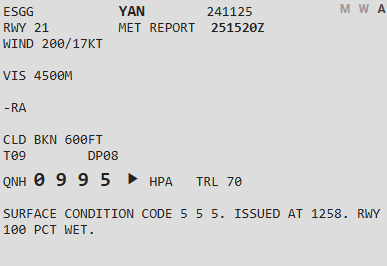
- ESGG - Airport designator (Göteborg Landvetter).
- **YAN** - ATIS letter (YAN=Yankee).
- **241125** - Date YYMMDD (2024-11-25).
- **M W A** - View modes (show above).
- **M** for **M**ETAR.
- **W** for **W**X.AWOS.
- **A** for VATSIM **A**TIS.
- RWY 21 - Runway in use. (*see below for more info on RWY indicators*)
- 251520Z - Date of the met report DDHHMM (25th 15:20z).
- WIND - Wind.
- VIS - Visibility.
- -RA - Precipitation, ("-RA" meaning light rain might also be shown as "FBL RA").
- CLD - Clouds.
- T09 DP08 - Temperature and dewpoint in Celsius, (minus shown as "MS"=TMS12=Temperature minus 12).
- QNH 0995 ⯈ HPA
- QNH Trend Arrow - Shown to the right of the QNH value.
The trend arrow indicates if the QNH has changed since the last update or not. **Sometimes this arrow appears after the first time data is changed/updated.**
- QNH increased: ⯅
- QNH same: ⯈
- QNH decreased: ⯆
- TRL 70 - Transition level (calculated from QNH or loaded from ATIS/WX.AWOS, depending on view mode).
- SURFACE CONDITION CODE(...) - Used entered NOTAM / Airport conditions, shown only in WX.AWOS and ATIS view modes.
This is disabled by default but can be enabled under **SYSTEM** -> **SETTINGS** if desired.
Legend
The data is displayed in three separate columns, depending on which sensor and where it is located (03 M 21), below an example for ESGG.
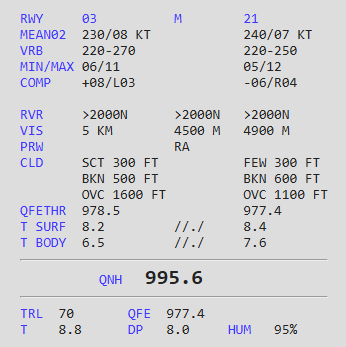
- MEAN02 - Mean wind, this is the wind given to the pilot at takeoff and landing clearance.
- VRB - Wind variable between
- *only given to pilots when present in METREPORT.*
- MIN/MAX - Minimum/maximum wind
- *only given to pilots when present in METREPORT.*
- COMP - Wind component.
- *+08/L03 shows 8 knots tailwind component and 3 knows crosswind component from the left.*
- RVR - Runway visual range
- *given to pilots on request or during LVP.*
- VIS - Visibility.
- PRW - Precipitation.
- CLD - Clouds.
- QNH - QNH
- *rounded down when given to pilot/shown in met report.*
- TRL - Transition level.
- QFETHR - QFE for the respective threshold.
- T SURF/BODY - Temperature at surface/body of respective runway
- QFE - QFE for airport elevation.
- T - Temperature in Celsius
- *minus shown as "MS"=TMS12=Temperature minus 12.*
- DP - Dewpoint in Celsius.
- HUM - Relative humidity, indicated in percent
- *100% if T and DP are the same.*
**Everything in the middle of the circle shall be read out to the pilot**, what is shown is automatically filtered.
Legend
The module will default to display the runway with the highest headwind component.
1. Runway selector, choses which wind anemometer (wind sensor) to use if several are available, this also affects the wind components shown in 5.
2. Mean wind direction and speed (2-minute average, MEAN02 in metsensor).
- ***Values shown in the circle shall be read to the pilots!***
- ≤60 degrees direction span (250-320 degrees in the example above) are shown.
- ≤180 degrees shown as VRB.
- ≤10 knot difference between mean wind speed and MIN/MAX speeds are shown.
3. The compass rose
- The red line indicated the mean wind, coming from 280 degrees in the example above (2-minute average, MEAN02 in metsensor).
- The yellow arc indicates the variable wind (10-minute average), variable between 250 and 320 degrees in the example above.
- The dark grey thick line indicates the selected runway and its direction, 08/26 in this case
4. MIN/MAX (GUST if METAR data) wind shows the minimum and maximum winds.
- ***The MIN/MAX/GUST wind is shown in bold if it shall be read to the pilots*** (≤10 knots difference between 2-minute and 10-minute min/max wind speed).
5. The head/tail-, and crosswind component indicators, this is affected by the runway selected in the top right corner. The example shows 2 knots headwind component and 1 knot crosswind component from the right for runway 26.
Aerodromes not listed can be manually added using the text field.
---
#### **`SMHI`**
Shows SMHI "weather radar" from [https://portaler-lfvradar.smhi.se/sverige](https://portaler-lfvradar.smhi.se/sverige)
The map displays precipitation intensity, along with lightning strikes detected by lightning sensors.
New images are available every 5 minutes.
Legend
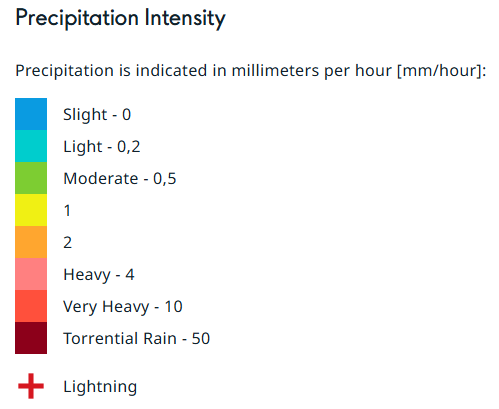
Unavailable UFN - Use **[AROWeb](https://www.aro.lfv.se/Links/Link/ShowFileList?type=AIS&path=%5Cpibsweden%5C&torlinkName=NOTAM%20Sweden)** or **NOTAM** window inside TopSky
Shows information about facility/service/procedure availability and hazards, such as taxiway/runway closures etc.
The NOTAMs can be filtered by aerofrome.
### `ECHARTS` - LFV eCharts
Shows (a custom version of) [LFV eCharts,](http://daim.lfv.se/echarts/) where you can view airspace/waypoint information etc.
### `FLIGHT` - Flight List
#### `ARR DEP`
Shows a list of flights to/from the selected aerodromes.
Pressing **`SYNC`** button will sync the same aerodromes that are chosen in the left column of EuroScope Runway Selection Dialogue.
##### **FLS Flight suspensions**
If a flight is suspended in the vIFF system, the STD will be shown in bold red, with the tooltip `FLS - Flight Suspended, update EOBT`. Left clicking will open the IFF Actions window with the callsign of the affected flight pre-filled to send a DLA (Delay) message.
##### **CTOTs**
##### CTOTs from the vIFF system are shown when present.
- **R** shown next to CTOT - REA message sent.
- **S** shown next to CTOT - SIR message sent.
[**CTOT**](https://cdm.vatsimspain.es/docs.html#ctot) - Calculated Take Off Time - Regulating when a flight is allowed to take off to avoid delays.
Often referred to as a slot time, take off is allowed within the CTOT window (**-5** to **+10** minutes of CTOT).
Active ECFMP flow measures are taken into account during CTOT calculations.
Hovering a CTOT will also show the EOBT and the issuing reason for the CTOT.
- Flow reason ending with **`-H`** or **`-O`** implies an airspace capacity restriction ([**H**ourly entries/**O**ccupancy](https://github.com/rpuig2001/CDM/wiki/vIFF-%E2%80%90-(ETFMS)-Calculate-restrictions#airspace-calculations)).
- **`ES-M23W-H`**
- ES - Sweden
- M23W - Malmö sectors 2,3,W
- H - Hourly entries (too many aircraft entering the airspace at once)
- Flow reason `XXXX` (ICAO of an airport) implies the arrival capacity of that airport.
- Other flow reasons may be
Left clicking a CTOT will open the **`IFF Actions`** window (see below)
### `ATFCM` - Air Traffic Flow and Capacity Management
#### `ECFMP`
Shows flow measures from [ECFMP](https://wiki.vatsim-scandinavia.org/books/flow-management/page/ecfmp) - European Collaboration & Flow Management Project.
Legend
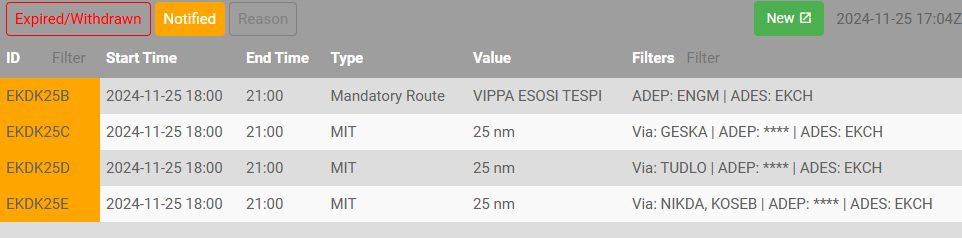
The measures are displayed in three different colours depending on the state of the flow measure:
1. Active - *This flow measure is presently in effect.*
2. Expired/Withdrawn - *This flow measure is no longer in effect.*
- Expired=The end time has passed.
- Withdrawn=The flow measure was cancelled before the end time has passed. (End time column shows withdrawal time)
3. Notified - *This flow measure will become active within the next 24 hours.*
- **Expired/Withdrawn** - Toggles visibility of expired/withdrawn measures.
- **Notified** - Toggles visibility of notified measures.
- **Reason** - Toggles visibility of "Reason" column.
- **New** - Opens ECFMP website to add new measure (requires login and flow manager roles).
"ID" and "Filters" columns can be filtered using the text fields
Enter " ES" in filters so see all measures mentioning any Swedish airport.
When hovering the mouse over a measure type a description is shown.
All IFF actions can also be triggered from within EuroScope if desired (except SIR).
---
### **`DOCUMENTS` - Wiki/AIP and other operational information.**
#### **`MANUAL`**
Shows this manual from within IRIS.
#### **`BULLETINS`**
Shows Sweden FIR ATC Operational Bulletins Wiki page.
#### **`CHECKLISTS`**
Shows checklist for controllers, (to be used as reference, not necessarily "read and do") the following are available:
- **Open position** - For when opening position.
- When not taking over any airspace from already open positions.
- **Close position** - For when closing position.
- When no relieving controller is taking over position.
- **Handover/takeover** - For when other controller/position is relieving (taking over) your airspace/position.
- **Runway change** - For planning and coordinating a runway change.
---
#### **`QUICKREF`**
Shows Quick References/Appendices as available from [Quick References/Appen... | Wiki](https://wiki.vatsim-scandinavia.org/books/lop/page/quick-referencesappendices)
The runway configuration in use is automatically selected but can also be manually chosen.
---
#### **`GOP/LOP/LoA`**
Shows Wiki pages as available from [ATC Sweden | Wiki](https://wiki.vatsim-scandinavia.org/shelves/atc-sweden)
---
#### **`AIP`**
Shows AIP pages as available from IAIP – AD 2 Aerodromes
---
#### **`OTHER`**
Shows other operational information.
- **ESSA PUSH** - Pushback procedure charts
- **ESGG PUSH** - Reference to which pushback direction is available from which stand, and information regarding which stands are blocked when pushing back for the respective stand (shown as tooltip when hovering stand number)
Note that pilots may not follow the IRL pushback procedures, depending on usage of tools such as GSX, also depending on updated profiles etc etc...
---
#### `CODES (ICAO)`
Shows a searchable list of
- Aircraft types, showing ICAO type code, wake turbulence category, wingspan, MTOW etc.
- Callsigns, showing ICAO flight plan designator, operator and country.
- Aerodromes, showing ICAO code, name and country.
---
#### **`REGIONAL AD`**
Shows the "Regional Aerodromes Overview" created by Thomas Ljung, from [VATSIM Scandinavia Forum](https://forum.vatsim-scandinavia.org/d/30-regional-aerodromes-sweden)
---
#### **`TEXT ALIAS`**
Shows a searchable quick reference to the text alias included in the Swedish GNG package.
- **Auto** - Toggle visibility of "Auto" aliases.
- **FSS** - Toggles visibility of "FSS" aliases.
---
#### **`NOTEPAD`**
Shows a notepad to write notes, such as non-standard agreements with adjacent positions etc.
### **`TRAFFIC`**
Shows sector occupancy for the selected sector combination.
The X-axis shows time, the Y-axis shows number of aircraft in the selected airspace volume.
- - Indicates airborne aircraft.
- - Indicates aircraft on ground and pre-filed flight plans.
### **`ATS`**
Shows ATC bookings for the coming two days.
### **`SECTORS`**
Shows Otto Tuhkunen's dynamic [ACC sectorisation map](https://esaa-sectors.lusep.fi/).
### **`DCT`**
Shows tactical directs (quick reference to LoA, shown at TopSky-map).
---
### **`PLS`** (*only shown when PLS integration selected.*)
There is a **SIMPLE** logic mode available, this is completely independent of the actual PLS system and will only show a timer of your time online (using the CID which you are logged in with in IRIS).
Configuring/activating PLS
1. Activate **PLS Integration** under **SYSTEM** -> **SETTINGS**
- This displays the PLS timer and PLS icon in the menu bar
2. Select your PLS logic mode.
- **SIMPLE** - Independent of the acual PLS system, showing the online session length automatically using your CID from VATSIM Connect.
- **CID** - To be used when controlling from home, the PLS timer will show no matter the status.
- **POSITION** - Only to be used when controlling at location during real live events etc.
3. Enter CID/POSITION if needed (normally not needed if using VATSIM Connect).
Using PLS + Legend
- **To "go on position":** press the PLS icon and enter the position/callsign you are connecting with/as.
- **To "go on break":** press the PLS timer and confirm you want to go on break.
**Legend (timer suffixes,** *only shown in CID logic mode***):**
- *None* - On position
- **P** - On break
- **Ö** - On break (Övrigt/other)
Note: The MAESTRO plugin is WIP and may contain bugs, if you think you have found one, let the developer know via the VATSCA Forums.
#### 2.1 Implementation (and limitations) on VATSIM:
The MAESTRO plugin emulates the AMAN tool with the same name, developed by Egis-Avia (now Thales), in use at EFHK, EKCH, ESSA among others. Its functionality is limited compared to the real systems, however it can be useful in helping virtual controllers monitor and manage inbound flows and delays to one or more airports.
The calculations are based on the predictions provided by EuroScope and its programmed data, so to get useable results, it is important to keep the aircrafts’ data updated. The most common problems are:
- Wrong landing runway:
- the aircraft won’t be included in the correct runway’s sequence at all.
- Old direct-to clearance stuck:
- the aircraft’s position in the sequence will be based on the predicted ETA which will be off by hours in the worst case as it assumes the aircraft turns back to that point.
- Calculated sequence not being followed:
- the whole sequence behind the affected aircraft is delayed until the sequence is manually corrected or the situation resolves itself as aircraft arrive and are removed from the sequence.
Note:The plugin can only be used for one airport group at a time. (If you select ESSA, also traffic to ESSB will be shown)
#### 2.2 Interpreting and acting on generated data:
**Example:**
- SAS904 is inbound ESSA via ELTOK (ETA at ELTOK 17:35).
- AMAN with help of EuroScope estimates, via the programmed STAR, it will take him 11 minutes flying from ELTOK to touchdown (on the selected runway).
Without delays, SAS904 would land at 17:46
- Because of a peak in arrivals to Arlanda, the first available landing slot is at 18:00
- AMAN calculates the difference between SAS904s present ETA at ELTOK (17:35) and his STA (scheduled time or arrival) [18:00 - 11 minutes = 17:49].
- The difference between his ETA and STA over ELTOK is calculated [17:49 - 17:35 = 14 minutes].
- SAS904 has 14 minutes to lose (to fit into the sequencing calculated by AMAN), this is called his ***current delay***, or ***TTL (time to lose)***.
---
- Depending on the TTL, delaying vectors, speed restrictions, or holdings may be given, to comply with the STA overhead the FF.
- 14 Minutes is aproximately 3 or 4 patterns in a holding, depending on the outbound time.
- **The time to lose (or to gain, when shortcuts are beneficial for the sequencing) is presented to the controller, and continously updated, freeing him from all manual calculations.**\
(This allows the controller to inform the pilot in holdings when to expect further clearance, which is the same as his STA (17:49))
Note: For actual operational procedures with AMAN in use: see 3.6
#### 2.3 Timeline and Glossary
- **STA:** Scheduled time of arrival - *flow planned arrival time by AMAN*.
- **ETA:** Estimated time of arrival - *estimated using the FLEG route within Euroscope*.
- **FF:** Feeder fix - *the waypoint where the STAR begins*.
- **Current delay:** How much delay is needed to reach RWY at STA - *Current ETA RWY-STA RWY*.
- **Total delay:** Initial ETA RWY-STA RWY - (i.e. for holding traffic, the total delay will increase)
### 3. Plugin usage and procedures
Some information is excluded or simplified for ease of understanding and use, for more detailed information on the inner workings of the plugin, see the included manual in the .zip package.
#### 3.1 Plugin installation
##### MAESTRO
The Swedish GNG package contains the latest beta version of the MAESTRO plugin by Juha Holopainen.
##### TopSky
The Swedish GNG package contains a version of TopSky that automatically receives MAESTRO data for ESSA/ESSB and EKCH when updated data is available.
#### 3.2 Operation modes
##### 3.2.1 Standalone mode
The plugin calculates its own data (can be useful for testing the plugin for the first time, not sharing any sequence data)
**This mode can also be selected to disconnect from other previously selected modes.**
##### 3.2.2 **MASTER** mode
**The plugin calculates its own data**, and shares it as follows:
- Web - Data is uploaded to a server
- Local - Data is saved to the local computer to be used by other EuroScope instances
- Web+Local - Both of the above
##### 3.2.3 **SLAVE** mode
**The plugin receives its data from an outside location** depending on the settings:
Note: TopSky automatically receives MAESTRO data from the server to show in aircraft labels and traffic management lists without the need to connect in MAESTRO.
You only need to connect via MAESTRO if you want to view the data on the MAESTRO timeline.
- Web - Data is downloaded from a server
- Local - Data is read locally
- Web+Local - Data is downloaded from the server, and then saved to the local computer
to be used by other EuroScope instances
Note: All three AMAN operation modes work regardless if you are connected as an active controller or OBS.
The relevant operation modes for live operation on VATSIM are:
• MASTER (Web+Local)
• SLAVE (Web+Local)
The persistent use of (Web+Local) should allow the planned sequence to be kept if MASTER is changed (see 3.8).
When using several instances of EuroScope, the secondary instances are to be connected as:
SLAVE (Local)
---
#### 3.3 General Operation
The COTS and AMAN windows can be moved by dragging them from the title bar. Other windows are
non-moveable.
- Left-clicking on the button above AMAN in the COTS Window opens the AMAN Window.
- Windows are closed by left-clicking the box in the top right corner.
- Windows are resized by dragging the box in the bottom right corner.
---
##### **3.3.1 The AMAN Window:**
1. The current airport (left-click to open the Setup Window)
2. The runway rates (left-click to open the Change Rates Window)
3. The measured actual rates during the past 30 minutes and deviation from set values
4. The sequence in numbers: aircraft past the FF (TMA), and the total number of aircraft (TOT)
5. The current operation mode, empty for standalone mode. (MASTER/SLAVE, the SI of the controller, local/web/web+local)
6. The UTC time when the data was last refreshed
7. Opens a menu to scroll between the FFs when in ACC and FLOW view mode, including an option to toggle visibility of the panels marked in red (1-6)
8. Changing between the three view modes: (See 3.3.2)
9. The “Desequenced” button displays the number of De-sequenced flights, (left-click to open the De-sequenced List).
10. Current UTC time (left-click to open the Labels Window, changing what is displayed in the flight label)
11. Scrollbar (Can be moved by dragging the bar itself, or by clicking on the background area next to the bar. Left-clicking changes the setting by one unit, right-clicking by 10 units, double-click to resume to default view)
12. The flight label, from left to right (left-clict to open callsign menu)\
• Current delay (Color depending on how long the delay is)\
• Aircraft callsign (Color depending on flight state)\
• STA RWY or FF depending on view mode\
(When in holding: the time in which the FF shall be passed, inbound TMA.)
16. The timeline, upwards on the scale indicates the future. defaulting to show current time at bottom. As time progresses, the scale automatically moves from top to bottom (To scroll, see 10.).
---
##### **3.3.2 The view modes:**
| View Mode |
Timelines |
A/C Position on Timeline |
| Runway |
One for each active arrival runway |
RWY STA |
| FLOW |
One for each pre-defined feeder fix group
One for flights not routing via any of the defined feeders |
| ACC (Feeder) |
FF STA |
Recommended view mode:
• ACC: ACC mode
• APP: Runway mode
Note: The ACC view is new since v1.1b3, it shows FF STA on the timeline instead of RWY STA.
---
##### **3.3.3 The Flight Information Window:**
The Flight Information Window can be opened from the callsign menu (see **3.3.1 -> 12**), it displays flight related data. as follows:
1. [](https://wiki.vatsim-scandinavia.org/uploads/images/gallery/2023-10/image-1696889383246.png)
2. [](https://wiki.vatsim-scandinavia.org/uploads/images/gallery/2023-10/image-1696889398809.png)
3. [](https://wiki.vatsim-scandinavia.org/uploads/images/gallery/2023-10/image-1696889413364.png)
4. [](https://wiki.vatsim-scandinavia.org/uploads/images/gallery/2023-10/image-1696889422552.png)
---
##### **3.3.4 The De-sequenced List:**
The “De-sequenced” can be opened from the main AMAN window (see **3.3.1 -> 9**), it contains flights temporarily removed from the sequence. They are presented in the same order as they were entered into the list. Left-clicking one or more callsigns highlights them. The “Resume” and “Remove” buttons can then be used to either re-enter the highlighted aircraft back into the sequence or remove them from it permanently.
---
##### **3.3.5 The TopSky track label:**
Note: TopSky automatically receives MAESTRO data from the server to show in aircraft labels.
When AMAN is active for an airport, for arrivals having a predicted sequencing, the current delay is displayed in line 0 of the track label in minutes, with one of the following prefixes:
- L (Lose) for time to lose (Delay)
- G (Gain) for time to gain (FF ETA is later than the FF STA)
---
##### **3.3.6 The Traffic Management Lists**
Note: TopSky automatically receives MAESTRO data from the server to show in the TMLs.
See [TopSky Profile - Traffic Management List 1 & 2](https://wiki.vatsim-scandinavia.org/books/general/page/app-acc-profile#bkmrk-traffic-management-l) to see the data fields showing AMAN/MAESTRO data.
---
#### 3.4 Flight states (and their colors)
Flight labels are color-coded according to their states which are based on the time from the airport and the feeder fix, except for the delay items whose coloring depends on the amount of delay,
- ** UNSTABLE **(More than 12 minutes from the FF - *The sequence is recalculated on every position update*)
- ** STABLE** (Within 12 minutes from the FF - *No plugin-initiated changes to the sequence*)
- ** SUPERSTABLE** (Within 8 minutes from the FF - No plugin-initiated changes to the sequence, except for missed approaches re-inserted into the sequence)
- ** FROZEN** (Within 5 minutes from landing - *No plugin-initiated changes to the sequence, except for the detected actual order on final)*
- ** LANDED** (Flights considered as landed)
Note: An aircraft disconnecting will always initiate a resequencing by the plugin.
Note: A flight still in UNSTABLE state can not be manually manipulated until it is turns STABLE.
---
#### 3.5 Interacting with flight labels and the timeline
##### Terminology:
- Slot - During a slot no arriving aircraft will be calculated to land.
- A slot can either bound to a specific flight (by clicking on a flight label), or specified as a time period (by clicking on the time line when in runway view mode, see 3.3.8)
- Slots can be useful for manually planning departure gaps, short runway closures, or runway changes.
If managing a runway change using AMAN, it is recommended to set the planned arrival runway manually for each aircraft (to prevent problems when changing the runway set as active for arrivals in EuroScope)
##### **3.5.1 Callsign menu**
Left-clicking on a flight label opens the callsign menu with the following options:
- Recompute Recomputes the flight’s data
- Change Runway - Opens the EuroScope menu to set the arrival runway
- Insert Slot - Opens the slot submenu (a value of 0 minutes removes the slot)
- Remove - Removes the flight from the sequence
- (The rest of the options are not implemented)
Note: Recomputing or moving a flight may become necessary when it is no longer in the unstable state (so its position in the sequence is fixed) and can no longer meet its calculated time profile, starting to delay all the flights behind it in the sequence.
Note: Disconnected flights will stay in the sequence for 10 minutes unless manually removed
(If a flight that is still online is removed from the sequence, it will be automatically added again).
##### **3.5.2 Timeline menu**
Left-clicking a timeline opens a menu with the following options:
- Insert/Modify Slot Opens the Slot Modification Window (only available in the Runways view)
- Insert Flight Allows to type in a callsign already in the sequence to move into that position
##### **3.5.3 Manually adjusting the sequence**
Changing the generated sequence can be done in the AMAN window in following different ways:
- By dragging a flight label to the wanted position in the sequence
- Left-click on a time in the timeline, select "add flight" (can be done to already existing flights)
- Left-double click a flight label (the label becomes boxed), then select another another flight label, the two will swap its positions in the sequence
When manually adjusting the sequence, a confirmation window will always be opened, asking to confirm or cancel the operation.
A flight still in unstable state cannot be moved.
Note:
Moving/adding a flight in only changes position in the sequence. The exact time in the timeline where the flight is placed is calculated by the EuroScope FLEG
---
#### 3.6 Roles, responsibilities and procedures
In real life. Stockholm (ESOS) receives (and transmits) AMAN data for ESSA. Malmö (ESMM) ATCC additionally receives AMAN data for EKCH also. The MAESTRO tool is managed by APP-C for the arrivals into Arlanda.
The following positions may be responsible managing the arrival sequencing to Arlanda using AMAN as MASTER, beginning with the highest and progressing to the lowest priority:
1. ESSA_C_APP (No active frequency)
2. ESOS_PLN_CTR (Separately approved frequency. 123.975)
3. ESSA_E_APP (When no separate planner is online. 126.650)
4. ESOS_1_CTR (When ARR-E is not separately manned)
Note: Any controller not responsible for managing AMAN may receive data as SLAVE.
ESMM may receive data about the planned sequencing into Arlanda, they do however not act on it, unless requested to by adjacent ESOS sectors (probably as it is too early with a relatively unstable sequence, unless severe delays are indicated/expected).
Mainly the ESOS-sectors adjacent to Stockholm TMA monitor and judge/act on the AMAN data.
The position acting as MASTER shall keep manual changes to the sequence to a minimum
**Suggested procedures when AMAN is in use (ONLY after prior coordination):**
When only parts of the sequence is indicating a delay, ESOS ACC does not have to act on that information.
If all inbounds show several minutes to lose, consider holding or delaying inbound traffic as appropriate
(Use common sense, TTL and TMA/TOT numbers may help in judging this)
At times of higher workloads in the TMA, it is preferable that ACC hands over traffic excactly according to FF STA (no more "current delay" remaining).
---
#### 3.7 Getting started
So now you've read through the entire wiki page and the pdf documentation? Great! What's next?
Open the Setup window (see 3.3.1), enter the airport identifier in the ICAO window, select the desired operation mode.\
After selecting operation mode, it should look like below:
To receive the web password for acting as MASTER, send an Email to max.kuhla@vatsim-scandinavia.org
or contact me via Discord (199890517914288128 or maxlk96)
**MASTER:**
[](https://wiki.vatsim-scandinavia.org/uploads/images/gallery/2023-07/image-1688614321558.png)
**SLAVE:**
[](https://wiki.vatsim-scandinavia.org/uploads/images/gallery/2023-07/image-1688614345599.png)
Click "Ok", and get to work, sequencing, or observing the sequencing!
Note: You do not need to have the AMAN window open to keep receiving updates to the sequence.
(when working ACC, all the information you need is in the TopSky track label, if all is working as it should for the MASTER)
#### 3.8 Tips and Tricks
Runway rates:
The runway rate preset in the system is defined by enviromental factors (high speed exits, runway used for departure simultaneously).
The actual available rate might be limited by human factors, such as:
• Controller capacity and experience (how consistent spacing can be produced)
• Pilot reliability (how quickly do they react, and how compliant are they in following instructions )
If the outputted numbers make no sense:
Try checking the aircraft in front of (below) the delays. Is there a time gap in front of him?
Also check all relevant FLEGs to see if they are correct, as they are used for the sequencing calculations.
If the final keeps getting longer: Maybe the arrival rate has to be lowered (See 3.3.2).
Alternatively, you can manually put in a slot behind one of the arrivals, in an attempt to give DIR a chance to catch up, and shorten the final.
When planning a runway change: Use time based slots to facilitate a smooth runway change, preventing that arrivals are planned to land on both runways at the same time (unless that is allowable).
When relieving the MASTER:
1. The relieving controller connects as SLAVE, (to fetch the planned sequence).
2. The relieved MASTER disconnects by selecting Standalone or SLAVE.
3. The relieving controller connects as MASTER.
# GNG Package Changelog
This page contains an unfiltered technical changelog to the Swedish GNG package.
The Swedish GNG package is installed as described in [**THIS GUIDE**](https://wiki.vatsim-scandinavia.org/books/general/page/euroscope-and-gng-package-installation "EuroScope and GNG package Installation"), or manually from **[here](https://files.aero-nav.com/SCA)**.
For a filtered summary of changes optimised for controllers, see [**Revision Highlights**](https://wiki.vatsim-scandinavia.org/books/general/page/revision-highlights).
**EuroScope does not allow for plugins to overwrite when updating the GNG package using the automatic download.** After updating, close EuroScope then go to `%appdata%\EuroScope`-> ESAA > Plugins > Updated Plugin" and copy the .dll files in the folder. Thereafter go back in the "Plugins" folder and paste the .dll files there. Overwrite existing files when prompted.
## AIRAC 2610
**AIRAC changes**
- NIL
**Non AIRAC changes**
- General
- Ground lists setup revised with new CDM features
- Merge OS ARR-E and APP-C voice channels (to remedy double text messages triggered by radio bridge)
- TopSky
- Replace ADSB RPS with SSR RPS
- New ENOS position added (ENU8)
- Freq maps updated
- CPDLC logins updated
- Areas completely revised using new parser.
- All SUP areas are now included (also with UAS flying inside, previously excluded)
- Old typos/mistakes corrected
- Added missing NOAIW flags
- GRP
- Rename Ground status REA to RDY (to reduce confusion with REA message in vIFF)
- ESSA:
- Add pushback drop points (ALT + D)
- Move AFR and KLM to T5
- Updated WIP areas
- ESSA
- ESMQ
- Cleanup of redundant entries
- CDM updated to 2.30.2b
- RDF plugin updated to 1.4.3
[**Files updated**](https://github.com/Vatsim-Scandinavia/ESAA-Sectorfile/compare/2609...2610)
## AIRAC 2609
**AIRAC changes**
- ESHE added
- ESNG TIA/TIZ and IAP updated
- ESOG TIZ and IAP updated
- ESNO IAP updated
- ESSA changes:
- APN P added
- FATO 07/25 added
- ESNZ changes:
- New APNs
- FATO F removed
- ESPA Main APN+Stand layout updated.
- Areas
- Changed: R50
- New: R50A,B
- Withdrawn: D191 and R208
- Updated to AIP SUP
- ODMEI replaced by MOQAQ, ref EKDK LoA
**Non AIRAC changes**
- General
- New (HUGE) cursor arrow added (Thanks Rui)
- New TopSky (pixelly) font for ASM menu among others
- ESOS APP-C added (ESSA\_FMP)
- ESGJ ESE combiner revised to solve duplicate naming
- AFV Bridge replaced by [RDF Plugin](https://github.com/KingfuChan/RDF). Same functionality, supporting both AFV and TrackAudio
- TopSky updated to 2.6b6
- AUP URL changed to VatIRIS
- EPGD info W frequency added
- GRP updated to 1.6b7
- ESSA standlist: CES added
- CDM updated to 2.30
- ECTOT renamed to EvSlot (now TOBT, no longer CTOT)
- VDGS link PM button added to lists
- Event-slot TOBT handling added
- Bugfixes
- ESSL CTR A ownership corrected (ÖKC T3 added above TC)
- ESSA KOGAV SID (01R/08LT via ARS) XFL corrected
- ESGJ ESE Proc combiner duplicate procedure names cleaned (affecting other airports also)
- ESOS APP-S freq map moved westbound (overlap with sector line)
- EKDK freq map level band corrected (245-285)
- ESMM DCT K->L map corrected activation with M2 open
- EFIN F/D split map activation corrected
- DCT map:
- PENOR VIA TRS, now INWIQ
- XENAS removed from E
- VFR+L map: ESSP VRP "ÅBY" corrected/readded
[**Files updated**](https://github.com/Vatsim-Scandinavia/ESAA-Sectorfile/compare/2605...2609)
## AIRAC 2605
**AIRAC changes**
- Military aerodrome and STRI positions changed to 8.33 kHz channels.
- Areas
- New: R7A-C, R129, R130
- Withdrawn: R125, R204, R208, R208A-B, R209A-B
**Non AIRAC changes**
- General
- ESOS DIR renamed ESSA DIR
- STRI positions renamed
- TopSky updated to 2.6b4
- Font updated (minimized arrow added, small letter no longer monospaced, STAR-dot size increased, added clarity for misc. symbols.)
- Add safety net inhibits for STRI positions (MSAW, MTCD, STCA, TCT)
- Added maps showing sector splits with a yellow line (OS 2/7, MM 4/5, EFIN F/D)
- Updated Mode S aerodromes (ESGJ,MK,MQ,MX,NS,OH,OK,SD,SP,ST,TA,TL now support mode S)
- ATYP and DIAS shown in unselected track labels for APP positions (as per IRL on OS/GG APP)
- GRP updated to 1.6b6
- ESNX increase stand 1 to code C
- WIP maps for ESSA and ESGG added
- Bugfixes
- Duplicate DCT map (ERNOV when manning OS 3) fixed
- GADDE1K displayed as GADE1K corrected
- Missing EFIN sector borders fixed
[**Files updated**](https://github.com/Vatsim-Scandinavia/ESAA-Sectorfile/compare/2604...2605)
## AIRAC 2604
**AIRAC changes**
- ESMM IS (Info South) now FIS-S, with new radio callsign "Sweden Information".
- ESMM IN and FIS-S remain "bandboxable".
**Non AIRAC changes**
- TopSky
- Traffic Management Lists now show unconcerned flights.
- Track Label fields updated
- DSFL and DBPS hidden in selected label for all positions (as they are not showing any information).
- For APP positions (except MM L):
- Show ATYP and DIAS in unselected labels
- Hide DMACH in selected labels
- CDM updated to 2.27
- Bugfixes
- Correct ACC Freq map (ESOS 7 (ESMM)).
[**Files updated**](https://github.com/Vatsim-Scandinavia/ESAA-Sectorfile/compare/2603...2604)
## AIRAC 2603
**AIRAC changes**
- Vilhelmina TIA/TIZ updated, vertically and laterally. Vertical divide now at 3200 ft.
- Vilhelmina IAP, new T-bar waypoints
- New restricted area ESR46B Junkön
- Eskilstuna IAP ILS Z/Y
- ATS-route Z330 TRS changed to INWIQ
- Ängelholm STAR new designatior
**Non AIRAC changes**
-
- General
- List updated for better placement of CDM/vIFF functionality.
- COPX now shown by default on CDM profile to allow for easy FLEG access.
- XFL M5 -> S3 DEST: ESOW/SU removed
- ESGG GND sectors reworked to fix sector sequence.
- SI for GND will show TWR when on TWY Z for DEP 21 and when passing TWY D for RWY 03.
- SI for TWR will show GND when on the RWY or on TWY Y between TWY D and TWY E.
- Fixed issue with wrong SI for arrivals at ESSA when two TWR positions online.
- RWY TRH waypoints added for ILS at ESSA. This will force the FLEG to pass over threshold before terminating att ARP.
- All COPX/XFL for ESSA DEL removed. To reduce complexity and harmonize with ESGG.
- TopSky updated to 2.6b3
- Flight plan equipment code usage rolled back due to spurious warnings.
- TCT inhibit now works
- MTCD conflict acknowledge value increased from 2 to 3 nm.
- MTCD floor lowered
- MTCD conflict indicator in label will now only be displayed for ACC. (MM-K/L excluded.)
- GRP
- ESSA RWY maps now hidden on TWR ASR
- Add GRP map shortcut keys. See [TWR / TWR CDM Profile ](https://wiki.vatsim-scandinavia.org/books/general/page/twr-twr-cdm-profile) for explanation.
- Update GRpluginOperatorInfo.txt
- ESSA: GVY parking at F-pier
- CDM updated to 2.2.8.25
- Bugfixes
- Alt + B now works
- ESKS TMA now added to TCT area
- Correct ESGG TMA TCT areas
- Correct label for RNP Y 01L on EOR GRP map
- Correct GRP restriction maps
[**Files updated**](https://github.com/Vatsim-Scandinavia/ESAA-Sectorfile/compare/2602...2603)
## AIRAC 2602
**AIRAC changes**
- NIL
**Non AIRAC changes**
-
- General
- Profiles renamed
- ESAA TOPSKY -> ESAA APP CTR
- ESAA TWR CDM -> **ESSA** TWR CDM
- All DEP/STUP lists revised to include CTOT
- [vats.im/vdgs](https://vats.im/vdgs) added to ESSA AD login profiles
- TopSky updated to 2.6b2
- SAP and APW re-enabled
- Enable (partial) FPL equipment code usage
- W and Y warnings enabled, all traffic still considered to be Mode S (with EHS) capable.
- Areas and Maps file now loaded from URL (updates not bound to GNG package releases)
- TCT now available
- TCT areas added (TCTA and TCT inhibits)
- TCT alert added to label
- DCL format updated
- CPDLC logon codes updated
- ESOS -> ESO1
- ESMM -> ESM2
- EPWW revised (new sectorisation)
- ENOR revised
- Areas AIP SUP -34/26
- Maps
- New Sector name map added (ALT+S)
- DCT and FREQ maps tweaked
- New EPWW DCT map
- FREQ maps revised for:
- EPWW (new sectorisation)
- ENBD (added ENBD 27)
- APPCLR defined (CAT2/CAT3 in CFL menu - Now only shown at airports/RWYs where applicable, might be expanded to more options in the future)
- GRP updated to 1.6b5
- Auotmatic maps now hidden from map selection menu
- CDM updated to 2.2.8.24
- TWR CDM profile revised for new workflow
- Bugfixes
- C-flags missing for ESMM L
[**Files updated**](https://github.com/Vatsim-Scandinavia/ESAA-Sectorfile/compare/2601...2602%2C1)
## AIRAC 2601
**AIRAC changes**
- New DMEs: (ESGG) NGG, SGG
- Locators withdrawn:
- ESGG: NL, SL
- ESSA: WA
- NDBs withdrawn:
- COR (replaced by SOVAX)
- ERK (replaced by ERXEC)
- LNA (replaced by OBCIV)
- New significant points:
- INWIQ (replacing TRS)
- VACRA (replacing HMR)
- VULGE
- MILNU, NEKLA, PELIT enroute holding
- ESGG IAP:
- New ILS Y RWY 03/21 (procedure via LAV)
- ILS RWY 03/21 changed, now ILS Z (procedure via GG708/404)
- ESGP ATS closed, withdrawing:
- CTR (and VRPs)
- IAP RNP RWY 19
- ATS position ESGP TWR
- ESSA
- TRS SID replaced by INWIQ
- HMR STAR replaced by VACRA
- New IAP: (straight) RNP z RWY 01R
- ESSB
- TRS SID/STAR replaced by INWIQ
- HMR STAR replaced by VACRA
- COR (MAP/holding) replaced by SOVAX
- ESNZ MVA changed.
**Non AIRAC changes**
- General
- ESMM ACC Positions revamp
- TopSky DCT maps revised
- TopSky FREQ maps revised
- TopSky (updated to 2.6b1)
- Areas updated till AIP SUP 14/26
- APW disabled (fix expected in 2.6b2)
- New domestic ACC FREQ map (similar to adjacent FIRs, now for domestic positions).
- Coordinates corrected to comply with revised coordinate handling.
- Update STCA inhibit and SOIR areas to comply with new syntax.
- Flight lists sorted by TopSky (Global Menu -> Flight Plan lists)
- Position settings loaded by SI instead of login callsign from TopSkySettings.txt
- ASP via CPDLC removed to align with real system.
- GRP
- ESSA updated stand types
- Bugfixes
- - Corrected presentation of international ACC-sector lines
- EN delegated areas moved to SCT entries
- Presentation of area HALTI removed
- EK ACC sectors
- ESGG APP-W frequency map corrected (was missed when 8,33 revision was made)
- COP/XFLs
- COP for GG DEL removed to allow for better COP for airborne traffic.
- Sector sequence corrected for RNP AR 01L/19R (now W->A->TW)
- Added COPX on FIR border for traffic to EFKT via FIR-point
[**Files updated**](https://github.com/Vatsim-Scandinavia/ESAA-Sectorfile/compare/2513...2601)
## AIRAC 2513
**AIRAC changes**
- NIL
**Non AIRAC changes**
- General
- ENBD positions updated to 8,33 mHz frequencies
- TopSky
- New CPDLC freetext options added
- ESCM VFR holding "LÄBY" was missing on VFR map
- KETAP LoA DCT revised: `(EDDB)` was missing
- GRP
- ESSA updated stand types
[**Files updated**](https://github.com/Vatsim-Scandinavia/ESAA-Sectorfile/compare/2512...2513)
## AIRAC 2512
**AIRAC changes**
- ESMT SID/STAR designator updated
- ESUP IAP, ILS Y/Z available.
- Areas AIP SUP -282/25
**Non AIRAC changes**
- General
- Auto prime frequency removed.
- TopSky
- EDWW LOA updated, DCT POBOX changed to CIPPI. DCT OGBER removed.
- Revise ESNZ RNP AR map
- Activated EoR STCA Inhibit areas
- Corrected Freq maps for ESMM AoR
- GRP
- ESSA, TAP moved to T2, other airline parking priorities changed.
- Fixed issue with AZD assigned to terminal at ESNU.
- ESNQ stands revised
- ESPE APN 4 removed
- ESMS stand definitions
- Added OAT callsigns to GRP, and AZD
[**Files updated**](https://github.com/Vatsim-Scandinavia/ESAA-Sectorfile/compare/2511...2512)
## AIRAC 2511
**AIRAC changes**
- ESNZ:
- DOFOK, OSLAV STAR replaced by LUHIQ STAR
- New RNP APP RWY 30.
- NDB DJ removed
- Areas:
- New: ESR27, R79, D873
**Non AIRAC changes**
- General
- - Completed revision of VFR SID
- EKCH\_O\_APP SI changed from CAE to CAO
- Disabled draw of MAESTRO plugin
- TopSky
- EKDK frequency maps revised to reflect new positions
- Release line GOTEBORG removed
- EKDK CPDLC Codes updated
- Areas
- New: ED D47C added
- Updated to SUP -264/25.
- GRP
- Added Approach Path views for ESGG, GP, GT, IB, MK, MS, NN, NQ, NU, PA, ESSA and ESSB
- Updated WIP areas (ESSA, CM, NZ)
- [VatIRIS](https://vatiris.se/) plugin added (missed in 2510)
[**Files updated**](https://github.com/Vatsim-Scandinavia/ESAA-Sectorfile/compare/2510...2511)
## AIRAC 2510
**AIRAC changes**
- NIL
**Non AIRAC changes**
- General
- New dataset from Navigraph now available with latest AIRAC
- STARs completely revised
- Standard inbound clearance now always on top of list
- Auto selection for standard inbound clearance even if not a standars STAR works for more AD
- All typs of approaches now selectable, ILS, VOR, NDB and RNP.
- Added MIL/AFIS-STAR indicating OVHD-XX to military airfields.
- Added Left, Right and Straight-in indication to ILS- and RNP-approaches with a T-approach transition.
- ESMM\_IN\_CTR changed to ESMM\_IN\_APP
- ESMS\_IS\_APP changed to ESMM\_IS\_APP. Frequency also changed.
- ESMM\_XK\_CTR Frequency changed.
- ESNX ESE Ground network added
- Bugs
- ESND VFR holding North updated
- Frequencies for ESNS, ESKS, ESKM and ESNG fixed.
- Wrong XFL for some EKCH/ESMS departures to EPWW fixed.
- RISMA XFL for GG ARR not working properly, fixed.
- TopSky
- Release line OGLAV and OSKOK removed to align with LOA
- Release line CODAN renamed OLPIB
- Areas from AIP SUP updated
- Added some soring updated
- Upplands Väsby map added for future reference.
- VFR maps revised, WIP
- RNP AR maps updated
- Revised RWYdist markers
- Added alt labels below IAFs
- ESSA EoR maps and functionality added
- Auto CFL for ESSA Slow DEP updated.
- GRP
- ESSA Stand assignment updated.
- ESSA WIP area updated
- CDM updated to v2.2.8.18
[**Files updated**](https://github.com/Vatsim-Scandinavia/ESAA-Sectorfile/compare/2508...2510)
## AIRAC 2508 (2413/1)
The change AIRAC provider for GNG is in its final stages, GNG is reviewing the new dataset before it becomes available. The files still indicate AIRAC 2413.
**AIRAC changes**
- ESGT Göteborg/Stallbacka renamed
- CTR renamed
- TMA sector name remains the same (TMA sector Trollhättan)
- ESUS withdrawn
- ESSA new VFR entry/exit point (Vallentuna)
**Non AIRAC changes**
- General
- ESSA VRP Vallentuna added
- ESGT Göteborg/Stallbacka renamed
- CTR renamed, TMA sector name remains the same.
- ESUS withdrawn
- Waypoints added for TRA/CBA (as for PCA)
- Several COPX fixes
- XFL SK-EFIJ (DOPUD)
- XFL SK-EFIH (MISMO)
- XFL ESMS-ERNOV
- XFL MK-M2
- TopSky
- Areas -SUP 168/25 (several areas excluded)
- TopSky callsigns de-capitalised
- GRP
- WIP areas updated
- ESSA R5
- ESSA TWY Z
- ESGG RWY 03
- ESNZ TWY G
- ESSV TWY M
- ESKN APN 4D label corrected
- ESIA intersection V1 added (previously V)
- CDM **updated to v2.2.8.7**
[**Files updated**](https://github.com/Vatsim-Scandinavia/ESAA-Sectorfile/compare/2507...2508)
## AIRAC 2507 (2413/1)
The change AIRAC provider for GNG is in its final stages, GNG is reviewing the new dataset before it becomes available. The files will still indicate AIRAC 2413.
**AIRAC changes**
- ESEK withdrawn
- ESSL: Removed stop bar on TWY C and updated ground view line colors
- Areas
- New: ESR12, ESR29
- Changed: ESR10, ESR16A-C, ESR24, ESR52, ESR102, ESR113
**Non AIRAC changes**
- General
- New ESMS & ESSA Ground Network
- ESAA PLN position with SI "PLN" and logon callsign "ESAA\_FMP"
- Removed FL245 airspace splits (no longer needed as EuroCenter vACC has ceased operations)
- TopSky
- New custom TopSky font
- Areas AIP SUP -163/25
- Mode-S radar range increased to fix correlation issues with EPWW and A2000
- Revised DCL for ESSA and ESGG.
- GRP
- New airport specific font for SMR view ESGG
- Fixed ESSV stand assignment issues with military stands
- Fixed takeoff timer issues at ESGG
- Empty GRpluginSettingsLocal.txt now included in GNG package.
- CDM **updated to v2.2.7.2**
[**Files updated**](https://github.com/Vatsim-Scandinavia/ESAA-Sectorfile/compare/2505...2507)
## AIRAC 2505 (2413/1)
The new AIRAC provider for GNG is taking longer than expected. The files will still indicate AIRAC 2413.
**AIRAC changes**
- Area D184 changed
- ESDF RWY 12/30 withdrawn
- ESSV SID/STAR updated
**Non AIRAC changes**
- General
- ESDF hold short line B RWY 01 added.
- TopSky
- Areas AIP SUP 134/25
- ESMV
- MVA map added
- MSAW exclude added
- Airspace to be updated in 2506
- SSR codes updated, A1000 not yet implemented
- Freq maps updated
- DCT maps updated
- GRP
- WIP added/updated
- ESSA (APN AB and APN D)
- ESSB (APN 6-7)
- ESGG (N APN)
- ESNZ (TWY G)
- ESPA (APN 12B)
- ESSA Stands updated with type E295
- CDM **updated to 2.2.6**
## AIRAC 2504 (2413/1)
**AIRAC changes**
- The new AIRAC provider för GNG is not yet in place so the ES-files will still indicate AIRAC 2413.
- Area R01-R09 renamed R1-R9.
- New R-area, R126 Rågården and R128 Harpsund.
- TRA updated
- EKCH ERNOV STAR runway 22L/R updated.
- AIP SUP added to 70/25.
**Non AIRAC changes**
- General
- ESSR\_MM\_APP added
- ESAA\_CTR added
- Login profiles updated with ESSR\_MM\_APP and ESAA\_CTR
- ESOS sector ownership changed
- Radars updated to extend the Mode-S range
- TopSky
- Areas AIP SUP 99/25
- TEXT INFO Levels fixed/updated
- Auto freq maps updated (AA replaces S1 and OS ACC revamp)
- ESAA and EVRE added to CPDLC
- RTM added to show ACC FREQ map
- GRP
- ESSA: WIPs and pushback STD 8 changed.
- ESKN: WIP timeframe extended
- CDM
- Added Event CTOT URL (same server as AMAN data)
- VCH **updated to 0.8.6**
Files updated
ADDED CHANGED REMOVED
*(.sct, .ese, .prf, and files in ICAO- and NavData folders always updated.)*
- Plugins/CDMconfig.xml
- Plugins/GRpluginMaps.txt
- Plugins/GRpluginStands.txt
- Plugins/TopSkyAreas.txt
- Plugins/TopSkyCPDLC.txt
- Plugins/TopSkyMaps.txt
- Plugins/VCH.dll
- Settings/LoginProfiles.txt
- Settings/VoiceChannels.txt
Files updated
ADDED CHANGED REMOVED
*(.sct, .ese, .prf, and files in ICAO- and NavData folders always updated.)*
- ASR/ESAA\_ACC.asr
- ASR/ESAA\_TWR\_APP.asr
- ASR/ESCM\_GND.asr
- Alias/alias.txt
- Plugins/CDM.dll
- Plugins/CDMconfig.xml
- Plugins/GRpluginMaps.txt
- Plugins/GRpluginStands.txt
- Plugins/TopSkyAreas.txt
- Plugins/TopSkyCPDLC.txt
- Plugins/TopSkyMSAW.txt
- Plugins/TopSkyMaps.txt
- Plugins/TopSkySettings.txt
- Settings/General.txt
- Settings/Lists.txt
- Settings/ListsTWR.txt
- Settings/ListsTWRCDM.txt
- Settings/LoginProfiles.txt
- Settings/Screen.txt
- Settings/VoiceChannels.txt
Files updated
ADDED CHANGED REMOVED
- alias.txt
- CDM.dll
- GRpluginMaps.txt
- ICAO\_Aircraft.json
- LoginProfiles.txt
- MAESTRO.dll
- TopSky.dll
- TopSkyAreas.txt
- TopSkyCPDLC.txt
- TopSkyMaps.txt
- VCH.dll
Files updated
ADDED CHANGED REMOVED
- ESKN\_GND.asr
- GRpluginStands.txt
- Lists.txt
- LoginProfiles.txt
- MAESTRO.dll
- Plugin.txt
- TopSky.dll
- TopSkyAreas.txt
- TopSkyMaps.txt
Files updated
ADDED CHANGED REMOVED
- ESAA\_ACC.asr
- ESAA\_TWR\_APP.asr
- ESTL\_GND.asr
- GRpluginMaps.txt
- GRpluginStands.txt
- Lists.txt
- MAESTRO.dll
- Plugin.txt
- TopSkyAreas.txt
- TopSkyMaps.txt
Files updated
ADDED CHANGED REMOVED
- GRpluginMaps.txt
- GRpluginStands.txt
- MAESTRO.dll
- Plugin.txy
- PluginTWR.txt
- PluginTWRCDM.txt
- TopSky.dll
- TopSkyAreas.txt
- TopSkySettings.txt
Files updated
ADDED CHANGED REMOVED
- VCH.dll
- ESAA TOPSKY.prf
- ESAA TWR.prf
- ESAA TWR CDM.prf
- ESNN\_GND.asr
- ESGP\_GND.asr
- ESKN\_GND.asr
- GRpluginMaps.txt
- GRpluginSettings.txt
- GRpluginStands.txt
- Lists.txt
- ListsTWRCDM.txt
- ListsTWR.txt
- MAESTRO.dll
- PluginTWRCDM.txt
- PluginTWR.txt
- TopSky.dll
- TopSkyAreas.txt
- TopSkyMaps.txt
Files updated
ADDED CHANGED REMOVED
- *(.sct, .ese, .prf, and files in ICAO- and NavData folders always updated.)*
- TopSkyMaps.txt
- TopSkySettings.txt
- GRpluginMaps.txt
- TopSkyAreas.txt
Files updated
ADDED CHANGED REMOVED
- *(.sct, .ese, .prf, and files in ICAO- and NavData folders always updated.)*
- TopSkyAreas.txt
- TopSkySettings.txt
- alias.txt
Files updated
ADDED CHANGED REMOVED
- *(.sct, .ese, .prf, and files in ICAO- and NavData folders always updated.)*
- CDM.dll
- CDMconfig.xml
- ESNU\_GND.asr
- ESNZ\_GND.asr
- ESNQ\_GND.asr
- ESTA\_GND.asr
- ESSV\_GND.asr
- ESDF\_GND.asr
- GRpluginMaps.txt
- GRpluginStands.txt
- ListsTWR.txt
- ListsTWRCDM.txt
- LoginProfiles.txt
- MAESTROsettings.txt
- PluginTWR.txt
- PluginTWRCDM.txt
- TopSkyAreas.txt
- TopSkyCPDLC.txt
- TopSkyMaps.txt
- TopSkySettings.txt
- TopSkyViews.txt
Files updated
ADDED CHANGED REMOVED
- *(.sct, .ese, .prf, and files in ICAO- and NavData folders always updated.)*
- ADDED
- TopSkyAreas.txt
- TopSkyMaps.txt
- VCCSSettings.txt
- REMOVED
Files updated
ADDED CHANGED REMOVED
- *(.sct, .ese, .prf, and files in ICAO- and NavData folders always updated.)*
- ESAA\_ESOS\_APP.asr
- ESAA\_ESGG\_APP.asr
- ESMV GND.asr
- ESNJ GND.asr
- GRpluginMaps.txt
- GRpluginStands.txt
- LoginProfiles.txt
- TopSkyMaps.txt
- TopSkyAirspace.txt
- ESAA\_ACC.asr
- ESOW GND.asr
- ESAA\_TMC.asr *(Replaced by APP-ASRs)*
Files updated
- (.sct, .ese, .prf, Files in ICAO- and NavData always updated.)
- GRpluginMaps.txt
- TopSkyAreas.txt
- LoginProfiles.txt
- Plugin.txt
For older changes to the sector file, see [this forum thread](https://vatsim-scandinavia.org/forums/topic/2828-esaa-fir-sector-file/)