Software Setup
- YourControls for FS20/FS24
- Diamond DA40-NGX Improvement Mod for FS20/FS24
- Diamond DA40-NGX Vatsim Scandinavia Pilot Training Livery
YourControls for FS20/FS24
Installation Instruction
This is only for Microsoft Flight Simulator 2020 and 2024!
- Download the automated installer from yourcontrols.org
- Open the installer and follow the steps inside the installer
Diamond DA40-NGX Improvement Mod for FS20/FS24
Installation Instruction
This is only for Microsoft Flight Simulator 2020 and 2024!
- Download the Improvement mod from flightsim.to
- Open the compressed (zipped) folder and move the version you need, into your community folder
- Search for the file DA40_cockpit.xml - this is the location inside the folder: /SimObjects/Airplanes/Asobo_DA40_NG/model/DA40_cockpit.xml
- Open the file you just downloaded (DA40_cockpit.xml) using a software to your liking, we used Visual Studio Code
- We want the disabled modules to be added to the active modules. You can compare to the pictures below:
Make sure to save all the changes!
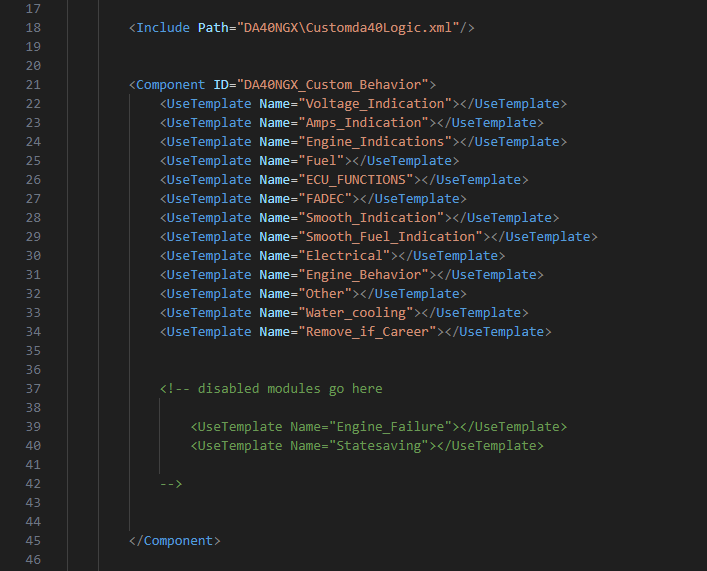 |
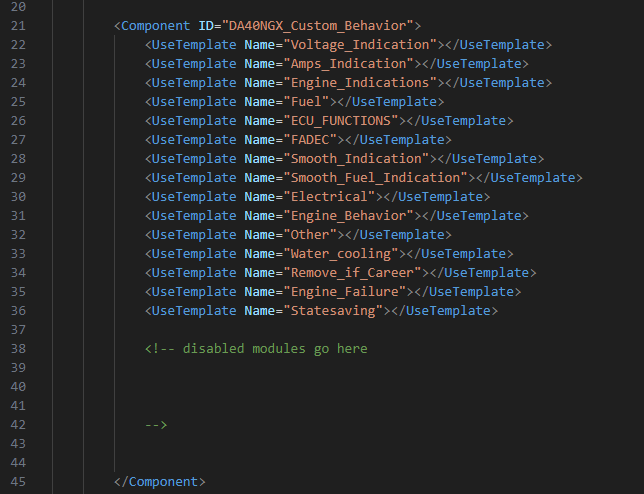 |
| Before modification | After modification |
Diamond DA40-NGX Vatsim Scandinavia Pilot Training Livery
This livery is only for Microsoft Flight Simulator 2020 and 2024
- Download the livery here
- Open the compressed (zipped) folder
- Move the content to your community folder