# Quick Reference

Appendixes for quick references and fast lookup. These are also found in the LAI, but a fast way to access can be made here

# AFIS

## Danish AFIS AD

In Denmark we have 5 TIZ/AFIS AD:

- EKOD - Odense
- EKEB - Esbjerg
- EKSB - Sønderborg
- EKVJ - Vojens
- EKVD - Vamdrup

The 3 later mentioned do not hold any commercial traffic.

### AFIS phraseology

<table border="1" id="bkmrk-situation-normal-ins" style="border-collapse: collapse; width: 100%; height: 448.844px;"><colgroup><col style="width: 33.3745%;"></col><col style="width: 33.4981%;"></col><col style="width: 33.2509%;"></col></colgroup><tbody><tr style="height: 33.7969px;"><td class="align-center" style="background-color: rgb(52, 73, 94); height: 33.7969px;">**<span style="color: rgb(255, 255, 255);">Situation</span>**</td><td class="align-center" style="background-color: rgb(52, 73, 94); height: 33.7969px;">**<span style="color: rgb(255, 255, 255);">Normal Instruction</span>**</td><td class="align-center" style="background-color: rgb(52, 73, 94); height: 33.7969px;">**<span style="color: rgb(255, 255, 255);">AFIS instruction</span>**</td></tr><tr style="height: 50.5938px;"><td class="align-center" style="height: 50.5938px;">Landing</td><td class="align-center" style="height: 50.5938px;">"Cleared to land"</td><td class="align-center" style="height: 50.5938px;">"No reported traffic on the runway. (Report vacated)"</td></tr><tr style="height: 33.7969px;"><td class="align-center" style="height: 33.7969px;">ATC clearance</td><td class="align-center" style="height: 33.7969px;">"Cleared to..."</td><td class="align-center" style="height: 33.7969px;">"Copenhagen control clears you to..."</td></tr><tr style="height: 54.25px;"><td class="align-center" style="height: 54.25px;">Startup</td><td class="align-center" style="height: 54.25px;">"Startup approved"</td><td class="align-center" style="height: 54.25px;">"Startup on own discretion \[Give Departure information\]"<sup>1</sup></td></tr><tr style="height: 50.5938px;"><td class="align-center" style="height: 50.5938px;">Takeoff</td><td class="align-center" style="height: 50.5938px;">"Cleared for Takeoff"</td><td class="align-center" style="height: 50.5938px;">"No reported traffic on the runway (Report airborne/passing...)"</td></tr><tr style="height: 50.5938px;"><td class="align-center" style="height: 50.5938px;">Taxi</td><td class="align-center" style="height: 50.5938px;">"Taxi Via A &amp; B to holding point runway 24"</td><td class="align-center" style="height: 50.5938px;">"Runway 24 in use, no traffic on the apron. I suggest you to taxi via A &amp; B"</td></tr><tr style="height: 33.7969px;"><td class="align-center" colspan="3" style="height: 33.7969px; background-color: rgb(52, 73, 94);">**<span style="color: rgb(255, 255, 255);">Departure and arrival information</span>**</td></tr><tr style="height: 33.7969px;"><td class="align-center" colspan="3" style="height: 33.7969px;">**Departure information should be given to departing aircraft and must contain:**</td></tr><tr style="height: 107.625px;"><td colspan="3" style="height: 107.625px;">- Runway in use
- Transition Level
- Weather
- QNH

</td></tr></tbody></table>

### Example on AFIS Phrasology

**Arrival into Sønderborg/EKSB**

> 🧑‍✈️ Sønderborg information, MMD122 inbound LIBRI planning on ILS RWY32
> 
> 🎧 MMD122, Sønderborgborg information. RWY32 in use, TL 030 QNH 1019. No reported trafic in the TIZ, report final. Do you require the latest MET-Report?
> 
> 🧑‍✈️ Roger RWY32 TL030 QNH1010, Negative, we have the latest METAR onboard, and will report final. MMD122
> 
> 🎧 ICE123, roger.
> 
> 🧑‍✈️On Final RWY32 MMD122
> 
> 🎧MMD122, Roger, No reported traffic on the runway, report vacated.
> 
> 🧑‍✈️Wilco, MMD122
> 
> 🧑‍✈️Runway vacated via B, MMD122
> 
> 🎧MMD122, Roger I sugest you taxi to apron, no traffic reported on the apron.
> 
> 🧑‍✈️Taxiing to the Apron via B, MMD122

**Departure out of Sønderborg/EKSB**

> 🧑‍✈️ Sønderborg information, MMD121 request IFR to EKCH
> 
> 🎧 MMD121, Sønderborg information. Copenhagen Control cleares you to EKCH via KOR, climb FL040, level change enroute, squawk 1234. RWY 32 in use. Do you require the MET-Report?
> 
> 🧑‍✈️ RWY 32 in use, cleared to EKCH via KOR, FL040, level change en-route, squawk 1234. And affirm we require the met-report. MMD121
> 
> 🎧 MMD121, roger, readback correct. Automatic report from 1450Z Winds 220 at 8 kt. variable 190 to 250. Visibility 10km. or greater Few clouds at FL120 Temperature -2 dewpoint -5, QNH1019. Report ready for taxi.
> 
> 🧑‍✈️Roger QNH1019, and WILCO, MMD121
> 
> 🧑‍✈️Ready for taxi MMD121
> 
> 🎧MMD121, roger no reported traffic on the apron and runway. I suggest you taxi via B, backtrack and lineup RWY32, and report ready for departure.
> 
> 🧑‍✈️Roger, we will taxi via B, backtrack and line up RWY32 and report ready MMD121
> 
> 🧑‍✈️Ready for Departure MMD121
> 
> 🎧MMD121, Roger winds 220/08, no reported traffic in the TIZ, report passing 3000 ft.
> 
> 🧑‍✈️Roger, will report passing 3000 ft. MMD121
> 
> 🧑‍✈️Passing 3000 for FL040 MMD121
> 
> 🎧MMD121, roger contact Copenhagen on 136.485 - Moin
> 
> 🧑‍✈️Copenhagen on 136.485 MMD121, Moin!


### Heliport Information Service - HIS

<p class="callout info">  
Helicopter <span style="text-decoration: underline;">platforms</span> are operated as an AFIS (HIS), even if inside class D or C.  
Helicopter operations at controlled airports are operated as normal traffic as per [BL-7-14](https://wiki.vatsim-scandinavia.org/books/training-library/page/bl-7-14)</p>

The Heliport is categorized as an HIS, so only information can be given on the platform itself. However, when the Helicopter is airborne, it is subject to the normal rules of the airspace.

The normal operation would be to give current wind and QNH from the nearest Airport and have the helicopter report landed and airborne.

Based on this, a landing and departure from Rigshospitalet/EKRH could be:

- Kastrup Tower, DOC98 at Vallensbæk 1000 ft. VFR to Rigshospitalet 4 persons onboard, request to enter.
- DOC98, Ketchup tower, Cleared into the Controlzone 1500 ft. or below. QNH 1013 winds at Kastrup 360/10. No reported traffic in the area. Report landed
- Tower, DOC98, cleared in the Controlzone 1500 ft. or below via Vallensbæk, QNH1013, will report landed
- Tower, DOC98 landed at Rigshospitalet.
- DOC98, Roger, report ready for departure

Departure:

- Tower, DOC98, Ready for departure at Rigshospitalet VFR to Ringsted via Vallensbæk, 3 Persons onboard.
- DOC98 Roger, QNH1013 winds at Kastrup 360/10, Leave the Controlzone via Vallensbæk 1500 ft. or below. Traffic is a C172 following Ellehammeruten Westbound, report airborne.
- Tower, DOC98, leaving the control zone via Vallensbæk 1500 ft. or below QNH 1013, looking for the traffic.
- Tower, DOC98, Reporting airborne, traffic in sight.
- DOC98, Roger, Report Vallensbæk
- Tower, DOC98, at Vallensbæk 1000 ft.
- DOC98, Roger frequency change approved

# Non Standard IFR Clearance

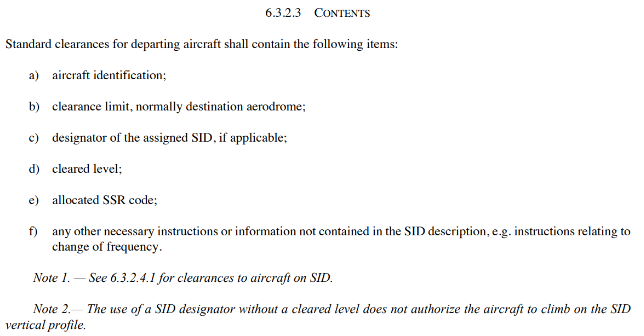
**When no SID, or aircraft is unable to follow SID, a non-standard clearance must be issued.**

<p class="callout warning">All non-standard clearance must be coordinated with APP or CTR unless specified in LAI</p>

The clearance must contain:

[![image.png](https://wiki.vatsim-scandinavia.org/uploads/images/gallery/2023-11/scaled-1680-/zTGimage.png)](https://wiki.vatsim-scandinavia.org/uploads/images/gallery/2023-11/zTGimage.png)

- Aircraft identification 
    - Callsign
- Clearance limit 
    - To destination aerodrome via either: **Flight planned route** - **WP then as filed** - **Radar vectors** (When issuing radar vectors, the entire trip will be via vectors only. Only issue this if specially coordinated with APP/CTR)
- Cleared Level 
    - Initial climb
- Allocated SSR code 
    - The squawk
- Other information 
    - Any practical information i.e. other runway for departure than stated in ATIS, maintain runway heading, follow standard noise abatement...

Based on this a clearance out of EKRK could be:

*"OYDDA cleared to EDDH via MAXEL, KOPEX then as filed. Climb initially 5000 ft. level change en-route, squawk 1234"*

Or in EKYT:

*"SAS123 cleared to EKCH via TNO, climb FL120 level change en-route, squawk 1234. After departure runway 08L follow standard noise abatement procedure."*

Here TNO is the only WP in the flightplan, and only valid for EKCH &amp; EKRK, hence no then as filed after the WP.

Or in EKAH:

*"RYR4EX cleared to Stansted via Flight Planed Route, climb FL060 expect level change en-route, squawk 1234."*  
  
Or in EKEB (AFIS):

*"DTR1 Copenhagen Control clears you to EKCH via Flight Planned Route, Initial climb FL050 squawk 1234. After departure runway 26, right turn to ABINO."*

As EKEB is an AFIS the clearance has to go via the overlaying EKDK sector, hence the "*Copenhagen Control cleares you to..."*

If an Aircraft wants to perform IFR Circuts a Non-std clearance must be issued as well.  
An example in EKCH, could be:

*"NSZ8938 cleared to Copenhagen via radar vectors, climb 3000 ft. squawk 1234. After departure maintain runway heading."*

# Wake Turbulence Schematic

Departure from thh same runway, using the same takeoff positions

<table border="1" id="bkmrk-departing-%2F-behind-l" style="border-collapse: collapse; width: 100%; height: 148.984px; border: 1px solid rgb(0, 0, 0);"><colgroup><col style="width: 20%;"></col><col style="width: 20%;"></col><col style="width: 20%;"></col><col style="width: 20%;"></col><col style="width: 20%;"></col></colgroup><tbody><tr style="height: 29.7969px; background-color: #1a475f;"><td class="align-center" style="height: 29.7969px; border-color: rgb(0, 0, 0);">**<span style="color: rgb(255, 255, 255);">Departing / Behind</span>**</td><td class="align-center" style="height: 29.7969px; border-color: rgb(0, 0, 0);">**<span style="color: rgb(255, 255, 255);">Light</span>**</td><td class="align-center" style="height: 29.7969px; border-color: rgb(0, 0, 0);">**<span style="color: rgb(255, 255, 255);">Medium</span>**</td><td class="align-center" style="height: 29.7969px; border-color: rgb(0, 0, 0);">**<span style="color: rgb(255, 255, 255);">Heavy</span>**</td><td class="align-center" style="height: 29.7969px; border-color: rgb(0, 0, 0);">**<span style="color: rgb(255, 255, 255);">Super</span>**</td></tr><tr style="height: 29.7969px;"><td class="align-center" style="height: 29.7969px; background-color: rgb(26, 71, 95); border-color: rgb(0, 0, 0);"><span style="color: rgb(255, 255, 255);">**Light**</span></td><td class="align-center" style="height: 29.7969px; background-color: rgb(65, 130, 110); border-color: rgb(0, 0, 0);"><span style="color: rgb(255, 255, 255);">1 Minute(s)</span></td><td class="align-center" style="height: 29.7969px; background-color: rgb(255, 152, 0); border-color: rgb(0, 0, 0);"><span style="color: rgb(255, 255, 255);">2 Minute(s)</span></td><td class="align-center" style="height: 29.7969px; background-color: rgb(255, 152, 0); border-color: rgb(0, 0, 0);"><span style="color: rgb(255, 255, 255);">2 Minute(s)</span></td><td class="align-center" style="height: 29.7969px; background-color: rgb(182, 63, 63); border-color: rgb(0, 0, 0);"><span style="color: rgb(255, 255, 255);">3 Minute(s)</span></td></tr><tr style="height: 29.7969px;"><td class="align-center" style="height: 29.7969px; background-color: rgb(26, 71, 95); border-color: rgb(0, 0, 0);"><span style="color: rgb(255, 255, 255);">**Medium**</span></td><td class="align-center" style="height: 29.7969px; background-color: rgb(65, 130, 110); border-color: rgb(0, 0, 0);"><span style="color: rgb(255, 255, 255);">1 Minute(s)</span></td><td class="align-center" style="height: 29.7969px; background-color: rgb(65, 130, 110); border-color: rgb(0, 0, 0);"><span style="color: rgb(255, 255, 255);">1 Minute(s)</span></td><td class="align-center" style="height: 29.7969px; background-color: rgb(255, 152, 0); border-color: rgb(0, 0, 0);"><span style="color: rgb(255, 255, 255);">2 Minute(s)</span></td><td class="align-center" style="height: 29.7969px; background-color: rgb(182, 63, 63); border-color: rgb(0, 0, 0);"><span style="color: rgb(255, 255, 255);">3 Minute(s)</span></td></tr><tr style="height: 29.7969px;"><td class="align-center" style="height: 29.7969px; background-color: rgb(26, 71, 95); border-color: rgb(0, 0, 0);"><span style="color: rgb(255, 255, 255);">**Heavy**</span></td><td class="align-center" style="height: 29.7969px; background-color: rgb(65, 130, 110); border-color: rgb(0, 0, 0);"><span style="color: rgb(255, 255, 255);">1 Minute(s)</span></td><td class="align-center" style="height: 29.7969px; background-color: rgb(65, 130, 110); border-color: rgb(0, 0, 0);"><span style="color: rgb(255, 255, 255);">1 Minute(s)</span></td><td class="align-center" style="height: 29.7969px; background-color: rgb(65, 130, 110); border-color: rgb(0, 0, 0);"><span style="color: rgb(255, 255, 255);">1 Minute(s)</span></td><td class="align-center" style="height: 29.7969px; background-color: rgb(255, 152, 0); border-color: rgb(0, 0, 0);"><span style="color: rgb(255, 255, 255);">2 Minute(s)</span></td></tr><tr style="height: 29.7969px;"><td class="align-center" style="height: 29.7969px; background-color: rgb(26, 71, 95); border-color: rgb(0, 0, 0);"><span style="color: rgb(255, 255, 255);">**Super**</span></td><td class="align-center" style="height: 29.7969px; background-color: rgb(65, 130, 110); border-color: rgb(0, 0, 0);"><span style="color: rgb(255, 255, 255);">1 Minute(s)</span></td><td class="align-center" style="height: 29.7969px; background-color: rgb(65, 130, 110); border-color: rgb(0, 0, 0);"><span style="color: rgb(255, 255, 255);">1 Minute(s)</span></td><td class="align-center" style="height: 29.7969px; background-color: rgb(65, 130, 110); border-color: rgb(0, 0, 0);"><span style="color: rgb(255, 255, 255);">1 Minute(s)</span></td><td class="align-center" style="height: 29.7969px; background-color: rgb(65, 130, 110); border-color: rgb(0, 0, 0);"><span style="color: rgb(255, 255, 255);">1 Minute(s)</span></td></tr></tbody></table>

Intersection departures

<table border="1" id="bkmrk-departing-%2F-behind-l-1" style="border-collapse: collapse; width: 100%; height: 148.984px; border: 1px solid rgb(0, 0, 0);"><colgroup><col style="width: 20%;"></col><col style="width: 20%;"></col><col style="width: 20%;"></col><col style="width: 20%;"></col><col style="width: 20%;"></col></colgroup><tbody><tr style="height: 29.7969px; background-color: #1a475f;"><td class="align-center" style="height: 29.7969px; border-color: rgb(0, 0, 0);">**<span style="color: rgb(255, 255, 255);">Departing / Behind</span>**</td><td class="align-center" style="height: 29.7969px; border-color: rgb(0, 0, 0);">**<span style="color: rgb(255, 255, 255);">Light</span>**</td><td class="align-center" style="height: 29.7969px; border-color: rgb(0, 0, 0);">**<span style="color: rgb(255, 255, 255);">Medium</span>**</td><td class="align-center" style="height: 29.7969px; border-color: rgb(0, 0, 0);">**<span style="color: rgb(255, 255, 255);">Heavy</span>**</td><td class="align-center" style="height: 29.7969px; border-color: rgb(0, 0, 0);">**<span style="color: rgb(255, 255, 255);">Super</span>**</td></tr><tr style="height: 29.7969px;"><td class="align-center" style="height: 29.7969px; background-color: rgb(26, 71, 95); border-color: rgb(0, 0, 0);"><span style="color: rgb(255, 255, 255);">**Light**</span></td><td class="align-center" style="height: 29.7969px; background-color: rgb(65, 130, 110); border-color: rgb(0, 0, 0);"><span style="color: rgb(255, 255, 255);">1 Minute(s)</span></td><td class="align-center" style="height: 29.7969px; background-color: rgb(182, 63, 63); border-color: rgb(0, 0, 0);"><span style="color: rgb(255, 255, 255);">3 Minute(s)</span></td><td class="align-center" style="height: 29.7969px; background-color: rgb(182, 63, 63); border-color: rgb(0, 0, 0);"><span style="color: rgb(255, 255, 255);">3 Minute(s)</span></td><td class="align-center" style="height: 29.7969px; background-color: rgb(75, 0, 130); border-color: rgb(0, 0, 0);"><span style="color: rgb(255, 255, 255);">4 Minute(s)</span></td></tr><tr style="height: 29.7969px;"><td class="align-center" style="height: 29.7969px; background-color: rgb(26, 71, 95); border-color: rgb(0, 0, 0);"><span style="color: rgb(255, 255, 255);">**Medium**</span></td><td class="align-center" style="height: 29.7969px; background-color: rgb(65, 130, 110); border-color: rgb(0, 0, 0);"><span style="color: rgb(255, 255, 255);">1 Minute(s)</span></td><td class="align-center" style="height: 29.7969px; background-color: rgb(65, 130, 110); border-color: rgb(0, 0, 0);"><span style="color: rgb(255, 255, 255);">1 Minute(s)</span></td><td class="align-center" style="height: 29.7969px; background-color: rgb(182, 63, 63); border-color: rgb(0, 0, 0);"><span style="color: rgb(255, 255, 255);">3 Minute(s)</span></td><td class="align-center" style="height: 29.7969px; background-color: rgb(75, 0, 130); border-color: rgb(0, 0, 0);"><span style="color: rgb(255, 255, 255);">4 Minute(s)</span></td></tr><tr style="height: 29.7969px;"><td class="align-center" style="height: 29.7969px; background-color: rgb(26, 71, 95); border-color: rgb(0, 0, 0);"><span style="color: rgb(255, 255, 255);">**Heavy**</span></td><td class="align-center" style="height: 29.7969px; background-color: rgb(65, 130, 110); border-color: rgb(0, 0, 0);"><span style="color: rgb(255, 255, 255);">1 Minute(s)</span></td><td class="align-center" style="height: 29.7969px; background-color: rgb(65, 130, 110); border-color: rgb(0, 0, 0);"><span style="color: rgb(255, 255, 255);">1 Minute(s)</span></td><td class="align-center" style="height: 29.7969px; background-color: rgb(65, 130, 110); border-color: rgb(0, 0, 0);"><span style="color: rgb(255, 255, 255);">1 Minute(s)</span></td><td class="align-center" style="height: 29.7969px; background-color: rgb(182, 63, 63); border-color: rgb(0, 0, 0);"><span style="color: rgb(255, 255, 255);">3 Minute(s)</span></td></tr><tr style="height: 29.7969px;"><td class="align-center" style="height: 29.7969px; background-color: rgb(26, 71, 95); border-color: rgb(0, 0, 0);"><span style="color: rgb(255, 255, 255);">**Super**</span></td><td class="align-center" style="height: 29.7969px; background-color: rgb(65, 130, 110); border-color: rgb(0, 0, 0);"><span style="color: rgb(255, 255, 255);">1 Minute(s)</span></td><td class="align-center" style="height: 29.7969px; background-color: rgb(65, 130, 110); border-color: rgb(0, 0, 0);"><span style="color: rgb(255, 255, 255);">1 Minute(s)</span></td><td class="align-center" style="height: 29.7969px; background-color: rgb(65, 130, 110); border-color: rgb(0, 0, 0);"><span style="color: rgb(255, 255, 255);">1 Minute(s)</span></td><td class="align-center" style="height: 29.7969px; background-color: rgb(65, 130, 110); border-color: rgb(0, 0, 0);"><span style="color: rgb(255, 255, 255);">1 Minute(s)</span></td></tr></tbody></table>

Arriving aircraft on APP

<table border="1" id="bkmrk-arriving-%2F-behind-li" style="border-collapse: collapse; width: 100%; height: 148.984px; border: 1px solid rgb(0, 0, 0);"><colgroup><col style="width: 20%;"></col><col style="width: 20%;"></col><col style="width: 20%;"></col><col style="width: 20%;"></col><col style="width: 20%;"></col></colgroup><tbody><tr style="height: 29.7969px; background-color: #1a475f;"><td class="align-center" style="height: 29.7969px; border-color: rgb(0, 0, 0);">**<span style="color: rgb(255, 255, 255);">Arriving / Behind</span>**</td><td class="align-center" style="height: 29.7969px; border-color: rgb(0, 0, 0);">**<span style="color: rgb(255, 255, 255);">Light</span>**</td><td class="align-center" style="height: 29.7969px; border-color: rgb(0, 0, 0);">**<span style="color: rgb(255, 255, 255);">Medium</span>**</td><td class="align-center" style="height: 29.7969px; border-color: rgb(0, 0, 0);">**<span style="color: rgb(255, 255, 255);">Heavy</span>**</td><td class="align-center" style="height: 29.7969px; border-color: rgb(0, 0, 0);">**<span style="color: rgb(255, 255, 255);">Super</span>**</td></tr><tr style="height: 29.7969px;"><td class="align-center" style="height: 29.7969px; background-color: rgb(26, 71, 95); border-color: rgb(0, 0, 0);"><span style="color: rgb(255, 255, 255);">**Light**</span></td><td class="align-center" style="height: 29.7969px; background-color: rgb(65, 130, 110); border-color: rgb(0, 0, 0);"><span style="color: rgb(255, 255, 255);">1 Minute(s) (2.5 miles)</span></td><td class="align-center" style="height: 29.7969px; background-color: rgb(182, 63, 63); border-color: rgb(0, 0, 0);"><span style="color: rgb(255, 255, 255);">3 Minute(s) (3.5 miles)</span></td><td class="align-center" style="height: 29.7969px; background-color: rgb(182, 63, 63); border-color: rgb(0, 0, 0);"><span style="color: rgb(255, 255, 255);">3 Minute(s) (3.5 miles)</span></td><td class="align-center" style="height: 29.7969px; background-color: rgb(75, 0, 130); border-color: rgb(0, 0, 0);"><span style="color: rgb(255, 255, 255);">4 Minute(s) (5 miles)</span></td></tr><tr style="height: 29.7969px;"><td class="align-center" style="height: 29.7969px; background-color: rgb(26, 71, 95); border-color: rgb(0, 0, 0);"><span style="color: rgb(255, 255, 255);">**Medium**</span></td><td class="align-center" style="height: 29.7969px; background-color: rgb(65, 130, 110); border-color: rgb(0, 0, 0);"><span style="color: rgb(255, 255, 255);">1 Minute(s) (2.5 miles)</span></td><td class="align-center" style="height: 29.7969px; background-color: rgb(65, 130, 110); border-color: rgb(0, 0, 0);"><span style="color: rgb(255, 255, 255);">1 Minute(s) (2.5 miles)</span></td><td class="align-center" style="height: 29.7969px; background-color: rgb(255, 152, 0); border-color: rgb(0, 0, 0);"><span style="color: rgb(255, 255, 255);">2 Minute(s) (3 miles)</span></td><td class="align-center" style="height: 29.7969px; background-color: rgb(75, 0, 130); border-color: rgb(0, 0, 0);"><span style="color: rgb(255, 255, 255);">4 Minute(s) (10 miles)</span></td></tr><tr style="height: 29.7969px;"><td class="align-center" style="height: 29.7969px; background-color: rgb(26, 71, 95); border-color: rgb(0, 0, 0);"><span style="color: rgb(255, 255, 255);">**Heavy**</span></td><td class="align-center" style="height: 29.7969px; background-color: rgb(65, 130, 110); border-color: rgb(0, 0, 0);"><span style="color: rgb(255, 255, 255);">1 Minute(s) (2.5 miles)</span></td><td class="align-center" style="height: 29.7969px; background-color: rgb(65, 130, 110); border-color: rgb(0, 0, 0);"><span style="color: rgb(255, 255, 255);">1 Minute(s) (2.5 miles)</span></td><td class="align-center" style="height: 29.7969px; background-color: rgb(65, 130, 110); border-color: rgb(0, 0, 0);"><span style="color: rgb(255, 255, 255);">1 Minute(s) (2.5 miles)</span></td><td class="align-center" style="height: 29.7969px; background-color: rgb(65, 130, 110); border-color: rgb(0, 0, 0);"><span style="color: rgb(255, 255, 255);">1 Minute(s) (2.5 miles)</span></td></tr><tr style="height: 29.7969px;"><td class="align-center" style="height: 29.7969px; background-color: rgb(26, 71, 95); border-color: rgb(0, 0, 0);"><span style="color: rgb(255, 255, 255);">**Super**</span></td><td class="align-center" style="height: 29.7969px; background-color: rgb(65, 130, 110); border-color: rgb(0, 0, 0);"><span style="color: rgb(255, 255, 255);">1 Minute(s) (2.5 miles)</span></td><td class="align-center" style="height: 29.7969px; background-color: rgb(65, 130, 110); border-color: rgb(0, 0, 0);"><span style="color: rgb(255, 255, 255);">1 Minute(s) (2.5 miles)</span></td><td class="align-center" style="height: 29.7969px; background-color: rgb(65, 130, 110); border-color: rgb(0, 0, 0);"><span style="color: rgb(255, 255, 255);">1 Minute(s) (2.5 miles)</span></td><td class="align-center" style="height: 29.7969px; background-color: rgb(65, 130, 110); border-color: rgb(0, 0, 0);"><span style="color: rgb(255, 255, 255);">1 Minute(s) (2.5 miles)</span></td></tr></tbody></table>

NOTE concerning EKCH:

- 2 minutes shall be used when departing 22R, after a landing 22R of higher category
- 2 minutes shall be used between landings and departures when using 12/04R configuration
- Departure wake turbulence separation shall also be used between parallel departures, 22R and 22L [![SL9jj8image.png](https://wiki.vatsim-scandinavia.org/uploads/images/gallery/2026-01/scaled-1680-/sl9jj8image.png)](https://wiki.vatsim-scandinavia.org/uploads/images/gallery/2026-01/sl9jj8image.png)

# Who parks where EKCH

[Who parks where - EKCH](https://vatsim-scandinavia.org/applications/core/interface/file/attachment.php?id=3458&key=1bec9365968440949f22427269c0fa0d)

^ Full clickable guide ^

In Kastrup, there are 3 main terminals. Terminal 1 &amp; 2 is for Schengen flights, Terminal 3 for Non-Schengen &amp; Shengen. CPH GO is for low-cost carriers.

<details id="bkmrk-which-airline-parks-"><summary>Which airline parks where?</summary>

[![Screenshot 2024-04-23 203729.png](https://wiki.vatsim-scandinavia.org/uploads/images/gallery/2024-04/scaled-1680-/screenshot-2024-04-23-203729.png)](https://wiki.vatsim-scandinavia.org/uploads/images/gallery/2024-04/screenshot-2024-04-23-203729.png)

</details><details id="bkmrk-a-stands---shengen-o"><summary>A Stands - Schengen only</summary>

[![Screenshot 2024-04-23 173541.png](https://wiki.vatsim-scandinavia.org/uploads/images/gallery/2024-04/scaled-1680-/screenshot-2024-04-23-173541.png)](https://wiki.vatsim-scandinavia.org/uploads/images/gallery/2024-04/screenshot-2024-04-23-173541.png)

</details><details id="bkmrk-b-stands---schengen-"><summary>B Stands - Schengen only</summary>

[![Screenshot 2024-04-23 204127.png](https://wiki.vatsim-scandinavia.org/uploads/images/gallery/2024-04/scaled-1680-/screenshot-2024-04-23-204127.png)](https://wiki.vatsim-scandinavia.org/uploads/images/gallery/2024-04/screenshot-2024-04-23-204127.png)

</details><details id="bkmrk-c-stands---non-schen"><summary>C Stands - NON Schengen only</summary>

[![Screenshot 2024-04-23 204148.png](https://wiki.vatsim-scandinavia.org/uploads/images/gallery/2024-04/scaled-1680-/screenshot-2024-04-23-204148.png)](https://wiki.vatsim-scandinavia.org/uploads/images/gallery/2024-04/screenshot-2024-04-23-204148.png)

</details><details id="bkmrk-d-stands---flexible-"><summary>D Stands - Flexible</summary>

[![Screenshot 2024-04-23 204217.png](https://wiki.vatsim-scandinavia.org/uploads/images/gallery/2024-04/scaled-1680-/screenshot-2024-04-23-204217.png)](https://wiki.vatsim-scandinavia.org/uploads/images/gallery/2024-04/screenshot-2024-04-23-204217.png)

</details><details id="bkmrk-e-stands---flexible-"><summary>E Stands - Flexible</summary>

[![Screenshot 2024-04-23 204253.png](https://wiki.vatsim-scandinavia.org/uploads/images/gallery/2024-04/scaled-1680-/screenshot-2024-04-23-204253.png)](https://wiki.vatsim-scandinavia.org/uploads/images/gallery/2024-04/screenshot-2024-04-23-204253.png)

</details><details id="bkmrk-f-stands---flexible-"><summary>F Stands - Flexible</summary>

[![Screenshot 2024-04-23 204318.png](https://wiki.vatsim-scandinavia.org/uploads/images/gallery/2024-04/scaled-1680-/screenshot-2024-04-23-204318.png)](https://wiki.vatsim-scandinavia.org/uploads/images/gallery/2024-04/screenshot-2024-04-23-204318.png)

</details><details id="bkmrk-g-stands---cargo-onl"><summary>G Stands - Cargo only</summary>

All cargo operators park at stands G120 - G137

[![Screenshot 2024-04-23 205257.png](https://wiki.vatsim-scandinavia.org/uploads/images/gallery/2024-04/scaled-1680-/screenshot-2024-04-23-205257.png)](https://wiki.vatsim-scandinavia.org/uploads/images/gallery/2024-04/screenshot-2024-04-23-205257.png)

</details><details id="bkmrk-general-aviation-%2F-b"><summary>General aviation / Business jets &amp; misc.</summary>

- In regards to GA, EKCH normally doesn't receive those. They normally prefer EKRK (Roskilde).  
    However if/when they come to EKCH they park at either A31 - A34, G15 - G19 or if they are parked here for some time, at Apron West.
- VIPs (i.e. state visit, royals, pop-groups) always park at W1 (Wilhelm Lauritzen Terminal)
- Bizz-jets normally park at A31 - A34 or in case of long term parking, at Apron West
- Helicopters park at G110 or G111

[![Screenshot 2024-04-23 205032.png](https://wiki.vatsim-scandinavia.org/uploads/images/gallery/2024-04/scaled-1680-/screenshot-2024-04-23-205032.png)](https://wiki.vatsim-scandinavia.org/uploads/images/gallery/2024-04/screenshot-2024-04-23-205032.png)[![Screenshot 2024-04-23 205227.png](https://wiki.vatsim-scandinavia.org/uploads/images/gallery/2024-04/scaled-1680-/screenshot-2024-04-23-205227.png)](https://wiki.vatsim-scandinavia.org/uploads/images/gallery/2024-04/screenshot-2024-04-23-205227.png)[![Screenshot 2024-04-23 205257.png](https://wiki.vatsim-scandinavia.org/uploads/images/gallery/2024-04/scaled-1680-/screenshot-2024-04-23-205257.png)](https://wiki.vatsim-scandinavia.org/uploads/images/gallery/2024-04/screenshot-2024-04-23-205257.png)

</details>

# Euroscope shortcuts

The below table shows the most used/useful shortcuts in Euroscope:

<table border="1" id="bkmrk-%C2%A0" style="border-collapse: collapse; width: 100%;"><colgroup><col style="width: 33.3333%;"></col><col style="width: 33.3333%;"></col><col style="width: 33.3333%;"></col></colgroup><tbody><tr><td class="align-center" style="background-color: rgb(52, 73, 94);"><span style="color: rgb(255, 255, 255);">Action needed</span></td><td class="align-center" style="background-color: rgb(52, 73, 94);"><span style="color: rgb(255, 255, 255);">Shortcut command</span></td><td class="align-center" style="background-color: rgb(52, 73, 94);"><span style="color: rgb(255, 255, 255);">Types of text for action</span></td></tr><tr><td class="align-center">Get the weather</td><td class="align-center">F2 + Airport ICAO</td><td class="align-center">.QD ekbi</td></tr><tr><td class="align-center">Ask an A/C to contact you</td><td class="align-center">'Home' btn. -&gt; click tag</td><td class="align-center">.contactme -&gt; click tag</td></tr><tr><td class="align-center">Center to an airport</td><td class="align-center">NIL</td><td class="align-center">.center ekbi</td></tr><tr><td class="align-center">Call a supervisor</td><td class="align-center">NIL</td><td class="align-center">.wallop \[regarding C/S\] \[message\]</td></tr><tr><td class="align-center">Write a remark on a pilot</td><td class="align-center">'Insert' btn. \[write remark/leave empty\] -&gt; click tag</td><td class="align-center">.QS \[write remark/leave empty\] -&gt; click tag</td></tr><tr><td class="align-center">Write on ATC channel</td><td class="align-center">NIL</td><td class="align-center">/\[Message\]</td></tr><tr><td class="align-center">Closing soon / on a break</td><td class="align-center">NIL</td><td class="align-center">.break</td></tr><tr><td class="align-center">Not closing / back from break</td><td class="align-center">NIL</td><td class="align-center">.nobreak</td></tr><tr><td class="align-center">Open SCT files</td><td class="align-center">F1 + number</td><td class="align-center">1 = EKCH GND  
2 = EKCH APP  
3 = EKDK  
4 = EKBI GND  
5 = EKBI APP  
6 = EKYT GND  
7 = EKYT APP  
8 = Ground view (General)  
</td></tr><tr><td class="align-center">To find a given WP or A/C</td><td class="align-center">F1 + F \[WP Name / A/C callsign\]</td><td class="align-center">.find \[WP Name / A/C callsign\]</td></tr><tr><td class="align-center">Open or create a flightplan</td><td class="align-center">F1 + A -&gt; click tag</td><td class="align-center">.am -&gt; click tag</td></tr><tr><td class="align-center">Get information on frequency pilot is monitoring</td><td class="align-center">F1 + I -&gt; click tag</td><td class="align-center">.inf -&gt; click tag</td></tr><tr><td class="align-center">Private msg to any station or plane</td><td class="align-center">F1 + C \[Callsign/click tag\]</td><td class="align-center">.chat \[Callsign/click tag\]</td></tr><tr><td class="align-center">Get the distance between two A/C</td><td class="align-center">F1 + D -&gt; click both tags</td><td class="align-center">.distance -&gt; click both tags</td></tr><tr><td class="align-center">Seperation tool between two A/C</td><td class="align-center">F1 + S -&gt; click both tags</td><td class="align-center">.sep -&gt; click both tags</td></tr><tr><td class="align-center">Watch the A/C flight strip in chat window</td><td class="align-center">F6</td><td class="align-center">NIL</td></tr><tr><td class="align-center">Switch between open SCT</td><td class="align-center">F7</td><td class="align-center">NIL</td></tr><tr><td class="align-center">Change A/C voice option</td><td class="align-center">F9 + T / V / R -&gt; click tag</td><td class="align-center">.QB + T / V / R -&gt; click tag  
T = Text only  
V = Voice  
R = Recive only</td></tr></tbody></table>

All commands can be found on the official ES site. Please note that not all commands functions propperly with our setup, and some shouldn't be used at all! [Command line reference](https://www.euroscope.hu/wp/command-line-reference/)

<p class="callout warning">DO NOT use the 'Busy mode', major conflicts can happen if a supervisor needs your attention, or other ATC for coordination!</p>

A full list of all the shortcuts can be found here, as a guide on how to edit these: [Editing and function keys](https://www.euroscope.hu/wp/editing-and-function-keys/)

# Custom ALIAS Files

### General

The ALIAS file describes all the . (dot) shortcuts for Text pilots in Euroscope.

The file is located in: EKDK &gt; Alias folder

It is highly recommended that all controllers make their edits or at least personalize the file to make it fit your exact needs.

### How to edit

#### Basic structure

The file itself is split up in different sections to make it easier to edit and read.  
All these categories are defined with:

```
;*** [Name] ***
```

The commands itself are defined with:

```
.[command] [Text to be inserted]
```

An example could be:

```
;*** A_TWR ***
.conapp Winds are $wind, runway $arrrwy, continue approach, you're number $2
```

To automatically insert values following codes are used:

<table border="1" id="bkmrk-wind-%24wind-arrival-r" style="border-collapse: collapse; width: 100%;"><colgroup><col style="width: 50%;"></col><col style="width: 50%;"></col></colgroup><tbody><tr><td>  
</td><td>  
</td></tr><tr><td>Wind</td><td>$wind</td></tr><tr><td>Arrival Runway</td><td>$arrrwy</td></tr><tr><td>STAR</td><td>$star</td></tr><tr><td>SID</td><td>$sid</td></tr><tr><td>QNH</td><td>$altim(\[ICAO\])</td></tr><tr><td>SSR Code</td><td>$asquawk</td></tr></tbody></table>

#### How to edit urself

You can enter as many new lines as you desire, just remember the basic lines as described above.

Once you are done simply save the document and remember to load it into Euroscope:

Open SCT &gt; Load Aliases &gt; Navigate to your Alias file.

If you have made a good file, or have some new entries, please share them with the Staff or @Jeppe S.  
Then they might be uploaded here for sharing.

# Airspace Classes

<table id="bkmrk-class-ifr-%2F-vfr-sepe"> <thead> <tr> <td style="min-width: 8ch">CLASS</td> <td style="min-width: 6ch">IFR / VFR</td> <td style="min-width: 13ch">SEPERATION</td> <td style="min-width: 20ch">SERVICE PROVIDED</td> <td style="min-width: 9ch">SPEED LIMITATION</td> <td style="min-width: 11ch">RADIO COMM.</td> <td style="min-width: 8ch">TRANS PONDER</td> <td style="min-width: 6ch">CLR</td> </tr> </thead> <tbody> <tr> <td>A</td> <td>IFR</td> <td>All Traffic</td> <td>Air traffic control service</td> <td></td> <td>Continuous two-way</td> <td>A + C</td> <td>Yes</td> </tr> <tr> <td rowspan="2">B</td> <td>IFR</td> <td>All Traffic</td> <td>Air traffic control service</td> <td></td> <td>Continuous two-way</td> <td>A + C</td> <td>Yes</td> </tr> <tr> <td>VFR</td> <td>All Traffic</td> <td>Air traffic control service</td> <td></td> <td>Continuous two-way</td> <td>A + C</td> <td>Yes</td> </tr> <tr> <td rowspan="2">C</td> <td>IFR</td> <td>IFR from IFR IFR from VFR</td> <td>Air traffic control service</td> <td></td> <td>Continuous two-way</td> <td>A + C</td> <td>Yes</td> </tr> <tr> <td>VFR</td> <td>VFR from VFR</td> <td>Air traffic control service for separation from IFR. VFR/VFR: Traffic information traffic avoidance advice on request

</td><td>250 KT IAS below FL 100</td><td>Continuous two-way</td><td>A + C</td><td>Yes</td></tr><tr><td rowspan="2">D</td><td>IFR</td><td>IFR from IFR</td><td>Air traffic control service. Traffic information about VFR flights, and traffic avoidance advice on request</td><td>250 KT IAS below FL 100</td><td>Continuous two-way</td><td>A + C</td><td>Yes</td></tr><tr><td>VFR</td><td>None</td><td>Air traffic control service. Traffic information about VFR and IFR flights, and traffic avoidance advice on request</td><td>250 KT IAS below FL 100</td><td>Continuous two-way</td><td>Above FL 95 TMZ</td><td>Yes</td></tr><tr><td rowspan="2">E</td><td>IFR</td><td>IFR from IFR</td><td>Air traffic control service Traffic information about VFR flights as far as practical</td><td>250 KT IAS below FL 100</td><td>Continuous two-way</td><td>A + C</td><td>Yes</td></tr><tr><td>VFR</td><td>None</td><td>Flight information service. Traffic informa-tion as far as practical</td><td>250 KT IAS below FL 100</td><td>Above FL 95 \*\*RMZ</td><td>Above FL 95TMZ</td><td>No</td></tr><tr><td rowspan="2">F</td><td>IFR</td><td>IFR from IFR</td><td>Air traffic advisory service and flight information</td><td>250 KT IAS below FL 100</td><td>Continuous two-way</td><td>A + C</td><td>No</td></tr><tr><td>VFR</td><td>None</td><td>Flight information service</td><td>250 KT IAS below FL 100 140 KT IAS VMC minima</td><td>No</td><td>Above FL 95 \*TMZ</td><td>No</td></tr><tr><td rowspan="2">G</td><td>IFR</td><td>None</td><td>Flight information service</td><td>250 KT IAS below FL 100</td><td>Continuous two-way</td><td>A + C</td><td>No</td></tr><tr><td>VFR</td><td>None</td><td>Flight information service</td><td>250 KT IAS below FL 100 140 KT IAS VMC minima</td><td>Above FL 95 \*\*RMZ Two-way in TIZ</td><td></td><td>No</td></tr> </tbody></table>

# Split Apron Operation

Split Apron Quick Reference Sheet

Copenhagen FIR

## 1. Setup

- [Download Track Audio from here (Needed for FQ. monitoring)](https://github.com/pierr3/TrackAudio/releases)
- Open up Track Audio and setup as below before logging on.

<span style="white-space: pre-wrap;"> </span>[![image.png](https://wiki.vatsim-scandinavia.org/uploads/images/gallery/2025-02/scaled-1680-/E1cimage.png)](https://wiki.vatsim-scandinavia.org/uploads/images/gallery/2025-02/E1cimage.png)

- Enable RX+TX on YOUR frequency, Volume 100%
- Enable RX on the OTHER frequency, Volume 25-35% or as desire

[![ezgif-8e5565930c43dc.gif](https://wiki.vatsim-scandinavia.org/uploads/images/gallery/2025-02/ezgif-8e5565930c43dc.gif)](https://wiki.vatsim-scandinavia.org/uploads/images/gallery/2025-02/ezgif-8e5565930c43dc.gif)

## 2. Coordination

****2.1 Coordination procedures are as follows:****

- First aircraft to get the instruction, is generally first and has the right of way.
- Listen to the other controller’s frequency to start alerted on flights, and to identify when there is a pause in transmissions to coordinate.
- WHEN needing to coordinate, listen for a break in his frequency, and state the coordination request DIRECTLY and without DELAY.

****2.2 Inbounds****

- Before you give an inbound taxi instruction, make sure that no traffic already taxiing is conflicting.
- Before clearing into a stand, ensure that no pushbacks are in progress.
- If you are first, and give a longer taxi instruction, look for conflicts and highlight them to the other controller if you have not positively heard that it’s been seen.
- 22L in use: Consider inbounds via B to M alley, to hold short of M, due to the length of the taxi duration.
- 04L in use: Consider inbounds to CPH GO to hold short of W, due to the length of the taxi duration.

****2.3 Outbounds****

- Before approving a pushback, ensure no already taxiing inbounds are crossing the pushback path.
- If you are first, and give a longer taxi instruction, look for conflicts and highlight them to the other controller if you have not positively heard that it’s been seen

## 4. Special rules

Following rules must be adhered to:

- S3, S4 and Y2 must NOT be used for pushback unless specifically coordinated.
- <span style="white-space: pre-wrap;">TWY S between TWY V and TWY W, may </span>****NOT****<span style="white-space: pre-wrap;"> be used for </span><u>OUTBOUNDS</u>
- TWT V shall only be used eastbound (Towards 22L) unless otherwise coordinated. TWY W remains omnidirectional.

## 5. Appendix

****Precise usage of STANDARD TAXI ROUTES is absolutely crucial****

# EKDK Sector Tool

With this tool you are able to view different AoR and how they work together .For detailed description, always refer to [https://wiki.vatsim-scandinavia.org/books/lai/page/lai-2-acc-sectors](https://wiki.vatsim-scandinavia.org/books/lai/page/lai-2-acc-sectors)

<p class="callout info">To start the simulation of the different sectors -&gt; [EKDK SECTORS](https://adbj.no/EKDK/ "EKDK SECTORS")</p>

On the left you can choose which sectors to view, and on the top which altitude to view,

# EKDK VFR Charts

The charts are available from Naviar.

<p class="callout info">[DENMARK VFR CHARTS](https://aim.naviair.dk/charts/ "DENMARK VFR CHARTS")</p>

Scroll down to find the latest updated charts.

# Airfields - Quick Reference Sheets

One-page documents summarising need-to-know information for Danish airfields, useful to controllers and pilots

# Regional Airports

Controlled Regional aerodromes: EKYT - EKAH - EKKA - EKBI - EKSP

[![EK_AD_SUP_Regional Quick Reference.png](https://wiki.vatsim-scandinavia.org/uploads/images/gallery/2025-08/scaled-1680-/ek-ad-sup-regional-quick-reference.png)](https://wiki.vatsim-scandinavia.org/uploads/images/gallery/2025-08/ek-ad-sup-regional-quick-reference.png)
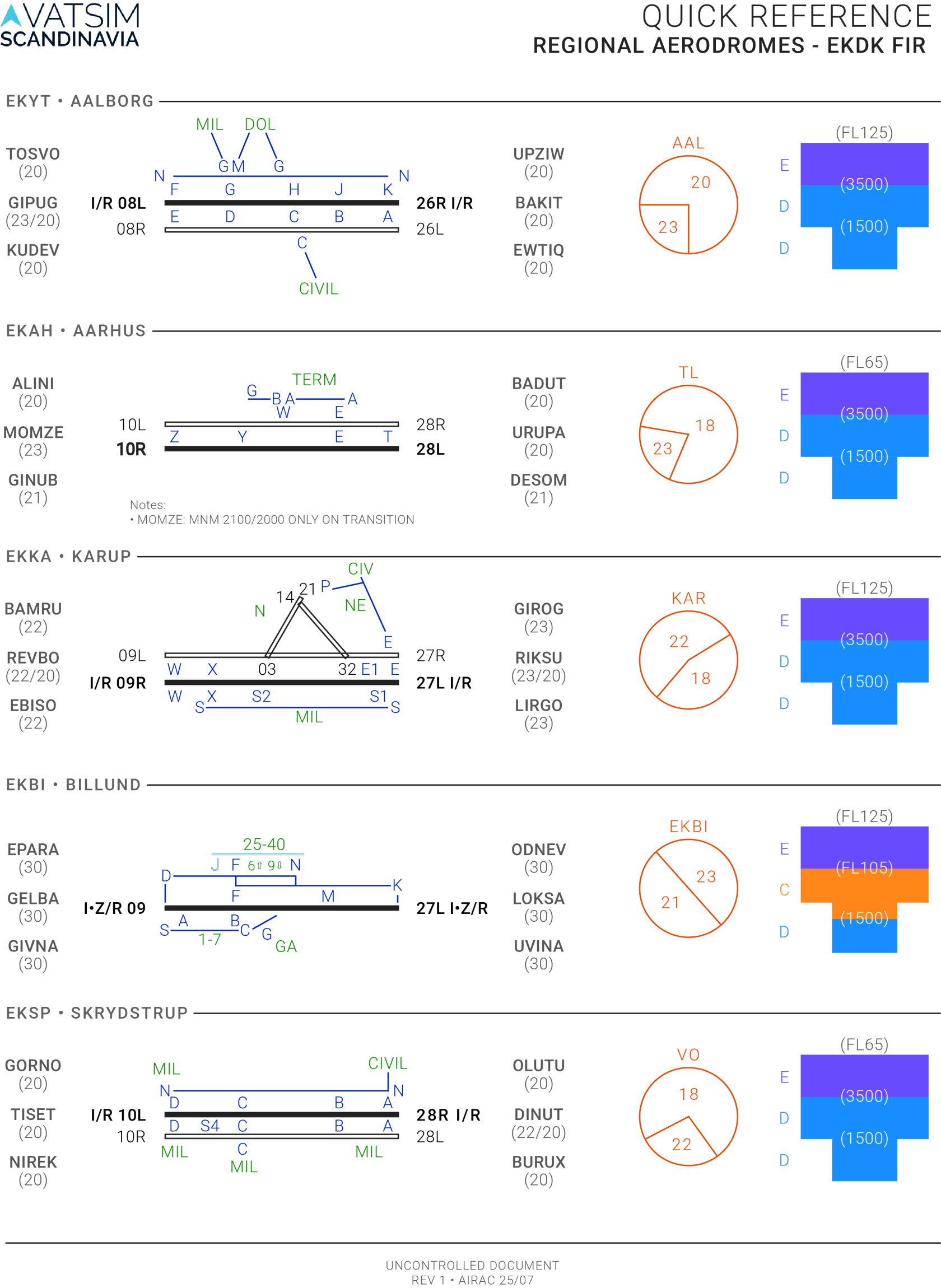

Download PDF: [EK_AD_SUP_Regional Quick Reference_V1](https://wiki.vatsim-scandinavia.org/attachments/457?open=true)

# AFIS Airports

AFIS aerodromes: EKVJ - EKEB - EKVD - EKOD - EKSB

[![EK_SUP_AFIS Quick Reference.png](https://wiki.vatsim-scandinavia.org/uploads/images/gallery/2025-08/scaled-1680-/ek-sup-afis-quick-reference.png)](https://wiki.vatsim-scandinavia.org/uploads/images/gallery/2025-08/ek-sup-afis-quick-reference.png)
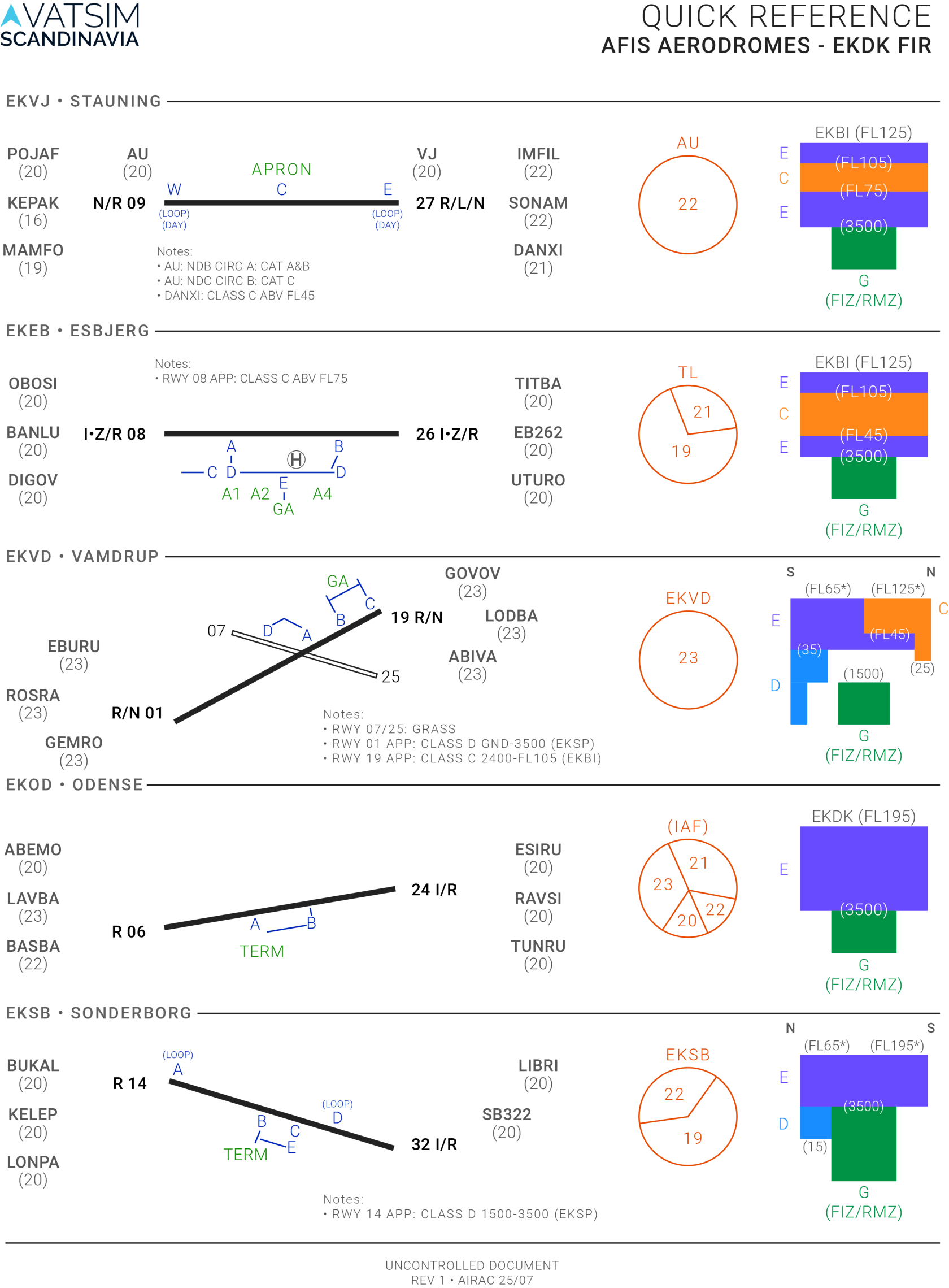


Download PDF: [EK_AD_SUP_AFIS Quick Reference_V1](https://wiki.vatsim-scandinavia.org/attachments/458?open=true)

# Copenhagen Area

Copenhagen area and Bornholm: EKCH - EKRK - EKRN

[![EK_SUP_East Quick Reference.png](https://wiki.vatsim-scandinavia.org/uploads/images/gallery/2026-01/scaled-1680-/LMDek-sup-east-quick-reference.png)](https://wiki.vatsim-scandinavia.org/uploads/images/gallery/2025-08/ek-sup-east-quick-reference.png)
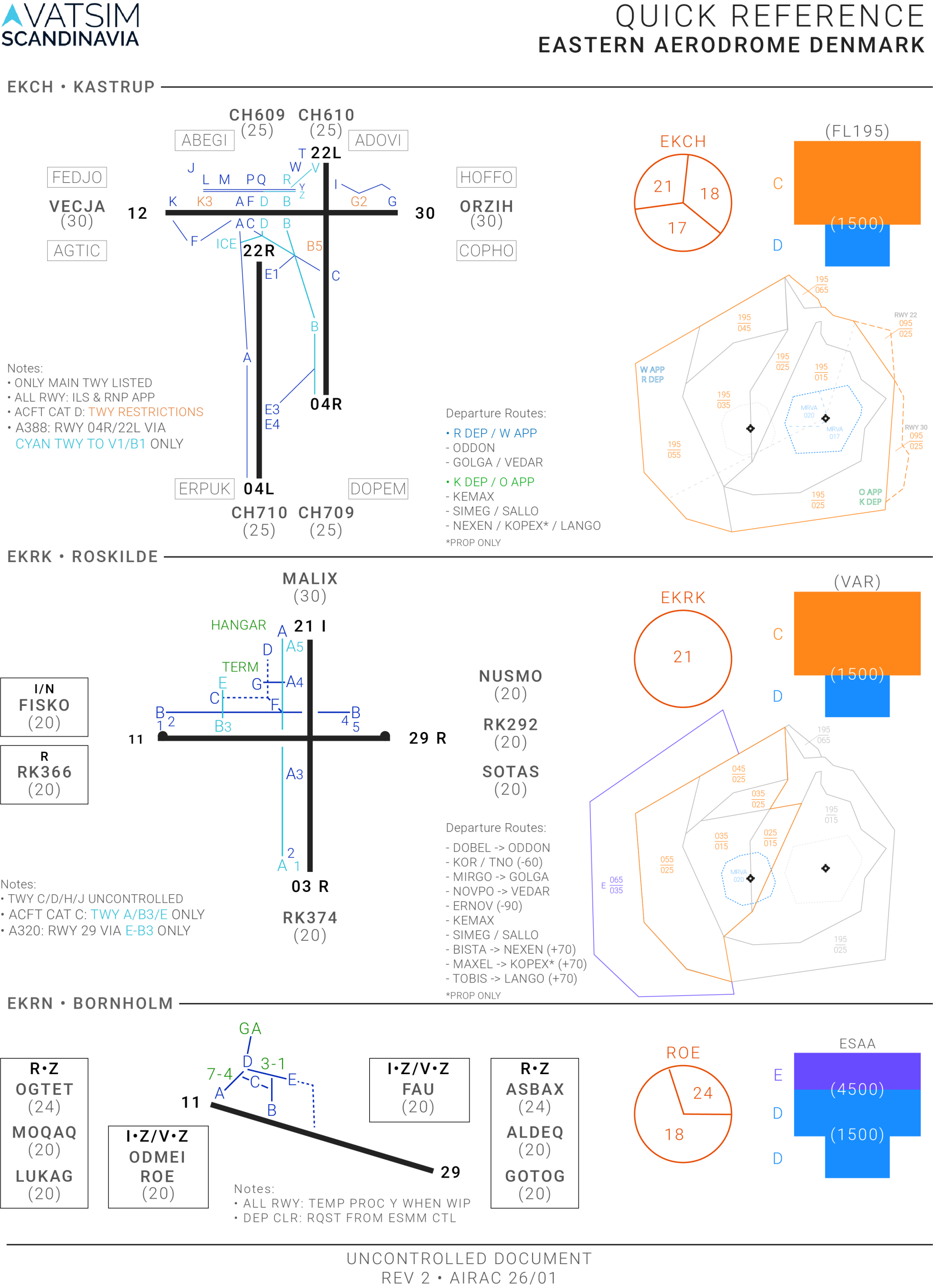
<span style="white-space: pre-wrap;">Download PDF: </span>[EK\_AD\_SUP\_Copenhagen Area Quick Reference\_V2](https://wiki.vatsim-scandinavia.org/attachments/459?open=true)