# AA+AD - Operation

<p class="callout success"><span style="white-space: pre-wrap;">Containing </span>**Description**<span style="white-space: pre-wrap;">, </span>**Operational Procedures**<span style="white-space: pre-wrap;"> and </span>**Submenus** <span style="white-space: pre-wrap;">of the scope called </span>**AA+AD**............</p>

[![Group 664 (3).png](https://wiki.vatsim-scandinavia.org/uploads/images/gallery/2026-09/scaled-1680-/group-664-3.png)](https://wiki.vatsim-scandinavia.org/uploads/images/gallery/2026-09/group-664-3.png)

### <span style="color: rgb(35, 111, 161);">1.1 Overview</span>

- <span style="white-space: pre-wrap;">Scope name: </span>**AA+AD,**
- <span style="white-space: pre-wrap;">Used by: </span>**EKCH\_A\_GND, EKCH\_B\_GND, EKCH\_C\_GND**

<span style="background-color: rgb(224, 62, 45);">\[PIC\]</span>

<span style="white-space: pre-wrap;">AA+AD scope is used by any apron frequency, and contains all relevant tasks for perfroming both inbound and outbound responsibilities. </span>

<span style="white-space: pre-wrap;">If a </span><u>split apron</u><span style="white-space: pre-wrap;"> is sensed, the scope is exanded into </span>**APRON DEP**<span style="white-space: pre-wrap;"> and </span>**APRON ARR** <span style="white-space: pre-wrap;">which contains same features but relevant bays expanded. </span>**APRON ARR** <span style="white-space: pre-wrap;">and </span>**APRON DEP**<span style="white-space: pre-wrap;"> will not be expanded upon as they contain identical information as this chapter.</span>

[![Rectangle 324.png](https://wiki.vatsim-scandinavia.org/uploads/images/gallery/2026-09/scaled-1680-/5Cfrectangle-324.png)](https://wiki.vatsim-scandinavia.org/uploads/images/gallery/2026-09/5Cfrectangle-324.png)

### <span style="color: rgb(35, 111, 161);">1.2 Scope Design</span>

<table id="bkmrk-column-1%28arr-info%29co" style="border-collapse: collapse; border-image: none; width: 1000px;"><colgroup><col style="width: 112.15pt;"></col><col style="width: 112.35pt;"></col><col style="width: 112.25pt;"></col><col style="width: 112.25pt;"></col><col style="width: 0px;"></col></colgroup><tbody><tr style="height: 50.8pt;"><td style="background: rgb(1, 60, 71); width: 112.15pt; border: 2.25pt solid windowtext; padding: 0cm 5.4pt; height: 50.8pt;"><span style="color: white;">Column 1</span>

<span style="color: white;">(ARR INFO)</span>

</td><td style="background: rgb(1, 60, 71); width: 112.35pt; border-width: 2.25pt 2.25pt 2.25pt medium; border-style: solid solid solid none; border-color: windowtext windowtext windowtext currentcolor; border-image: none; padding: 0cm 5.4pt; height: 50.8pt;"><span style="color: white;">Column 2</span>  
<span style="color: white;">(TAXI MOVEMENT)</span>

</td><td style="background: rgb(1, 60, 71); width: 112.25pt; border-width: 2.25pt 2.25pt 2.25pt medium; border-style: solid solid solid none; border-color: windowtext windowtext windowtext currentcolor; border-image: none; padding: 0cm 5.4pt; height: 50.8pt;"><span style="color: white;">Column 3</span>

<span style="color: white;">(START/PUSH)</span>

</td><td style="background: rgb(1, 60, 71); width: 112.25pt; border-width: 2.25pt 2.25pt 2.25pt medium; border-style: solid solid solid none; border-color: windowtext windowtext windowtext currentcolor; border-image: none; padding: 0cm 5.4pt; height: 50.8pt;"><span style="color: white;">Column 4</span>

<span style="color: white;">(DEL)</span>

</td><td style="height: 50.8pt; border-width: medium; border-style: none; border-color: currentcolor; border-image: none;"></td></tr><tr style="height: 79.25pt;"><td rowspan="2" style="background: rgb(85, 82, 85); width: 112.15pt; border-width: medium 2.25pt 2.25pt; border-style: none solid solid; border-color: currentcolor windowtext windowtext; border-image: none; padding: 0cm 5.4pt; height: 79.25pt;"><span style="color: rgb(255, 242, 142);">MESSAGES</span>

</td><td rowspan="2" style="background: rgb(85, 82, 85); width: 112.35pt; border-width: medium 2.25pt 2.25pt medium; border-style: none solid solid none; border-color: currentcolor windowtext windowtext currentcolor; padding: 0cm 5.4pt; height: 79.25pt;"><span style="color: rgb(133, 180, 175);">TWY DEP</span>

</td><td rowspan="3" style="background: rgb(85, 82, 85); width: 112.25pt; border-width: medium 2.25pt 2.25pt medium; border-style: none solid solid none; border-color: currentcolor windowtext windowtext currentcolor; padding: 0cm 5.4pt; height: 79.25pt;"><span style="color: rgb(133, 180, 175);">STARTUP</span>

</td><td style="background: rgb(85, 82, 85); width: 112.25pt; border-width: medium 2.25pt 2.25pt medium; border-style: none solid solid none; border-color: currentcolor windowtext windowtext currentcolor; padding: 0cm 5.4pt; height: 79.25pt;"><span style="color: rgb(133, 180, 175);">SAS</span><sup style="color: rgb(133, 180, 175);"><span class="editor-theme-superscript">1</span></sup>

</td><td style="height: 79.25pt; border-width: medium; border-style: none; border-color: currentcolor; border-image: none;"></td></tr><tr style="height: 20.55pt;"><td rowspan="3" style="background: rgb(85, 82, 85); width: 112.25pt; border-width: medium 2.25pt 2.25pt medium; border-style: none solid solid none; border-color: currentcolor windowtext windowtext currentcolor; padding: 0cm 5.4pt; height: 20.55pt;"><span style="color: rgb(133, 180, 175);">NORWEGIAN</span><sup style="color: rgb(133, 180, 175);"><span class="editor-theme-superscript">1</span></sup>

</td><td style="height: 20.55pt; border-width: medium; border-style: none; border-color: currentcolor; border-image: none;"></td></tr><tr style="height: 35.1pt;"><td rowspan="2" style="background: rgb(85, 82, 85); width: 112.15pt; border-width: medium 2.25pt 2.25pt; border-style: none solid solid; border-color: currentcolor windowtext windowtext; border-image: none; padding: 0cm 5.4pt; height: 35.1pt;"><span style="color: rgb(255, 242, 142);">FINAL</span>

</td><td rowspan="2" style="background: rgb(85, 82, 85); width: 112.35pt; border-width: medium 2.25pt 2.25pt medium; border-style: none solid solid none; border-color: currentcolor windowtext windowtext currentcolor; padding: 0cm 5.4pt; height: 35.1pt;"><span style="color: rgb(133, 180, 175);">TWY DEP</span>

</td><td style="height: 35.1pt; border-width: medium; border-style: none; border-color: currentcolor; border-image: none;"></td></tr><tr style="height: 35.05pt;"><td rowspan="2" style="background: rgb(85, 82, 85); width: 112.25pt; border-width: medium 2.25pt 2.25pt medium; border-style: none solid solid none; border-color: currentcolor windowtext windowtext currentcolor; padding: 0cm 5.4pt; height: 35.05pt;"><span style="color: rgb(133, 180, 175);">PUSHBACK</span>

</td><td style="height: 35.05pt; border-width: medium; border-style: none; border-color: currentcolor; border-image: none;"></td></tr><tr style="height: 45.9pt;"><td style="background: rgb(85, 82, 85); width: 112.15pt; border-width: medium 2.25pt 2.25pt; border-style: none solid solid; border-color: currentcolor windowtext windowtext; border-image: none; padding: 0cm 5.4pt; height: 45.9pt;"><span style="color: rgb(255, 242, 142);">RWY ARR</span>

</td><td rowspan="2" style="background: rgb(85, 82, 85); width: 112.35pt; border-width: medium 2.25pt 2.25pt medium; border-style: none solid solid none; border-color: currentcolor windowtext windowtext currentcolor; padding: 0cm 5.4pt; height: 45.9pt;"><span style="color: rgb(255, 242, 142);">TWY ARR</span>

</td><td rowspan="2" style="background: rgb(85, 82, 85); width: 112.25pt; border-width: medium 2.25pt 2.25pt medium; border-style: none solid solid none; border-color: currentcolor windowtext windowtext currentcolor; padding: 0cm 5.4pt; height: 45.9pt;"><span style="color: rgb(133, 180, 175);">OTHER</span><sup style="color: rgb(133, 180, 175);"><span class="editor-theme-superscript">1</span></sup>

</td><td style="height: 45.9pt; border-width: medium; border-style: none; border-color: currentcolor; border-image: none;"></td></tr><tr style="height: 50.8pt;"><td style="background: rgb(85, 82, 85); width: 112.15pt; border-width: medium 2.25pt 2.25pt; border-style: none solid solid; border-color: currentcolor windowtext windowtext; border-image: none; padding: 0cm 5.4pt; height: 50.8pt;"><span style="color: rgb(255, 242, 142);">STAND</span>

</td><td style="background: rgb(85, 82, 85); width: 112.25pt; border-width: medium 2.25pt 2.25pt medium; border-style: none solid solid none; border-color: currentcolor windowtext windowtext currentcolor; padding: 0cm 5.4pt; height: 50.8pt;"><span style="color: rgb(133, 180, 175);">DE-ICE</span>

</td><td style="height: 50.8pt; border-width: medium; border-style: none; border-color: currentcolor; border-image: none;"></td></tr></tbody></table>

1. **1: Categories combined under PLANNED DEP**
2. **MESSAGES FINAL and RWY ARR will not be expanded upon. Refer to chapter 2 for details on MESSAGES.**

 [![Rectangle 324.png](https://wiki.vatsim-scandinavia.org/uploads/images/gallery/2026-09/scaled-1680-/aXSrectangle-324.png)](https://wiki.vatsim-scandinavia.org/uploads/images/gallery/2026-09/aXSrectangle-324.png)

### **1.3 PLANNED DEP**

Column 4 and the bays associated (OTHERS, SAS, NORWEGIAN) represents planned departures, for use in case there is no delivery or sequence planner is online, resulting in an apron controller providing the clearance.

<span style="white-space: pre-wrap;">The three planned departure bays work in an identical fashion as all other scope. Refer to </span>[Chapter 3 - CLR DEL](https://wiki.vatsim-scandinavia.org/books/software-manuals/page/clr-del-operation "Chapter 3 - CLR DEL")<span style="white-space: pre-wrap;"> for detailed information on its operation. </span>

<span style="white-space: pre-wrap;">Exception for AA+AD scope includes: </span>

- <span style="white-space: pre-wrap;">An ATC Clearance issued from AA+AD scope will immediately transfer to STARTUP bay for AA+AD and be assumed by the controller, enabling use of CDM tasks by AA+AD. See </span>[<span style="white-space: pre-wrap;">Chapter 8 - CDM Operation </span>](https://wiki.vatsim-scandinavia.org/books/software-manuals/page/cdm-operation "Chapter 8 - CDM Operation ")for more info.

[![Rectangle 324.png](https://wiki.vatsim-scandinavia.org/uploads/images/gallery/2026-09/scaled-1680-/vhzrectangle-324.png)](https://wiki.vatsim-scandinavia.org/uploads/images/gallery/2026-09/vhzrectangle-324.png)

### <span style="color: rgb(35, 111, 161);">1.4 STARTUP</span>

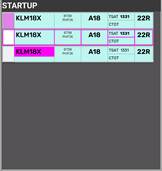
<span style="white-space: pre-wrap;">The bay STARTUP is for aircraft who has received the ATC Clearance, and has reported ready for startup. </span>

With exception of when ATC Clearance is issued by AA+AD, strips are transfered by previous controller, when released for startup.

Strip must be moved out of the STARTUP bay and into the PUSHBACK bay when a pushback instruction has been issued.

#### **Strip design**

1. **S**<span style="color: rgb(186, 55, 42); white-space: pre-wrap;">I </span>**Field**<span style="color: rgb(186, 55, 42); white-space: pre-wrap;">: </span><span style="white-space: pre-wrap;">Click to </span>**Accept** <span style="white-space: pre-wrap;">Transfer </span>[![image.png](https://wiki.vatsim-scandinavia.org/uploads/images/gallery/2026-09/scaled-1680-/My3image.png)](https://wiki.vatsim-scandinavia.org/uploads/images/gallery/2026-09/My3image.png)<span style="white-space: pre-wrap;">, or click to </span>**Initiate** <span style="white-space: pre-wrap;">Transfer </span>[![image.png](https://wiki.vatsim-scandinavia.org/uploads/images/gallery/2026-09/scaled-1680-/mflimage.png)](https://wiki.vatsim-scandinavia.org/uploads/images/gallery/2026-09/mflimage.png).
2. **Callsign**: Click to mark or open callsign menu.
3. **Type / WTC: Click either to open "FPL MENU"
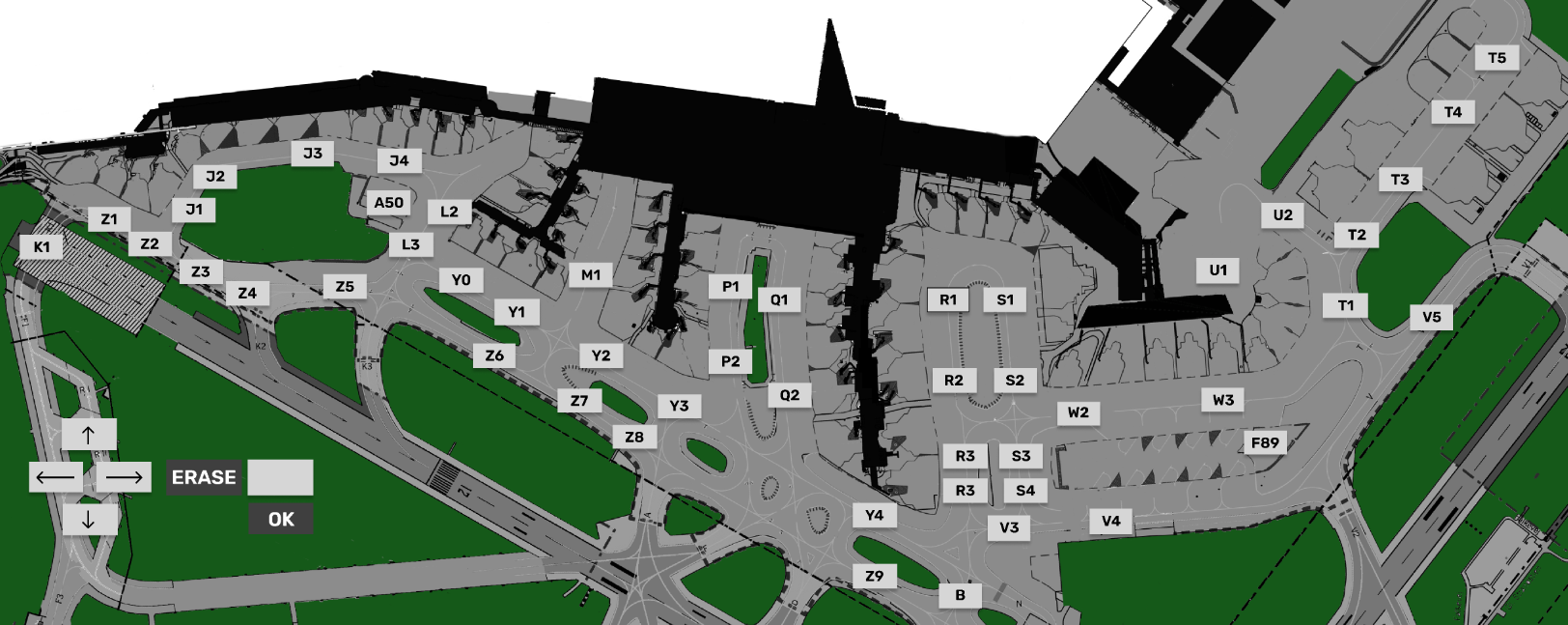
4. **STAND**: Click to open pushback map to assign release point.
5. **TSAT**<span style="white-space: pre-wrap;">: Click to update TOBT to current time. </span>**Color coding as per** [**Chapter 8 - CDM Operation**](https://wiki.vatsim-scandinavia.org/books/software-manuals/page/cdm-operation "Chapter 8 - CDM Operation ")
6. **CTOT**<span style="white-space: pre-wrap;">: Informational only. </span>**Color coding as per** [**Chapter 8 - CDM Operation**](https://wiki.vatsim-scandinavia.org/books/software-manuals/page/cdm-operation "Chapter 8 - CDM Operation ")
7. **DEPRWY**: Runway of Departure. Click to change.

<table id="bkmrk-idnamedescriptionbay" style="border-collapse: collapse; border-image: none; width: 1000px;"><colgroup><col style="width: 21.25pt;"></col><col style="width: 103.5pt;"></col><col style="width: 204.55pt;"></col><col style="width: 109.25pt;"></col></colgroup><tbody><tr style="height: 46.15pt;"><td colspan="4" style="background: rgb(85, 82, 85); width: 438.55pt; border: 2.25pt solid windowtext; padding: 0cm 5.4pt; height: 46.15pt;">![](https://wiki.vatsim-scandinavia.org/uploads/images/gallery/2026-09/embedded-image-89xc3ivw.png)

</td></tr><tr style="height: 28.25pt;"><td style="background: rgb(1, 60, 71); width: 21.25pt; border-width: medium 1pt 2.25pt 2.25pt; border-style: none solid solid; border-color: currentcolor windowtext windowtext; padding: 0cm 5.4pt; height: 28.25pt;"><span style="color: white;">ID</span>

</td><td style="background: rgb(1, 60, 71); width: 103.5pt; border-width: medium 1pt 2.25pt medium; border-style: none solid solid none; border-color: currentcolor windowtext windowtext currentcolor; padding: 0cm 5.4pt; height: 28.25pt;"><span style="color: white;">Name</span>

</td><td style="background: rgb(1, 60, 71); width: 204.55pt; border-width: medium 1pt 2.25pt medium; border-style: none solid solid none; border-color: currentcolor windowtext windowtext currentcolor; padding: 0cm 5.4pt; height: 28.25pt;"><span style="color: white;">Description</span>

</td><td style="background: rgb(1, 60, 71); width: 109.25pt; border-width: medium 2.25pt 2.25pt medium; border-style: none solid solid none; border-color: currentcolor windowtext windowtext currentcolor; padding: 0cm 5.4pt; height: 28.25pt;"><span style="color: white;">Bay</span>

</td></tr><tr style="height: 28.25pt;"><td style="background: rgb(133, 180, 175); width: 21.25pt; border-width: medium 1pt 1pt 2.25pt; border-style: none solid solid; border-color: currentcolor windowtext windowtext; padding: 0cm 5.4pt; height: 28.25pt;"><span style="color: rgb(192, 0, 0);">1</span>

</td><td style="background: rgb(133, 180, 175); width: 103.5pt; border-width: medium 2.25pt 1pt medium; border-style: none solid solid none; border-color: currentcolor windowtext windowtext currentcolor; padding: 0cm 5.4pt; height: 28.25pt;">**S**<span style="color: rgb(192, 0, 0); white-space: pre-wrap;">I </span>**Field**

</td><td style="background: rgb(133, 180, 175); width: 204.55pt; border-width: medium 2.25pt 1pt medium; border-style: none solid solid none; border-color: currentcolor windowtext windowtext currentcolor; padding: 0cm 5.4pt; height: 28.25pt;"><span style="color: black; white-space: pre-wrap;">Click to </span>**Accept** <span style="color: black; white-space: pre-wrap;">Transfer </span>[![](https://wiki.vatsim-scandinavia.org/uploads/images/gallery/2026-09/embedded-image-cjs1m4bt.png)](https://wiki.vatsim-scandinavia.org/uploads/images/gallery/2026-09/My3image.png)<span style="color: black;">,</span>

<span style="color: black; white-space: pre-wrap;">Click to </span>**Initiate** <span style="color: black; white-space: pre-wrap;">Transfer </span>[![](https://wiki.vatsim-scandinavia.org/uploads/images/gallery/2026-09/embedded-image-ebommfc8.png)](https://wiki.vatsim-scandinavia.org/uploads/images/gallery/2026-09/mflimage.png)<span style="color: black;">.</span>

</td><td rowspan="7" style="background: rgb(133, 180, 175); width: 109.25pt; border-width: medium 2.25pt 2.25pt medium; border-style: none solid solid none; border-color: currentcolor windowtext windowtext currentcolor; padding: 0cm 5.4pt; height: 28.25pt;">![](https://wiki.vatsim-scandinavia.org/uploads/images/gallery/2026-09/embedded-image-qjcdz1ak.png)

</td></tr><tr style="height: 28.25pt;"><td style="background: rgb(133, 180, 175); width: 21.25pt; border-width: medium 1pt 1pt 2.25pt; border-style: none solid solid; border-color: currentcolor windowtext windowtext; padding: 0cm 5.4pt; height: 28.25pt;"><span style="color: rgb(192, 0, 0);">2</span>

</td><td style="background: rgb(133, 180, 175); width: 103.5pt; border-width: medium 2.25pt 1pt medium; border-style: none solid solid none; border-color: currentcolor windowtext windowtext currentcolor; padding: 0cm 5.4pt; height: 28.25pt;">**Callsign**

</td><td style="background: rgb(133, 180, 175); width: 204.55pt; border-width: medium 2.25pt 1pt medium; border-style: none solid solid none; border-color: currentcolor windowtext windowtext currentcolor; padding: 0cm 5.4pt; height: 28.25pt;"><span style="color: black;">Click to mark or open callsign menu.</span>

<span style="color: white; white-space: pre-wrap;"> </span>

</td></tr><tr style="height: 28.25pt;"><td style="background: rgb(133, 180, 175); width: 21.25pt; border-width: medium 1pt 1pt 2.25pt; border-style: none solid solid; border-color: currentcolor windowtext windowtext; padding: 0cm 5.4pt; height: 28.25pt;"><span style="color: rgb(192, 0, 0);">3</span>

</td><td style="background: rgb(133, 180, 175); width: 103.5pt; border-width: medium 2.25pt 1pt medium; border-style: none solid solid none; border-color: currentcolor windowtext windowtext currentcolor; padding: 0cm 5.4pt; height: 28.25pt;">**Type / WTC**

</td><td style="background: rgb(133, 180, 175); width: 204.55pt; border-width: medium 2.25pt 1pt medium; border-style: none solid solid none; border-color: currentcolor windowtext windowtext currentcolor; padding: 0cm 5.4pt; height: 28.25pt;"><span style="color: black;">Click either to open "FPL MENU"</span>

<span style="color: white; white-space: pre-wrap;"> </span>

</td></tr><tr style="height: 28.25pt;"><td style="background: rgb(133, 180, 175); width: 21.25pt; border-width: medium 1pt 1pt 2.25pt; border-style: none solid solid; border-color: currentcolor windowtext windowtext; padding: 0cm 5.4pt; height: 28.25pt;"><span style="color: rgb(192, 0, 0);">4</span>

</td><td style="background: rgb(133, 180, 175); width: 103.5pt; border-width: medium 2.25pt 1pt medium; border-style: none solid solid none; border-color: currentcolor windowtext windowtext currentcolor; padding: 0cm 5.4pt; height: 28.25pt;">**STAND**

</td><td style="background: rgb(133, 180, 175); width: 204.55pt; border-width: medium 2.25pt 1pt medium; border-style: none solid solid none; border-color: currentcolor windowtext windowtext currentcolor; padding: 0cm 5.4pt; height: 28.25pt;"><span style="color: black;">Click to open pushback map to assign release point.</span>

</td></tr><tr style="height: 28.25pt;"><td style="background: rgb(133, 180, 175); width: 21.25pt; border-width: medium 1pt 1pt 2.25pt; border-style: none solid solid; border-color: currentcolor windowtext windowtext; padding: 0cm 5.4pt; height: 28.25pt;"><span style="color: rgb(192, 0, 0);">5</span>

</td><td style="background: rgb(133, 180, 175); width: 103.5pt; border-width: medium 2.25pt 1pt medium; border-style: none solid solid none; border-color: currentcolor windowtext windowtext currentcolor; padding: 0cm 5.4pt; height: 28.25pt;">**TSAT**

</td><td style="background: rgb(133, 180, 175); width: 204.55pt; border-width: medium 2.25pt 1pt medium; border-style: none solid solid none; border-color: currentcolor windowtext windowtext currentcolor; padding: 0cm 5.4pt; height: 28.25pt;"><span style="color: black;">Click to update TOBT to current time.</span>

**Color coding as per**

[**Chapter 8 - CDM Operation**](https://wiki.vatsim-scandinavia.org/books/software-manuals/page/cdm-operation "Chapter 8 - CDM Operation ")

</td></tr><tr style="height: 28.25pt;"><td style="background: rgb(133, 180, 175); width: 21.25pt; border-width: medium 1pt 1pt 2.25pt; border-style: none solid solid; border-color: currentcolor windowtext windowtext; padding: 0cm 5.4pt; height: 28.25pt;"><span style="color: rgb(192, 0, 0);">6</span>

</td><td style="background: rgb(133, 180, 175); width: 103.5pt; border-width: medium 2.25pt 1pt medium; border-style: none solid solid none; border-color: currentcolor windowtext windowtext currentcolor; padding: 0cm 5.4pt; height: 28.25pt;">**CTOT**

</td><td style="background: rgb(133, 180, 175); width: 204.55pt; border-width: medium 2.25pt 1pt medium; border-style: none solid solid none; border-color: currentcolor windowtext windowtext currentcolor; padding: 0cm 5.4pt; height: 28.25pt;"><span style="color: black; white-space: pre-wrap;">Informational only. </span>**Color coding as per** [**Chapter 8 - CDM Operation**](https://wiki.vatsim-scandinavia.org/books/software-manuals/page/cdm-operation "Chapter 8 - CDM Operation ")

</td></tr><tr style="height: 28.25pt;"><td style="background: rgb(133, 180, 175); width: 21.25pt; border-width: medium 1pt 2.25pt 2.25pt; border-style: none solid solid; border-color: currentcolor windowtext windowtext; padding: 0cm 5.4pt; height: 28.25pt;"><span style="color: rgb(192, 0, 0);">7</span>

</td><td style="background: rgb(133, 180, 175); width: 103.5pt; border-width: medium 2.25pt 2.25pt medium; border-style: none solid solid none; border-color: currentcolor windowtext windowtext currentcolor; padding: 0cm 5.4pt; height: 28.25pt;">**DEPRWY**

</td><td style="background: rgb(133, 180, 175); width: 204.55pt; border-width: medium 2.25pt 2.25pt medium; border-style: none solid solid none; border-color: currentcolor windowtext windowtext currentcolor; padding: 0cm 5.4pt; height: 28.25pt;"><span style="color: black;">Runway of Departure. Click to change.</span>

</td></tr></tbody></table>

### <span style="color: rgb(35, 111, 161);">1.5 PUSHBACK</span>

The bay PUSHBACKis for aircraft who has received pushback instruction.

<span style="white-space: pre-wrap;">A pushback release point (or a general direction) should be assigned if possible. Aircraft not requiring pushback should not be moved into this bay, but should remain in STARTUP bay until ready to taxi. </span>

#### **Strip design**

1. **S**<span style="color: rgb(186, 55, 42); white-space: pre-wrap;">I </span>**Field**<span style="color: rgb(186, 55, 42); white-space: pre-wrap;">: </span>Informational only
2. **Callsign**: Click to mark or open callsign menu.
3. **Type / WTC: Click either to open "FPL MENU"
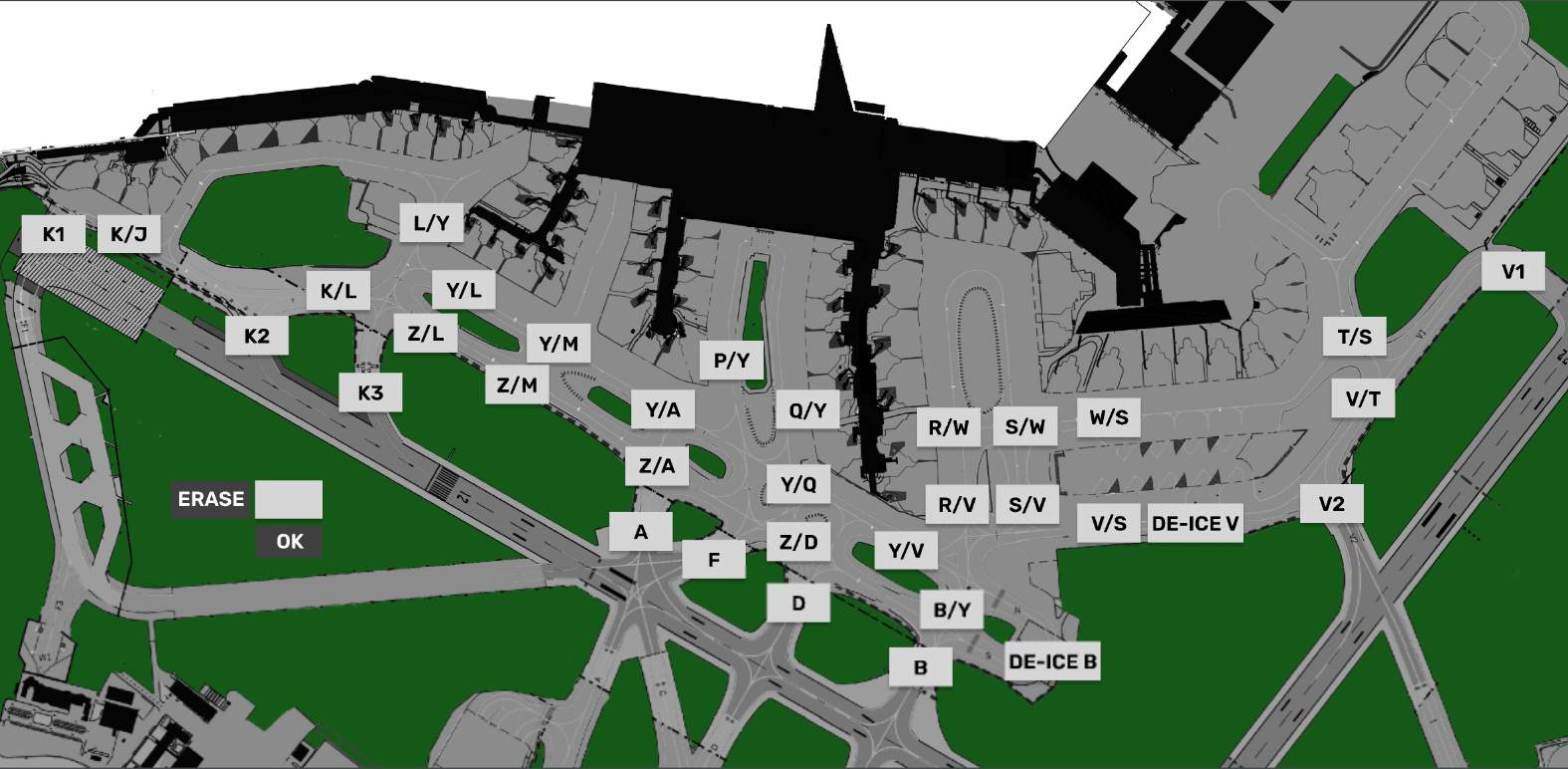
4. **Release Point**: Click to open "Apron taxi map" to assign taxi limit.
5. **TSAT**: Informational only.
6. **CTOT**<span style="white-space: pre-wrap;">: Informational only. </span>**Color coding as per** [**Chapter 8 - CDM Operation**](https://wiki.vatsim-scandinavia.org/books/software-manuals/page/cdm-operation "Chapter 8 - CDM Operation ")
7. **DEPRWY**: Runway of Departure. Click to change.

### <span style="color: rgb(35, 111, 161);">1.6 TWY DEP</span>

<span style="white-space: pre-wrap;">The bay TWY DEP is unique in being the only one of its kind with </span><u>**Two Sections**</u>

<span style="white-space: pre-wrap;">This is important because there is a difference! </span>

- The upper section of TWY DEP, is ONLY visible to APRON, and used for hold short instructions within apron
- The Lower section of TWY DEP, is ALSO visible to all TWR scopes, used for hold short of RWY 12/30.

**NOTE: The purpose of this is not to overload TWR with Departure information until it is actually relevant.**

#### **Strip design**

1. **S**<span style="color: rgb(186, 55, 42); white-space: pre-wrap;">I </span>**Field**<span style="color: rgb(186, 55, 42); white-space: pre-wrap;">: </span><span style="white-space: pre-wrap;">Click to </span>**Initiate** <span style="white-space: pre-wrap;">Transfer </span>[![image.png](https://wiki.vatsim-scandinavia.org/uploads/images/gallery/2026-09/scaled-1680-/mflimage.png)](https://wiki.vatsim-scandinavia.org/uploads/images/gallery/2026-09/mflimage.png).
2. **Callsign**: Click to Mark.
3. **STAND Informational only
4. **DE-ICE**<span style="white-space: pre-wrap;">: Infromational that De-Ice is required. </span>**Color coding as per** [Chapter 9 - Specific Features](https://wiki.vatsim-scandinavia.org/books/software-manuals/page/specific-features "Chapter 9 - Specific Features")
5. **HS**: Hold Short points (Clearance Limit)
6. **HP**: Holding Point assigned
7. **DEPRWY**: Runway of Departure. Click to change.

### <span style="color: rgb(230, 126, 35);">1.7 TWY ARR</span>

<span style="white-space: pre-wrap;">The bay TWY ARR contains the inbound aircraft currently taxiing on a taxiway. The bay contains all strips, including the ones owned by TE/TW and GE/GW. </span>

<span style="white-space: pre-wrap;">Aircraft remains in TWY ARR bay until on stand, after which they must be </span><u><span style="white-space: pre-wrap;">manually </span></u><span style="white-space: pre-wrap;">moved to the STAND bay. </span>

#### **Strip design**

1. **S**<span style="color: rgb(186, 55, 42); white-space: pre-wrap;">I </span>**Field**<span style="color: rgb(186, 55, 42); white-space: pre-wrap;">: </span><span style="white-space: pre-wrap;">Click to </span>**Accept** <span style="white-space: pre-wrap;">Transfer </span>[![image.png](https://wiki.vatsim-scandinavia.org/uploads/images/gallery/2026-09/scaled-1680-/My3image.png)](https://wiki.vatsim-scandinavia.org/uploads/images/gallery/2026-09/My3image.png)
2. **Callsign**: Click to Mark or open callsign menu.
3. **Type / WTC: Click either to open "FPL MENU"
4. **ARRRWY**: Informational only
5. **HS**: Hold Short points (Clearance Limit)
6. **STAND Informational only
7. **TBD**

### <span style="color: rgb(230, 126, 35);">1.8 STAND</span>

<span style="white-space: pre-wrap;">The bay STAND contains the inbound aircraft which is on stand, and has been moved there MANUALLY by a controller. </span>

<span style="white-space: pre-wrap;">Aircraft remains in STAND bay for 3 minutes after which the strip is removed from exsistence. the 3 minute delay allows controller to move aircraft back in case of inadvertant movement to STAND bay. </span>

#### **Strip design**

1. **ALL Informational**

[![Group 435.png](https://wiki.vatsim-scandinavia.org/uploads/images/gallery/2026-09/scaled-1680-/4vggroup-435.png)](https://wiki.vatsim-scandinavia.org/uploads/images/gallery/2026-09/4vggroup-435.png)

[![Group 664 (5).png](https://wiki.vatsim-scandinavia.org/uploads/images/gallery/2026-09/scaled-1680-/group-664-5.png)](https://wiki.vatsim-scandinavia.org/uploads/images/gallery/2026-09/group-664-5.png)

### **2.1 Startup and Pushback**

A strip is transfered by SEQPLN (or EKCH\_DEL), when startup is approved in accordance with TSAT requirements.

If neither of the above mentioned entities are online, APRON DEP must complete CDM procedures in accordance with Chapter 8.

<span style="white-space: pre-wrap;">Click on SI Field when aircraft call up, to confirm transfer, and approve a pushback. This you can do by one of three actions, specified below </span><u>in order of most preferred:</u>

- <span style="white-space: pre-wrap;">Click on STAND to select release point. Aircraft is </span><u><span style="white-space: pre-wrap;">automatically </span></u>moved to PUSHBACK bay.
    - Click and drag aircraft to PUSHBACK bay. Select release point thereafter within 10 seconds.
        - Click and drop aircraft to PUSHBACK bay. Select release point thereafter within 10 seconds.

---

<span style="white-space: pre-wrap;">Once Pushback is complete and aircraft reports ready for taxi, you need to continue the process. This you can do by one of the three actions, specified below </span><u><span style="white-space: pre-wrap;">in order of most prefered: </span></u>

- <span style="white-space: pre-wrap;">Click on RELEASE POINT to select taxi clearance limit. Aircraft is </span><u><span style="white-space: pre-wrap;">automatically </span></u>moved to TWY DEP bay<sup style="color: rgb(230, 126, 35);"><span class="editor-theme-superscript">1</span></sup>.
    - <span style="white-space: pre-wrap;">Click and drag aircraft to approrpiate TWY DEP bay. Select taxi clearance limit thereafter. </span>
        - <span style="white-space: pre-wrap;">Click and drop aircraft to approrpiate TWY DEP bay. Select taxi clearance limit thereafter. </span>

<sup style="color: rgb(230, 126, 35);"><span class="editor-theme-superscript">1</span></sup><span style="color: rgb(230, 126, 35);">Strip is automatically put into Upper Section or Lower Section, depending on the clearance limit selected.</span>

[![Rectangle 324.png](https://wiki.vatsim-scandinavia.org/uploads/images/gallery/2026-09/scaled-1680-/Rh8rectangle-324.png)](https://wiki.vatsim-scandinavia.org/uploads/images/gallery/2026-09/Rh8rectangle-324.png)

### **2.2 TWY DEP &amp; Transfer.**

<span style="white-space: pre-wrap;">Once aircraft goes to TWY DEP, you will see the SI Field being populated with the identifier for next position. The position takes "cross coupling" into account, so it will show GW (Ground West on 118.580) even if he is not online, but one of the tower controllers has crosscoupled the frequency. </span>

<span style="white-space: pre-wrap;">Once aircraft approches the clearance limit for transfer click on SI Field to initiate transfer, and ask aircraft to contact next frequency. </span>

<span style="white-space: pre-wrap;">If the SI Field for whatever reason </span><u><span style="white-space: pre-wrap;">does not </span></u><span style="white-space: pre-wrap;">contain the correct next controller, manually select next frequency by one of two alternative options. </span>

- Click on Aircraft and select TRF to open manual transfer dialogue (explaining in Chapter 2)
    - Click on Aircraft and select TW/TE/GW/GE in the small menu above

<p class="callout warning">**NOTE: The second option does* **NOT** *transfer, but simply** <u>**changes** </u>**the unit on the SI field. You must still transfer.**</p>

<span style="white-space: pre-wrap;">You </span><u><span style="white-space: pre-wrap;">must </span></u>ensure that aircraft is in the Lower Section of TWY DEP before transfering!

<span style="white-space: pre-wrap;">You </span><u><span style="white-space: pre-wrap;">must </span></u>move strips in correct order so bottom one is transfered first, to communicate correct sequence. to GE/GW.

[![Rectangle 324.png](https://wiki.vatsim-scandinavia.org/uploads/images/gallery/2026-09/scaled-1680-/4DRrectangle-324.png)](https://wiki.vatsim-scandinavia.org/uploads/images/gallery/2026-09/4DRrectangle-324.png)

### **2.3 Inbound Taxi**

Inbound aircraft will be transfered to you cleared to the appropriate clearance limit in accordance with LAI. Once in contact, you must accept the strip, by clicing on SI field, and provide further taxi to stand.

<p class="callout danger">**It is NOT recommended to change the stand after transfer. The gate assignment system takes many factors into account in assigning stands.**</p>

<span style="white-space: pre-wrap;">If you really need to change stand clicking on the STAND field in the flightplan allows you to request a new stand. It is highly prefered to automatically request a stand instead of manually selecting it. </span>

<p class="callout warning"><span style="white-space: pre-wrap;">Pilots should </span>**NOT** be allowed to taxi to a prefered stand unless you are aboslutely sure they will disconnect as soon as they arrive and will not return to the stand for another flight. Pilots can request stands via EFB.</p>

Once aircraft approaches the stand, immediately move the strip to STAND bay, to clear up space.

[![Group 435.png](https://wiki.vatsim-scandinavia.org/uploads/images/gallery/2026-09/scaled-1680-/uelgroup-435.png)](https://wiki.vatsim-scandinavia.org/uploads/images/gallery/2026-09/uelgroup-435.png)<span style="white-space: pre-wrap;"> </span>

[![Group 664 (6).png](https://wiki.vatsim-scandinavia.org/uploads/images/gallery/2026-09/scaled-1680-/group-664-6.png)](https://wiki.vatsim-scandinavia.org/uploads/images/gallery/2026-09/group-664-6.png)

### <span style="color: rgb(35, 111, 161);">3.1 MEM AID</span>

The ATC Clearance dialogue is divided into three sectors. Departure section, Arrival Section and general information.

### <span style="color: rgb(35, 111, 161);">3.2 APRON PUSHBACK MAP</span>

[![image.png](https://wiki.vatsim-scandinavia.org/uploads/images/gallery/2026-09/scaled-1680-/TkZimage.png)](https://wiki.vatsim-scandinavia.org/uploads/images/gallery/2026-09/TkZimage.png)

### <span style="color: rgb(35, 111, 161);">3.3 APRON TAXI MAP</span>

[![image.png](https://wiki.vatsim-scandinavia.org/uploads/images/gallery/2026-09/scaled-1680-/ka8image.png)](https://wiki.vatsim-scandinavia.org/uploads/images/gallery/2026-09/ka8image.png)

[![Group 435.png](https://wiki.vatsim-scandinavia.org/uploads/images/gallery/2026-09/scaled-1680-/nyzgroup-435.png)](https://wiki.vatsim-scandinavia.org/uploads/images/gallery/2026-09/nyzgroup-435.png)