# Chapter 4 - CLR DEL Operation

<p class="callout success"><span style="white-space: pre-wrap;">Containing </span>**Description**<span style="white-space: pre-wrap;">, </span>**Operational Procedures**<span style="white-space: pre-wrap;"> and </span>**Submenus** of the scope called CLR DEL...</p>

<p class="callout danger">**!!!IMPORTANT!!!**<span style="white-space: pre-wrap;"> This scope is </span><u><span style="white-space: pre-wrap;">ONLY </span></u><span style="white-space: pre-wrap;">displayed for EKCH\_DEL when a </span><u><span style="white-space: pre-wrap;">seperate entity </span></u><span style="white-space: pre-wrap;">is handling CDM. It is NOT possible to mange CDM from this scope. If EKCH\_DEL is managing CDM, the </span><u>**SEQ PLN Scope** </u><span style="white-space: pre-wrap;">is the correct one to use. </span></p>

## 1. General Overview

<p class="callout info"><span style="color: rgb(35, 111, 161);">Used by: EKCH\_DEL</span></p>

### General Design

<table id="bkmrk-column-1%28arr%29column-" style="border-collapse: collapse; border-image: none; width: 100%;"><colgroup><col style="width: 112.15pt;"></col><col style="width: 112.35pt;"></col><col style="width: 112.25pt;"></col><col style="width: 112.25pt;"></col><col style="width: 0px;"></col></colgroup><tbody><tr style="height: 27.55pt;"><td style="background: rgb(56, 56, 56); width: 112.15pt; border-width: 1.5pt 1.5pt 3pt; border-style: solid; border-color: rgb(191, 191, 191); border-image: none; padding: 0cm 5.4pt; height: 27.55pt;">**Column 1**

<span style="color: white;">(ARR)</span>

</td><td style="background: rgb(56, 56, 56); width: 112.35pt; border-width: 1.5pt 1.5pt 3pt medium; border-style: solid solid solid none; border-color: rgb(191, 191, 191) rgb(191, 191, 191) rgb(191, 191, 191) currentcolor; padding: 0cm 5.4pt; height: 27.55pt;">**Column 2**

<span style="color: white;">(DEP)</span>

</td><td style="background: rgb(56, 56, 56); width: 112.25pt; border-width: 1.5pt 1.5pt 3pt medium; border-style: solid solid solid none; border-color: rgb(191, 191, 191) rgb(191, 191, 191) rgb(191, 191, 191) currentcolor; padding: 0cm 5.4pt; height: 27.55pt;">**Column 3**

<span style="color: white;">(SU+PUSH)</span>

</td><td style="background: rgb(56, 56, 56); width: 112.25pt; border-width: 1.5pt 1.5pt 1.5pt medium; border-style: solid solid solid none; border-color: rgb(191, 191, 191) rgb(191, 191, 191) windowtext currentcolor; padding: 0cm 5.4pt; height: 27.55pt;">**Column 4**

<span style="color: white;">(PLANNED DEP)</span>

</td><td style="height: 27.55pt; border-width: medium; border-style: none; border-color: currentcolor; border-image: none;"></td></tr><tr style="height: 102.95pt;"><td rowspan="3" style="background: rgb(85, 82, 85); width: 112.15pt; border-width: medium 1.5pt 1.5pt; border-style: none solid solid; border-color: currentcolor rgb(191, 191, 191) rgb(191, 191, 191); border-image: none; padding: 0cm 5.4pt; height: 102.95pt;"><span style="color: white;">OTHERS</span><sup style="color: white;"><span class="editor-theme-superscript">1</span></sup>

</td><td rowspan="2" style="background: rgb(85, 82, 85); width: 112.35pt; border-width: medium 1.5pt 1.5pt medium; border-style: none solid solid none; border-color: currentcolor rgb(191, 191, 191) rgb(191, 191, 191) currentcolor; padding: 0cm 5.4pt; height: 102.95pt;"><span style="color: white;">SAS</span><sup style="color: white;"><span class="editor-theme-superscript">1</span></sup>

</td><td rowspan="2" style="background: rgb(85, 82, 85); width: 112.25pt; border-width: medium 1.5pt 1.5pt medium; border-style: none solid solid none; border-color: currentcolor windowtext rgb(191, 191, 191) currentcolor; padding: 0cm 5.4pt; height: 102.95pt;"><span style="color: white;">CLEARED</span>

</td><td style="background: rgb(203, 203, 203); width: 112.25pt; border-width: medium 1.5pt 1.5pt medium; border-style: none solid solid none; border-color: currentcolor windowtext windowtext currentcolor; padding: 0cm 5.4pt; height: 102.95pt;"><span style="color: black;">PUSHBACK</span><sup style="color: black;"><span class="editor-theme-superscript">2</span></sup><span style="color: black; white-space: pre-wrap;"> (Passive)</span>

</td><td style="height: 102.95pt; border-width: medium; border-style: none; border-color: currentcolor; border-image: none;"></td></tr><tr style="height: 23.85pt;"><td rowspan="2" style="background: rgb(203, 203, 203); width: 112.25pt; border-width: medium 1.5pt 1.5pt medium; border-style: none solid solid none; border-color: currentcolor windowtext windowtext currentcolor; padding: 0cm 5.4pt; height: 23.85pt;"><span style="color: black;">TWY DEP</span><sup style="color: black;"><span class="editor-theme-superscript">2</span></sup>

<span style="color: black;">(Passive)</span>

</td><td style="height: 23.85pt; border-width: medium; border-style: none; border-color: currentcolor; border-image: none;"></td></tr><tr style="height: 76.1pt;"><td style="background: rgb(85, 82, 85); width: 112.35pt; border-width: medium 1.5pt 1.5pt medium; border-style: none solid solid none; border-color: currentcolor rgb(191, 191, 191) rgb(191, 191, 191) currentcolor; padding: 0cm 5.4pt; height: 76.1pt;"><span style="color: white;">NORWGIAN</span><sup style="color: white;"><span class="editor-theme-superscript">1</span></sup>

</td><td style="background: rgb(0, 60, 71); width: 112.25pt; border-width: medium 1.5pt 1.5pt medium; border-style: none solid solid none; border-color: currentcolor windowtext rgb(191, 191, 191) currentcolor; padding: 0cm 5.4pt; height: 76.1pt;"><span style="color: white;">MESSAGES</span>

</td><td style="height: 76.1pt; border-width: medium; border-style: none; border-color: currentcolor; border-image: none;"></td></tr><tr style="height: 16.85pt;"><td colspan="4" style="background: rgb(56, 56, 56); width: 449pt; border-width: medium 1.5pt 1.5pt; border-style: none solid solid; border-color: currentcolor rgb(191, 191, 191) rgb(191, 191, 191); border-image: none; padding: 0cm 5.4pt; height: 16.85pt;"><span style="color: white;">TASK BAR</span>

</td><td style="height: 16.85pt; border-width: medium; border-style: none; border-color: currentcolor; border-image: none;"></td></tr></tbody></table>

##### **1: OTHER, SAS and NORWEGIAN are collectively known as PLANNED DEPARTURES. Departures without ATC clearance.**

##### **2: Passive bays, for informational purposes only.**

<details id="bkmrk-live-scope-example"><summary>LIVE SCOPE EXAMPLE</summary>

[![image.png](https://wiki.vatsim-scandinavia.org/uploads/images/gallery/2026-10/scaled-1680-/7ARimage.png)](https://wiki.vatsim-scandinavia.org/uploads/images/gallery/2026-10/7ARimage.png)

</details>---

<span style="white-space: pre-wrap;">The CLR DEL scope has two major differences to all the other scopes. </span>

1. It sorts from top to bottom unlike any other scope
2. It does not contain any ownership, made apparent by the lack of SI field in the strips.

This is because flightplans are only activated by startup, and hence does not contain any ownership before that.

<span style="white-space: pre-wrap;"> </span>

### **Planned Departures**

Planned Departures is a term that covers all aircraft which are online in the airport, but has not yet received an ATC clearance. Some scopes have them bundled together but other scopes, such as CLR DEL has them divided into three separate bays:

- SAS
- NORWEGIAN
- OTHERS

They are all PLANNED DEPARTURES.

If an aircraft cannot be located, it can be found by clicking on PLANNED in the bay header, and selected from the list.

[![PLACEHOLDER.png](https://wiki.vatsim-scandinavia.org/uploads/images/gallery/2026-10/scaled-1680-/placeholder.png)](https://wiki.vatsim-scandinavia.org/uploads/images/gallery/2026-10/scaled-1680-/placeholder.png)

If a new flight plan desires to be made, clicking on NEW will open a empty flight plan. Filling in the callsign will automatically try to find an already filed flight plan.

[![PLACEHOLDER.png](https://wiki.vatsim-scandinavia.org/uploads/images/gallery/2026-10/scaled-1680-/placeholder.png)](https://wiki.vatsim-scandinavia.org/uploads/images/gallery/2026-10/scaled-1680-/placeholder.png)

<p class="callout warning"><span style="white-space: pre-wrap;">FlightStrips </span>**CANNOT** <span style="white-space: pre-wrap;">make a flight plan on a callsign that </span><u>does not</u><span style="white-space: pre-wrap;"> exist on VATSIM. Only callsigns logged on can have a flight plan created for them!</span></p>

<span style="white-space: pre-wrap;"> </span>

[![FSDivider.png](https://wiki.vatsim-scandinavia.org/uploads/images/gallery/2026-09/scaled-1680-/ahqgroup-435.png)](https://wiki.vatsim-scandinavia.org/uploads/images/gallery/2026-09/scaled-1680-/ahqgroup-435.png)

## <span style="color: rgb(35, 111, 161);">ATC Clearance</span>

The primary function with CLR DEL scope is to assign an ATC clearance. This is being done by clicking on the STAND/DEST field on the strip. This is one single click spot which opens the ATC Clearance Dialogue.

<span style="white-space: pre-wrap;"> </span>[![PLACEHOLDER.png](https://wiki.vatsim-scandinavia.org/uploads/images/gallery/2026-10/scaled-1680-/placeholder.png)](https://wiki.vatsim-scandinavia.org/uploads/images/gallery/2026-10/scaled-1680-/placeholder.png)

<p class="callout warning"><span style="white-space: pre-wrap;">NOTE! This action is identical to all scopes who assigns an ATC Clearance. No matter which position you sit, refer to this chapter for information on providing ATC Clearances! </span></p>

---

### ATC Clearance Dialogue

The ATC Clearance dialogue is a large window, containing identical information as the FPL window.

[![Group 2.png](https://wiki.vatsim-scandinavia.org/uploads/images/gallery/2026-10/scaled-1680-/group-2.png)](https://wiki.vatsim-scandinavia.org/uploads/images/gallery/2026-10/scaled-1680-/group-2.png)
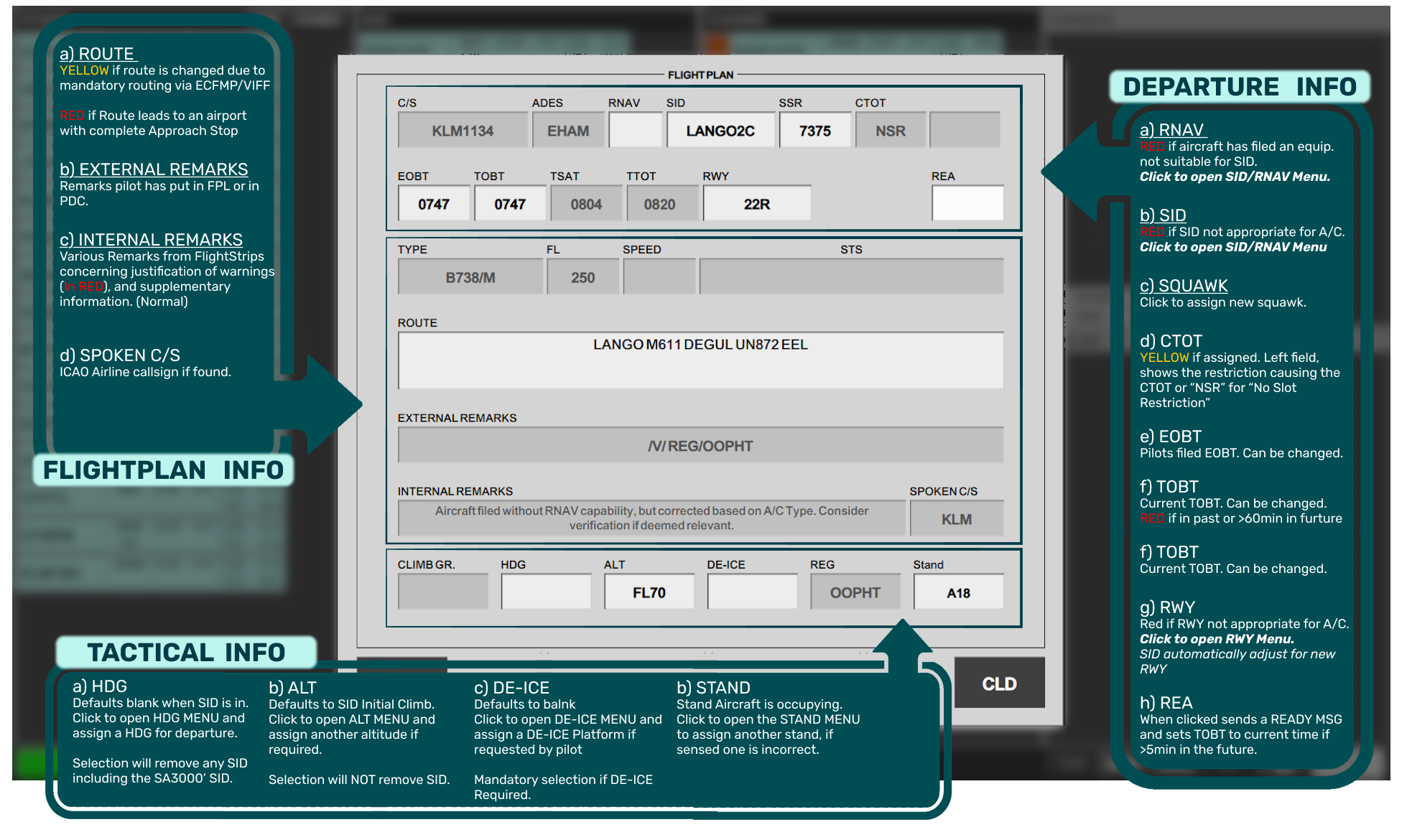
<p class="callout info"><span style="white-space: pre-wrap;">All </span>**Red-marked**<span style="white-space: pre-wrap;"> areas must be corrected before issuing ATC Clearance.</span></p>

- <span style="white-space: pre-wrap;">All </span><span style="color: rgb(0, 0, 0); background-color: rgb(241, 196, 15);">Yellow-Marked</span><span style="white-space: pre-wrap;"> areas must be inspected and evaluated before issuing ATC Clearance.</span>

---

#### <span style="white-space: pre-wrap;"> </span><span style="color: rgb(35, 111, 161);">Submenus</span>

<details id="bkmrk-sid%2Frnav-menupicture"><summary>SID/RNAV MENU</summary>

- <span style="white-space: pre-wrap;">Active Selection in </span><span style="color: rgb(255, 255, 255); background-color: rgb(45, 194, 107);">GREEN</span>
- click ESC after selection is made
- Click ERASE to leave dialogue without any changes.
- SA3000' will automatically clear aircraft on **"Straight Ahead, Climb to 3000ft."**

[![image.png](https://wiki.vatsim-scandinavia.org/uploads/images/gallery/2026-10/scaled-1680-/cOGimage.png)](https://wiki.vatsim-scandinavia.org/uploads/images/gallery/2026-10/scaled-1680-/cOGimage.png)

</details><details id="bkmrk-rwy-menuto-come"><summary>RWY MENU</summary>

- <span style="white-space: pre-wrap;">Click to select the desired Runway for Departure. </span>
- Click ESC after selection is made

[![image.png](https://wiki.vatsim-scandinavia.org/uploads/images/gallery/2026-10/scaled-1680-/5gximage.png)](https://wiki.vatsim-scandinavia.org/uploads/images/gallery/2026-10/5gximage.png)

</details><details id="bkmrk-hdg-menuto-come"><summary>HDG MENU</summary>

- LT, RT, SA = "Left Turn", "Right Turn", "Straight Ahead"
- Preconfigured standard turns in right side for RWY04R ONLY! (LT350, LT360, RT090).
- Click in the number. Press ERASE to remove entire selection, click arrow back to remove last number.
- Click ESC to close the menu without changes
- Click OK to close the menu with the changes

[![image.png](https://wiki.vatsim-scandinavia.org/uploads/images/gallery/2026-10/scaled-1680-/yYBimage.png)](https://wiki.vatsim-scandinavia.org/uploads/images/gallery/2026-10/yYBimage.png)

</details><details id="bkmrk-alt-menuto-come"><summary>ALT MENU</summary>

- Select altitude or type in another altitude.
- Click ERASE to close menu without changes
- <span style="white-space: pre-wrap;">Click ESC to close menu with changes. </span>

[![image.png](https://wiki.vatsim-scandinavia.org/uploads/images/gallery/2026-10/scaled-1680-/3GPimage.png)](https://wiki.vatsim-scandinavia.org/uploads/images/gallery/2026-10/3GPimage.png)

</details><details id="bkmrk-de-ice-menuto-come"><summary>DE-ICE MENU</summary>

- <span style="white-space: pre-wrap;">DEICE OPERATOR and SEMPLAT shows you the handler, and which platform is preferred. </span>
- Click on the options to select platform.
- Select NO DE-ICE only to remove a platform inserted. It is NOT needed to select this on every flight not requesting de-ice
- Click OK to close dialogue

[![image.png](https://wiki.vatsim-scandinavia.org/uploads/images/gallery/2026-10/scaled-1680-/MZ6image.png)](https://wiki.vatsim-scandinavia.org/uploads/images/gallery/2026-10/MZ6image.png)

<span style="white-space: pre-wrap;"> </span></details>---

<span style="white-space: pre-wrap;">A </span>**“Standard ATC Clearance”**<span style="white-space: pre-wrap;"> can be issued by reading the Departure information line, from left to right. </span>

If a NON-SID departure is needed, this can be issued by either:

- Select HDG and ALT in the misc. fields at the bottom.
- Open SID menu and select SA3000’. (Straight Ahead, 3000ft).

---

<span style="white-space: pre-wrap;"> </span>

### <span style="color: rgb(35, 111, 161);">Completion of ATC Clearance.</span>

Only when the pilot has successfully read back his clearance, can you press the “CLD” button, to activate the flight plan.

[![image.png](https://wiki.vatsim-scandinavia.org/uploads/images/gallery/2026-10/scaled-1680-/GwSimage.png)](https://wiki.vatsim-scandinavia.org/uploads/images/gallery/2026-10/GwSimage.png)
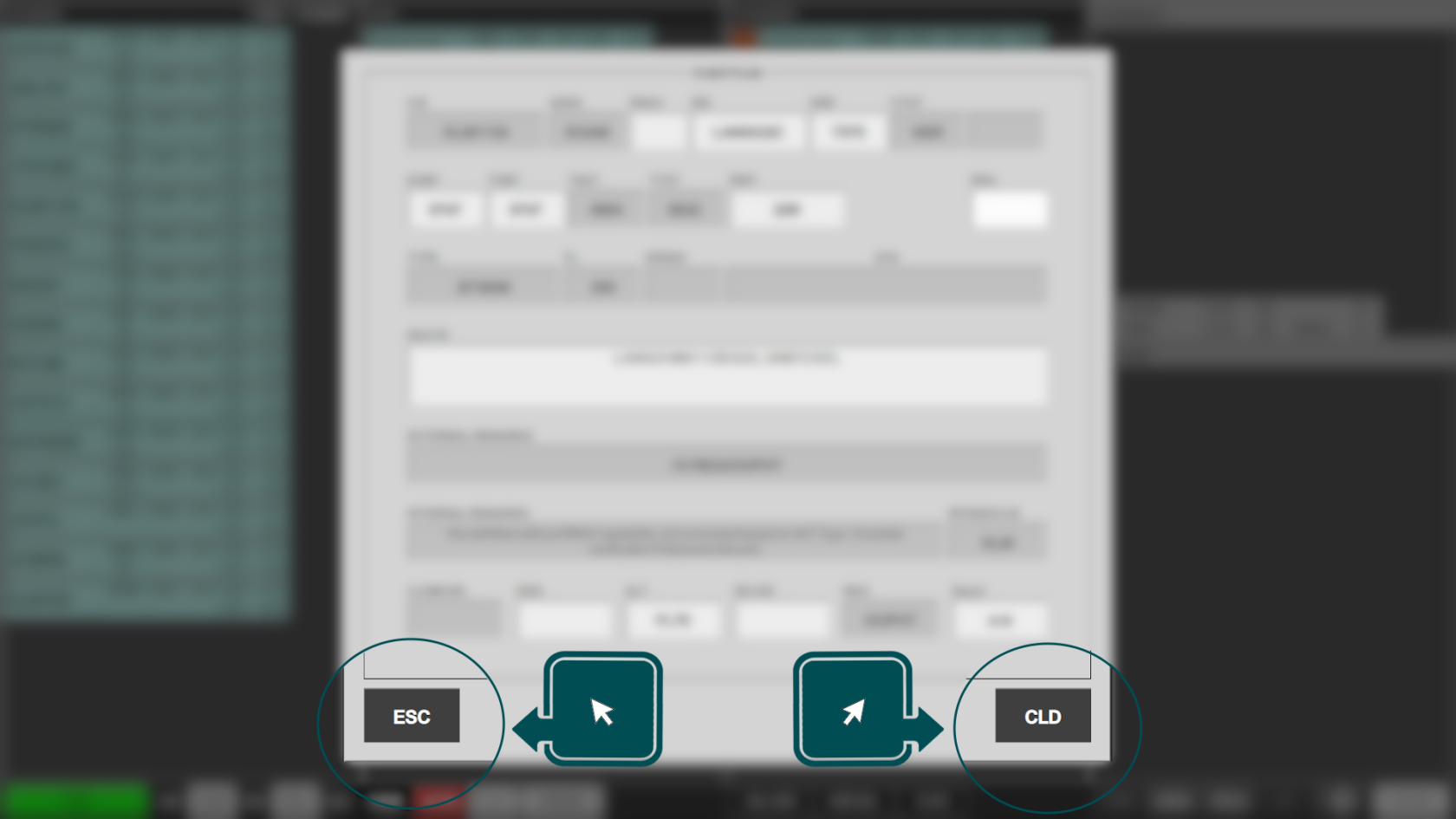
Once an aircraft is cleared, the aircraft moves into the CLEARED bay, and is automatically transferred to controller in charge of STARTUP and CDM management.

[![Group 4.png](https://wiki.vatsim-scandinavia.org/uploads/images/gallery/2026-10/scaled-1680-/group-4.png)](https://wiki.vatsim-scandinavia.org/uploads/images/gallery/2026-10/group-4.png)
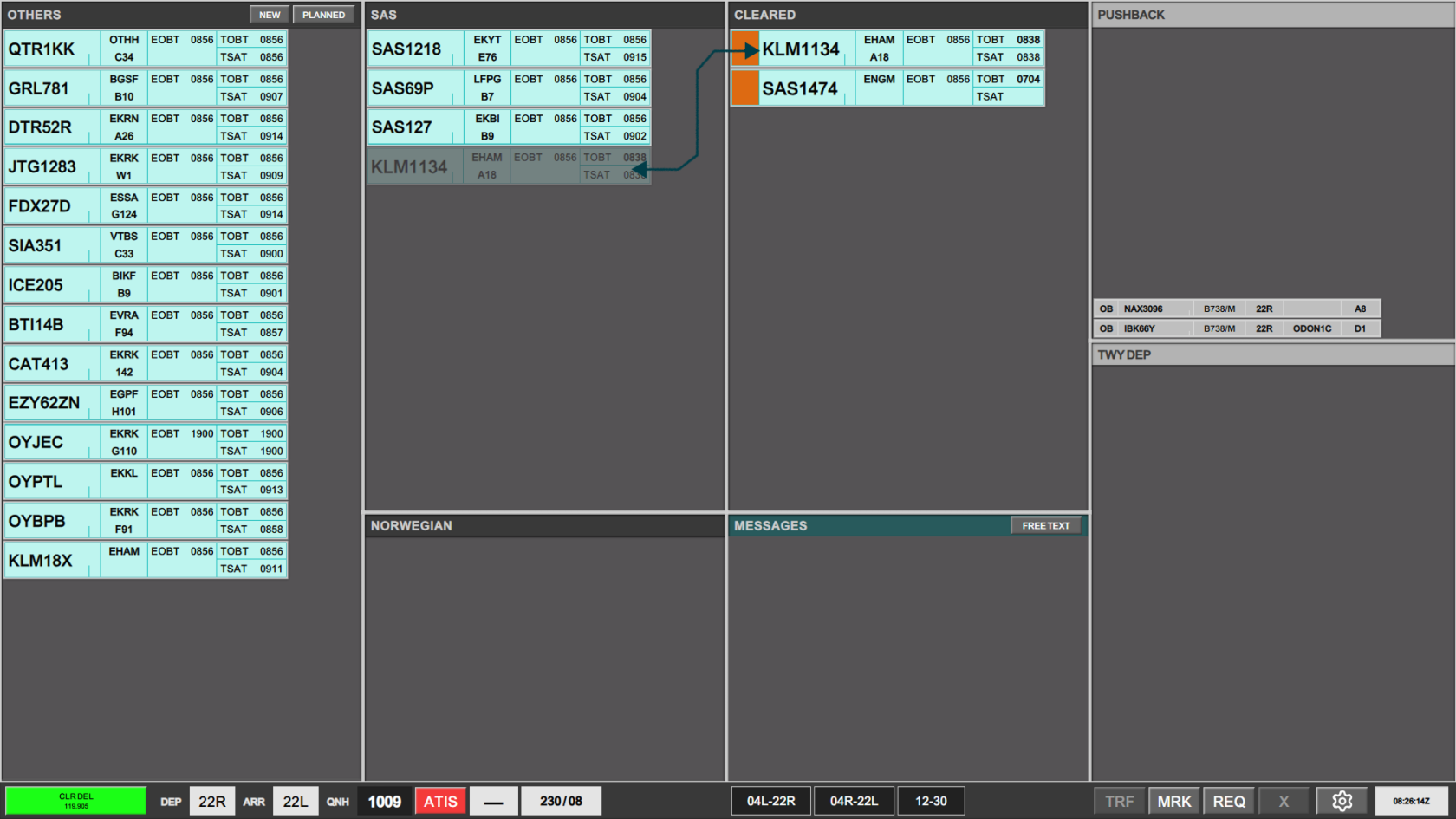
<p class="callout success"><span style="white-space: pre-wrap;">The SI field will light up in </span><span style="color: rgb(255, 255, 255); background-color: rgb(230, 126, 35); white-space: pre-wrap;">ORANGE </span>indicating the transfer is completed, and you must send the aircraft to next frequency, as described in the strip.</p>

<span style="white-space: pre-wrap;"> </span>

[![image.png](https://wiki.vatsim-scandinavia.org/uploads/images/gallery/2026-10/scaled-1680-/kgPimage.png)](https://wiki.vatsim-scandinavia.org/uploads/images/gallery/2026-10/kgPimage.png)

## <span style="color: rgb(35, 111, 161);">Pre-Departure Clearance (PDC)</span>

<p class="callout info"><span style="white-space: pre-wrap;">PDCs are available and </span>**"semi-autonomously"**<span style="white-space: pre-wrap;"> handled by Flightstrips.</span></p>

A PDC is automatically processed provided that:

- <span style="white-space: pre-wrap;">PDC Request has </span><u>**no errors**</u>
- <span style="white-space: pre-wrap;">PDC Request is </span><u>**planned on an SID**</u>
- <span style="white-space: pre-wrap;">PDC Request </span><u>**does not**</u><span style="white-space: pre-wrap;"> contain custom remarks from pilot</span>

<p class="callout warning">If either of the above conditions are not met, a PDC must be manually processed.</p>

---

### <span style="color: rgb(35, 111, 161);">Automatic PDC Process</span>

For automatic PDCs:

1. **The controller will be prompted by the strip flashing in Purple color**
    - **This indicates indicating that a PDC has been received from pilot.**
2. **PDC will subsequently automatically move to the CLEARED by, in full Purple fill color**.
    - **This indicates that a PDC has been send back to pilot**
3. **Strip will after a delay remove the purple color if:**
    - **Pilot has acknowledged the PDC**
4. **Strip will after a delay move back to Planned Departures if**
    - **Pilot did not acknowledge the PDC.**

[![PLACEHOLDER.png](https://wiki.vatsim-scandinavia.org/uploads/images/gallery/2026-10/scaled-1680-/placeholder.png)](https://wiki.vatsim-scandinavia.org/uploads/images/gallery/2026-10/scaled-1680-/placeholder.png)

---

### <span style="color: rgb(35, 111, 161);">Manual PDC Process:</span>

1. **Controller will be prompted with a Validation Status indicating a PDC requiring attention**
    - **Opening ATC Clearance menu will reveal an extra button called “Revert to Voice Procedures”**
2. **Clicking CLD will send the PDC to the pilot**
    - **Strip moves to CLEARED bay in full purple color**
3. **Strip will after a delay remove the purple color if:**
    - **Pilot has acknowledged the PDC**
4. **Strip will after a delay move back to Planned Departures if**
    - **Pilot did not acknowledge the PDC.**
5. **Clicking REVERT TO VOICE will cancel the PDC**
    - **Strip remains in PLANNED DEPARTURE bay in full yellow color**

[![PLACEHOLDER.png](https://wiki.vatsim-scandinavia.org/uploads/images/gallery/2026-10/scaled-1680-/placeholder.png)](https://wiki.vatsim-scandinavia.org/uploads/images/gallery/2026-10/scaled-1680-/placeholder.png)



