# Chapter 8 - APRON ARR Operation

<p class="callout success"><span style="white-space: pre-wrap;">Containing </span>**Description**<span style="white-space: pre-wrap;">, </span>**Operational Procedures**<span style="white-space: pre-wrap;"> and </span>**Submenus** <span style="white-space: pre-wrap;">of the scope called </span>**AA+AD**............</p>

## 1. General Overview

<p class="callout info">Used by: EKCH\_A\_GND</p>

<p class="callout success"><span style="white-space: pre-wrap;">Similar scopes: </span>**AA+AD** (used for combination of Apron DEP and Apron ARR).</p>

### <span style="color: rgb(35, 111, 161);">General Design</span>

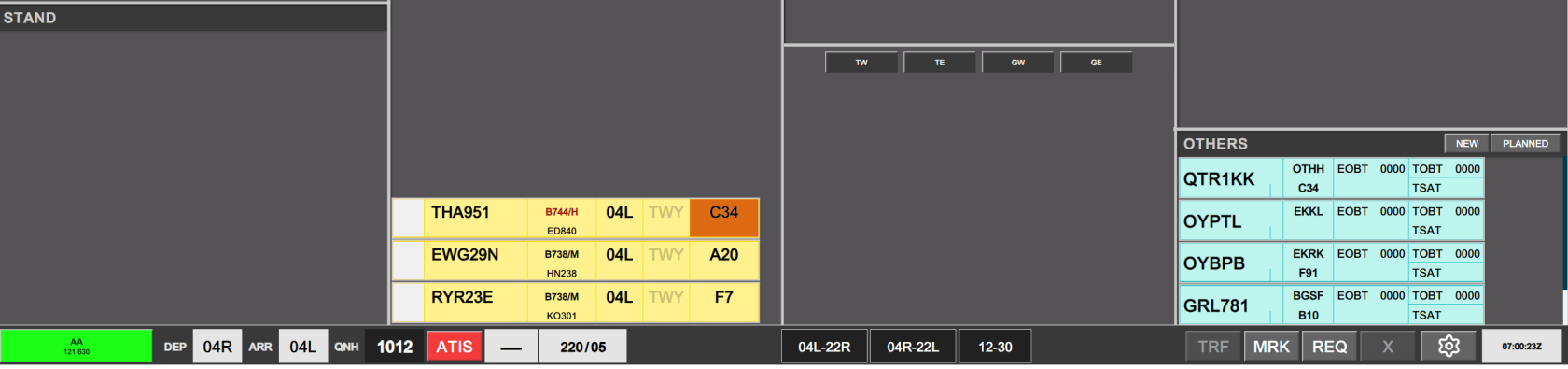
<table id="bkmrk-column-1%28arr%29column-" style="border-collapse: collapse; border-image: none; width: 100%;"><colgroup><col style="width: 112.15pt;"></col><col style="width: 112.35pt;"></col><col style="width: 112.25pt;"></col><col style="width: 112.25pt;"></col><col style="width: 0px;"></col></colgroup><tbody><tr style="height: 27.55pt;"><td style="background: rgb(56, 56, 56); width: 112.15pt; border-width: 1.5pt 1.5pt 3pt; border-style: solid; border-color: rgb(191, 191, 191); border-image: none; padding: 0cm 5.4pt; height: 27.55pt;">**Column 1**

<span style="color: white;">(ARR)</span>

</td><td style="background: rgb(56, 56, 56); width: 112.35pt; border-width: 1.5pt 1.5pt 3pt medium; border-style: solid solid solid none; border-color: rgb(191, 191, 191) rgb(191, 191, 191) rgb(191, 191, 191) currentcolor; padding: 0cm 5.4pt; height: 27.55pt;">**Column 2**

<span style="color: white;">(DEP)</span>

</td><td style="background: rgb(56, 56, 56); width: 112.25pt; border-width: 1.5pt 1.5pt 3pt medium; border-style: solid solid solid none; border-color: rgb(191, 191, 191) rgb(191, 191, 191) rgb(191, 191, 191) currentcolor; padding: 0cm 5.4pt; height: 27.55pt;">**Column 3** <span style="color: white;">(SU+PUSH)</span>

</td><td style="background: rgb(56, 56, 56); width: 112.25pt; border-width: 1.5pt 1.5pt 3pt medium; border-style: solid solid solid none; border-color: rgb(191, 191, 191) rgb(191, 191, 191) rgb(191, 191, 191) currentcolor; padding: 0cm 5.4pt; height: 27.55pt;">**Column 4**

<span style="color: white;">(PLANNED DEP)</span>

</td><td style="height: 27.55pt; border-width: medium; border-style: none; border-color: currentcolor; border-image: none;"></td></tr><tr style="height: 23.85pt;"><td style="background: rgb(0, 61, 72); width: 112.15pt; border-width: medium 1.5pt 1.5pt; border-style: none solid solid; border-color: currentcolor rgb(191, 191, 191) rgb(191, 191, 191); border-image: none; padding: 0cm 5.4pt; height: 23.85pt;"><span style="color: white;">MESSAGES</span>

</td><td style="background: rgb(85, 82, 85); width: 112.35pt; border-width: medium 1.5pt 1.5pt medium; border-style: none solid solid none; border-color: currentcolor rgb(191, 191, 191) rgb(191, 191, 191) currentcolor; padding: 0cm 5.4pt; height: 23.85pt;"><span style="color: white;">DE ICE V</span>

</td><td rowspan="3" style="background: rgb(85, 82, 85); width: 112.25pt; border-width: medium 1.5pt 1.5pt medium; border-style: none solid solid none; border-color: currentcolor rgb(191, 191, 191) rgb(191, 191, 191) currentcolor; padding: 0cm 5.4pt; height: 23.85pt;"><span style="color: white;">STARTUP</span>

</td><td rowspan="3" style="background: rgb(85, 82, 85); width: 112.25pt; border-width: medium 1.5pt 1.5pt medium; border-style: none solid solid none; border-color: currentcolor rgb(191, 191, 191) rgb(191, 191, 191) currentcolor; padding: 0cm 5.4pt; height: 23.85pt;"><span style="color: white;">SAS</span>

</td><td style="height: 23.85pt; border-width: medium; border-style: none; border-color: currentcolor; border-image: none;"></td></tr><tr style="height: 23.8pt;"><td rowspan="2" style="background: rgb(85, 82, 85); width: 112.15pt; border-width: medium 1.5pt 1.5pt; border-style: none solid solid; border-color: currentcolor rgb(191, 191, 191) rgb(191, 191, 191); border-image: none; padding: 0cm 5.4pt; height: 23.8pt;"><span style="color: white;">FINAL</span>

</td><td style="background: rgb(85, 82, 85); width: 112.35pt; border-width: medium 1.5pt 1.5pt medium; border-style: none solid solid none; border-color: currentcolor rgb(191, 191, 191) rgb(191, 191, 191) currentcolor; padding: 0cm 5.4pt; height: 23.8pt;"><span style="color: white;">DE ICE B</span>

</td><td style="height: 23.8pt; border-width: medium; border-style: none; border-color: currentcolor; border-image: none;"></td></tr><tr style="height: 50.8pt;"><td rowspan="2" style="background: rgb(85, 82, 85); width: 112.35pt; border-width: medium 1.5pt 1.5pt medium; border-style: none solid solid none; border-color: currentcolor rgb(191, 191, 191) rgb(191, 191, 191) currentcolor; padding: 0cm 5.4pt; height: 50.8pt;"><span style="color: white;">(UPR) TWY DEP</span>

</td><td style="height: 50.8pt; border-width: medium; border-style: none; border-color: currentcolor; border-image: none;"></td></tr><tr style="height: 23.85pt;"><td rowspan="2" style="background: rgb(85, 82, 85); width: 112.15pt; border-width: medium 1.5pt 1.5pt; border-style: none solid solid; border-color: currentcolor rgb(191, 191, 191) rgb(191, 191, 191); border-image: none; padding: 0cm 5.4pt; height: 23.85pt;"><span style="color: white;">RWY ARR</span>

</td><td rowspan="3" style="background: rgb(85, 82, 85); width: 112.25pt; border-width: medium 1.5pt 1.5pt medium; border-style: none solid solid none; border-color: currentcolor rgb(191, 191, 191) rgb(191, 191, 191) currentcolor; padding: 0cm 5.4pt; height: 23.85pt;"><span style="color: white;">PUSHBACK</span>

</td><td rowspan="2" style="background: rgb(85, 82, 85); width: 112.25pt; border-width: medium 1.5pt 1.5pt medium; border-style: none solid solid none; border-color: currentcolor rgb(191, 191, 191) rgb(191, 191, 191) currentcolor; padding: 0cm 5.4pt; height: 23.85pt;"><span style="color: white;">NORWEGIAN</span>

</td><td style="height: 23.85pt; border-width: medium; border-style: none; border-color: currentcolor; border-image: none;"></td></tr><tr style="height: 23.8pt;"><td rowspan="2" style="background: rgb(85, 82, 85); width: 112.35pt; border-width: medium 1.5pt 1.5pt medium; border-style: none solid solid none; border-color: currentcolor rgb(191, 191, 191) rgb(191, 191, 191) currentcolor; padding: 0cm 5.4pt; height: 23.8pt;"><span style="color: white;">(LWR) TWY DEP</span>

</td><td style="height: 23.8pt; border-width: medium; border-style: none; border-color: currentcolor; border-image: none;"></td></tr><tr style="height: 50.8pt;"><td style="background: rgb(85, 82, 85); width: 112.15pt; border-width: medium 1.5pt 1.5pt; border-style: none solid solid; border-color: currentcolor rgb(191, 191, 191) rgb(191, 191, 191); border-image: none; padding: 0cm 5.4pt; height: 50.8pt;"><span style="color: white;">TWY ARR</span>

</td><td style="background: rgb(85, 82, 85); width: 112.25pt; border-width: medium 1.5pt 1.5pt medium; border-style: none solid solid none; border-color: currentcolor rgb(191, 191, 191) rgb(191, 191, 191) currentcolor; padding: 0cm 5.4pt; height: 50.8pt;"><span style="color: white;">OTHERS</span>

</td><td style="height: 50.8pt; border-width: medium; border-style: none; border-color: currentcolor; border-image: none;"></td></tr><tr style="height: 16.85pt;"><td colspan="4" style="background: rgb(56, 56, 56); width: 449pt; border-width: medium 1.5pt 1.5pt; border-style: none solid solid; border-color: currentcolor rgb(191, 191, 191) rgb(191, 191, 191); border-image: none; padding: 0cm 5.4pt; height: 16.85pt;"><span style="color: white;">TASK BAR</span>

</td><td style="height: 16.85pt; border-width: medium; border-style: none; border-color: currentcolor; border-image: none;"></td></tr></tbody></table>

## 2. Procedures

### <span style="color: rgb(35, 111, 161);">Planned Departures</span>

ATC Clearance can be assigned by APRON DEP as required, using procedure as outlined in CLR DEL Chapter.

<span style="white-space: pre-wrap;"> </span>

### <span style="color: rgb(35, 111, 161);">Assigning Arrival Taxi instruction</span>

<span style="white-space: pre-wrap;">Unless otherwise coordinated an aircraft is transferred as per LAI, and visible in the TWY ARR bay. By provision of HS instructions, aircraft is eventually instructed to a stand. </span>

<p class="callout info">There is no place to mark the clearance limit of a stand.</p>

<span style="white-space: pre-wrap;"> </span>

Once an aircraft is entering the stand, the strip is moved from TWY ARR, into the STAND bay, where the aircrafts SI field turns orange, and has its flight plan closed.

[![ezgif-236625ee566c5a05.gif](https://wiki.vatsim-scandinavia.org/uploads/images/gallery/2026-10/ezgif-236625ee566c5a05.gif)](https://wiki.vatsim-scandinavia.org/uploads/images/gallery/2026-10/ezgif-236625ee566c5a05.gif)
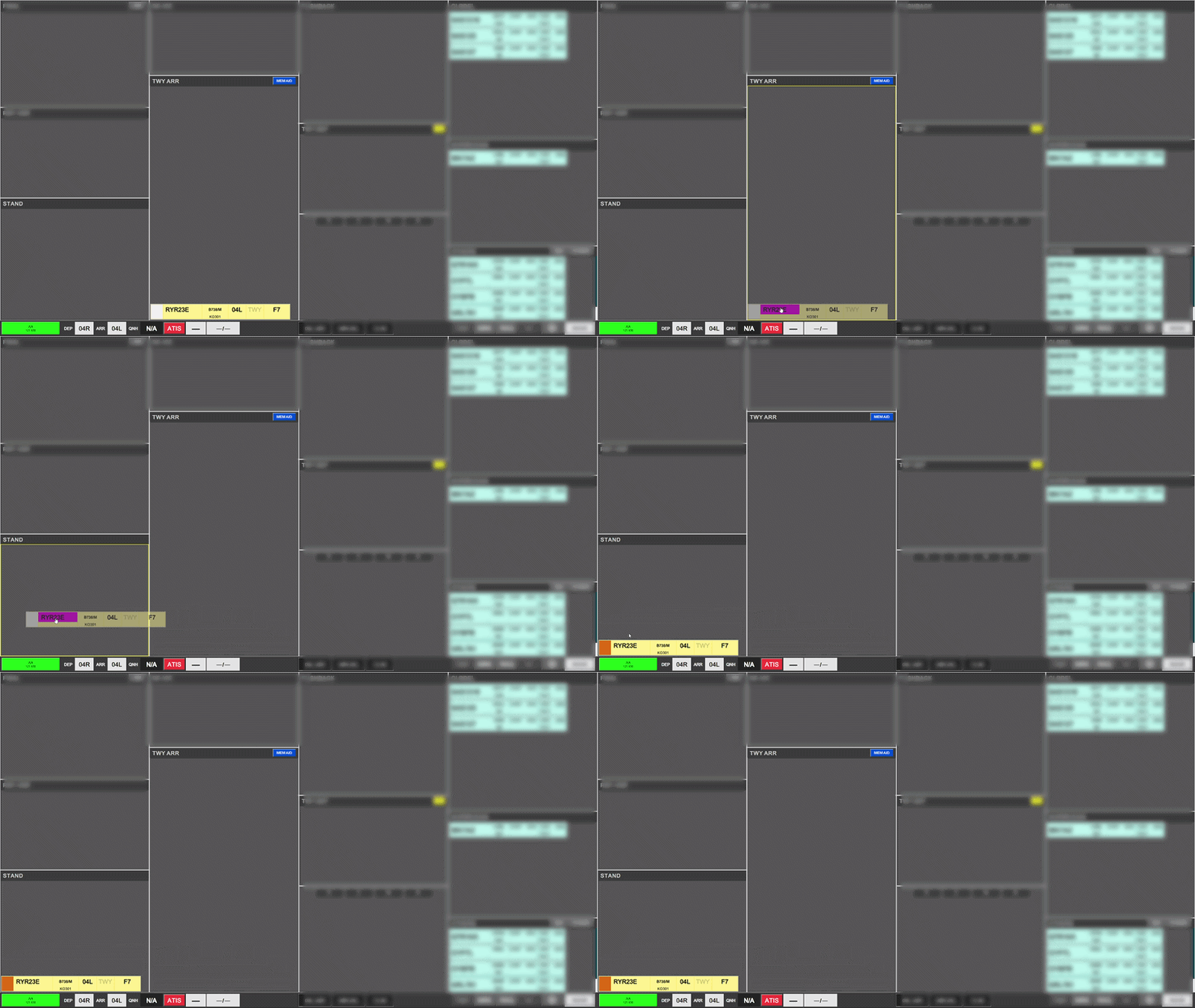
<p class="callout warning"><span style="white-space: pre-wrap;">It is </span>**imperative** <span style="white-space: pre-wrap;">that aircraft are moved to the STAND bay </span><u>as soon as possible,</u><span style="white-space: pre-wrap;"> to avoid unnecessary strip buildup in the TWY ARR bay</span></p>

<span style="white-space: pre-wrap;">APRON ARR has a </span>**3 minute window**<span style="white-space: pre-wrap;"> to recall the strip, if it was inadventantly placed in the STAND bay. After 3 minutes has expired (or aircraft has logged off), the strip is automatically removed from existence.</span>

<span style="white-space: pre-wrap;"> </span>

### <span style="color: rgb(35, 111, 161);">Selecting a New Stand</span>

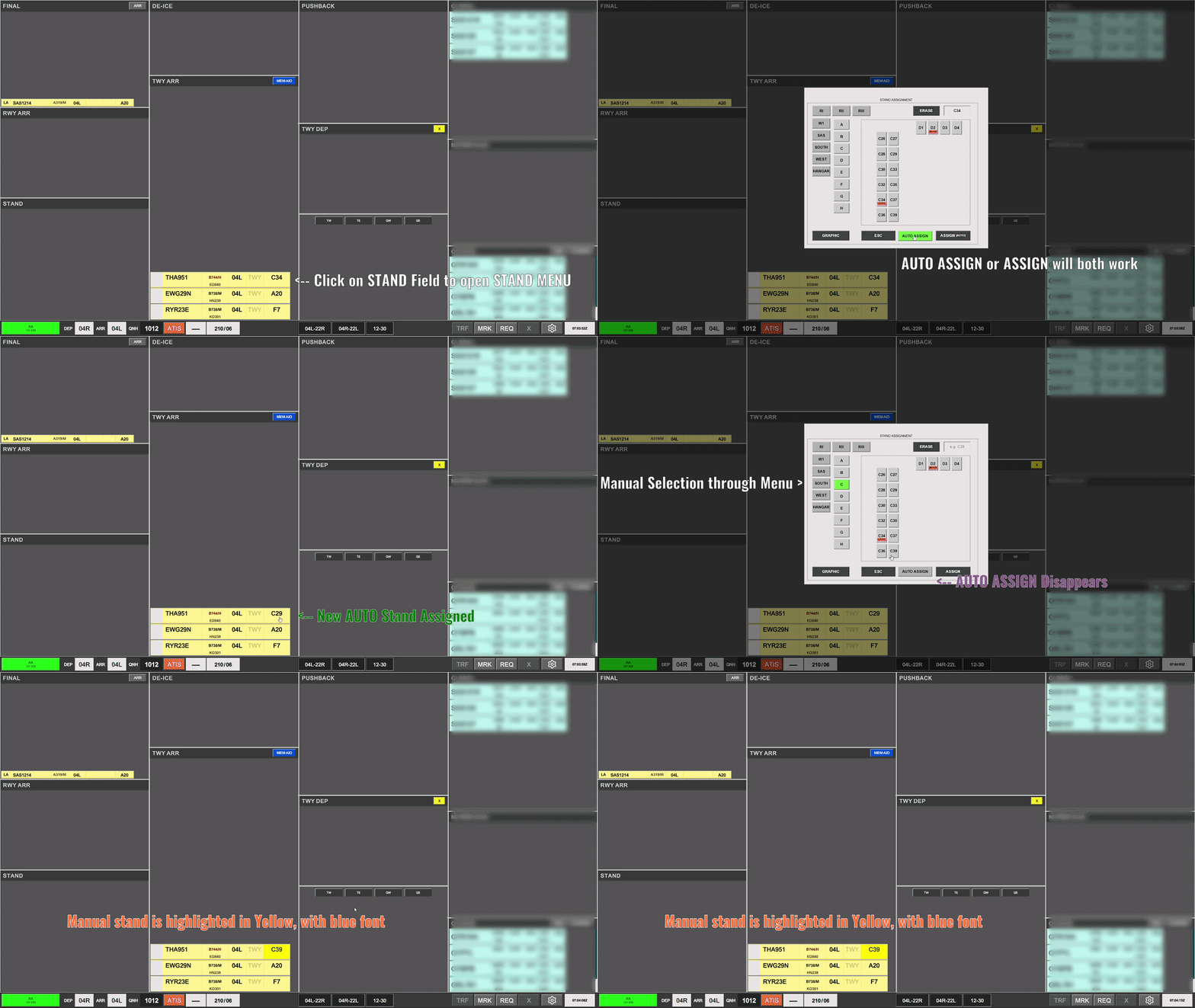
<span style="white-space: pre-wrap;">If the assigned stand has become occupied, the stand field produce a warning by turning to a </span><span style="background-color: rgb(230, 126, 35);">dark orange</span><span style="white-space: pre-wrap;"> color.</span>

[![image.png](https://wiki.vatsim-scandinavia.org/uploads/images/gallery/2026-10/scaled-1680-/J6Eimage.png)](https://wiki.vatsim-scandinavia.org/uploads/images/gallery/2026-10/J6Eimage.png)prompting selection of a new stand, the STAND field of the strip is selected to open the stand assignment menu.

<span style="white-space: pre-wrap;"> </span>

The AUTO ASSIGN is marked by defauly, and clicking either that icon or the ASSIGN will automatically assign a new stand.

If required a manual stand can be assigned, by navigating the menu.

- <span style="white-space: pre-wrap;">A stand carrying a red indication is considered blocked and </span><u>**CANNOT**</u><span style="white-space: pre-wrap;"> be assigned</span>
- <span style="white-space: pre-wrap;">A stand carrying a Yellow indication is considered assigned to an inbound on intermediate approach and </span><u>**SHOULD**</u><span style="white-space: pre-wrap;"> not be assigned, unless pilot can promise immediate disconnect, and no respawning on said stand.</span>

[![ezgif-27d621d322f781e0.gif](https://wiki.vatsim-scandinavia.org/uploads/images/gallery/2026-10/ezgif-27d621d322f781e0.gif)](https://wiki.vatsim-scandinavia.org/uploads/images/gallery/2026-10/ezgif-27d621d322f781e0.gif)

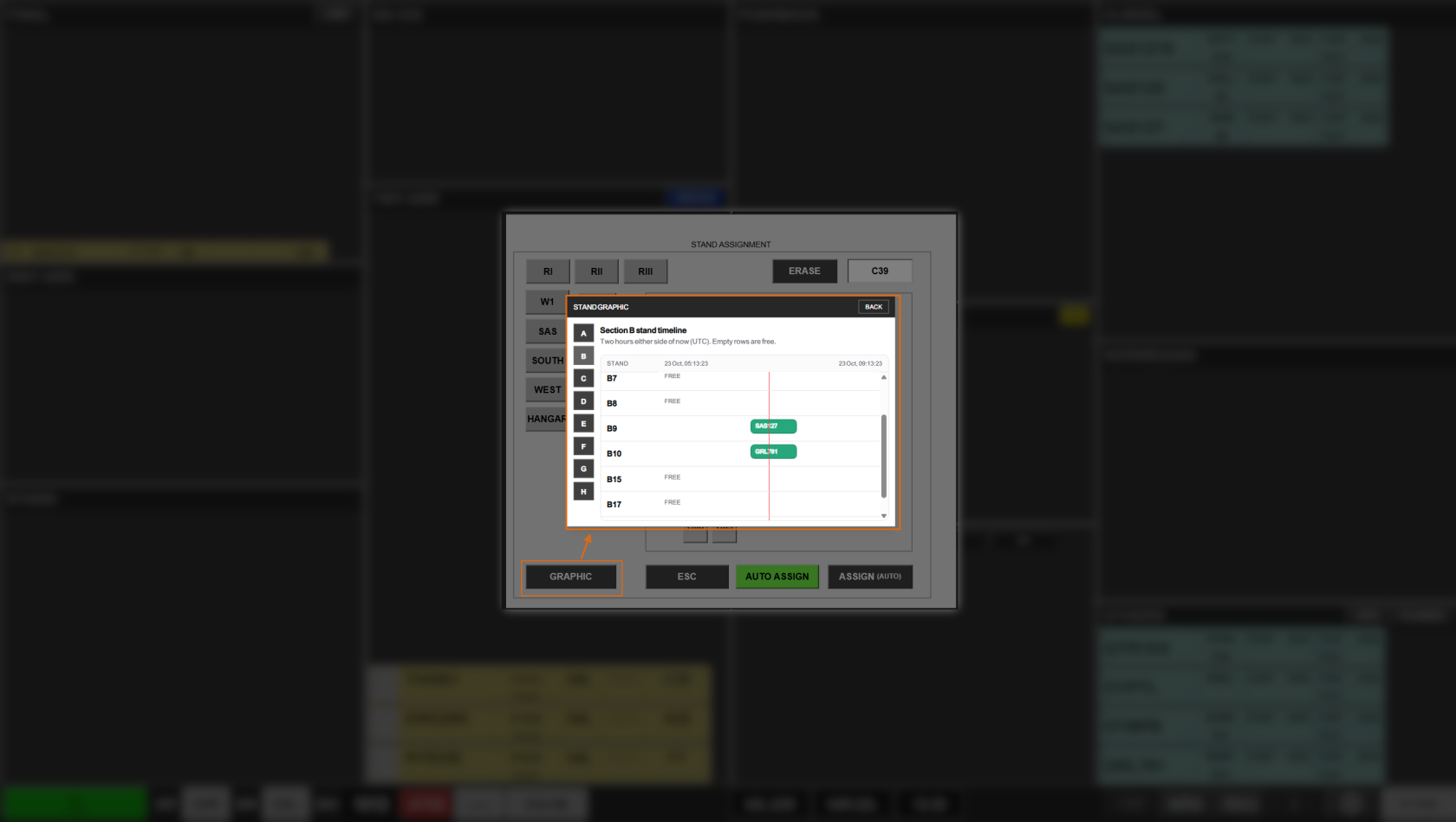
In the left corner is a graphic indicating which stands are occupied where over a +/- 2 hour period.

[![image.png](https://wiki.vatsim-scandinavia.org/uploads/images/gallery/2026-10/scaled-1680-/cJwimage.png)](https://wiki.vatsim-scandinavia.org/uploads/images/gallery/2026-10/cJwimage.png)
## COORDINATION

### <span style="color: rgb(35, 111, 161);">Coordination between APRON DEP &amp; APRON ARR</span>

Coordination between the two aprons can be achieved primarily by use of MEM AIDs

- CROSSING BEHIND -&gt;
- CROSSING AHEAD &lt;-

This can be used to alert a follow controller of an aircrafts relative position to the strips in that controllers queue. Achieve this by:

1. Click to Select strip in question.
2. Click MEMAID
3. Select the CROSSING BEHIND or CROSSING AHEAD.
4. Place the strip so the arrow point to the aircraft it crosses behind or ahead of
    - <span style="white-space: pre-wrap;">Meaning place it </span>**below** <span style="white-space: pre-wrap;">an aircraft if it crosses </span>**ahead**.
    - <span style="white-space: pre-wrap;">Meaning place it </span>**above** <span style="white-space: pre-wrap;">an aircraft it crosses </span>**behind**.
5. Clicking the hourglass on the right of the strip, will acknowledge the request by the other controller.

### <span style="color: rgb(35, 111, 161);">Coordination between APRON DEP &amp; GW</span>

Coordination between APRON DEP &amp; GW can be achieved either by MEM AIDs, or by use of the RTI (Request Tacitical Instruction) feature of flightstrips.

A MEM AID is used similarly, as when coordinating in between aprons.

An RTI can only be requested on a “purple” strip. Strips which are coming to you, but not yet. Therefore this, for the purpose of APRON DEP is requested by GW for you to do something. The request goes as follows:

- GW selects the taxi map and selects a HS position
- Selection turns yellow for both controllers indicating a request.
- APRON DEP clicks the HS and selects the same HS position that was requested.
- Selection removes yellow color and is shown in blue font (indicating a manual selection).

<span style="white-space: pre-wrap;"> </span>

## Traffic Sequencing &amp; Handover

APRON DEP must ensure traffic is sequenced correctly, by placing the aircraft leading the queue in the bottom of the bays, followed by next strips in sequence stacked on top.

<span style="white-space: pre-wrap;"> </span>

An aircraft approaching its clearance limit, for handover must be in the Lower TWY DEP bay, because Tower controllers can only see this lower bay. Additionally it must be sequenced correctly.

<span style="white-space: pre-wrap;"> </span>

**Automatic transfer is available, by clicking on SI field to initiate transfer to next controller.**

If transfer is desired to another station that what is indicated, four small buttons between the two TWY DEP bays, allows a change of default controller by:

[![image.png](https://wiki.vatsim-scandinavia.org/uploads/images/gallery/2026-10/scaled-1680-/xWRimage.png)](https://wiki.vatsim-scandinavia.org/uploads/images/gallery/2026-10/xWRimage.png)

- Click to select current strip.
- Click on the station you wish to change the default to.
- Click on SI field to initiate transfer to that controller

The SI field will only change if the station selected is actually online.

If desired a transfer can always be initiated via the Manual TRF option from the command bar.

<span style="white-space: pre-wrap;"></span>