
User guide & Procedures
How to Start CDM
As the first thing when you log on you must activate vACDM to use it
Write .cdm master EKCH to activate!

Now you should see something like this in your startup list.
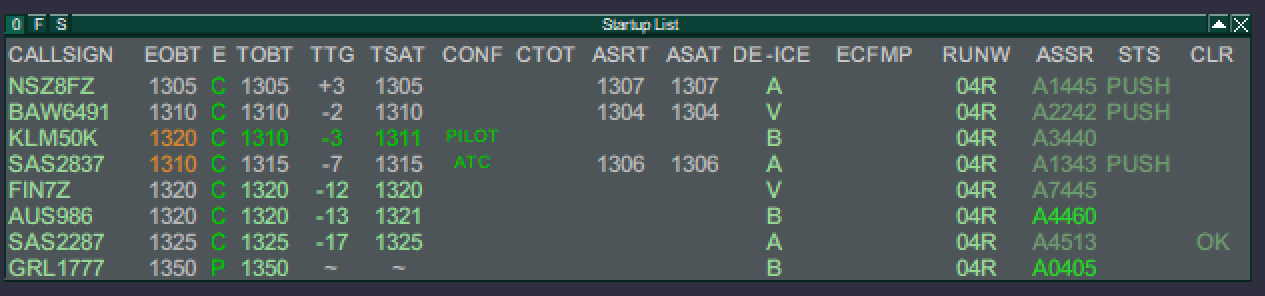
Press on the top of the TSAT column where it says TSAT! This orders the list after that and makes it easier to manage
EOBT; TOBT; TSAT; ASRT,ASAT,CTOT
Colors
There are different colors which represents different timings. They may seem complicated but you learn them fast.
- ORANGE = Invalid or Expired
- LIGHT GREEN = Valid but not within window for Startup
- DARK GREEN = Valid and within window for startup
- YELLOW = Expires soon
- RED = Valid but not Confirmed (More than 5 minutes delay expected)
Explanations
Here is the start-up list sorted for TSATs. See for each number what is happening
Procedures
Following steps are needed while using vACDM. It is not difficult be takes a few minutes to get used to
TOBT does not have to be confirmed for pilot to request pushback. It is only to give a more precise indication
Whether pilot has TOBT confirmed or not does not require anything from you. You can confirm it for him by Left clicking on the TOBT and select one of the following from the "TOBT menu"

- TOBT now: Set the TOBT to current time
- TOBT edit: Write the TOBT in yourself
- TOBT confirm: TOBT stays at the time provided but becomes confirmed
If you edit the TOBT the TSAT may get changed to reflect the TOBT as well
Pilot requests startup

This gives you Three options depending on the color of the TOBT & TSAT. These three scenarios will guide you to what to do
Scenario 1: DARK GREEN TSAT

Call has correctly be made within TOBT +/-5 and TSAT is within the window for startup.
Left click on TSAT to Assign Start-up and observe ASAT time being activated and rest of "line" grayed out.

Scenario 2: YELLOW TOBT (dark/light), LIGHT GREEN TOBT

Pilot has called (probably) within his TOBT time but a delay is expected due to traffic congestion.
Click on ASRT to mark he has requested start up, and wait until pilot is within his TSAT window

Scenario 3 Green TOBT (dark/light), LIGHT GREEN TSAT

Pilot has called before his TOBT. Set TOBT to "now" by either:
- RIGHT click on the TOBT time to automatically do this
- LEFT click on the TOBT time and select it through the TOBT menu
Doing this will result in one of two scenarios
- TOBT becomes DARK GREEN, and TSAT becomes Dark Green because a TSAT within the new TOBT time is found.
- See Scenario 1
-

- TOBT becomes YELLOW and TSAT remains LIGHT GREEN. A delay can be expected.
- See Scenario 2


