
Simplified CDM Procedures (APP/CTR)
How to StartStarting CDM (All Controllers)
As the first thing when you log on you must activate vACDM to use it
Write .cdm master EKCH to activate!

Simplified CDM Procedures (Top-down by APP/CTR)
NowPerform youabove shoulditem seebefore somethingcontinuing, likeotherwise thisall inis "????"
Simplified CDM procedures are done from departure list. Please know that:
- You are completely allowed to perform expanded CDM procedures if your
startupcapacitylist.allows - You MUST adhere to displayed CTOT for takeoff
- You may ignore TSATs without CTOTs, if workload is too heavy.
Reference Material
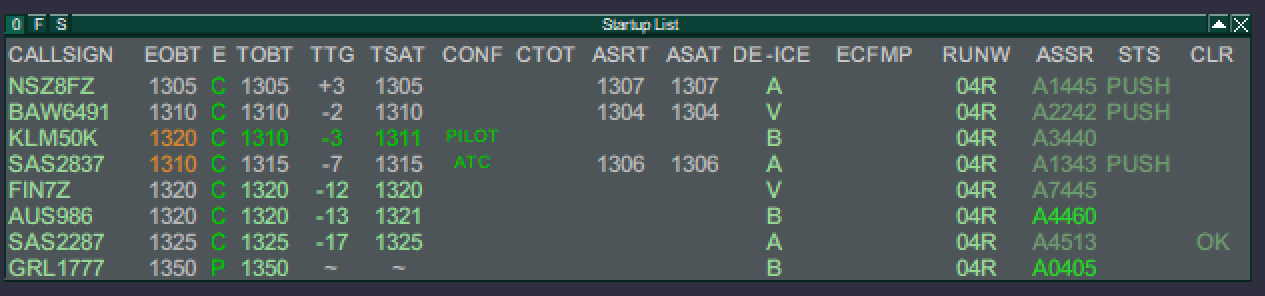
Press on the top of the TSAT column where it says TSAT! This orders the departure list after thatTSATs and makes it easier to manage
Actions for simplified CDM procedures are identical as expanded, but with more freedom
EOBT;You TOBT;departure TSAT;list ASRT,ASAT,CTOTnow features a TOBT, a TSAT and a CTOT.
Colors

ThereTOBT areshows differentthe colorsestimated whichtime representsof differentdeparture timings.filed Theyby maythe seempilot. complicated but you learn them fast.
ORANGE= Invalid or ExpiredLIGHT GREENTOBT:=IsValidLight green when the time is valid but notwithin window for StartupDARK GREEN= Valid and within window for startupYELLOW= Expires soonRED= Valid but not Confirmed (More than 5 minutes delay expected)
Explanations
Here is the start-up list sorted for TSATs. See for each number what is happening
Procedures
Following steps are needed while using vACDM. It is not difficult be takes a few minutes to get used to
TOBT does not have to be confirmed for pilot to request pushback. It is only to give a more precise indication
Whether pilot has TOBT confirmed or not does not require anything from you. You can confirm it for him by Left clicking on the TOBT and select one of the following from the "TOBT menu"

TOBT now: Set the TOBT to current timeTOBT edit: Write the TOBT in yourselfTOBT confirm: TOBT stays at the time provided but becomes confirmed
If you edit the TOBT the TSAT may get changed to reflect the TOBT as well
Pilot requests startup

This gives you Three options depending on the color of the TOBT & TSAT. These three scenarios will guide you to what to do
Scenario 1: DARK GREEN TSAT

Call has correctly be made within TOBT +/-5 and TSAT isyet within the window for startup.
- TSAT: Is Light green when the time is valid but not yet within the window for startup.
- TSAT: Is Dark green when the time is within time for startup approval.
- TSAT: Is Yellow when the time is within 1 minute from expiring
- TSAT is blank if time is expired.
- CTOT: Is Green, Orange or Red depending on the type of restriction triggering the CTOT.
Procedures
Aircraft calls for ATC Clearance
If CTOT is present: Advise of CTOT. You MUST in this case adhere to the TSAT. Advise pilot about CTOT!
LeftIf clickno onCTOT: TSATNo tofurther Assignaction Start-uprequired andat observethis ASAT time being activated and rest of "line" grayed out.

ScenarioAircraft 2:calls YELLOWfor STARTUP/PUSHBACK
- Right click on TOBT
(dark/light),toLIGHTsignalGREENaircraftTOBTready for startup.

Pilot
hascalledto (probably)TSAT Displayed . If TSAT is not yet within hisstartup TOBTwindow time(Light but a delay is expected due to traffic congestion.
Click on ASRT to mark he has requested start up, and wait untilgreen), pilot must wait.

Scenariois 3 Green TOBT (dark/light), LIGHT GREEN TSAT

Pilot has called before his TOBT. Set TOBT to "now" by either:
present
RIGHTStartclickandonpushthecanTOBTbe approved, regardless of TSAT timeto automatically do thisLEFTBeclickawareonthatthenon-adheranceTOBTtotimeTSATsand select it through the TOBT menu
Doing this willmay result in onelonger ofwaiting twotimes scenarios
TOBT becomes DARK GREEN, and TSAT becomes Dark Green because a TSAT withinat thenew TOBT time is found.See Scenario 1
TOBT becomes YELLOW and TSAT remains LIGHT GREEN. A delay can be expected.See Scenario 2


Explanations
NIL