
CLR DEL - Operation
Containing Description, Operational Procedures and Submenus of the scope called CLR DEL...

1. 1.1General Overview
Scope name:CLR DELUsed by: EKCH_DEL
[PIC]

1.2 ScopeGeneral Design
Column 1 (ARR) | Column 2 (DEP) | Column 3 (SU+PUSH) | Column 4 (PLANNED DEP) | |
OTHERS1 | SAS1 | CLEARED | PUSHBACK2 (Passive) | |
|
| TWY DEP2 (Passive) | ||
NORWGIAN1 | MESSAGES | |||
TASK BAR | ||||
1:
CategoriesOTHER,combinedSASunderand NORWEGIAN are collectively known as PLANNEDDEPDEPARTURES. Departures without ATC clearance.-
MESSAGES and2: Passivebaysbays,willfornotinformationalbepurposesexpandedonly.upon.ReferLIVE SCOPE EXAMPLE
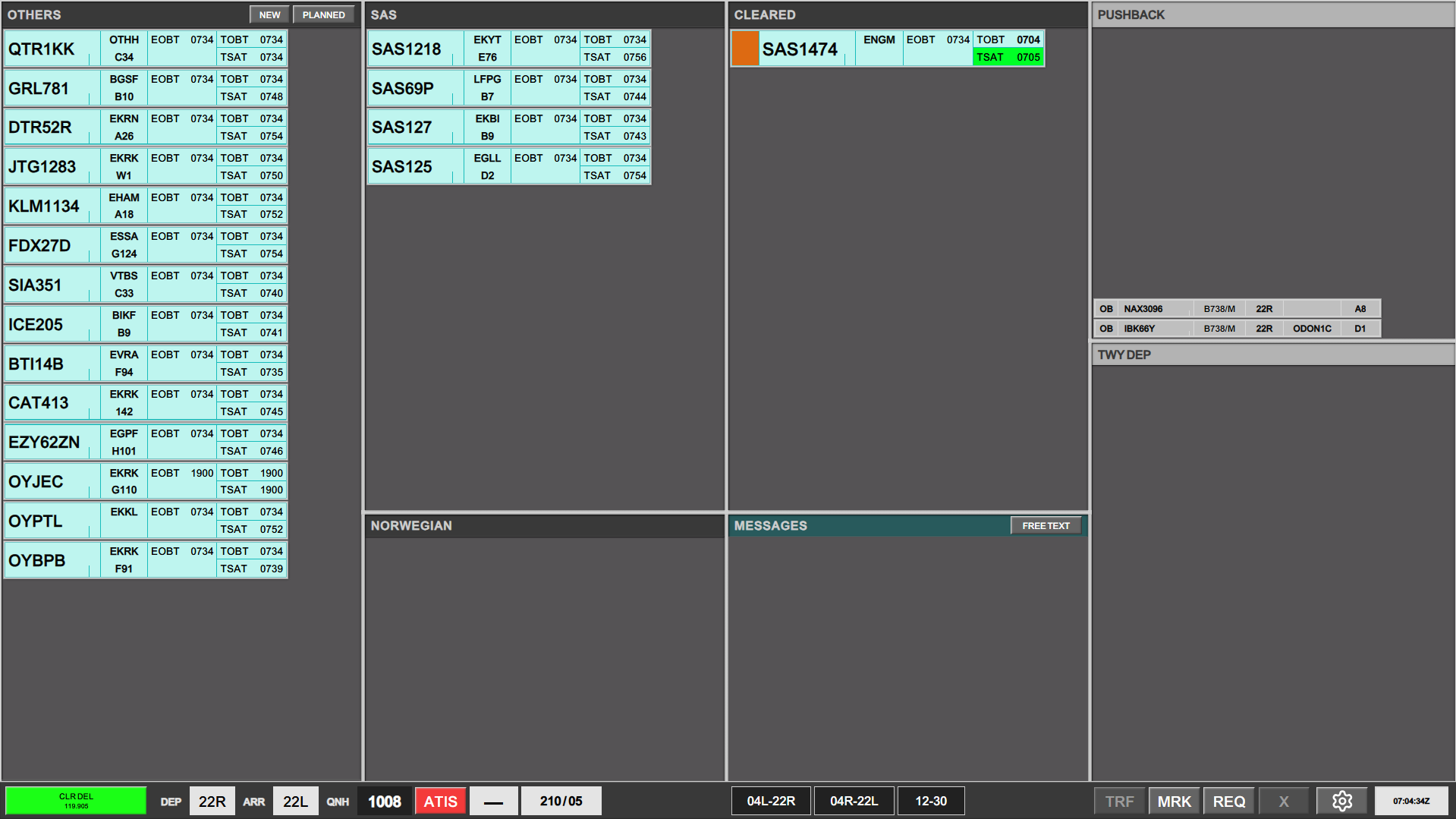
The CLR DEL scope has two major differences to
chapter 2 for details.
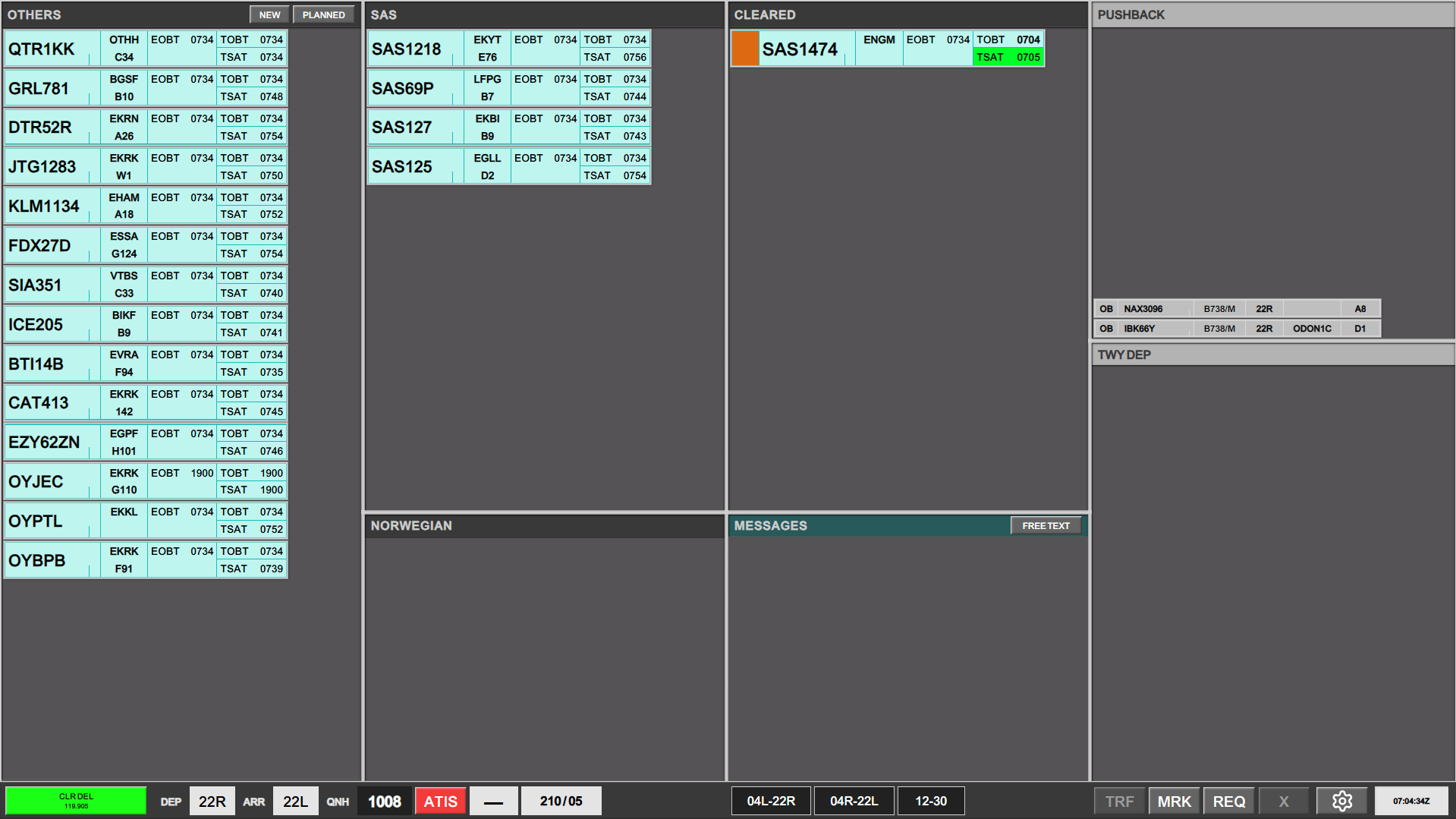

1.3 PLANNED DEP
Column 1 and 2 andall the baysother associatedscopes. (OTHERS,
- It
NORWEGIAN)sortsrepresentfromplannedtopdepartures,towhichbottom unlike any other scope - It does not
yetcontainhaveanytheirownership,ATCmadeClearance.apparentThereby the lack of SI field in the strips.
This is nobecause SIflightplans field,are asonly theactivated stripsby startup, and hence does not havecontain any ownership before that.
Planned Departures
Planned Departures is a term that covers all aircraft which are online in the airport, but has not yet received an ownerATC atclearance. theSome plannedscopes departurehave stagethem i.e.bundled stripstogether CANNOTbut other scopes, such as CLR DEL has them divided into three separate bays:
- SAS
- NORWEGIAN
- OTHERS
They are all PLANNED DEPARTURES.
If an aircraft cannot be assumedlocated, andit transferred.
Stripbe design
found 
Callsign.clickingClickontoPLANNEDopen callsign menuDestination/ Stand. Click either to open “ATC CLEARANCE MENU”EOBT. Informational onlyTOBT. Informational onlyCTOT. Informational onlyTSAT. Informational only

1.4 CLEARED
Column 3 andin the bay CLEAREDheader, and selected from the list.

If a new flight plan desires to be made, clicking on NEW will open a empty flight plan. Filling in the callsign will automatically try to find an already filed flight plan.
FlightStrips CANNOT make a flight plan on a callsign that does not exist on VATSIM. Only callsigns logged on can have a flight plan created for them!

ATC Clearance
The primary function with CLR DEL scope is forto aircraftassign whoan hasATC receivedclearance. This is being done by clicking on the STAND/DEST field on the strip. This is one single click spot which opens the ATC Clearance and is automatically transferred to the next controller.Dialogue.
Strip design
Callsign. Click to open callsign menuDestination / Stand number. Click either to open Flight PlanEOBT. Informational onlyCTOT. Informational onlyTOBT. Informational onlyTSAT. Informational only

2.1action is identical to all scopes who assigns an ATC Clerance
Clearance. WhenNo anmatter aircraftwhich callsposition you sit, refer to this chapter for ATC Clearance, clickinformation on Destination / Stand to open the ATC CLEARANCE MENU, to read the clearance to the pilot.
[GIF]
Onceproviding ATC Clearance is read back by the pilot click on CLD to confirm the clearance. Aircraft is immediately moved from the associated “PLANNED DEP” bay to “CLEARED” bay.

2.2 Pre-Departure Clearance (PDC)
Upon reception of a PDC, strip will blink for five seconds following by either:
Moved to CLEARED bay if no errors detected. Strip will remain solid purple until pilot acknowledges the clearance.Maintained in PLANNED DEP bay highlighted in bright yellow, if one of the following conditions were sensed:Error in FPLCustom message inserted in remarks.
In case of errors or remaks, open up the ATC CLEARANCE MENU and assign the clearance manually, by clicking CLD. If you are unable to provide a clearance to the pilot, click REVERT TO VOICE next to CLD. Either action will send the appropriate message to the pilot via PDC.

2.3 Completion of ATC Clearance
Upon move to CLEARED bay, the SI field becomes apparent in an orange color. This is because the strip is already transferred to next controller.
As Delivery you must immediately hand over the aircraft to next frequency.
If EKCH_DEL are responsible for START-UP in addition to normal responsibilities, the SEQ PLN scope shall be manually selected and controlled through there.
CDM and Startup approvals CANNOT be controlled from CLR DEL scope. EKCH_DEL must be on SEQ PLN scope when in charge of CDM


3.1 ATC CLEARANCEClearance DIALGUEDialogue
The ATC Clearance dialogue is divideda intolarge threewindow, sectors.containing identical information as the FPL window.
All Red-marked areas must be corrected before issuing ATC Clearance.
All Yellow-Marked areas must be inspected and evaluated before issuing ATC Clearance.
A “Standard ATC Clearance” can be issued by reading the Departure section,information Arrivalline, Sectionfrom left to right.
If a NON-SID departure is needed, this can be issued by either:
- Select HDG and
generalALTinformation.in the misc. fields at the bottom. - Open SID menu and select SA3000’. (Straight Ahead, 3000ft).
3.2Completion NEW
of 3.3ATC PLANNEDClearance.
Only when the pilot has successfully read back his clearance, can you press the “CLD” button, to activate the flight plan.
Once an aircraft is cleared, the aircraft moves into the CLEARED bay, and is automatically transferred to controller in charge of STARTUP and CDM management.
The SI field will light up in Oindicating the transfer is completed, and you must send the aircraft to next frequency, as described in the strip.

Pre-Departure Clearance (PDC)
PDCs are available and "semi-autonomously" handled by Flightstrips.
A PDC is automatically processed provided that:
- PDC Request has no errors
- PDC Request is planned on an SID
- PDC Request does not contain custom remarks from pilot
If either of the above conditions are not met, a PDC must be manually processed.
Automatic PDC Process
For automatic PDCs:
- The controller will be prompted by the strip flashing in Purple color
- This indicates indicating that a PDC has been received from pilot.
- PDC will subsequently automatically move to the CLEARED by, in full Purple fill color.
- This indicates that a PDC has been send back to pilot
- Strip will after a delay remove the purple color if:
- Pilot has acknowledged the PDC
- Strip will after a delay move back to Planned Departures if
- Pilot did not acknowledge the PDC.
Manual PDC Process:
- Controller will be prompted with a Validation Status indicating a PDC requiring attention
- Opening ATC Clearance menu will reveal an extra button called “Revert to Voice Procedures”
- Clicking CLD will send the PDC to the pilot
- Strip moves to CLEARED bay in full purple color
- Strip will after a delay remove the purple color if:
- Pilot has acknowledged the PDC
- Strip will after a delay move back to Planned Departures if
- Pilot did not acknowledge the PDC.
- Clicking REVERT TO VOICE will cancel the PDC
- Strip remains in PLANNED DEPARTURE bay in full yellow color