Expanded CDM Procedures (TWR/GND/DEL)
Starting CDM (All Controllers)
As the first thing when you log on you must activate vACDM to use it
Write .cdm master EKCH to activate!

Expanded CDM Procedures (TWR/GND/DEL)
Perform above item before continuing, otherwise all is "????"
Expanded CDM procedures are done from Startup list, but can be done via departure list for TWR. Please know that:
- You should adhere to CDM procedures at all times, either through Departure list or Startup list.
- You MUST adhere to displayed CTOT for takeoff
Reference Material
Press on the top of the TSAT column where it says TSAT! This orders the departure list after TSATs and makes it easier to manage
With expanded mode there is a lot more information, but procedures are very similar
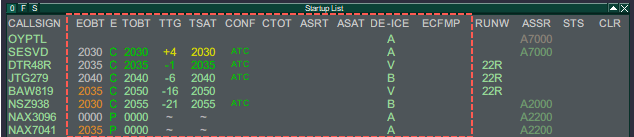
Descriptor
There are four main descriptor of times (EOBT, TOBT, TSAT, CTOT), separated by three descriptors (E, TTG, CONF), and an additional four additional items (ASRT, ASAT, DE-ICE, ECFMP).
- EOBT: Estimated Off Block Time
- The pilot filed off block time from the flightplan (e.g. Simbrief). The one passengers shows up for.
- TOBT: Target Off Block Time.
- The pilot filed off block time, via our CDM tool to confirm actual time of start-up readiness.
- TSAT: Target Start-up Approval Time.
- The time our system calculates based off the TOBT, to have the pilot fit into the sequence.
- For internal capacity mainly
- CTOT: Calculated Takeoff Time
- A Takeoff time at which the aircraft must depart within -5/+10 min of. TSAT is adjusted accordingly.
- For external capacity (ECFMP, ATFCM)
(Color) Coding
EOBT
TOBT
TSAT
CTOT
LIGHT GREEN
--
Valid, but not yet Active
--
DARK GREEN
--
Active
By CDM Server*
YELLOW
--
TOBT+4
TSAT+4
Default Color
RED
Flight Suspended
--
By CAD*
ORANGE
EOBT >5min from TOBT
By Manual Event*
WHITE
Default color
*Not important to know
- E: A descriptor about the validity of the filed TOBT.
- TTG: Time until the TSAT (- equals time to go, +equals past TSAT)
- CONF: A descriptor if the TOBT has been confirmed ( or altered) by either "pilot" or "ATC"
-
(Color) Coding
E
TTG
CONF
DARK GREEN
Correct (C) or Passed (P)
-35min until +3 min
Default Color
YELLOW
--
+4min until +5 min
TSAT+4
RED
Invalid (I)
--
-
- ASRT: Actual Start-up Request Time
- The pilot requested start-up if done so before TSAT is active.
- ASAT: Actual Start-up Approval Time
- When start-up approved (STUP or PUSH in Status), ASAT activates and rest of line goes gray.
- DE-ICE: De Icing assigned
- De-ice is required for the pilot, hence taxi out time will be extended.
- ECFMP: European Central Flow Management Position
- A note on what is the origin of a particular flow measure. Only for information.
Procedures
Procedures depends on whether you are handling SEQ only or DEL+SEQ.
Aircraft calls for ATC Clearance (if within AOR)
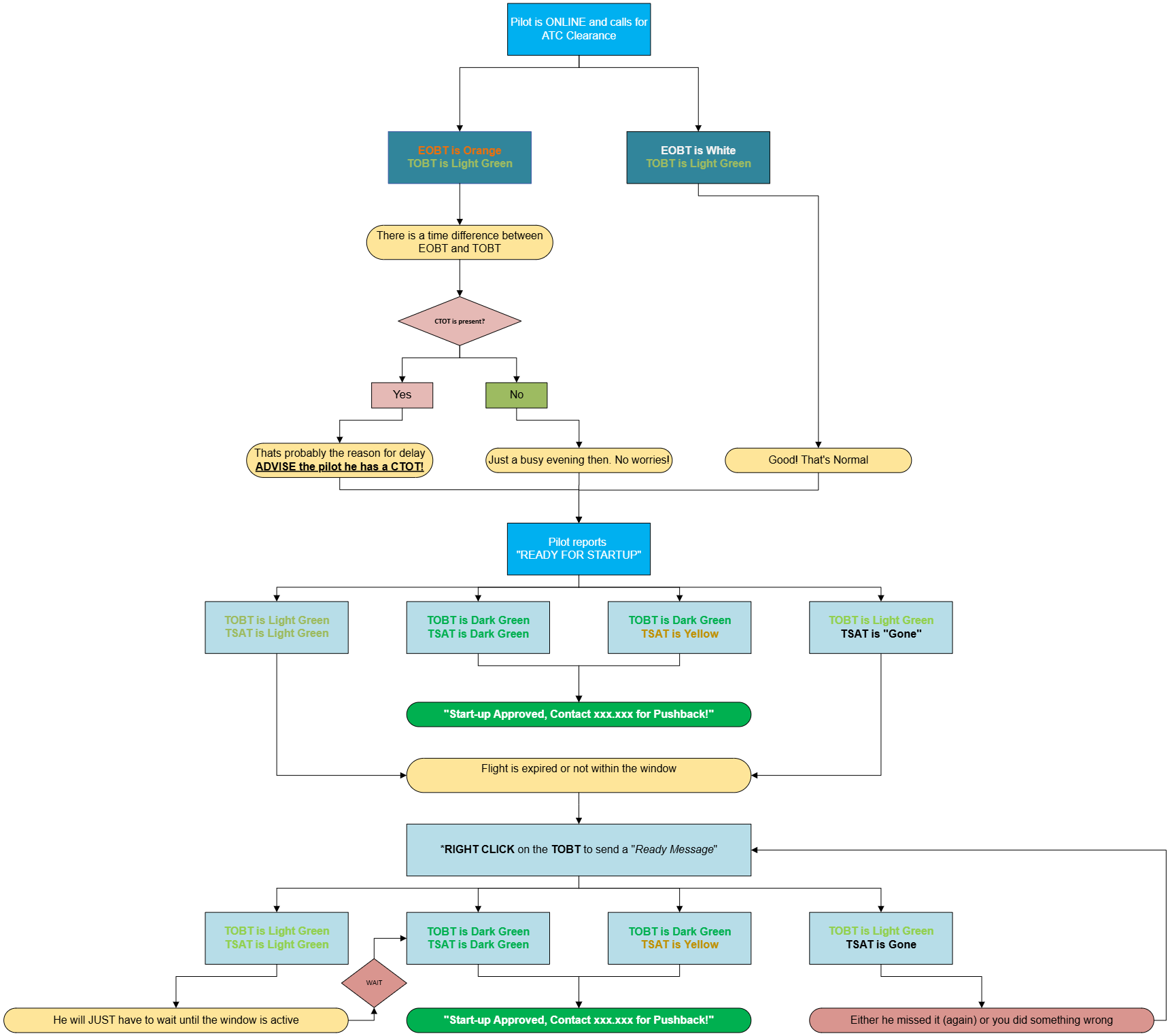
If CTOT is present: Advise pilot about CTOT!. Advise on earliest startup time (TSAT)
If no CTOT: No further action required at this stage.
Aircraft calls for STARTUP/PUSHBACK
Check your timings and note:
- If TSAT is Dark Green, Start-up can be approved.
- If TSAT is Light Green, Pilot is still more than 5 minutes early. he must wait.
- If TSAT is Yellow Start-up can be approved, but be quick, it will soon expire.
- If TSAT is Blank, Flightplan expired and new TOBT must be filed.
If TSAT is Light Green or a CTOT is present or TOBT is Invalid (expired), try to improvedimprove it by sending a "Ready message" by *right clicking on the TOBT. This updates the TOBT to current time, and tries to recalculate everything to look for an earlier time.
If TSAT remains Light Green after that, Start-up cannot yet be approved.
- Click ASRT to remind that a request has been made by the pilot
- Approve Startup when TSAT turns Dark Green
When start-up approved
- Update Status to STUP or PUSH to activate ASAT, and blank out the rest of the times. Aircraft is released.
Flow Chart