Updating sectorfiles
Updating of Sectorfiles
Sector files are updated:
- Approximately every 28 days, when a new AIRAC cycle is released;
- Whenever a major change is published in our internal files.
When a new sector file update is released, go to https://files.aero-nav.com/SCA ↗.
Download the "EKDK EKDK_FIR-Update-Only" package instead of the full package.
Begin by opening File Explorer. You can do this easily by pressing Windows + E.
Next, locate your AppData folder. The easiest way is to click the address bar, type "%appdata%", and press Enter; this will take you directly to the folder.

Locate your EuroScope folder.
As with the initial installation, open the ZIP file and copy all contents into your EuroScope installation directory. You will be prompted to overwrite existing files; make sure to select "Yes".
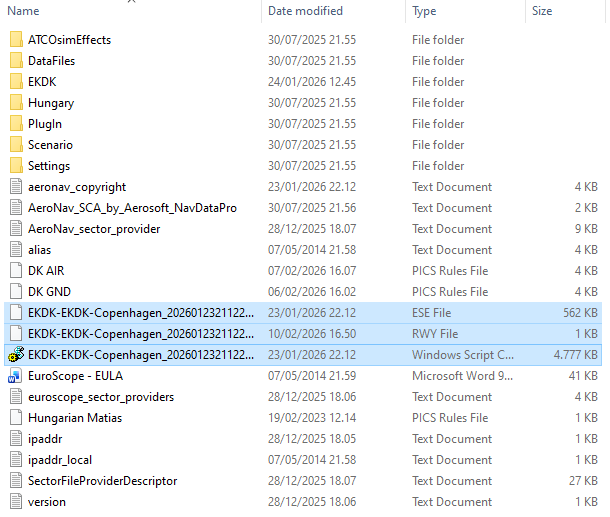
At your own discretion, it can be a good idea to delete the following three files before installing new sector files. This helps ensure that EuroScope does not accidentally load outdated or additional ESE or RWY files when launching.
This can happen because some file names are not always identical and therefore may not be overwritten during the update process. This step is not always necessary, but it can be beneficial in certain cases.