
CDM Operation
CDM Procedures, What it is? How it works? How to use it? How it is intergrated into FlightStrips...

CDM - Explained
CDM (Collaborative Decision Making) is a complex but vital part of ensuring we can cope with the traffic levels on VATSIM. In order to use CDM properly it is important that you understand
- The logic behind CDM operation
- How to effectively use CDM operation
1.1 Purpose
The first thing you need to understand is that there are TWO (2) different kinds of CDM, They are intertwined and both must be respected.
- A-CDM (Airport - Collaborative Decision Making)
- vIFF CDM (Intergrated Flight and Flow - Collaborative Decision Making)
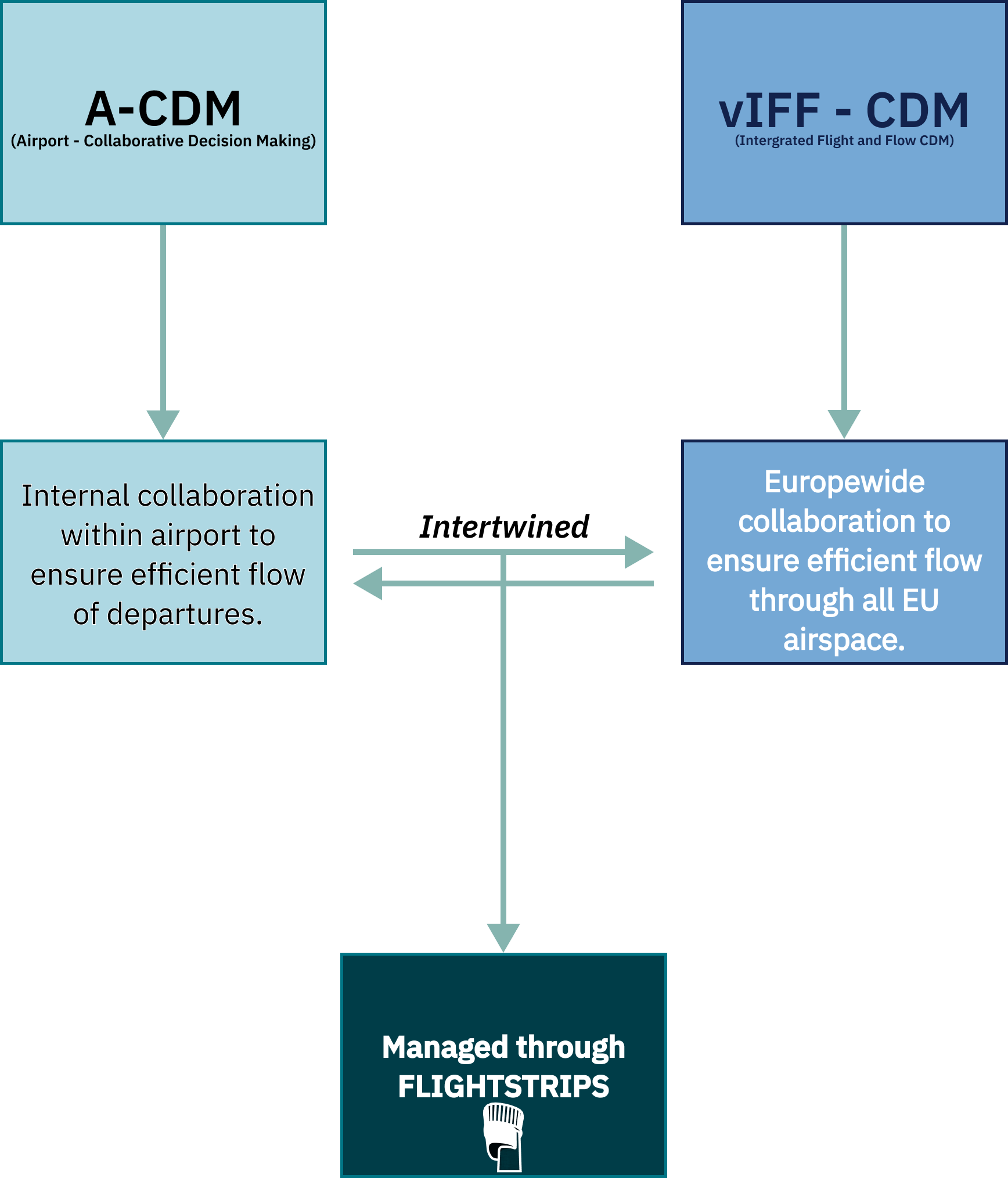
These two systems work towards seperate goals, but must constantly talk to eachother as they are co-dependent.
A change to one of the entities can affect the other one. In order to ensure compliance we have intergrated it all in a user friendly managed manner within FlightStrips
1.2 Abbriviations & Explanations
Many foreign abbreviations are being used for CDM, and we need to cut it into the bone of knowing just the basics for your daily routing:
NOTE: Blue background items are operational items, gray background items are purely adminstrative and not gouvering when controlling
TERM | NAME | DESCRIPTION | USAGE |
EOBT | Estimated Off Block Time | The time the pilot has filed his flightplan to be ready for Startup | Used as initial planning for the TOBT until system, ATC or Pilot says otherwise. |
TOBT | Target Off Block Time | Time the pilot targets to be ready for Startup, depending on the loading process and pax delays | Accepted via pilot EOBT. Can be modified by ATC, the Pilot, CTOTs or automatically by the system at any time. |
TSAT | Target Start Approval Time | Time the ATC targets to provide pilot with his startup, based on capacity restrictions at his TOBT | Based on the filed TOBT, system will calculate the closest time to the TOBT that startup can be approved to respect all flow restrictions |
CTOT | Calculated Take-Off Time | Time pilot must be “Takeoff” in order to respect a restriction en-route or at arrival field | If a vIFF restriction en-route forces aircraft to be airborne in a certain time window a CTOT will be produced to ensure this. |
ASAT | Actual Start Approval Time | Actual time of Start. | Locks the timings in vIFF |
EXOT | Estimated Taxi-Out Time | Expected time between Start and Takeoff | Standard timings based on gate |
TTOT | Target Take-Off Time | Expected Takeoff Time based on Taxi out time and TOBT. | Used to ensure an even departure rate |
1.3 Flow Control Logic
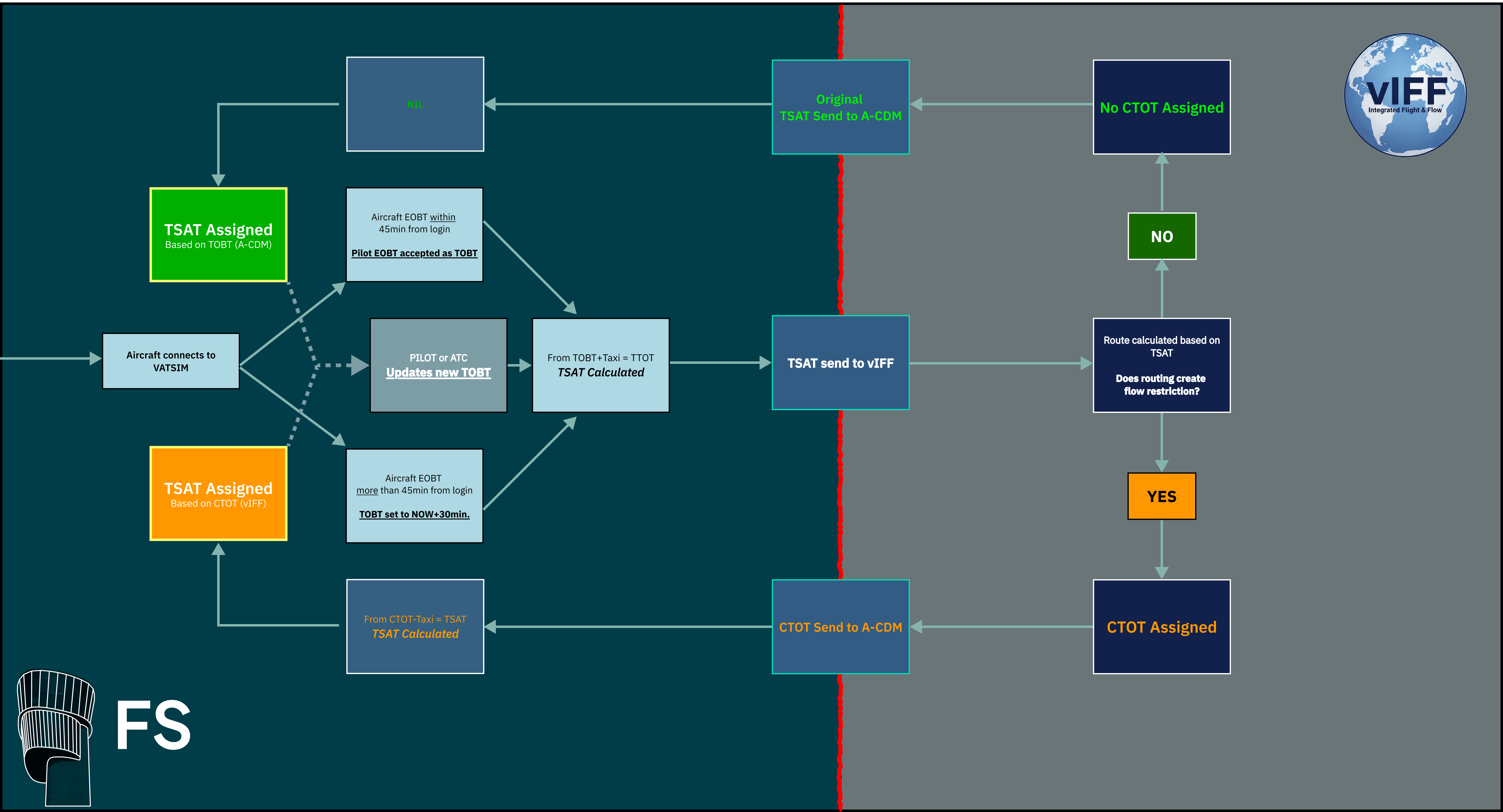
Flow Control logic works through constant calculations. It is important that you understand the logic.
- Pilot Logs onto VATSIM Network. In his Flightplan he has filed an EOBT.
- FS evaluates the validity of EOBT, and assigns a TOBT.
- A-CDM process begind. Based of the TOBT and available space in sequence a TSAT is "calculated"
- The TSAT is send to vIFF servers for calculation.
- vIFF servers used TSAT to calculate the routing to the destination, and if it exceeds ATC capacity anywhere
- One of two things happen:
- a) No restrictions are identified, and TSAT is returned without edits to A-CDM.
- b) Restrictions identified, CTOT produced to comply with restricionts and returned to A-CDM.
- A-CDM either confirms the TSAT, or calculates a new TSAT based on CTOT restriction
- TSAT is "Assigned" to an aircraft.
- If a TOBT is updated by either pilot or ATC, steps 3-8 are repeated.
Refer to flowchart below for visual explanation
1.4 Calculation
1.4.1 A-CDM
A-CDM needs to calculate a takeoff sequence. The core purpose is to only have as many departures an hour as the airport can handle, and nicely spread out. Therefore it is all based on TTOT (Target Takeoff Time).
- In EKCH the capacity is 40flts/hr and therefore we have 40TTOT spots, spaced 1.5 minutes apart.
The calculation of A-CDM is as follows:
- EOBT is recorded from flightplan, and based on that a TOBT is assigned.
- Stand is recorded and based on RWY in use, a EXOT is established. TOBT+EXOT = TTOT
- Example: TOBT: 1435z. EXOT 12min; 1435z+00:12min = TTOT=1447z
- The system then compares the TTOT to available TTOTs and does one of two things:
- TTOT available: TSAT issued at TOBT
- Example: TTOT: 1447z available, EXOT 12min. 1447z-00:12min = TSAT=1435z
- TTOT occupied: Find next available TTOT, calculate back EXOT, which becomes TSAT
- Example: TTOT: 1453z first available, exit 12min. 1453z-00:12min = TSAT=1441z
- TTOT available: TSAT issued at TOBT
- TSAT assigned to optimize traffic flow depending on what TTOT is available.
1.4.1 vIFF - CDM
vIFF does NOT care about our internal capacity. Only about:
- Enroute Sector capacity
- Arrival TMA capacity
- Arrival Airport capacity
- ECFMP special restrictions
vIFF knows the EXOT of EKCH.
- TSAT which was determined by A-CDM is send to vIFF.
- vIFF, uses TSAT+EXOT to determine TTOT, and afterwards a 3D routing through all airspaces
- If a sector capacity does not allow the flight it will assign a CTOT at a time the capacity allows.
- CTOT is send back to A-CDM
- A-CDM produces a TSAT to fit that CTOT, overriding all other A-CDM restrictions, and delaying subsequent aircrafts TTOT.

 There are two different kinds of layout of CDM. They are similar in colorcoding but differently build up.
- SEQ PLN, AA+AD (or APRON DEP), GND + TWR
- Controlled using conventional FlightStrips techniques
- EST Scope
- Controlled using EST Scope technique.

2.1 CDM Design on Strips
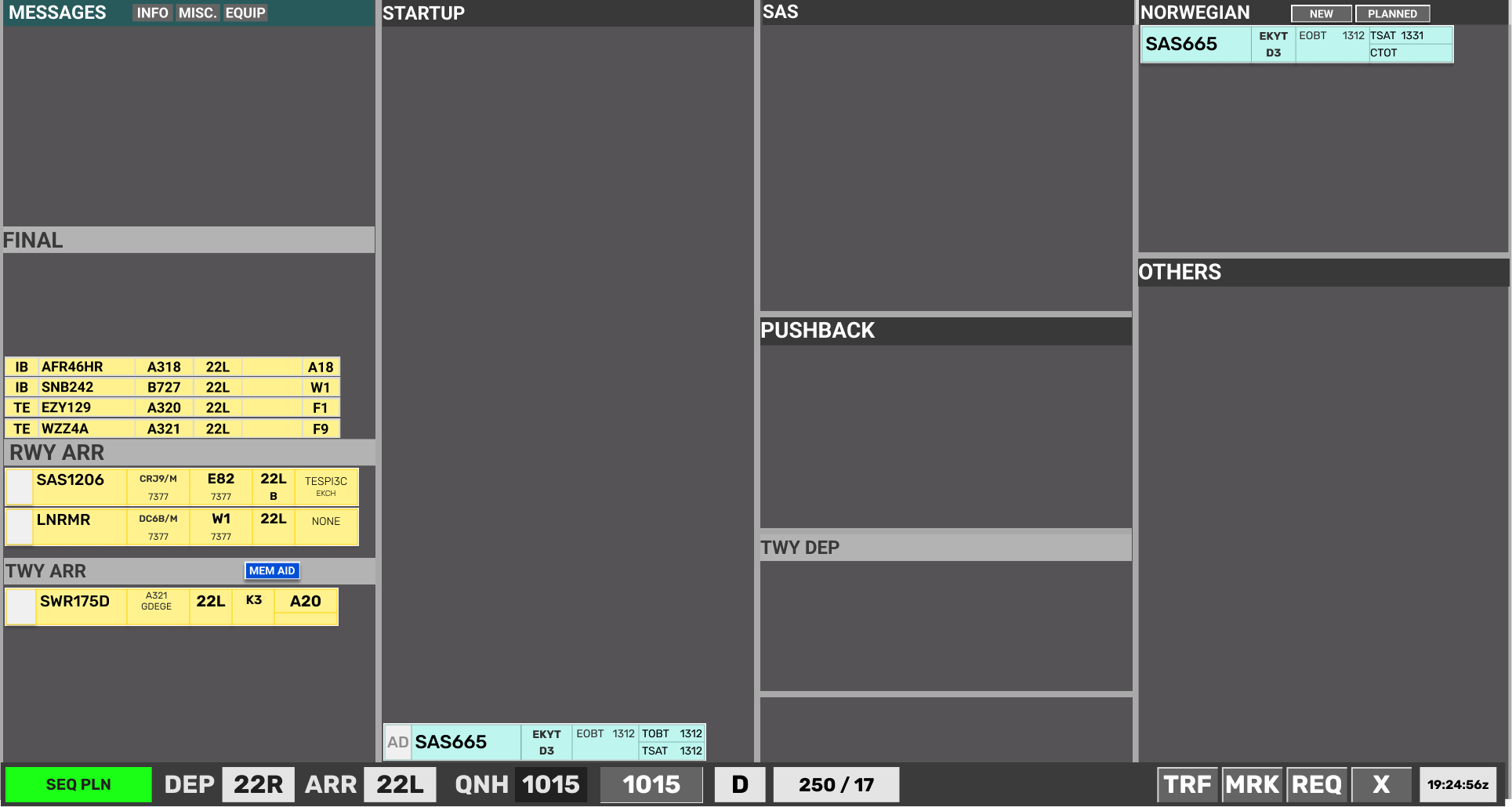
CDM operation IS NOT possible from the CLR DEL scope. CLR DEL must use the SEQ PLN scope.
CDM operation is accomplished via the STARTUP bay in conventional FlightStrips scopes. Aircrafts are sorted with earliest TSAT in bottom.
CDM Design on Strips
2.1.1 Unrestricted Strips
An unrestricted aircraft will not have any color codes until its start-up window.

2.1.2 Startup Approved Strips
An aircraft which has reached its startup window will show a green TSAT. Start-up may be approved.

TSAT Sequence
Start-up window may include a CTOT, but TSAT will still indicate green.

When a TSAT is one (1) minute from expiring, TSAT will indicate Yellow.

When TSAT is expired, TSAT coloring will disappear and a Red TOBT appears.

New TOBT must be filed
2.1.3 A-CDM Delayed Strips
An aircraft which has been delayed by A-CDM due to RWY capacity, will show an Orange TOBT indicating a >5min delay between the TOBT and TSAT.

- When within startup window TSAT will turn green
2.1.4 vIFF Delayed Strips
An aircraft which has been delayed by VIFF due to EU capacity, will show an Yellow CTOT to warn controllers. The CTOT may or may not also be accompanied by an Orange TOBT if the CTOT results in a >5min delay from TOBT

- When within startup window TSAT will turn green

2.2 CDM Design on EST
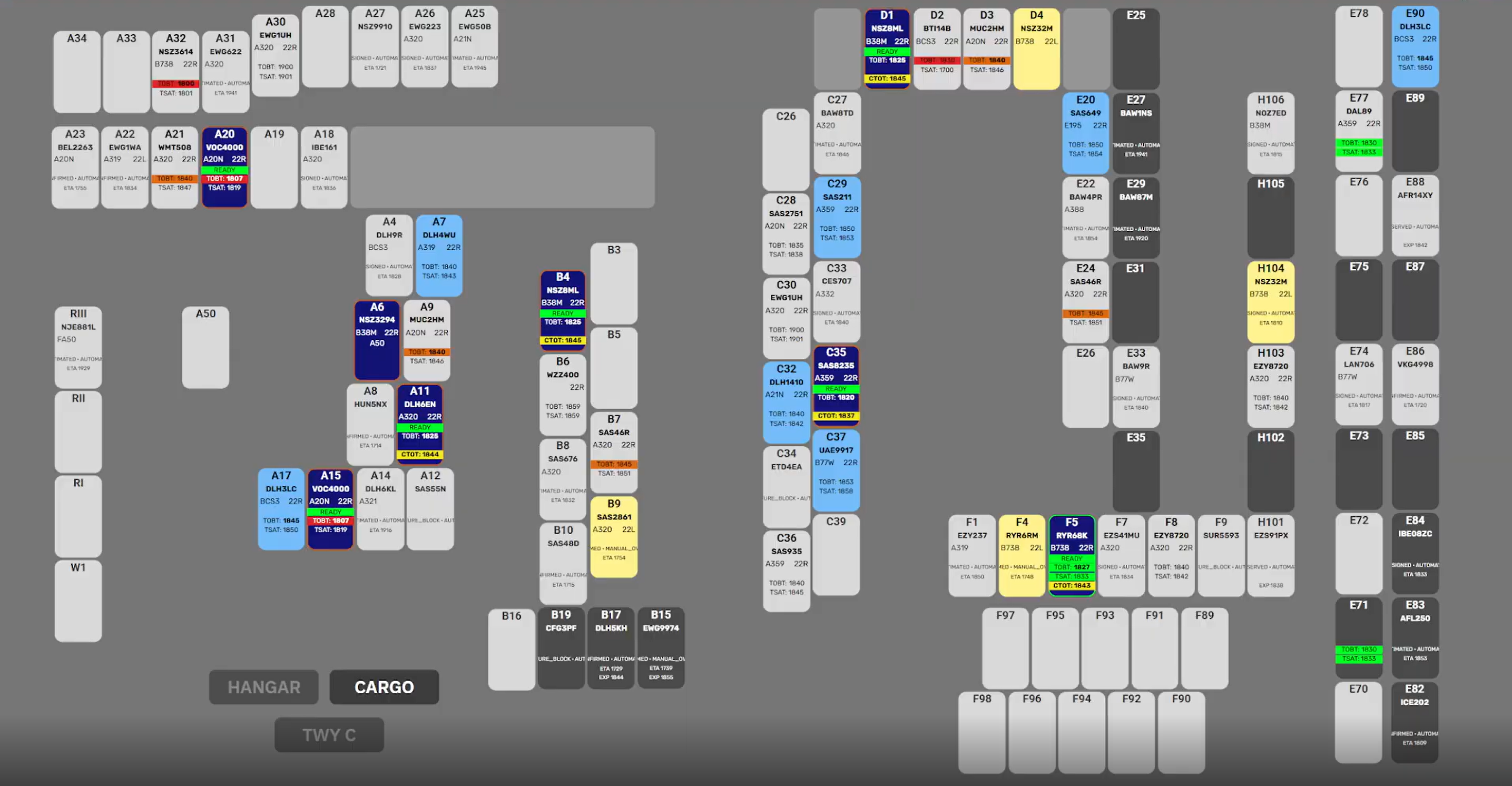
EST Scope has a different layout as it is an image of all the stands. It will show for each individual stand the same color codes as the regular scopes.
CDM Design on EST
2.1.1 Unrestricted Strips
An unrestricted aircraft will not have any color codes until its start-up window.
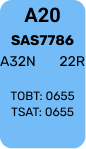
2.1.1 Startup Approved Strips
An aircraft which has reached its startup window will show a green TSAT & TOBT. Start-up may be approved.
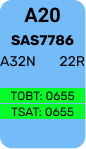
Start-up window may include a CTOT, but TSAT will still indicate green.
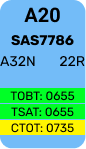
When a TSAT is one (1) minute from expiring, TSAT will indicate Yellow.
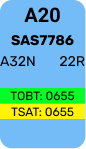
When TSAT is expired, TSAT coloring will disappear and a Red TOBT appears.
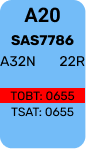
New TOBT must be filed
2.1.1 A-CDM Delayed Strips
An aircraft which has been delayed by A-CDM due to RWY capacity, will show an Orange TOBT indicating a >5min delay between the TOBT and TSAT.
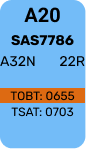
- When within startup window TSAT will turn green
2.1.1 vIFF Delayed Strips
An aircraft which has been delayed by VIFF due to EU capacity, will show an Yellow CTOT to warn controllers. The CTOT may or may not also be accompanied by an Orange TOBT if the CTOT results in a >5min delay from TOBT.
A CTOT which has had an improvement will show in Dark Blue to alert controller of an improvement
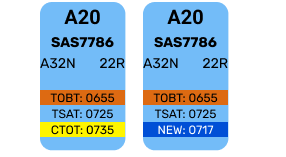
- When within startup window TSAT will turn green


This chapter is about what procedures you must adhere to when managing CDM. You have learned the philosphy and how it looks, now you need to know how to use it. Its developed into 4 subchapters:
- Timings
- EST procedures
- SEQ PLN procedures
- AA+AD procedures
3.1 Acceptable Timing
CDM procedures varies from Apron (and DEL) and Towers.
- GND/DEL prime concern is to ensure Aircraft starts in accordance with TSAT
- TWR prime concern is to ensure Aircraft takes off in accordnace with CTOT
By following the guidelines of Chapter 3 - FlightStrips CDM operation, controller shall adhere to following timings:
- GND/DEL: Start-up approval within -5 min until +5min of TSAT.
- TWR: Takeoff commenced within -5min until +10min of CTOT
Outside of TSAT+6 a new TOBT must be requested
Outside of CTOT+11 TWR should consider severity of exceedance, and allow aircraft to depart only if deemed safe and responsibly to do so by judgement of controller.

3.2 EST Scope Procedures
On EST Screen, clicking on an aircraft on a stand, the menu appears with several different options
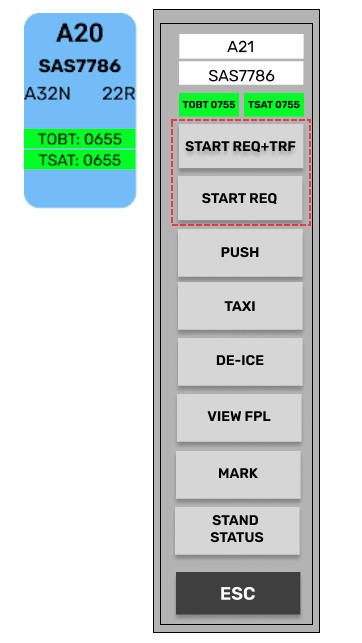
- START REQ + TRF
- START REQ
Which one you need is dependent on the situation of the aircraft. The visual action is similar, but what goes on behind the scenes are different.
START REQ + TRF
START REQ + TRF
Only available when aircraft is WITHIN TSAT Window. It performs following actions
- Approves the aircraft for startup by assigning ASAT, locking the CDM.
- Transfers the strip automatically over to APRON
- Changes appearance to a dark blue color labelled READY above. TOBT & TSAT removed.

START REQ
START REQ
Available if aircraft reports ready before the TSAT window. It performs following actions:
- Selects TOBT to current time in order to look for an earlier TSAT.
- Changes appearance to dark blue color labelled READY above.
- Orange outline, until within TSAT window, then changing to green outline.
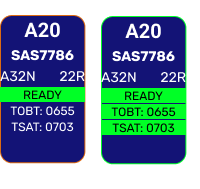
START REQ can be used for:
- TSAT not yet within window. looking for an earlier TSAT
- TSAT expired. Resetting TOBT to find new TSAT
- RDY MSG send by pilot. Will look for an earlier CTOT.
If a START REQ results in a new TSAT found within the window, START REQ + TRF must subsequently be pushed.
START REQ will not look for a new TSAT if current TSAT is within 10min AND has a CTOT attached to it.
OTHER BUTTONS
Other Buttons
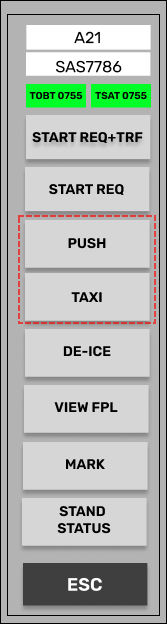
Two additional buttons called PUSH and TAXI is also available. This does the same as START REQ+TRF, but instead of transfering it automatically moves them directly to PUSHBACK and TWY DEP bay respectively.
Useful for when using EST screen, while sitting on a GND or TWR position.

3.3 SEQ PLN Procedures
On SEQ PLN scope, on the strip there are only one click spot you can use.

Clicking on TOBT field, will do the same as START REQ does on the EST scope. It will set TOBT to current time and allow an earlier TSAT to be found. Can be used for:
- TSAT not yet within window. looking for an earlier TSAT
- TSAT expired. Resetting TOBT to find new TSAT
- RDY MSG send by pilot. Will look for an earlier CTOT.
If an earlier TSAT is found, TSAT and TOBT will light up green and start-up can be approved.

Transfer must be done by clicking on the SI Field indicator to commence transfer.
Transfer via SI field will NOT work outside of TSAT window. Manual transfer only in case of CDM malfunction
TSAT click spot will not look for a new TSAT if current TSAT is within 10min AND has a CTOT attached to it.

3.4 AA+AD / GND+TWR Procedures
On AA+AD (And GND+TWR), Strips have a different layout and only displays TSAT and CTOT

NOTE: In above example CTOT is also present
Clicking on TSAT field, will set TOBT to current time and look for a new TSAT. Can be used for:
- TSAT not yet within window. looking for an earlier TSAT
- TSAT expired. Resetting TOBT to find new TSAT
- RDY MSG send by pilot. Will look for an earlier CTOT.
If an earlier TSAT is found, TSAT will light up green and start-up can be approved.

NOTE: In above example CTOT is improved and shows in Blue.
Aircraft can then be transfered into PUSHBACK bay by standard procedures.
If aircraft is positioned in PUSHBACK or TWY DEP bay before TSAT window, the TOBT will automatically be set to current time, and earliest TSAT assigned.
Failure of system to find an earlier TSAT will result in a "Validation status", warning controller.
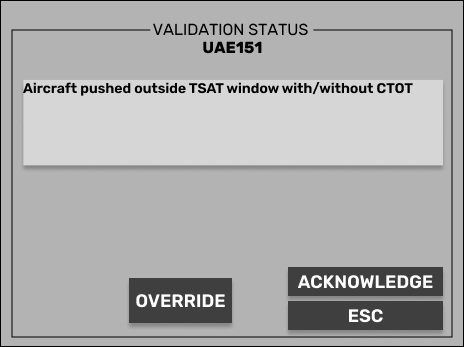
Controller must delay pushback/taxi/takeoff or override to serve delay at holding point