
Chapter 3 - Strip Design
Description, Features and Design of the various Strips in FlightStrips

TABLE OF CONTENT
Flight Strips - General FeaturesFlight Strips - Design and DescriptionTactical StripsMESSAGES Strips


Flight Strips are the strips that are concerned with the flights at your airport. They come in two colors
- Teal: Departures
- Yellow: Arrivals
Colors are matched to the colors from the Ground Radar Plugin used in EKCH
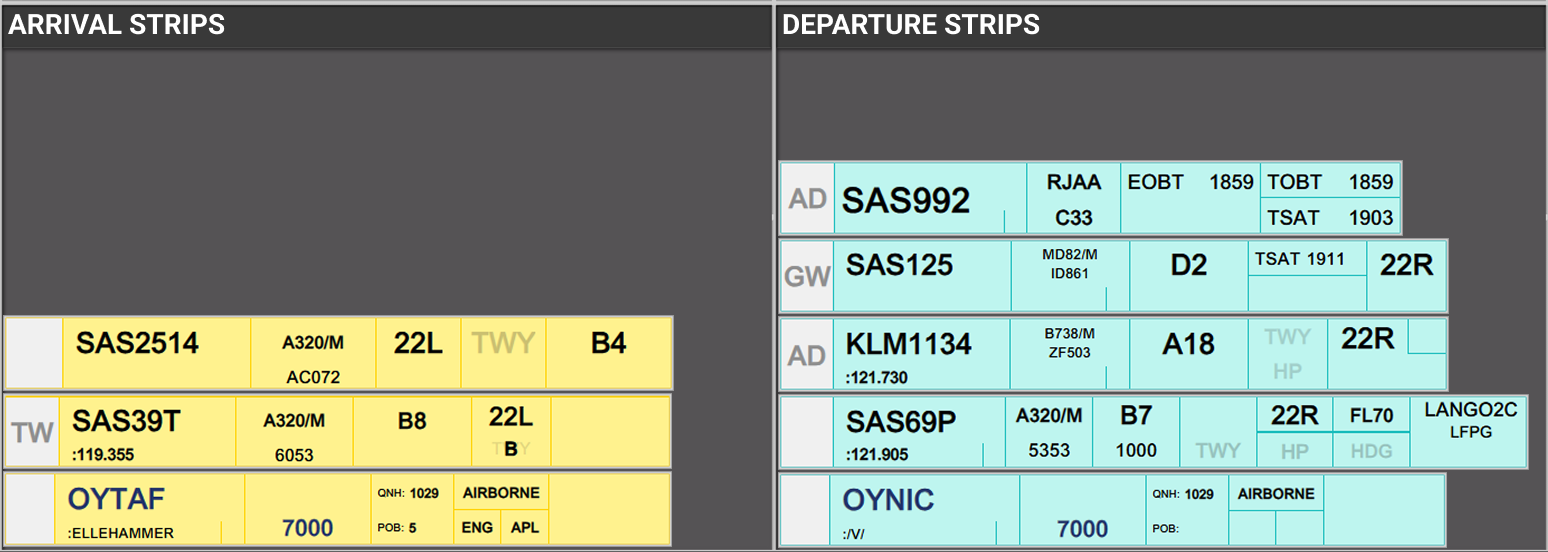
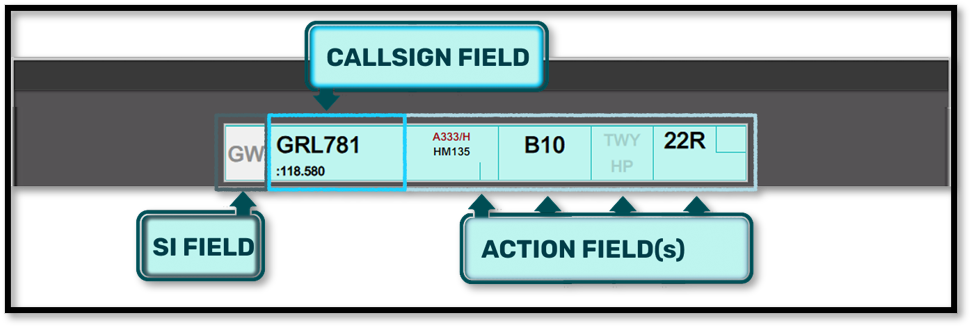
While the many different looks of strips may seem confusing at first, they are all based on the same fundamentals.
SI Field
- A rectangular field, in three possible color combinations, with out without a two letter identifier.
Callsign Field
- A large field, containing the callsign of the aircraft, where movement of strip is controlled from.
Action Fields
- Various fields of tactical information, which can be changed, and edited depending on Strip.
1.1 SI Field
The SI field has different colors depending on the state of ownership of the strip.
- Purple: when it is concerned, meaning you will receive ownership of this at some point, but not yet.
- Purple/White: In transfer towards YOU from previous controller
- White: Assumed and controlled by YOU
- White/Orange: In transfer towards next controller from YOU
- Orange: Transferred and accepted by next controller
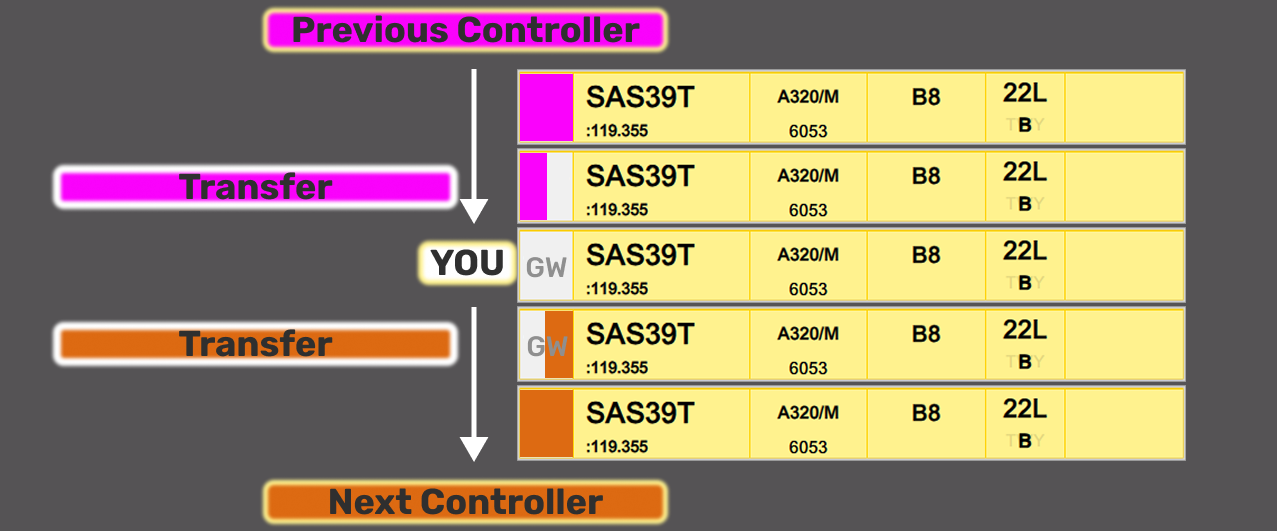
The logic is identical to transfer/assume in COOPANS, only difference is Concerned in COOPANS is green instead of purple.
As a controller you accept and transfer the strips by clicking on the SI Field.
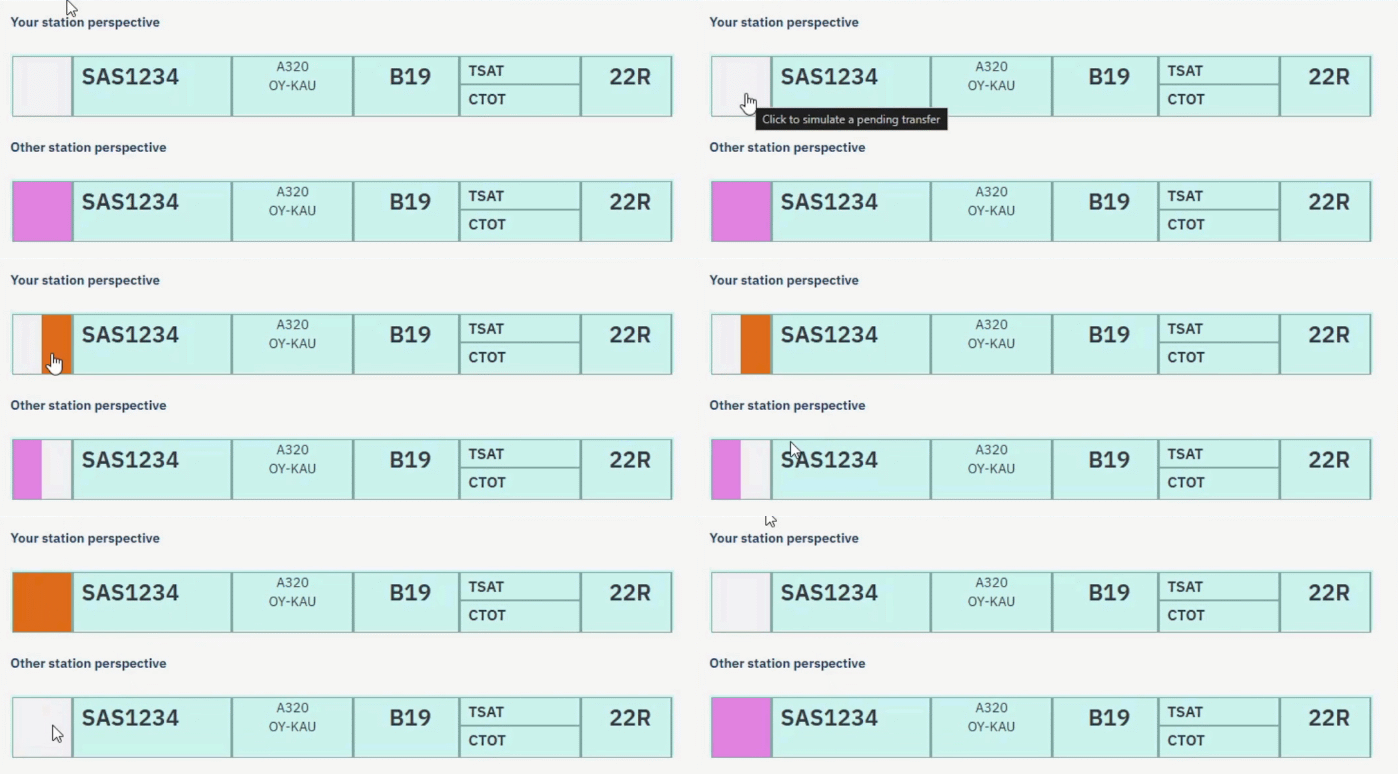
An SI field will often contain a "Two Letter" code which signifies the recipient of the strip when you transfer.
FlightStrips is able to sense the next controller based on several factors including but not limited to:
- Runway in use for departure
- Aircrafts Departure Runway
- Cross Coupled frequencies within Track Audio
Different options such as "Manual Transfers" and "Modified SIs" are available to accomendate exceptional needs. This is expanded upon in other chapters.
1.2 Callsign Field
The callsign field is one which you can click on.
Clicking the callsign is generally for selcting an aircraft you have control of, and move it around.
If a strip is NOT under your ownership, clicking will open the "CALLSIGN MENU", which has various features
NOT OWNED
Not assumed
Clicking on callsign field will open the “Callsign Menu” where you can select various submenus
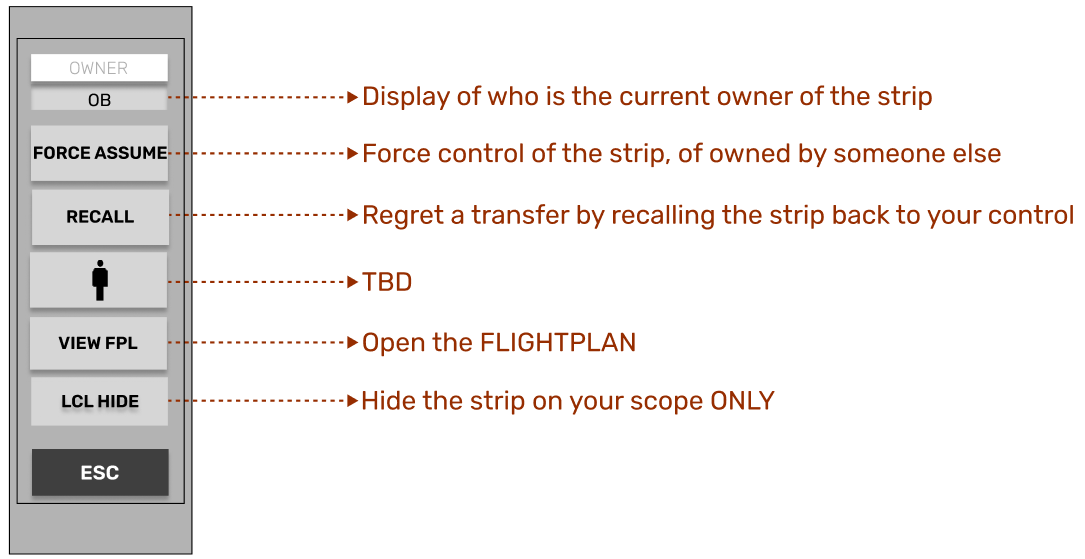
FORCE ASSUME: Can be used to override ownership. Mainly used for forgotten transfers.
RECALL: cannot be available alongside FORCE ASSUME. Is used when you initiate a transfer, that you regret.
VIEW FPL: Refer to Chapter 4 under the ATC Clearance Dialogue. These are Identical in features and format.
LCL HIDE: The strip does not HIDE, but will reduce to half size, for a better overview.
OWNED
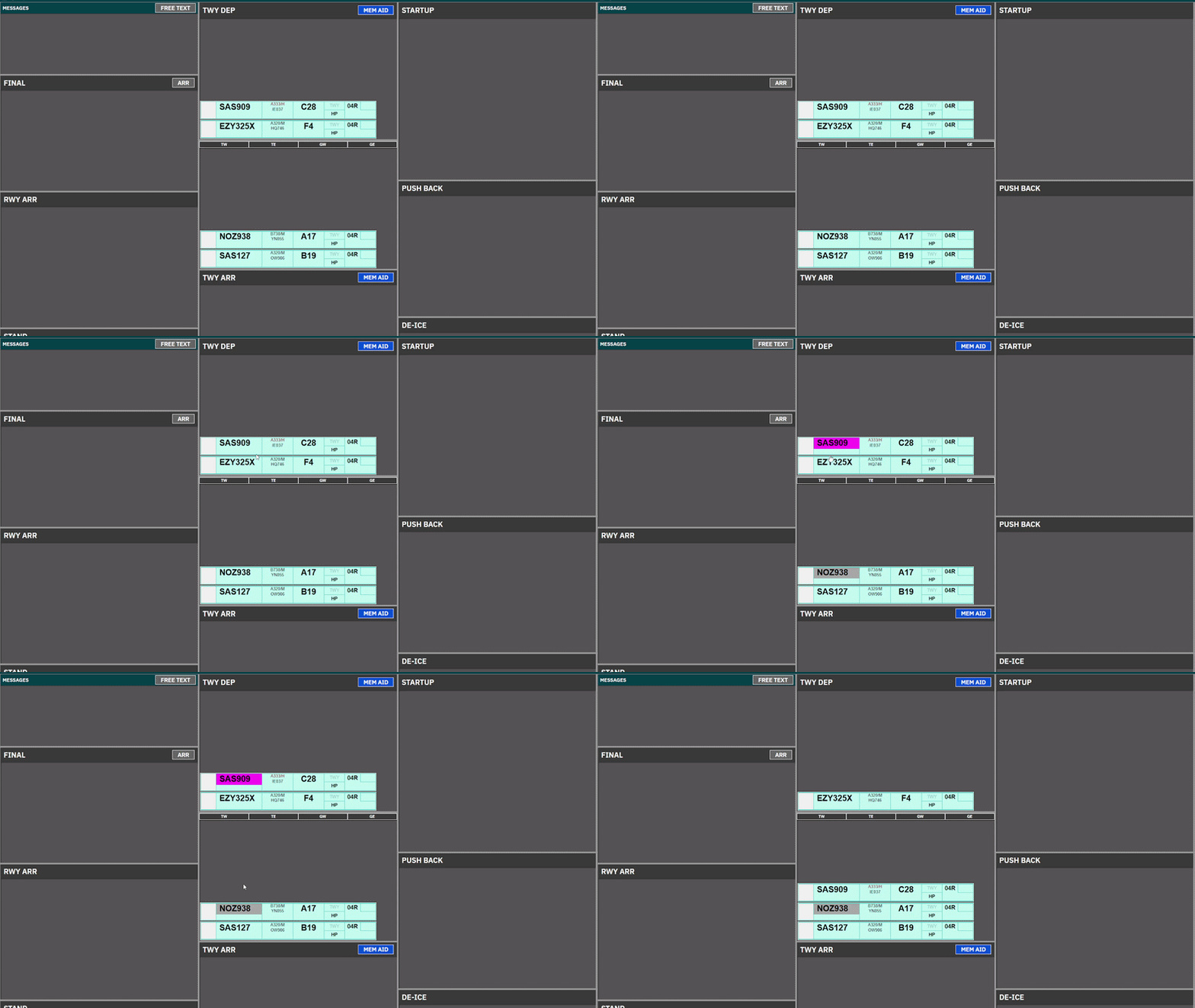
Clicking on the CALLSIGN field, will select the strip, made apparent by the purple fill color of the field.
It is common procedure to click and drag the strip to establish the correct sequence within the bay
- Holding the click down will allow you to drag the strip around.
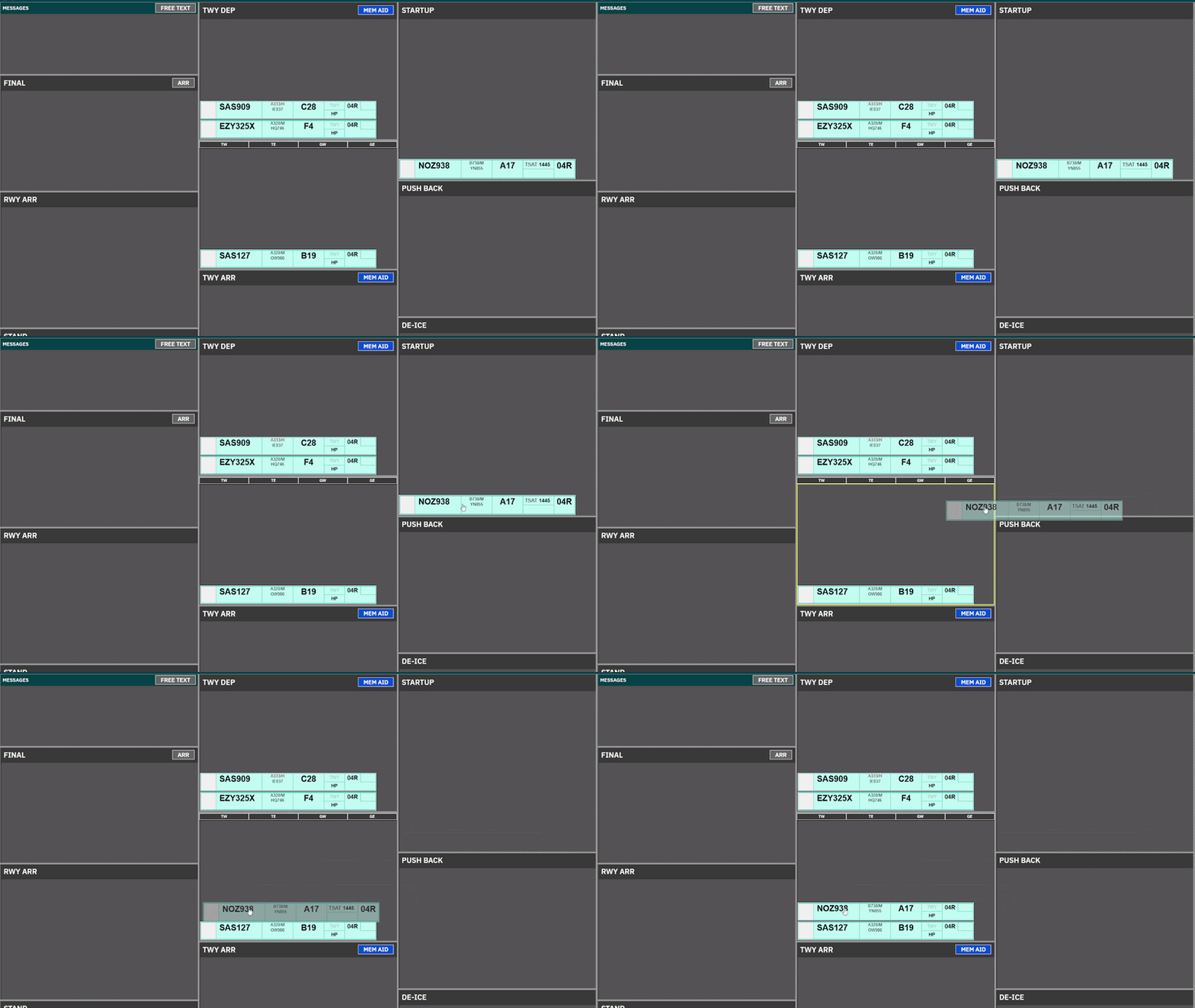
- Clicking on Strip and subsequently clicking on another bay will move the strip.
1.3 Action Fields
Various click spots:


There are (not counting VFR) six different version of Flight Strips, each with action fields which are relevant to the phase of flight for the strip.
STRIP NAME | USED BY |
Planned Departure Strip | CLR DEL & SEQ-PLN to provide ATC Clearance and CDM management. |
Push/Start Strip | ALL Controllers in STARTUP & PUSHBACK Bays to facilitate such. |
Taxi-Out Strip | APRON for Taxi-Out instructions, relevant holding points. |
EXPANDED Taxi-Out Strip | TOWER for Taxi-Out instructions, including departure info. |
EXPANDED Taxi-In Strip | TOWER for Taxi-in, for information on LDG RWY, timings and STAR. |
Taxi-In Strip | APRON for Taxi-In instructions, relevant stand information. |
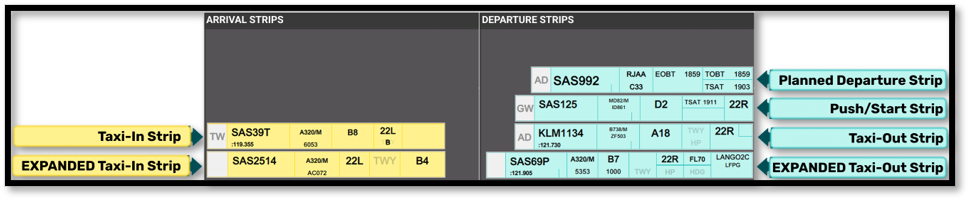
In the following sections we will go through the buildup of each strip, for you to reference. The actual usage of strip is described in each “operation” chapter.

2.1 Planned Departure Strip
Planned Departure Strip is a strip, containing only CDM information, and the needed clickspots to assign an ATC Clearance and Startup. This strip is used in
- All bays of the CLR DEL Scope.
- STARTUP bay of the SEQ PLN Scope.
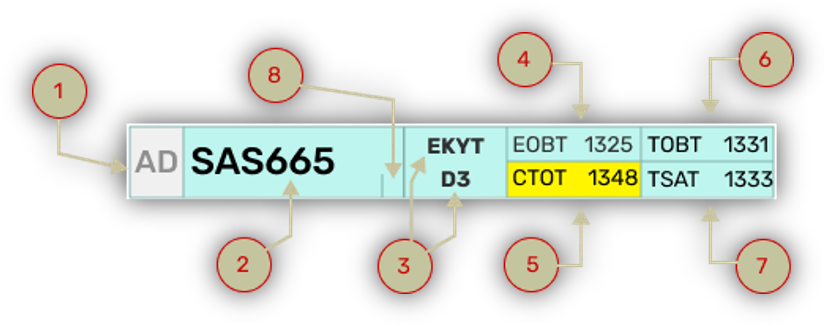
ID | Name | Description | Clickspot |
1 | SI Field* | Click to Initiate Transfer | Yes |
2 | CALLSIGN Field | Click to open callsign menu. | Yes |
3 | Dest/Stand | Click on either to open ATC CLEARANCE Dialogue | Yes |
4 | EOBT | Information on FPL filed EOBT | No |
5 | CTOT | CTOT assigned. Color coding/ops as per Chapter 11 - CDM Operation | No |
6 | TOBT | Information on latest TOBT. Color coding/ops as per Chapter 11 - CDM Operation | Yes* |
7 | TSAT | Information on latest TSAT Color coding/ops as per Chapter 11 - CDM Operation | No |
8 | /t info | Provides info on pilot being text only | No |

*Only in SEQ PLN Scope
2.2 Push / Start Strip
PUSH/START Strip is a strip containing simplified CDM info as well as the features needed to provide pushback and engine starts. It is used in:
- All PUSHBACK and STARTUP bays on the scope with exception of:
- STARTUP bay in SEQ PLN
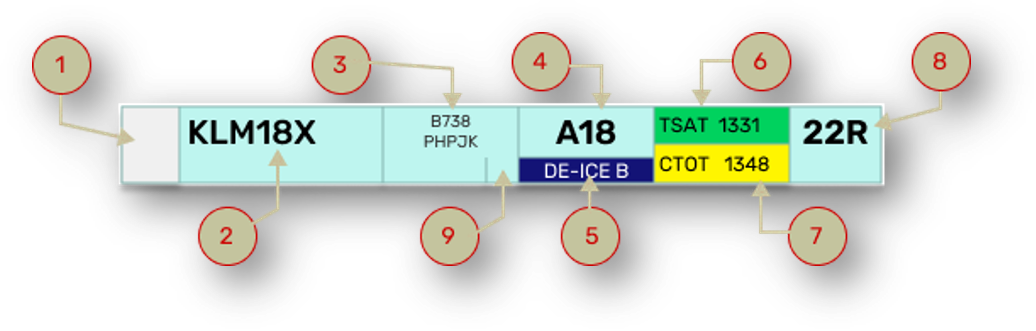
ID | Name | Description | Clickspot |
1 | SI Field | Click to Accept Transfer Click to Initiate Transfer | Yes |
2 | CALSSIGN Field | Click to Mark or open Callsign Menu | Yes |
3 | Reg / Type | Open FlightPlan | Yes |
4 | Stand | Open Airport Map for selection of clearance limit | Yes |
5 | DE-ICE | Showing platform for De-Ice if requested. Accompanied by snow icon below Ref/Type | No |
6 | TSAT | Information on latest TSAT. Color coding/ops as per Chapter 8 - CDM Operation | Yes |
7 | CTOT | Information on latest CTOT Color coding/ops as per Chapter 8 - CDM Operation | No |
8 | DEP RWY | Click to manually change Departure Runway | Yes |
9 | /t info | Provides info on pilot being text only | No |

2.3 Taxi-Out Strip
Taxi-Out Strip is used on TWY DEP for specifically Kastrup Apron controllers. This means it is visible only at:
- TWY DEP bay for following scopes:
- AA+AD, APRON DEP, APRON ARR
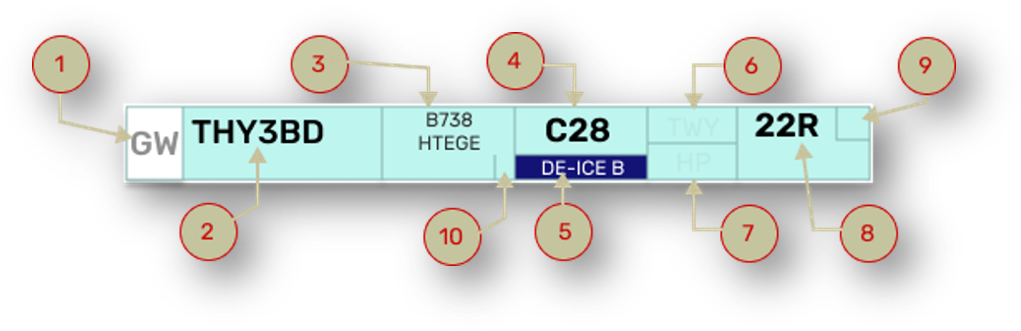
ID | Name | Description | Clickspot |
1 | SI Field | Click to Accept Transfer Click to Initiate Transfer | Yes |
2 | Callsign | Click to Mark or open Callsign Menu | Yes |
3 | Reg / Type | Open FlightPlan | Yes |
4 | Stand | Informational only (in case of return to stand) | No |
5 | DE-ICE | Showing platform for De-Ice if requested. Accompanied by snow icon below Ref/Type | No |
6 | TWY HS | Taxi clearance limit. Click to assign hold short | Yes |
7 | HP | Holding point. Click to assign Holding Point. | Yes |
8 | DEP RWY | Click to manually change Departure Runway | Yes |
9 | TBD |
|
|
1 | /t info | Provides info on pilot being text only | No |

2.4 Expanded TAXI-OUT Strip
Expanded TAXI-OUT Strip is used on TWY DEP for specifically Kastrup Tower controllers. The purpose of this strip is to accomendate more departure relevant information such as initial climb and assigned headings.
It is used for
- TWY DEP, RWY DEP and AIRBORNE bay for following scopes:
- GE+GE, TW+TE, TWR+GND
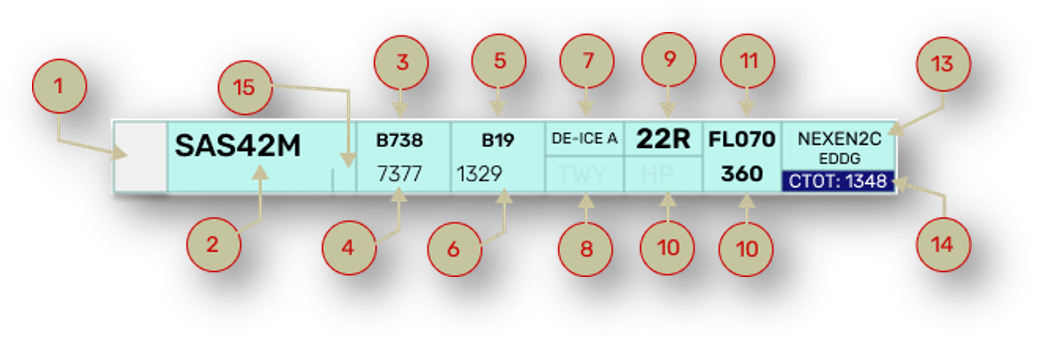
ID | Name | Description | Bay |
1 | SI Field | Click to Accept Transfer Click to Initiate Transfer | Yes |
2 | Callsign | Click to Mark or open Callsign Menu | Yes |
3 | Type | Informational only | No |
4 | Squawk | Informational only | No |
5 | Stand | Informational only | No |
6 | EOBT | Informational only | No |
7 | DE-ICE | Showing platform for De-Ice if requested. | No |
8 | TWY HS | Taxi clearance limit. Click to assign hold short | Yes |
9 | DEP RWY | Click to change Departure Runway | Yes |
10 | HP | Click to assign Holding Point. | Yes |
11 | CFL | Cleared Flight Level. Click to change. SID level default | Yes |
12 | HP | Assigned Heading. Click to change. Blank by default | Yes |
13 | SID/Destination | Click to open FlightPlan | Yes |
14 | CTOT | Information only Color coding/ops as per Chapter 8 - CDM Operation | No |
15 | /t info | Provides info on pilot being text only | No |
2.5 Expanded TAXI-IN Strip
Expanded TAXI-IN Strip is used on TWY ARR for specifically Kastrup Tower controllers.
It is used for
- TWY ARR and RWY ARR and FINAL bay for following scopes:
- GE+GE, TW+TE, TWR+GND
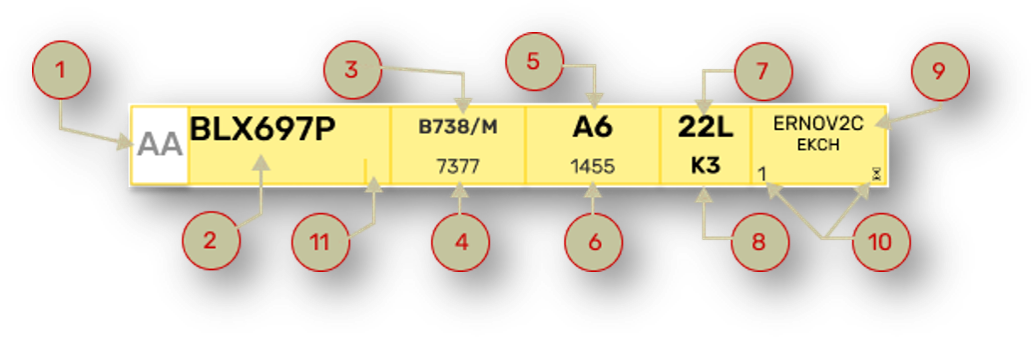
ID | Name | Description | Bay |
1 | SI Field | Click to Accept Transfer Click to Initiate Transfer |
|
2 | Callsign | Click to Mark or open Callsign Menu |
|
3 | Type / WTC | Informational only |
|
4 | Squawk | Informational only |
|
5 | Stand | Click to open Stand Assignment Tool |
|
6 | LDG Time | Informational only |
|
7 | ARR RWY | Informational only |
|
8 | TWY HS | Click to select taxi clearance limit Standard feeder route on default |
|
9 | STAR/Dest | Click to open FlightPlan |
|
10 | Marshaller | Detects if pilot has GSX through FlightStrips. Appears only if that is the case. Number denotes stop line |
|
11 | /t info | Provides info on pilot being text only | No |
2.6 Taxi-In Strip
PUSH/START Strip is used on TWY ARR for specifically Kastrup Apron controllers. This means it is visible only at:
- TWY ARR bay for following scopes:
- AA+AD, APRON DEP, APRON ARR
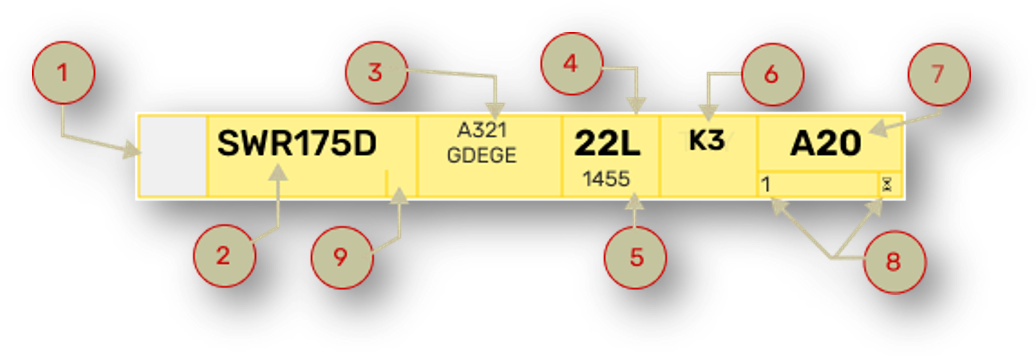
ID | Name | Description | Clickspot |
1 | SI Field | Click to Accept Transfer | Yes |
2 | Callsign | Click to Mark or open Callsign Menu | Yes |
3 | Type / Reg | Click to open Flightplan | Yes |
4 | ARR RWY | Informational only | No |
5 | LDG Time | Informational only | No |
6 | TWY HS | Click to select taxi clearance limit Standard feeder route on default | Yes |
7 | Stand | Click to open Stand Assignment Tool | Yes |
8 | Marshaller | Detects if pilot has GSX through FlightStrips. Appears only if that is the case. Number denotes stop line | TBA |
9 | /t info | Provides info on pilot being text only | No |

FlightStrips contains several types of strips, which are tactical and not associated with a flight. They are identified by:
- Distinctively different colors from the strips.
- Half the size of Flight Strips
- Can not be transfered
MEMORY AIDs
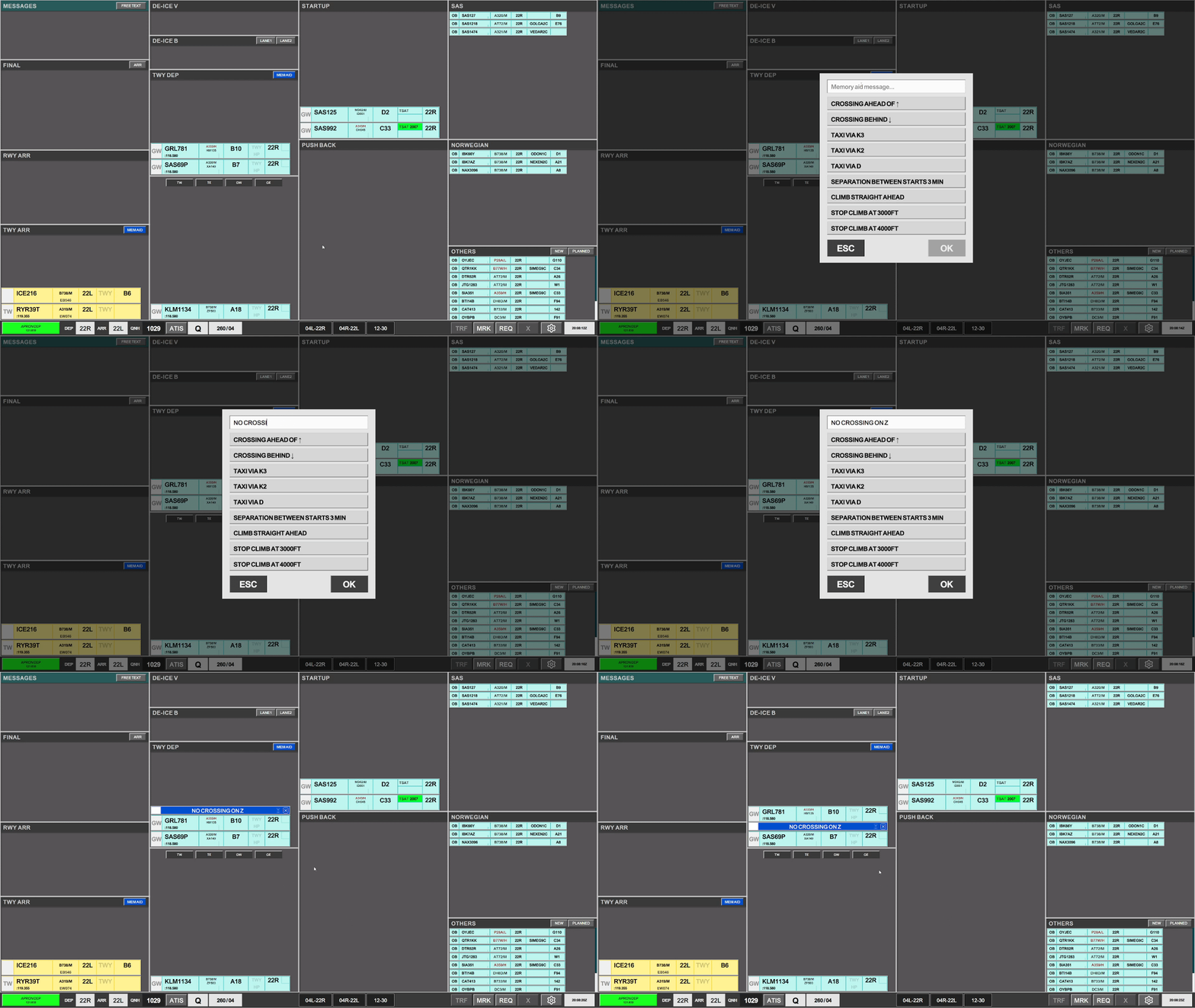
MEMORY AIDs are types of strips a controller can activate to put a condition or reminder to an aircraft.
MEM AIDs are available on TWY DEP and TWY ARR bays on all scopes which has the possibility to manipulate those two bays.

MEM AIDs has two different functions, that are widely used in FlightStrips.
- General MEMAID a controller select for their own reminder
- Callsign Specific MEMAID, used to facilitate coordination
- To make a flight specific memory aid, select the flight before clicking memory aid, and you will see the airplane in parenthsis in the MEM AID strip.
MEM AID - General
MEM AID - Callsign Specific
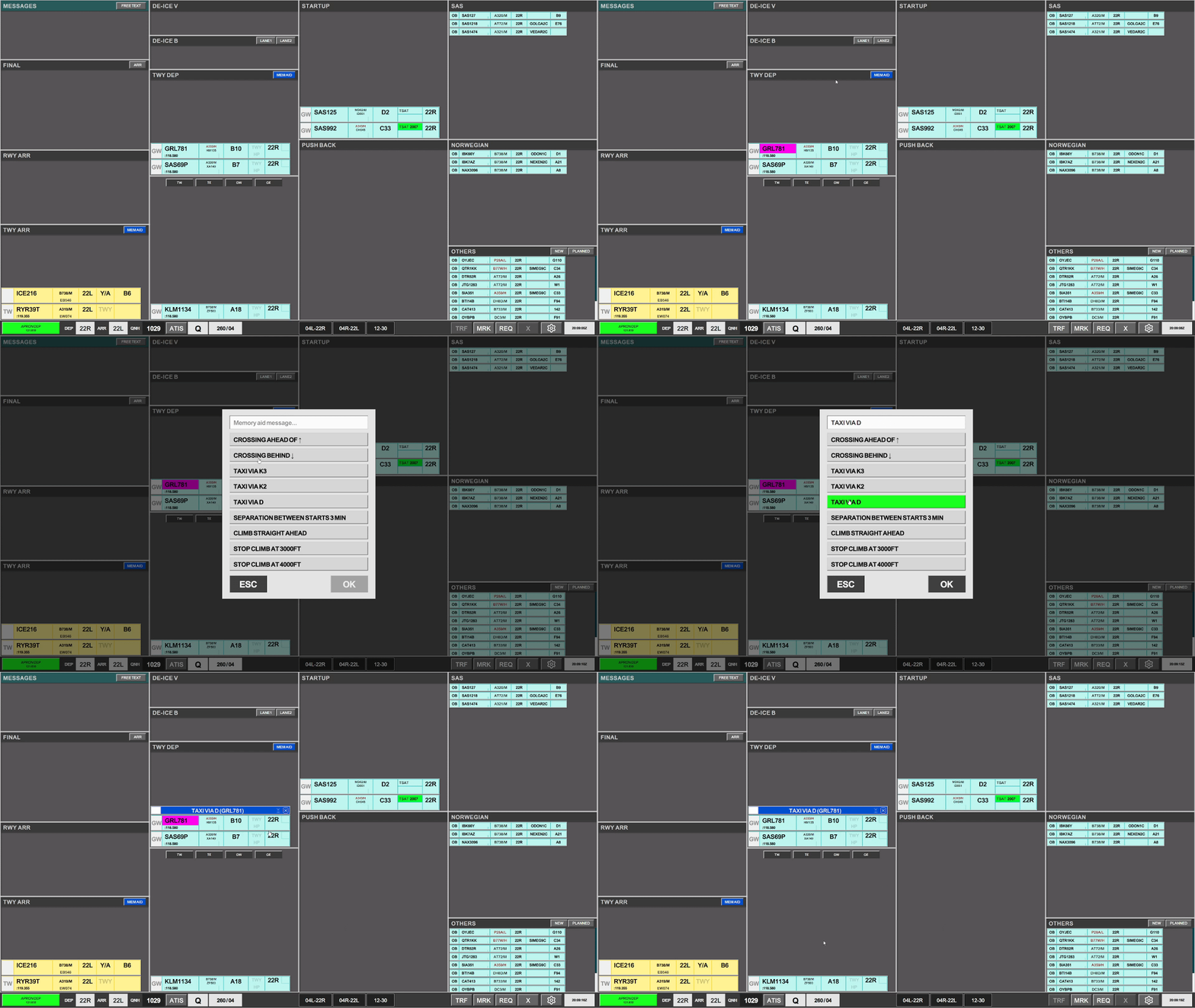
A MEM AID, once introduced to a bay has three possible actions:
- Click anywhere to allow to FORCE ASSUME (only if not author of the MEMAID)
- Click on the "x" to remove the MEM AID (only if author of the MEMAID)
- click on "hourglass" to acknowledge MEM AID (only if not author of the MEMAID)


CROSSING Strips
CROSSING strip is an "X" on a bright yellow color background and is a tactical reminder when an aircraft in one bay, as to cross the path of an aircraft in another bay.
Crossing Strips are available in all Tower related movement bays (TWY DEP, TWY ARR, RWY DEP, RWY ARR).

The purpose of these strips is to coordinate in traffic crossing in bays the controller does not own. Main examples of its use are:
- Cargo aircrafts on GW crossing 04R/22L which is owned by TE
- TE and TW coordinating inbounds and outbounds at the "Seven Star" (A/F/D/12/30 intersection)
- GE and GW coordinating aircraft crossing B on RWY 30
The CROSSING Strip must be located in the bay where the "flow is disturbed".
- To create a crossing strip, click on the “X” in the yellow box above a qualifying bay. The strip is produced instantly.
- Once produced, you can move it around, to the correct position to reflect where traffic will cross.
- Any controller can force ownership of the “CROSSING” strip by clicking on the strip and selecting “FORCE ASSUME”.
- A “CROSSING” strip should be deleted once the condition is no longer present.
LAND / START Strip
LAND and START strips takes bright orange colors and is to mark an aircraft landing or taking off on a runway, where the strip may not actually be present.
A LAND or a START strip is located in any bay where a landing or departing aircraft may encroach. This means:
- in RWY ARR bay (Active Arrival Runway)
- in RWY DEP bay (Active Departure Runway)
- Tower scopes TWY DEP bay (12/30 activity)

Because a controller may not have control of one of the three bays described above, a tactical reminder MUST be present to signify that a Runway is blocked by a starting or landing aircraft, to alert the controller using that bay.
Therefore as an alternative, this strip can be laid down, while the actual strip may be in another bay.
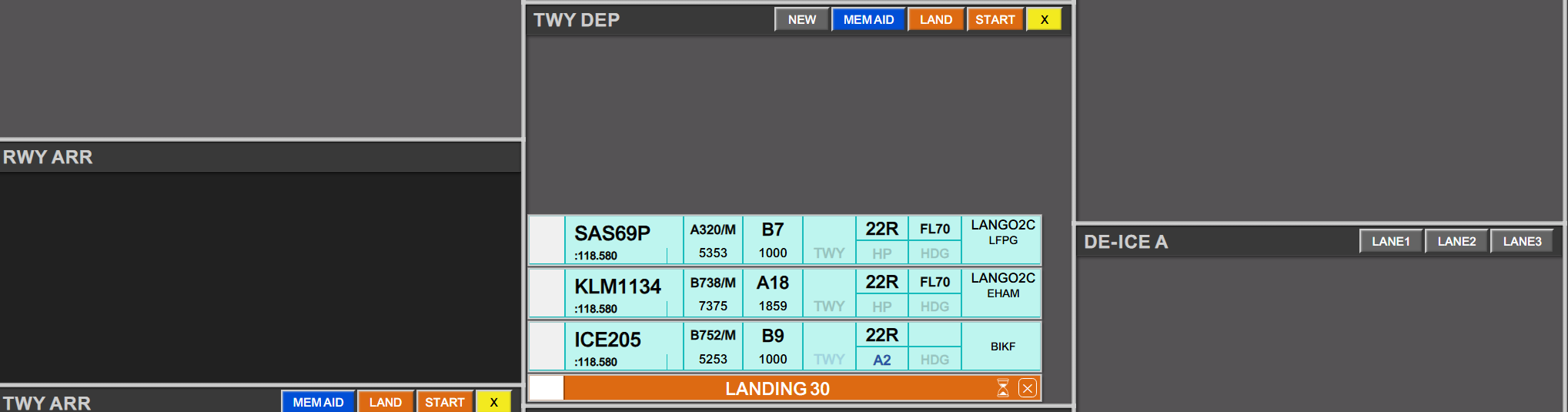
Uniquely to LAND/START strips an hourglass is present, which can be clicked to start a time. This can be useful for Wake Turbulence separation.
Examples of use are:
A_TWR needs a landing on 22R. Strip can be activated to signify landing on 22R.
A_TWR needs a low pass on RWY30. Strip can be activated on TWY DEP to ensure no flights are crossing 12/30 while aircraft performs low pass.

All scopes contains a bay reserved for Messages. This is an inter-program communication system, for short messages, and status alerts of various character.
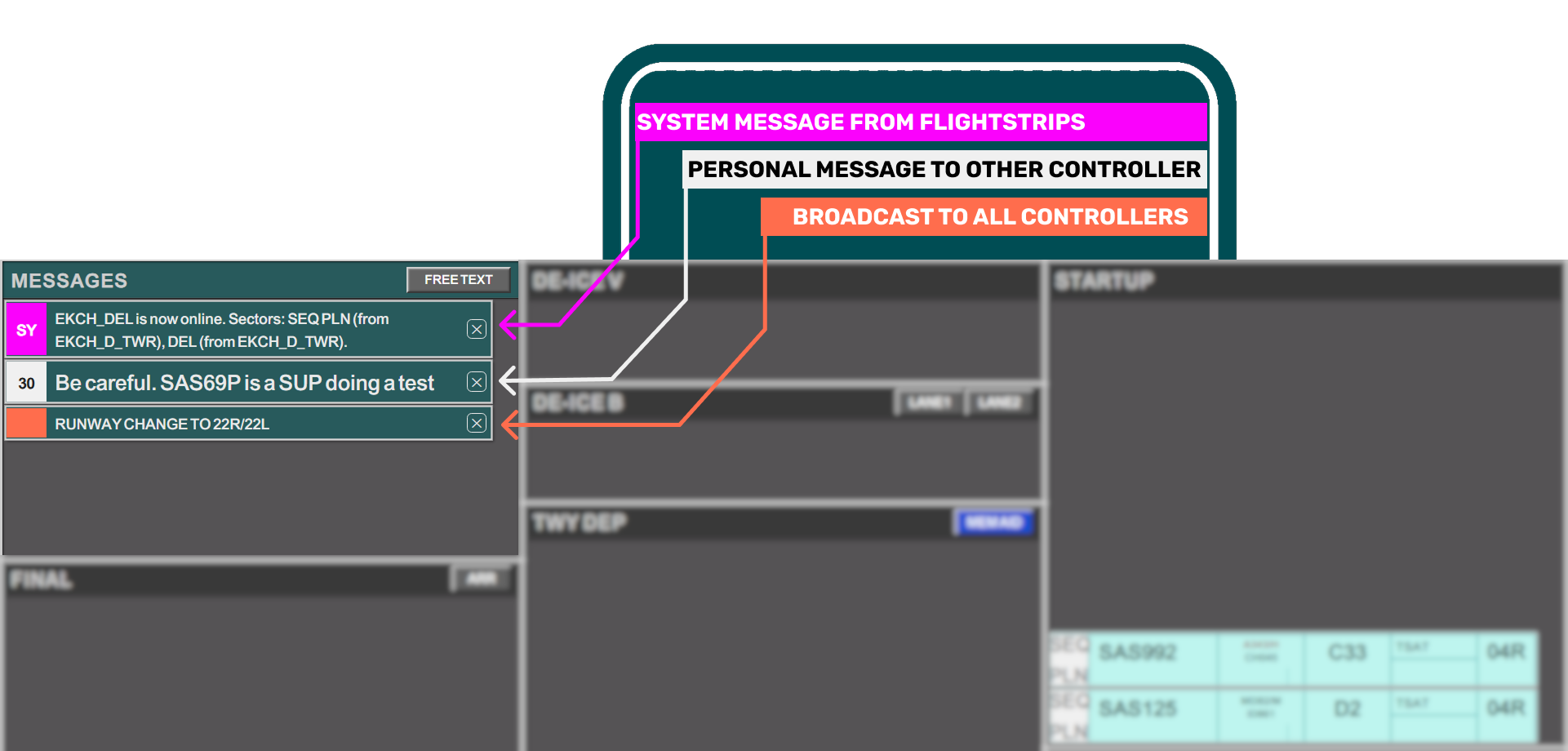
Messages are divided into:
- System messages from FlightStrips
- Internal Messages between Controllers
- Broadcasted messages
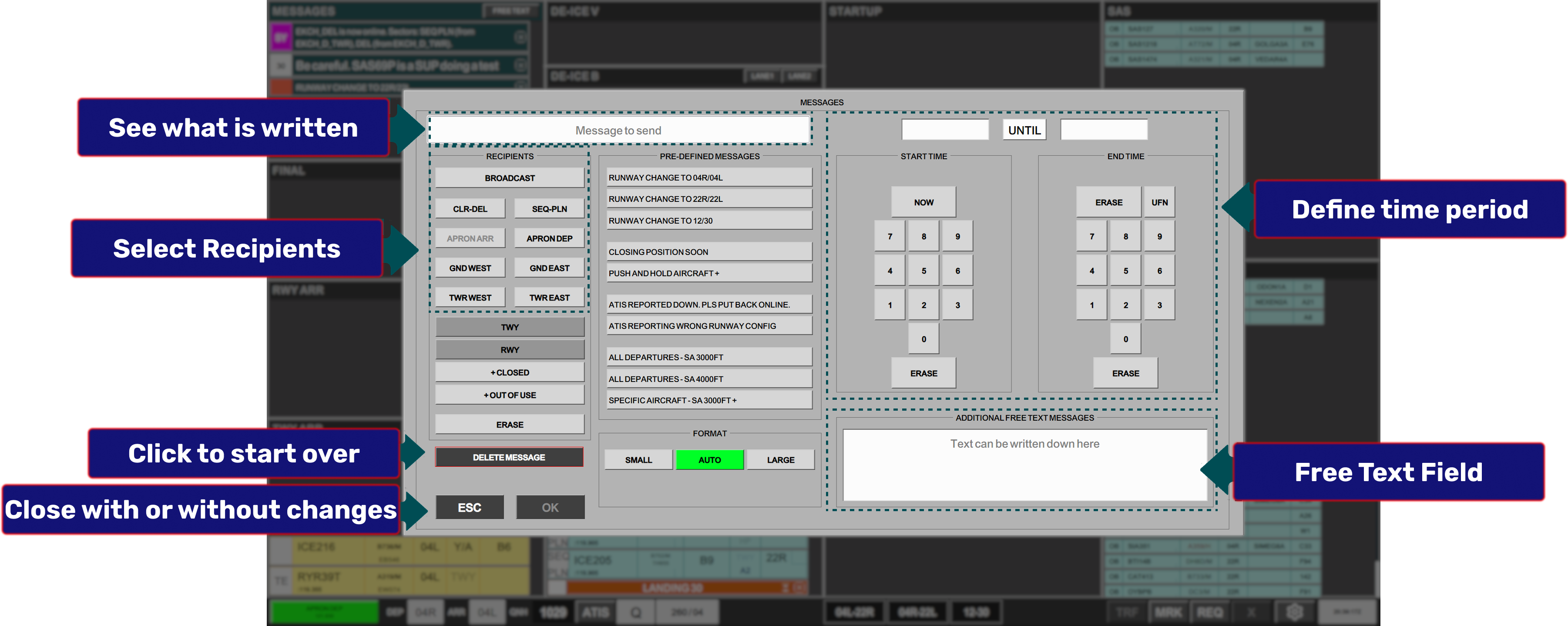
All controllers, can create their own MESSAGE by click on any field in the MESSAGES bay header. It will open the MESSAGES Dialogue
When a message is received you can close it at any time. Closing the message on your scope does not close it in any other controllers scope.
Log of MESSAGES are being kept by FlightStrips, and VATSIM COC is valid for internal messages as well!!!!