Chapter 7 - APRON DEP Operation
Containing Description, Operational Procedures and Submenus of the scope called AA+AD............
1. General Overview

Similar scopes: AA+AD (used for combination of Apron DEP and Apron ARR).
1.1 Overview
Scope name:AA+AD,Used by:EKCH_A_GND, EKCH_B_GND, EKCH_C_GND
[PIC]
AA+AD scope is used by any apron frequency, and contains all relevant tasks for perfroming both inbound and outbound responsibilities.
If a split apron is sensed, the scope is exanded into APRON DEP and APRON ARR which contains same features but relevant bays expanded. APRON ARR and APRON DEP will not be expanded upon as they contain identical information as this chapter.

1.2 ScopeGeneral Design
Column 1 ( | Column 2 ( | Column 3 ( | Column 4 ( | |
MESSAGES |
| STARTUP | SAS | |
| ||||
FINAL |
| |||
| ||||
RWY ARR |
|
| ||
| ||||
TWY ARR |
| |||
TASK BAR | ||||
1:Categories2.
combinedProceduresunderPlanned
PLANNEDDeparturesDEPMESSAGESATC
FINALClearanceand RWY ARR will notcan beexpandedassignedupon.byRefer to chapter 2 for details on MESSAGES.

1.3 PLANNEDAPRON DEP
Columnas 4required, andusing theprocedure baysas associated (OTHERS, SAS, NORWEGIAN) represents planned departures, for useoutlined in caseCLR thereDEL is no delivery or sequence planner is online, resulting in an apron controller providing the clearance.Chapter.
The three planned departure bays work inIf an identical fashion as all other scope. Refer to Chapter 3 - CLR DEL for detailed information on its operation.
Exception for AA+AD scope includes:
An ATC Clearance issued from AA+AD scope will immediately transfer to STARTUP bay for AA+AD and be assumed by the controller, enabling use of CDM tasks by AA+AD. SeeChapter 8 - CDM Operationfor more info.

1.4 STARTUP
The bay STARTUP is for aircraft who has received the ATC Clearance, and has reported ready for startup.
With exception of when ATC Clearance is issuedassigned bydirectly through APRON DEP, or AA+AD, strips are transfered by previous controller, when released for startup.
Strip must be moved out of the STARTUPstrip baybypasses SEQ PLN and intois the PUSHBACK bay when a pushback instruction has been issued.directly:
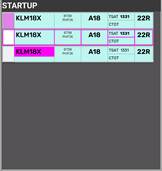
Strip design
SIField:Click toAcceptTransfer
, or click toInitiateTransfer
.Callsign: Click to mark or open callsign menu.Type / WTC:Click either to open "FPL MENU"STAND: Click to open pushback map to assign release point.TSAT: Click to update TOBT to current time.Color coding as perChapter 8 - CDM OperationCTOT: Informational only.Color coding as perChapter 8 - CDM OperationDEPRWY: Runway of Departure. Click to change.


| |||
|
|
|
|
|
|
|
|
|
|
| |
|
|
| |
|
|
| |
|
|
| |
|
|
| |
|
|
| |

1.5 PUSHBACK
The bay PUSHBACKis for aircraft who has received pushback instruction.
A pushback release point (or a general direction) should be assigned if possible. Aircraft not requiring pushback should not be moved into this bay, but should remainPlaced in STARTUP bay until ready to taxi.
Strip design
SIField:Informational onlyCallsign:UnderClick to mark or open callsign menu.Type / WTC:Click either to open "FPL MENU"Release Point: Click to open "Apron taxi map" to assign taxi limit.TSAT: Informational only.CTOT: Informational only.Color coding as perChapter 8 - CDM OperationDEPRWY: Runway of Departure. Click to change.
1.6 TWY DEP
The bay TWY DEP is unique in being the only one of its kind with Two Sections
This is important because there is a difference!
The upper section of TWY DEP, is ONLY visible to APRON, and used for hold short instructions within apronThe Lower section of TWY DEP, is ALSO visible to all TWR scopes, used for hold short of RWY 12/30.
NOTE: The purpose of this is not to overload TWR with Departure information until it is actually relevant.
Strip design
SIField:Click toInitiateTransfer.Callsign: Click to Mark.STANDInformational onlyDE-ICE: Infromational that De-Ice is required.Color coding as perChapter 9 - Specific FeaturesHS: Hold Short points (Clearance Limit)HP: Holding Point assignedDEPRWY: Runway of Departure. Click to change.
1.7 TWY ARR
The bay TWY ARR contains the inbound aircraft currently taxiing on a taxiway. The bay contains all strips, including the ones owned by TE/TW and GE/GW.
Aircraft remains in TWY ARR bay until on stand, after which they must be manually moved to the STAND bay.
Strip design
SIField:Click toAcceptTransferCallsign: Click to Mark or open callsign menu.Type / WTC:Click either to open "FPL MENU"ARRRWY: Informational onlyHS: Hold Short points (Clearance Limit)STANDInformational onlyTBD
1.8 STAND
The bay STAND contains the inbound aircraft which is on stand, and has been moved there MANUALLY by a controller.
Aircraft remains in STAND bay for 3 minutes after which the strip is removed from exsistence. the 3 minute delay allows controller to move aircraft back in case of inadvertant movement to STAND bay.
Strip design
ALL Informational


2.1 Startup and Pushback
A strip is transfered by SEQPLN (or EKCH_DEL), when startup is approved in accordance with TSAT requirements.
If neithercontrol of the abovecontroller mentionedwho entitiesassigned arethe online,clearance.
Assigning Pushback
Once an aircraft calls APRON DEP mustfor completepushback, CDMthe proceduresaircraft inis accordanceconsidered approved for startup with Chapterrespect 8.to CDM.
ClickTo on SI Field when aircraft call up, to confirm transfer, and approveassign a pushback.pushback, ThisAPRON youDEP, can do byperform one of three actions,actions specifiedwith belowsame in order of most preferred:result:
- Click on the STAND field, to open the “Pushback Map”, and select appropriate release
point.pointAircraftor direction. Once selected strip isautomaticallymovedrelocated to PUSHBACKbay.- BAY
- Click and drag aircraft to
PUSHBACKPUSHBAYbay.Bay,Selectand subsequently choose a releasepoint thereafter within 10 seconds.- point/direction
- Click and drop aircraft to
PUSHBACKPUSHBAYbay.Bay,Selectand subsequently choose a releasepoint thereafter within 10 seconds.
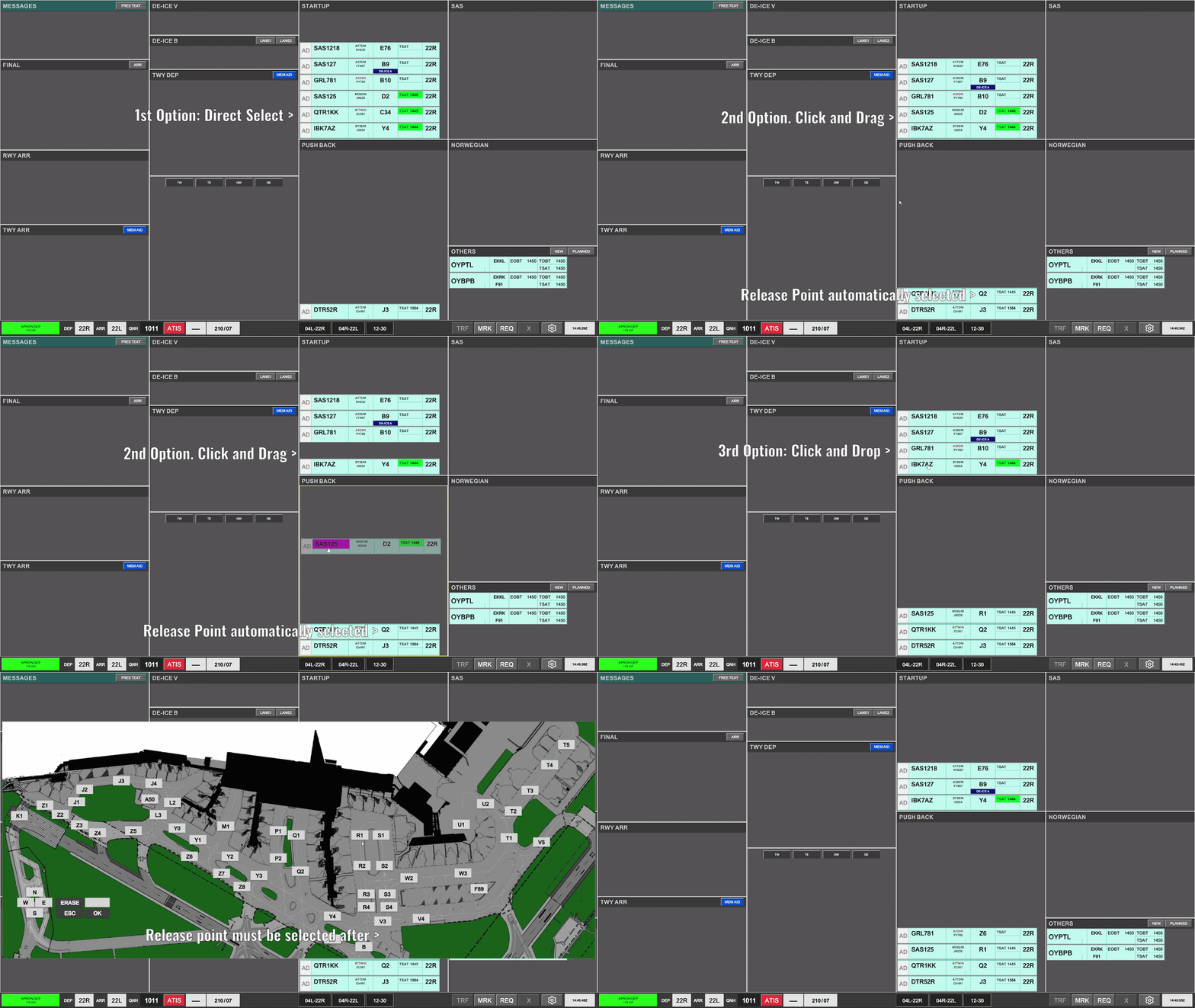
OnceDoing Pushbackone isof completethese three actions are mandatory, as assigning a pushback results in CTOTs being locked, and activating the flight for vIFF.
Taxi-Out Instruction
When an aircraft reportsis ready for taxi, you need to continuepushback, the process.strip Thisis youplaced can do byin one of the threetwo actions,different specified below in ordertypes of most prefered:
Click on RELEASE POINT to select taxi clearance limit. Aircraft isautomaticallymoved toTWY DEPbay1.bays.Appropriate use of these bays must be respected by use of one of the following actions:
- Click on the STAND field, to open the “Apron Taxi Map”, and select point of holding short. Aircraft will be prompted to move to the appropriate bay as required by the HS.
- Click and drag aircraft to
approrpiateTWY DEPbay.Bay,Selectandtaxisubsequentlyclearancechooselimitathereafter.HS- point. (as desired)
- Click and drop aircraft to
approrpiateTWY DEP Bay, and subsequently choose a HS point. (as desired).
It is recommended but not mandatory to select hold short positions
There are Two TWY DEP
bay. Select taxi clearance limit thereafter.
1Strip is automatically put into Upper Section or Lower Section, depending on the clearance limit selected.bays:

2.2- UPPER TWY DEP
& Transfer.
Which one of the two TWY DEP bays to use, depends on the “clearance limit” of the strip in question If De-Icing is required, this is clearly marked on the strip in blue color and white font “DE-ICE B” or “DE-ICE V”, in which case APRON DEP is responsible. When clearing an aircraft to the platform, the strip must be moved into the appropriate de-icing patform. If destined for DE-ICE B it must also be assigned a lane. LANE 1, LANE 2 strips can be selected to keep overview of who holds where, and will further more provide the frequency for De-Icing the pilots can contact. Once aircraft is placed into the DE-ICE B or DE-ICE V bay the DE-ICE indication in the strip, will change from highlighted in blue, to a subtle colorless indication, signifying that the de-icing has been completed. Coordination between the two aprons can be achieved primarily by use of MEM AIDs This can be used to alert a follow controller of an aircrafts relative position to the strips in that controllers Coordination between APRON DEP & GW can be achieved either by MEM AIDs, or by use of the RTI (Request Tacitical Instruction) feature of flightstrips. A MEM AID is used similarly, as when coordinating in between aprons. An RTI can only be requested on a “purple” strip. Strips which are coming to you, but not yet. Therefore this, for the purpose of APRON DEP is requested by GW for you to do something. The request goes as follows: APRON DEP must ensure traffic is sequenced correctly, by placing the aircraft leading the queue in the bottom of the bays, followed by next strips in sequence stacked on top. Automatic transfer is available, by clicking on SI field to initiate transfer to next controller. If transfer is desired to another station that what is indicated, four small buttons between the two TWY DEP Once aircraft goes tobayDEP,DEP youbaywill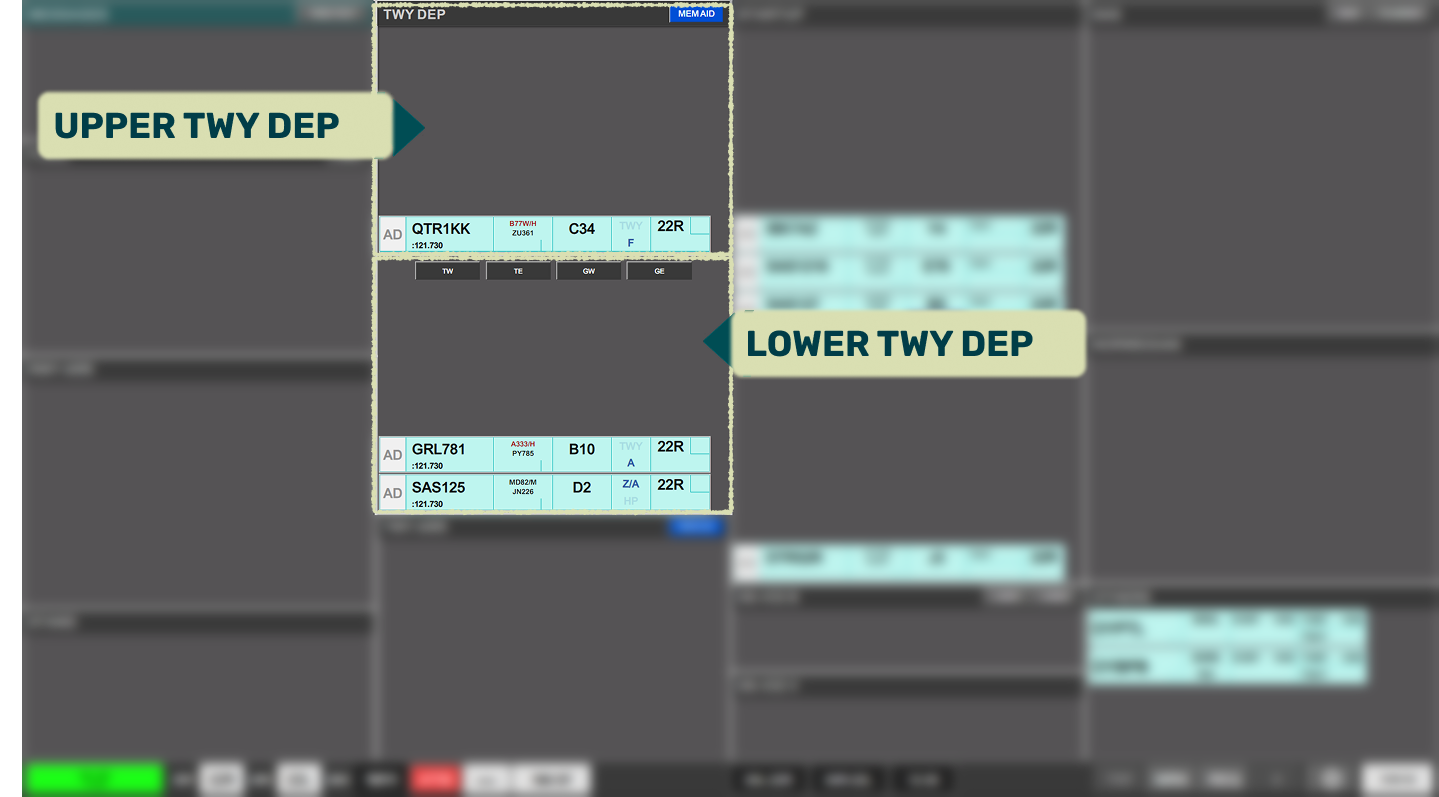
see the SI Field being populated with the identifier for next position. The position takes "cross coupling" into account, so it will show GW (Ground West on 118.580) even if he is not online, butDE-ICE B / DE-ICE V
COORDINATION
Coordination between APRON DEP & APRON ARR
hasqueue. crosscoupledAchieve this by:frequency.CROSSING BEHIND or CROSSING AHEAD.Coordination between APRON DEP & GW
Traffic Sequencing & Handover
OnceAn aircraft approchesapproaching theits clearance limitlimit, for transfer click on SI Field to initiate transfer, and ask aircraft to contact next frequency.
If the SI Field for whatever reason does not contain the correct next controller, manually select next frequency by one of two alternative options.
Click on Aircraft and select TRF to open manual transfer dialogue (explaining in Chapter 2)Click on Aircraft and select TW/TE/GW/GE in the small menu above
NOTE: The second option does NOT transfer, but simply changes the unit on the SI field. Youhandover must still transfer.
You must ensure that aircraft isbe in the Lower SectionTWY ofDEP bay, because Tower controllers can only see this lower bay. Additionally it must be sequenced correctly.beforebays, transfering!Youa mustchange moveof stripsdefault incontroller correct order so bottom one is transfered first, to communicate correct sequence. to GE/GW.by:
2.3 Inbound Taxi
Inbound aircraft will be transferedyouselect clearedcurrent tostrip.appropriate clearance limit in accordance with LAI. Once in contact,station you must accept the strip, by clicing on SI field, and provide further taxi to stand.
The It is NOT recommendedwish to change the standdefault afterto.transfer.on SI field to initiate transfer to that controllergateSI assignmentfield systemwill takesonly manychange factorsif intothe accountstation inselected assigningis stands.
If desired a transfer can always be initiated via the Manual TRF option from the command bar.
If you really need to change stand clicking on the STAND field in the flightplan allows you to request a new stand. It is highly prefered to automatically request a stand instead of manually selecting it.
Pilots should NOT be allowed to taxi to a prefered stand unless you are aboslutely sure they will disconnect as soon as they arrive and will not return to the stand for another flight. Pilots can request stands via EFB.
Once aircraft approaches the stand, immediately move the strip to STAND bay, to clear up space.


3.1 MEM AID
The ATC Clearance dialogue is divided into three sectors. Departure section, Arrival Section and general information.
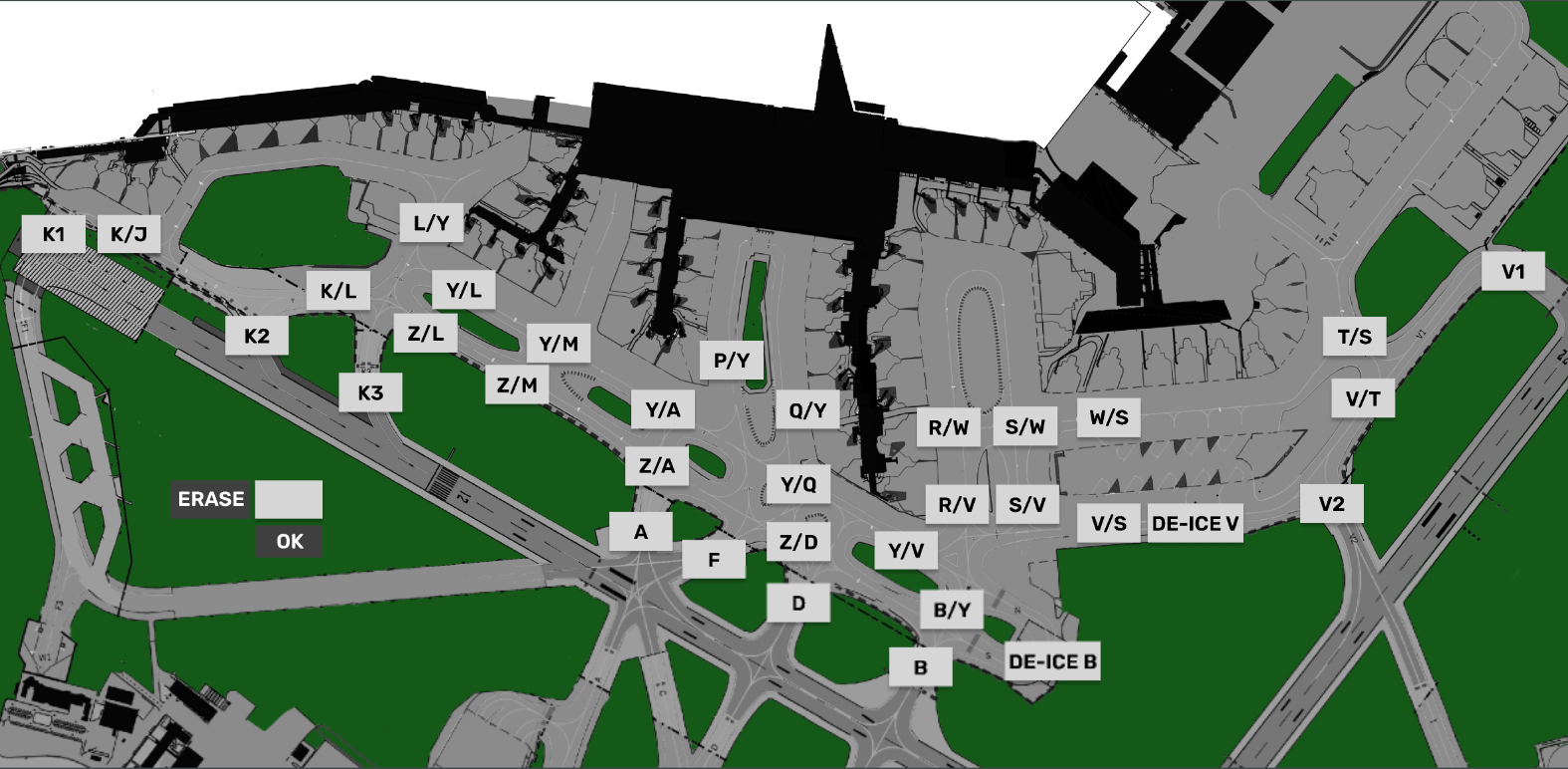
3.2 APRON PUSHBACK MAP
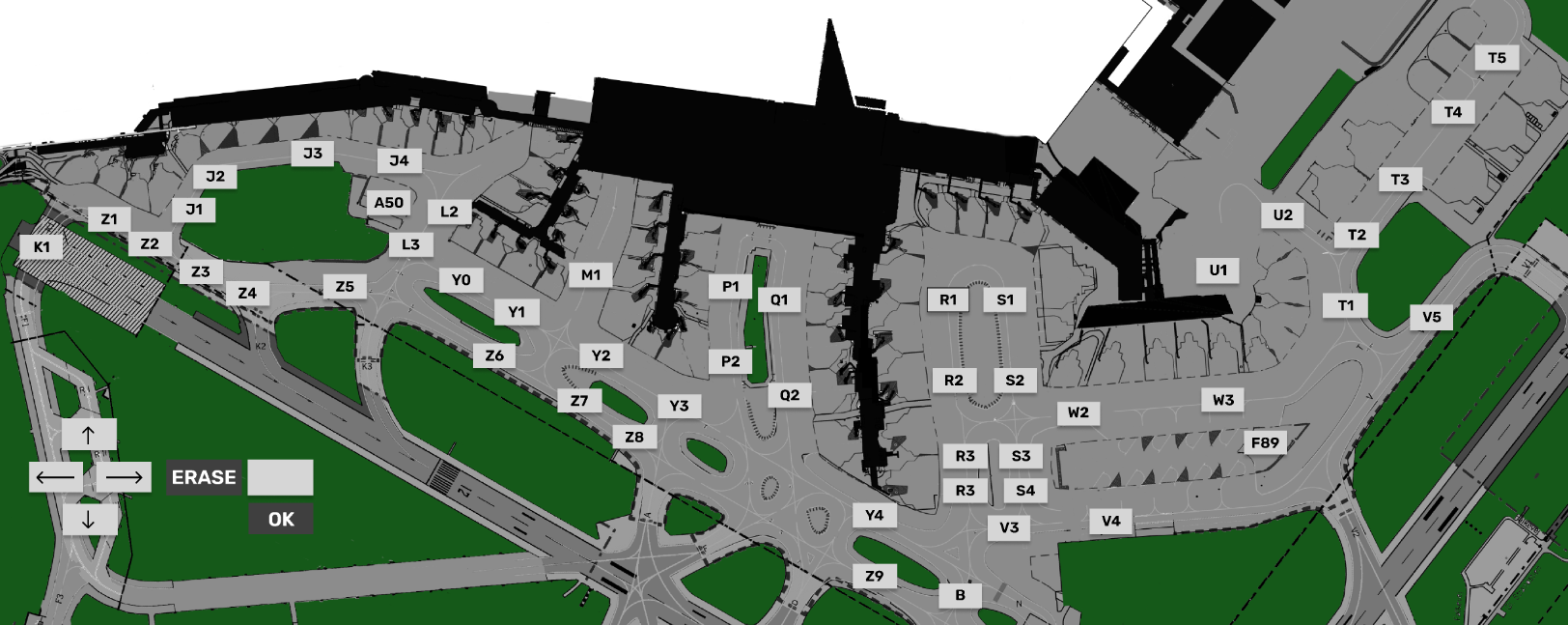
3.3 APRON TAXI MAP