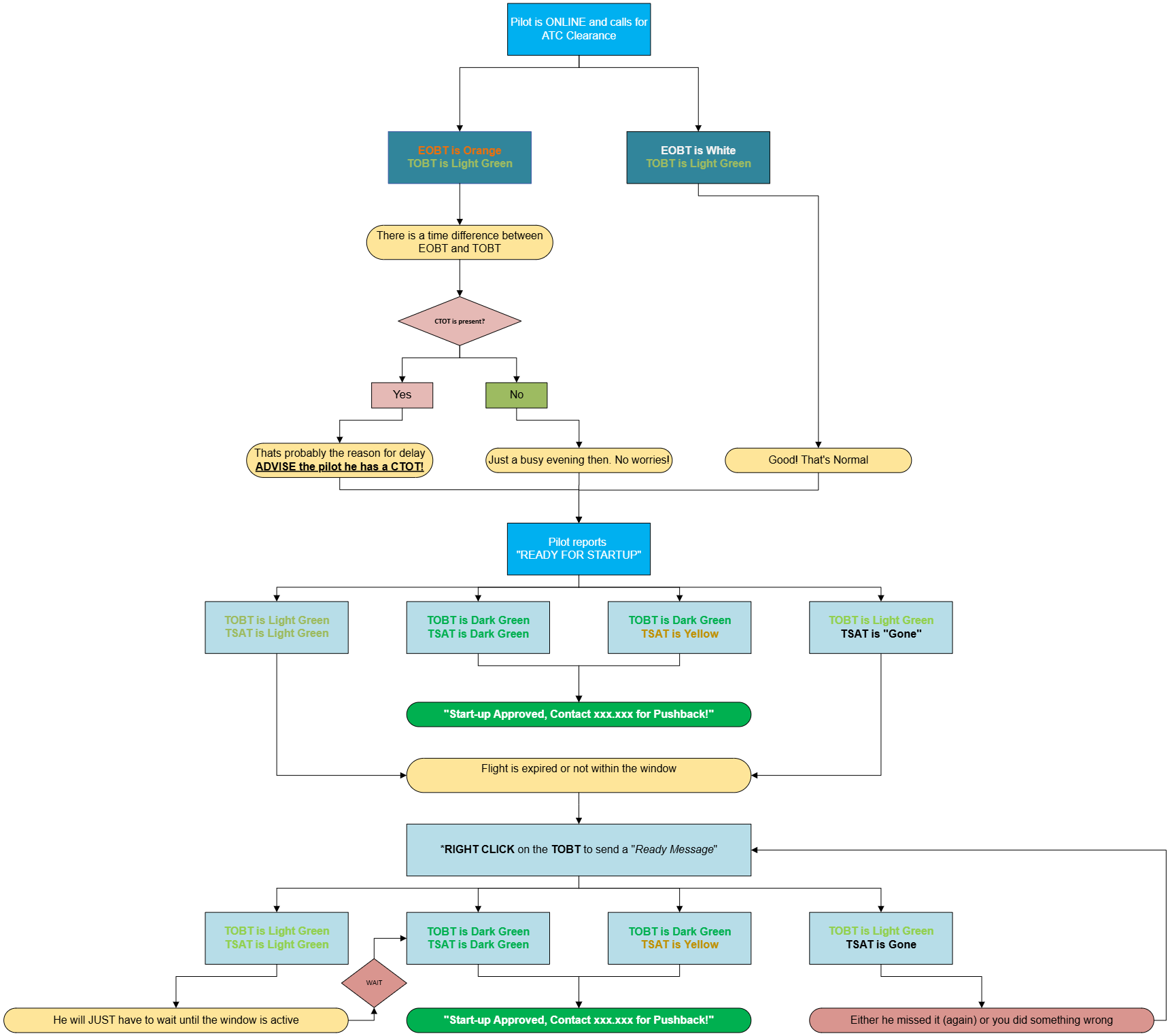
Expanded CDM Procedures (TWR/GND/DEL)
BeforeThese youprocedures start,are makefor sureDEL, GND and TWR. Follow them in full unless traffic is very light. A CTOT must always be followed.
Start CDM is started for yourthe airport.airport first. See Starting CDM & handing over master.
Expanded CDM Procedures (TWR/GND/DEL)
This covers both ATFCM (CTOTs) and A-CDM (TSATs).
ExpandedBIRD runs CDM procedureswith arereal donemode off. The EOBT is never copied into the TOBT, so a flight has no TSAT until the pilot sets a TOBT on the VDGS or you set one. Getting the TOBT is part of every clearance.
The lists
DEL and GND work from the start-up list.list; TWR may use the departure listlist. instead. Please note that:
Youshouldfollow A-CDM procedures unless traffic is low, using eitherClick thedepartureTSATlistheaderortothesort by start-uplist.YouMUSTadhere to the displayed CTOT for take-off.
Reference Material
Click the TSAT column header. This sorts the list by TSAT and makes it easier to manage.time.
Expanded mode shows a lot more information, but the procedures are very similar.
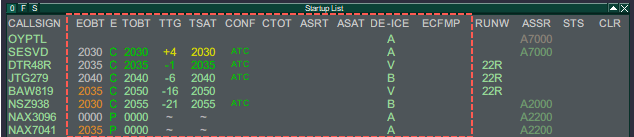
Columns
There are four main times (EOBT, TOBT, TSAT, CTOT), three status columns (E, TTG, CONF) and four additional items (ASRT, ASAT, DE-ICE, ECFMP).
EOBT: Estimated Off-Block TimeThe off-block time filed in the flight plan (e.g. from SimBrief). The time the passengers show up for.
TOBT: Target Off-Block TimeThe time the aircraft expects to be ready, confirmed or updated by the pilot on the VDGS (vats.im/vdgs) or set by ATC.
TSAT: Target Start-up Approval TimeThe time the system calculates from the TOBT to fit the aircraft into the departure sequence.Mainly for local airport capacity.
CTOT: Calculated Take-Off TimeThe aircraft must take off within -5/+10 minutes of this time. The TSAT is adjusted to match.For external capacity (ATFCM, ECFMP).
| TSAT | Start-up time | Calculated, no action | ||
| TTOT | Take-off time | Calculated, no action | ||
| CTOT | Slot | Set or remove a manual CTOT (master only) | ||
| TSAC | The TSAT you gave the | Set it to the current TSAT | ||
| ASRT / READY | Pilot has called ready | Set or clear ASRT | ||
| ASAT | Start-up | Set by | ||
*The source of a CTOT is for information only.
E: Whether the TOBT is valid.TTG: Time to go until the TSAT (negative = time remaining, positive = past the TSAT).CONF: Whether the TOBT has been confirmed (or changed) by the pilot or by ATC.
Colours
| Column | Colour | |||
|---|---|---|---|---|
| TSAT | Light |
not
- yet
ASRT:inActualtheStart-up Request TimeThe timewindow: the pilotrequestedmuststart-up.wait
When start-up is approved (status set to STUP or PUSH), ASAT is recorded and the rest of the line turns grey.
The aircraft needs de-icing, so the taxi-out time is extended.
Shows where a flow measure comes from. For information only.
Procedures
The procedures depend on whether you are handling sequencing only, or both clearance delivery and sequencing.
Aircraft calls for ATC clearance (if within your area of responsibility)
If a CTOT is present: advise the pilot of the CTOT and of the earliest start-up time (TSAT).
If there is no CTOT: no further action is required at this stage.
Aircraft calls for start-up/pushback
Check the times:
TSATdark green±5): start-up can beapproved.approved
Delivery
- Check the TOBT.
- Set on the VDGS and still valid: use it.
- Missing or clearly wrong: ask for it and enter it with Edit TOBT.
- Pilot ready now: use Ready TOBT.
- Wait up to 10 seconds for the TSAT. Check the CTOT column and, if there is a slot, the FLOW column for the regulation.
- Give the clearance with the slot (
setifbyany) and the start-up time, then click TSAC. - When the pilot
oncallstheready,VDGS,clickor by you with Ready TOBT)ASRT. - When the TSAT
isturnslightdarkgreen,green, transfer to Ground.
If
During events with a slot file, the slot shows in the event slot column. Use Add Event CTOT as MAN CTOT to apply it. Do not use the old VATCAN Bookings SLOT column.
Ground
- TSAT dark green: approve start-up or push. Set STUP or PUSH to record the ASAT.
- TSAT light green: the pilot is
present,early.orSettheASRTTOBTifisnotinvalidalready(expired),set, tryto improve it withReady TOBT(right-click the TOBT). This sets the TOBT to the current time and recalculates to lookfor an earlierTSAT.TSAT,Ifthen give theTSAT is stilllight greenafter that,start-upcannottimebeandapprovedaskyet:ClickASRTthem torecordcallthatback.- TSAT blank: the times were cancelled. If the pilot
has requested start-up. Approve start-up when the TSAT turnsdark green.
readyWhen start-upisapproved:- now,
Set the status to STUP or PUSH. This records theuseASATReady TOBT andgreys outgive therestnewofTSAT. Otherwise ask them to update thetimes.TOBTTheon the VDGS.- With a CTOT: time the taxi so the aircraft
is released.
Flow ChartRight-clickreaches theimageholdingandpointselectinside"Opentheinslot window.
Tower
- Take-off must be within CTOT -5/+10. Do not clear an aircraft for take-off more than 5 minutes before its CTOT.
- If an MDI is active, keep the interval between airborne times. You may clear an aircraft slightly early to meet it.
- During radar release periods, get an APP release for each departure before take-off clearance.
Missed slots
| Situation | Action |
|---|---|
| Will miss by up to 10 minutes, flight plan active | CTOT options → EXTEND (+10 minutes, once only) |
| Will miss by more | Use Ready TOBT or the Network Status REA option. vIFF issues a new |
| Manual or event slot | The CDM master sets a new manual CTOT |
| CTOT has changed | Pass the new slot to the pilot: "revised slot ..." |
For phraseology, see itCDM in higher resolution.phraseology.